Siddhant Deval
Siddhant DevalAuthor
Senior Full-Stack Engineer·Aug 27, 2026·10 min read

Reactivity From First Principles

Before asking where to store state, ask whether you need to store it at all. This article builds a complete mental model of reactivity — from JS value semantics and the Observer pattern, through React's render cycle and reconciliation, to the critical difference between derived state and synced state.

Technical Series

Frontend State Architecture

Part 1 of 8

Reactivity From First Principles

The mindset of a senior frontend engineer approaching state architecture starts with a single discipline: treat state as a liability, not an asset. Before asking "Where should I store this?", train yourself to ask "Do I even need to store this?"
That question is only answerable if you understand what reactivity actually is — at the JavaScript level, at the React level, and at the level of data flow through a component tree. This article builds that foundation. Everything in the rest of this series depends on it.

1. Value vs. Reference Semantics

JavaScript holds data in two fundamentally different ways, and confusing them is the root cause of an entire class of React bugs.

1.1 Primitives Are Copied by Value

javascript
let a = 42
let b = a   // b gets a COPY of 42
b = 100
console.log(a) // 42 — a is untouched
Strings, numbers, booleans, null, undefined, Symbol, and BigInt are all primitives. When you assign them, you copy the value. There is no shared reference.

1.2 Objects Are Copied by Reference

javascript
const user = { name: 'Alice', age: 30 }
const userRef = user   // userRef points to the SAME object
userRef.age = 31
console.log(user.age) // 31 — mutation affected the original
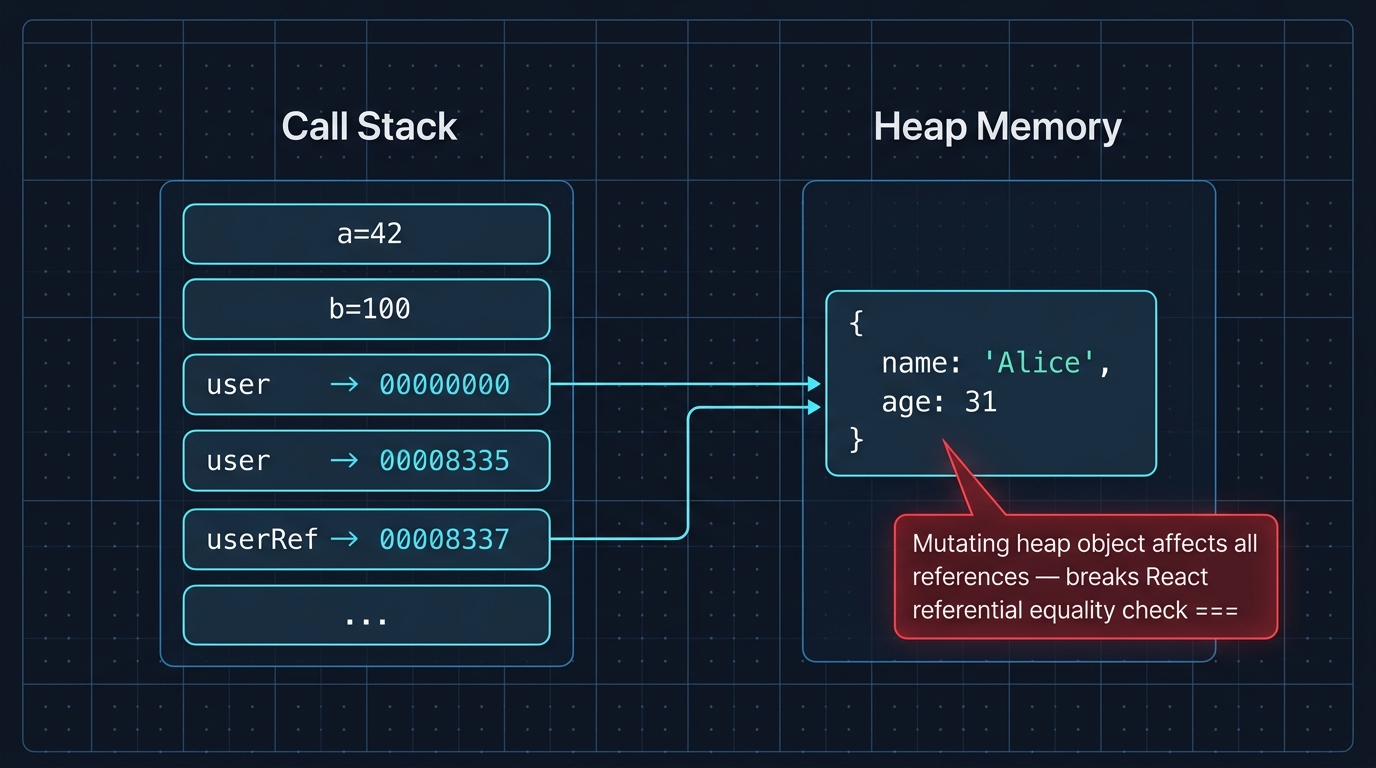
Objects (including arrays and functions) live in the heap. Variables hold a pointer to that heap location, not the data itself. Assigning an object variable copies the pointer.

1.3 Why This Silently Breaks React

React uses referential equality (===) to determine if state has changed. When you mutate an object in place and pass the same reference back to setState, React sees the same pointer — and concludes nothing changed.
javascript
// ❌ This mutation is invisible to React
const [user, setUser] = useState({ name: 'Alice', age: 30 })

function birthday() {
  user.age += 1      // mutates in place
  setUser(user)      // same reference — React bails out, no re-render
}

// ✅ Create a new reference
function birthday() {
  setUser({ ...user, age: user.age + 1 })  // new object, new reference
}
Two-column memory model diagram. Left column labeled 'Stack' shows variable slots: primitive 'a = 42' and 'b = 100' each containing their own values. Right column labeled 'Heap' shows an object box with properties 'name: Alice' and 'age: 31'. Two pointer arrows on the stack — one labeled 'user' and one labeled 'userRef' — both point to the same heap object box, illustrated with a shared memory address highlight. A red callout reads: 'Copying an object copies the pointer, not the data — both variables reference the same heap location'.
Figure: Two-column memory model diagram. Left column labeled 'Stack' shows variable slots: primitive 'a = 42' and 'b = 100' each containing their own values. Right column labeled 'Heap' shows an object box with properties 'name: Alice' and 'age: 31'. Two pointer arrows on the stack — one labeled 'user' and one labeled 'userRef' — both point to the same heap object box, illustrated with a shared memory address highlight. A red callout reads: 'Copying an object copies the pointer, not the data — both variables reference the same heap location'.
Performance / Safety Warning
In-place mutation is the single most common cause of "my state updated but the UI didn't re-render" bugs in React. The fix is always the same: return a new object identity.

2. Immutability & Structural Sharing

"Always return a new object" sounds expensive. If you have a list of 10,000 items and you change one, do you really copy all 10,000?
No — because of structural sharing.

2.1 What Structural Sharing Means

When you spread an array or object to produce a new one, JavaScript only allocates the top-level container. The nested values still point to the same heap locations.
javascript
const original = { id: 1, profile: { name: 'Alice' }, scores: [10, 20, 30] }

const updated = { ...original, id: 2 }
// updated.profile === original.profile  → true (same reference, not copied)
// updated.scores  === original.scores   → true (same reference, not copied)
Only the fields you explicitly replace get new allocations. Everything else is shared. This is identical to how Git stores commits — a new commit object points to unchanged tree nodes from the parent commit.
Tree diagram illustrating structural sharing between two object versions. Left tree labeled 'original' has a root node with three children: 'id: 1' (yellow), a 'profile' subtree containing 'name: Alice', and a 'scores: [10,20,30]' array node. Right tree labeled 'updated = { ...original, id: 2 }' has a new root node and a new 'id: 2' child (highlighted green as 'newly allocated'). Its 'profile' subtree and 'scores' array are connected from the original tree by dashed grey arrows labeled 'shared reference — no copy'. A legend: green = new allocation, grey = shared/unchanged. Caption: 'Only changed nodes are allocated — unchanged branches are shared between old and new versions'.
Figure: Tree diagram illustrating structural sharing between two object versions. Left tree labeled 'original' has a root node with three children: 'id: 1' (yellow), a 'profile' subtree containing 'name: Alice', and a 'scores: [10,20,30]' array node. Right tree labeled 'updated = { ...original, id: 2 }' has a new root node and a new 'id: 2' child (highlighted green as 'newly allocated'). Its 'profile' subtree and 'scores' array are connected from the original tree by dashed grey arrows labeled 'shared reference — no copy'. A legend: green = new allocation, grey = shared/unchanged. Caption: 'Only changed nodes are allocated — unchanged branches are shared between old and new versions'.
Mental Model Check
Think of your state object as a Merkle tree. Each node is immutable. To "change" a node, you create a new node and re-point its ancestors. Unchanged branches are shared, not copied. The engine's garbage collector cleans up the old root when no references remain.

2.2 Deep Updates Without a Library

For deeply nested structures, spread operators become verbose. This is the exact use case for Immer, which lets you write mutable-looking code that produces immutable updates:
typescript
import { produce } from 'immer'

type State = { users: { id: number; name: string }[] }

const nextState = produce(state, (draft) => {
  // Looks like mutation — Immer tracks the changes and produces a new object
  const user = draft.users.find((u) => u.id === 3)
  if (user) user.name = 'Bob'
})
// state is unchanged; nextState is a new object with structural sharing

3. The Observer Pattern: What Every Reactive System Solves

React, Zustand, MobX, Vue, Svelte — they are all solving the same problem: "When data changes, which parts of the UI need to update?" The foundational pattern behind every solution is the Observer (Pub/Sub) pattern.

3.1 Build a Minimal Reactive System

javascript
function createStore(initialState) {
  let state = initialState
  const subscribers = new Set()

  return {
    getState: () => state,

    setState: (updater) => {
      const nextState = typeof updater === 'function' ? updater(state) : updater
      if (nextState !== state) {        // referential check — same as React
        state = nextState
        subscribers.forEach((fn) => fn(state))  // notify all observers
      }
    },

    subscribe: (fn) => {
      subscribers.add(fn)
      return () => subscribers.delete(fn)  // returns unsubscribe
    },
  }
}

const store = createStore({ count: 0 })

const unsubscribe = store.subscribe((state) => {
  console.log('State changed:', state.count)
})

store.setState((s) => ({ count: s.count + 1 }))  // logs: "State changed: 1"
store.setState((s) => ({ count: s.count + 1 }))  // logs: "State changed: 2"
unsubscribe()
store.setState((s) => ({ count: s.count + 1 }))  // no log — unsubscribed
This is, in essence, what useState is under the hood — a subscription that re-renders the component when setState is called. Zustand is this exact pattern, packaged as a React hook with a selector API.
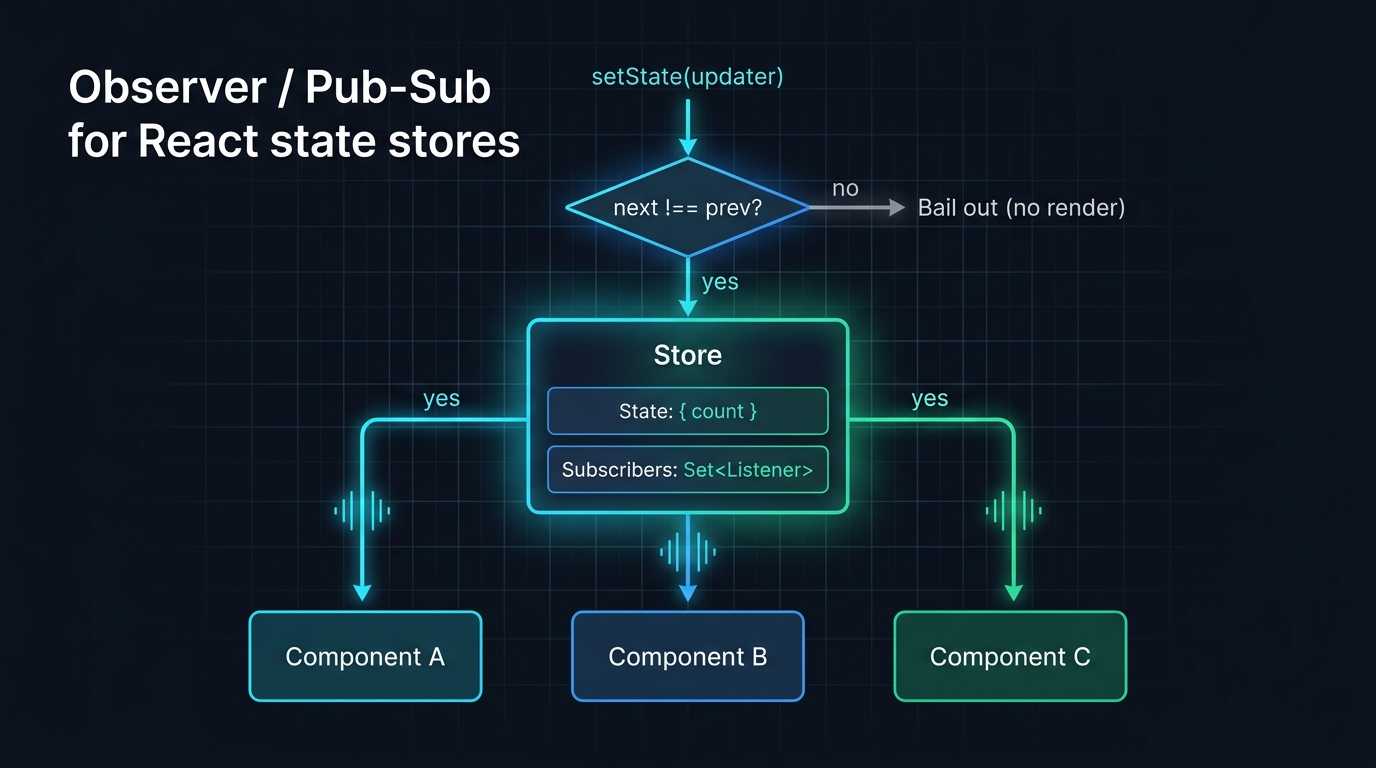
Flow diagram of the Observer/Pub-Sub pattern. A central 'Store' box contains two sections: 'state: { count }' and 'subscribers: Set<fn>'. Three arrows labeled 'subscribe(fn)' point inward from three component boxes (A, B, C). A 'setState(updater)' call at the top triggers a broadcast arrow fanning outward from the store to all three components simultaneously, labeled 'notify all observers'. A small decision diamond on the setState path reads 'nextState !== state?' with a 'yes → notify' branch and a 'no → bail out' branch. Caption: 'React, Zustand, and every reactive library are all implementations of this same Observer pattern'.
Figure: Flow diagram of the Observer/Pub-Sub pattern. A central 'Store' box contains two sections: 'state: { count }' and 'subscribers: Set<fn>'. Three arrows labeled 'subscribe(fn)' point inward from three component boxes (A, B, C). A 'setState(updater)' call at the top triggers a broadcast arrow fanning outward from the store to all three components simultaneously, labeled 'notify all observers'. A small decision diamond on the setState path reads 'nextState !== state?' with a 'yes → notify' branch and a 'no → bail out' branch. Caption: 'React, Zustand, and every reactive library are all implementations of this same Observer pattern'.

4. React's Mental Model: Unidirectional Data Flow

React enforces a strict discipline: data flows down, events flow up.
Parent Component
│
├── props ──────────────► Child A
│                              │
│                              ▼
│                         (renders using props)
│                              │
│                         event/callback ──► Parent (updates state) ──► re-render
│
└── props ──────────────► Child B
  • Data goes down via props. A child never reaches up into its parent to read state.
  • Events go up via callback props. A child calls onSubmit(data) — the parent decides what to do with it.
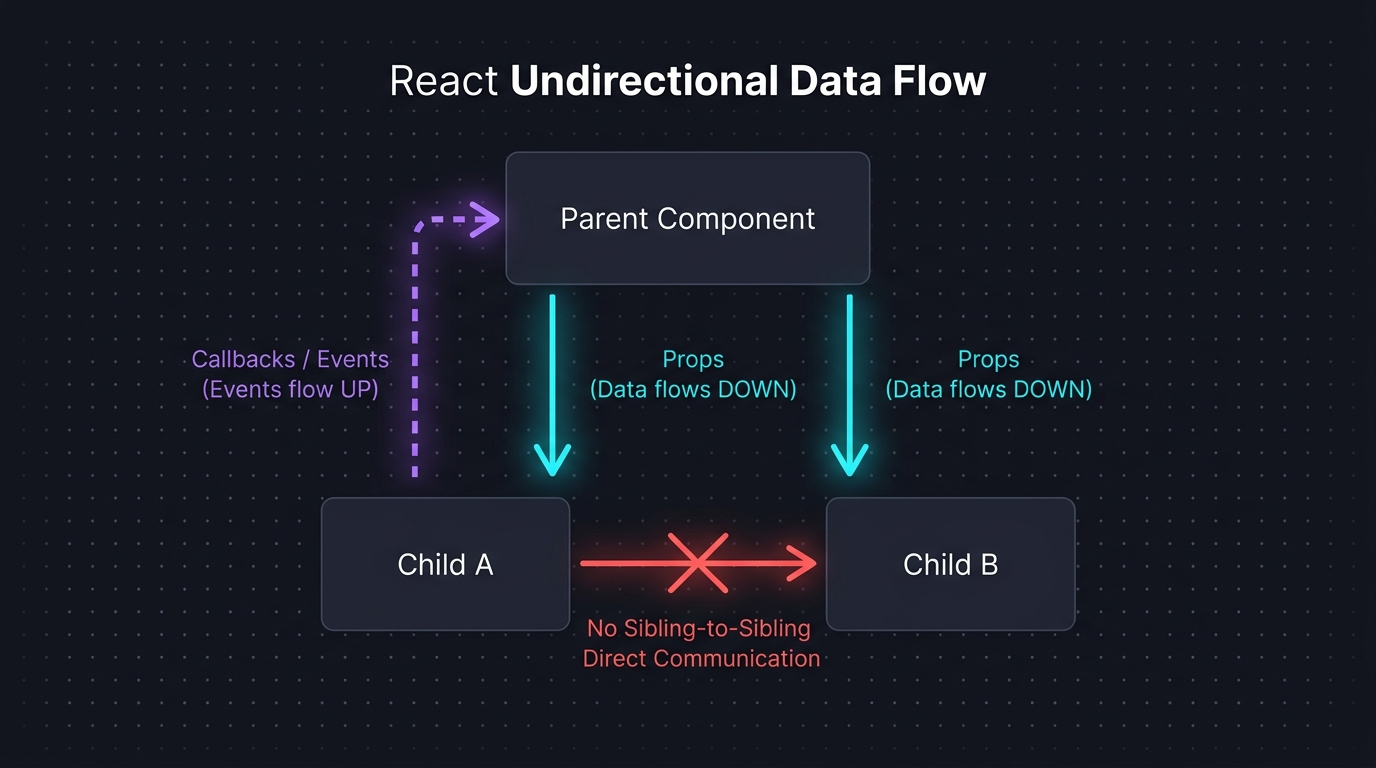
Tree diagram showing React's strict unidirectional data flow. A 'Parent' component box sits at the top. Two solid downward arrows labeled 'props' connect to 'Child A' and 'Child B' boxes below. From Child A, a single dashed upward arrow labeled 'callback / event (e.g. onSubmit)' returns to the Parent. A red crossed-out horizontal arrow between Child A and Child B is labeled 'Siblings cannot communicate directly'. At the bottom, two annotations: 'Data flows DOWN via props' and 'Events flow UP via callbacks'. Caption: 'One-way data flow makes state changes traceable — you always know which component owns a value and who can change it'.
Figure: Tree diagram showing React's strict unidirectional data flow. A 'Parent' component box sits at the top. Two solid downward arrows labeled 'props' connect to 'Child A' and 'Child B' boxes below. From Child A, a single dashed upward arrow labeled 'callback / event (e.g. onSubmit)' returns to the Parent. A red crossed-out horizontal arrow between Child A and Child B is labeled 'Siblings cannot communicate directly'. At the bottom, two annotations: 'Data flows DOWN via props' and 'Events flow UP via callbacks'. Caption: 'One-way data flow makes state changes traceable — you always know which component owns a value and who can change it'.
Mental Model Check
Two-way binding (as in Angular 1 or Vue's v-model) is a convenience that hides this contract. React makes the contract explicit. Explicit data flow is harder to set up but dramatically easier to debug — you always know where a value came from and who changed it.

5. The Render Cycle: What Actually Triggers a Re-render

React re-renders a component in exactly four situations:
TriggerExample
Own state changessetState(newValue) is called
Own props changeParent passes a different value
Consumed context changesA Provider value updates
Parent re-rendersParent re-renders; child re-renders by default unless wrapped in React.memo
The fourth one surprises most developers: a parent re-render causes every child to re-render by default, even if the child's props haven't changed. This is why React.memo exists — but as we'll cover in Part 6, React.memo is a band-aid. The architectural cure is preventing unnecessary parent re-renders in the first place.
typescript
// React.memo compares props shallowly — if props reference changes, it re-renders
const Child = React.memo(function Child({ count }: { count: number }) {
  return <div>{count}</div>
})

// ❌ This creates a new object on every Parent render — memo is useless
<Child config={{ theme: 'dark' }} />

// ✅ Stable reference — memo works correctly
const CONFIG = { theme: 'dark' }
<Child config={CONFIG} />

6. The Virtual DOM & Reconciliation

React does not update the real DOM directly on every render. Instead:
  1. Render phase: React calls your component functions and builds a Virtual DOM — a lightweight JavaScript object tree describing what the UI should look like.
  2. Diffing: React compares the new Virtual DOM tree against the previous one.
  3. Commit phase: React applies only the minimal set of changes to the real DOM.

6.1 The O(n) Diffing Algorithm

React's diffing algorithm makes two assumptions that reduce it from O(n³) to O(n):
  1. Elements of different types produce completely different trees. If a <div> becomes a <section>, React tears down the entire subtree and rebuilds — no further comparison.
  2. The developer provides key props for list elements. Without a key, React compares children positionally (index 0 vs. index 0, etc.). With a key, React matches by identity across positions.
tsx
// ❌ Without key — React compares by index. Inserting at the top destroys and
//    recreates every list item because every index shifts.
{items.map((item) => <Row item={item} />)}

// ✅ With stable key — React correctly identifies the new item and moves existing ones
{items.map((item) => <Row key={item.id} item={item} />)}
Performance / Safety Warning
Using index as a key is almost as bad as no key when the list can be reordered or have items inserted/removed. Use a stable, unique ID from the data itself.
Side-by-side comparison diagram of Virtual DOM list reconciliation. Both panels show a parent 'ul' node with three child 'li' nodes. Top panel labeled 'Without key prop': list originally has items [A, B, C]. After inserting D at position 0, the new list is [D, A, B, C]. Each li is compared by index position — li[0] was A, now D, so React sees a change and re-renders; same for all positions. All four li nodes are highlighted red as 'destroyed and recreated'. Bottom panel labeled 'With stable key prop (item.id)': React matches children by key identity across positions. Key=D is new (green, created). Keys A, B, C are found in both trees (grey, reused/moved). Only 1 node created vs 4 in the keyless version. Caption: 'The key prop is React diffing algorithm's primary identity hint for list children — always use a stable data ID, never array index'.
Figure: Side-by-side comparison diagram of Virtual DOM list reconciliation. Both panels show a parent 'ul' node with three child 'li' nodes. Top panel labeled 'Without key prop': list originally has items [A, B, C]. After inserting D at position 0, the new list is [D, A, B, C]. Each li is compared by index position — li[0] was A, now D, so React sees a change and re-renders; same for all positions. All four li nodes are highlighted red as 'destroyed and recreated'. Bottom panel labeled 'With stable key prop (item.id)': React matches children by key identity across positions. Key=D is new (green, created). Keys A, B, C are found in both trees (grey, reused/moved). Only 1 node created vs 4 in the keyless version. Caption: 'The key prop is React diffing algorithm's primary identity hint for list children — always use a stable data ID, never array index'.

6.2 What "Fiber" Actually Means

React Fiber (introduced in React 16) is the internal reimplementation of the reconciler. Fiber broke the rendering work into small units that can be paused, prioritized, and resumed. This is what powers Suspense, concurrent rendering, and useTransition (covered in Part 8). The Virtual DOM tree is now a linked list of "fiber nodes" rather than a plain JS object tree.

7. Derived State vs. Synced State

This is the most practically important section in this article.

7.1 The Anti-Pattern: Syncing Derived State with useEffect

typescript
// ❌ Classic anti-pattern — syncing derived data into state via useEffect
function ProductList({ products }: { products: Product[] }) {
  const [filteredProducts, setFilteredProducts] = useState(products)
  const [searchQuery, setSearchQuery] = useState('')

  useEffect(() => {
    setFilteredProducts(
      products.filter((p) => p.name.toLowerCase().includes(searchQuery.toLowerCase()))
    )
  }, [products, searchQuery])

  // Problem 1: Extra render cycle — first render shows stale filteredProducts,
  //            then useEffect fires, setting state, causing a second render.
  // Problem 2: filteredProducts is always one render behind the source truth.
  // Problem 3: filteredProducts can diverge from products+searchQuery if you forget
  //            a dependency.
}

7.2 The Correct Pattern: Compute During Render

typescript
// ✅ Derive during render — always consistent, no extra renders, no dependency array
function ProductList({ products }: { products: Product[] }) {
  const [searchQuery, setSearchQuery] = useState('')

  // Computed directly — zero lag, zero possibility of stale state
  const filteredProducts = useMemo(
    () => products.filter((p) =>
      p.name.toLowerCase().includes(searchQuery.toLowerCase())
    ),
    [products, searchQuery]
  )

  return (
    <>
      <input value={searchQuery} onChange={(e) => setSearchQuery(e.target.value)} />
      {filteredProducts.map((p) => <ProductCard key={p.id} product={p} />)}
    </>
  )
}
filteredProducts is not stored state — it's a cache of a pure computation. useMemo makes it efficient by memoizing the result until products or searchQuery changes. There is no useEffect, no second render, and no possibility of the derived value diverging from its source.
Pro Tip & Optimization
Before reaching for useState, ask: "Can I compute this from existing state or props during render?" If yes, do that. useState is for values that can't be derived — user input, server responses, UI toggles. Everything else is a computation.
The rule of thumb is simple:
Data TypeStorageTool
User-entered valueStoreuseState
Filtered/sorted/transformed version of stored dataDeriveuseMemo
Aggregate (total, count, sum) of stored dataDeriveuseMemo
Value fetched from serverServer stateReact Query (Part 4)
URL-driven filterDerive from URLuseSearchParams (Part 5)

8. References

  1. React — Keeping Components Pure
  2. React — Render and Commit
  3. React Fiber Architecture — GitHub
  4. Immer — Structural Sharing
  5. You Might Not Need an Effect — React Docs
  6. React Reconciliation — legacy.reactjs.org
Research & Synthesis Note

This article was developed with AI-assisted deep search, specification cross-referencing, and technical research synthesis.

#React#Reactivity#JavaScript#State Management#Virtual DOM#Immutability#Observer Pattern
Siddhant Deval

Written by Siddhant Deval

Senior Full-Stack Engineer building high-scale architectures, browser performance engineering systems, and SaaS platforms.