
The Frame Budget & Rendering Pipeline: 16.67 ms to Ship a Frame
Dissect the 60 fps frame budget, walk each phase of the rendering pipeline — Style, Layout, Paint, Composite — and learn how requestAnimationFrame and requestIdleCallback fit into the frame lifecycle.
Browser Engine Architecture
The Frame Budget & Rendering Pipeline: 16.67 ms to Ship a Frame
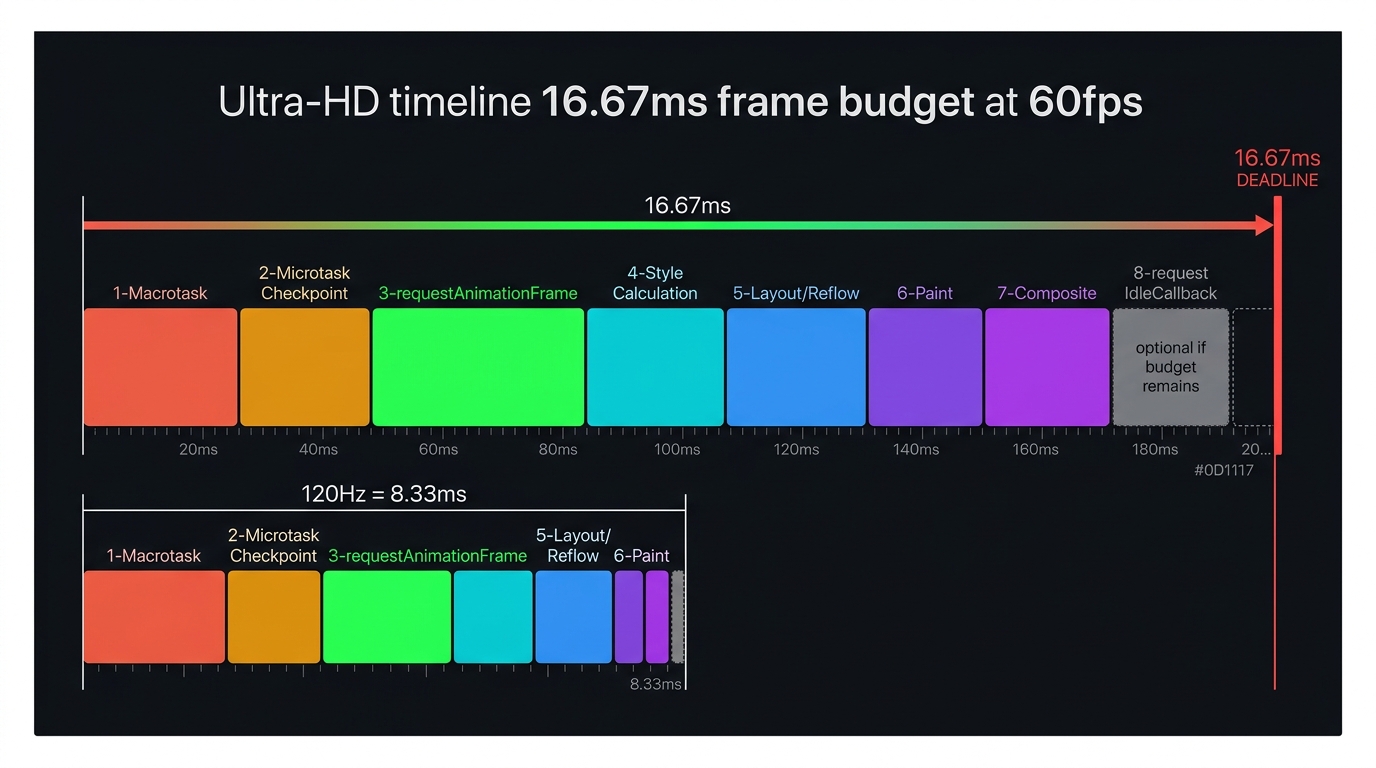
Fluid animation is a contract between your code and the display hardware. At 60 Hz, the monitor is ready for a new frame every 16.67 milliseconds. The browser must complete every phase of the rendering pipeline — Style, Layout, Paint, Composite — inside that window or the frame is dropped and the user sees a stutter.
Understanding every phase, what it costs, and which API hooks exist within the frame lifecycle is what allows you to write JavaScript that reliably stays inside the budget.
1. The Frame Budget
| Display Refresh Rate | Time Per Frame |
|---|---|
| 60 Hz | 16.67 ms |
| 90 Hz | 11.11 ms |
| 120 Hz | 8.33 ms |
| 144 Hz | 6.94 ms |
The budget is fixed by hardware. Your JavaScript, style work, layout, and paint combined must finish inside this window. Any phase that overruns causes a dropped frame — the browser shows the previous frame again, and the user perceives jank.
The browser itself consumes ~1–2 ms of every frame budget for internal overhead (compositing, IPC, display scheduling). Budget-conscious code must target ~12–14 ms, not the full 16.67 ms.
2. The Rendering Pipeline Phases
Phase 1 — Macrotask
The event loop dequeues one task from the Macrotask queue (a setTimeout callback, a click handler, a network callback, etc.) and runs it to completion. This is where the vast majority of JavaScript runs.
If your Macrotask runs for 20 ms, the browser misses the 16.67 ms frame deadline before any rendering phase even begins. Long Macrotasks are the most common cause of animation jank. Use scheduler.yield() or setTimeout(fn, 0) chunking to break long work into sub-16 ms slices.
Phase 2 — Microtask Checkpoint
Immediately after the Macrotask finishes, the browser exhaustively drains the Microtask queue: all resolved Promise.then callbacks, queueMicrotask callbacks, and MutationObserver notifications. The pipeline cannot advance until the Microtask queue is empty.
Phase 3 — requestAnimationFrame
If a frame is scheduled for this tick, the browser fires all pending requestAnimationFrame callbacks before touching the DOM for rendering. This makes rAF the only architecturally correct place to perform DOM mutations that need to appear in the current frame.
Phase 4 — Style Calculation
The browser matches every CSS selector against every DOM node to compute Computed Styles — the final, cascaded value of every property on every element. This is an O(n × s) operation across nodes and selectors.
Deep, complex selectors (e.g., .nav ul li a:hover span) are matched right-to-left and force the browser to walk large swaths of the subtree. Flat, atomic class selectors (BEM or utility classes) dramatically reduce the style recalculation cost.
Phase 5 — Layout (Reflow)
Given the computed styles, the browser calculates the geometric position and dimensions of every box in the document. This is the most computationally expensive phase for pages with large, interdependent DOM trees.
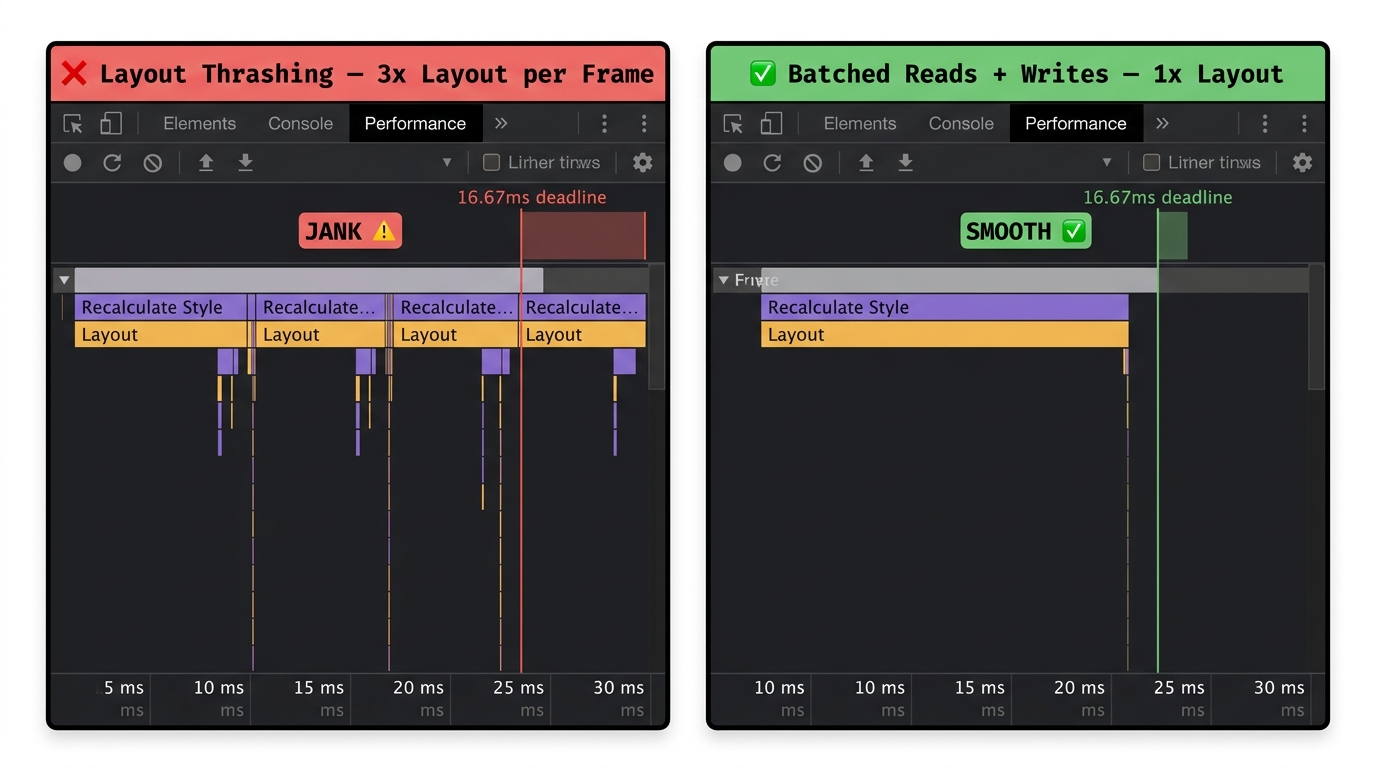
Layout Thrashing
Layout Thrashing is the single most destructive pattern in interactive UI code. It occurs when JavaScript alternates reads and writes of layout-dependent properties within the same frame:
Phase 6 — Paint
Paint does not draw pixels to the screen. Instead, the Main Thread generates a Display List (paint records): a serialised list of draw commands — "fill this rectangle with colour #3A7BF4", "stroke this path with 2 px", "draw this glyph at position (120, 44)" — for each changed layer.
This display list is what gets handed to the Compositor Thread for rasterisation.
Phase 7 — Composite
The Compositor Thread receives updated paint records and layer metadata. It dispatches tile rasterisation to Raster Worker Threads (via the GPU Process), then combines all the rasterised layers into the final frame and sends it to the display.
Because transform and opacity changes do not invalidate paint records — they only affect which matrix is applied to an already-rasterised layer — the Compositor can handle those changes independently.
Phase 8 — requestIdleCallback (Optional)
If the browser finishes Composite with remaining time before the next VSync tick, it fires requestIdleCallback with an IdleDeadline object that reports the remaining budget in milliseconds.
requestIdleCallback is exclusively for non-visual, deferrable work: analytics batching, prefetch queue processing, cache warming. Never perform DOM mutations or anything that affects layout inside an idle callback — the browser may fire it late, after the frame deadline, causing the next frame to thrash.
3. Pipeline Shortcutting
Not every frame requires all six rendering phases. The browser tracks which layers have changed and skips phases whose outputs are still valid:
| What changed | Phases triggered |
|---|---|
transform or opacity only |
Composite only |
background-color (no geometry change) |
Paint → Composite |
width, height, margin |
Layout → Paint → Composite |
| Inserted/removed DOM node | Style → Layout → Paint → Composite |
Understanding this table lets you predict the cost of any CSS or DOM change before profiling.
4. References
This article was developed with AI-assisted deep search, specification cross-referencing, and technical research synthesis.
