
Server State Is Not UI State: React Query, SWR & the RSC Boundary
Server state is asynchronous, remote, stale-by-default, and the UI doesn't own it. Treating it like local state — with useState and useEffect — is the root cause of race conditions, stale data, and duplicated loading spinners. This article covers TanStack Query, SWR, optimistic updates, and the Next.js RSC/Server Actions model.
Frontend State Architecture
Server State Is Not UI State: React Query, SWR & the RSC Boundary
The second pillar of senior-level state thinking is segregate domains. The most consequential segregation in modern React applications is between two categories that look superficially similar but require fundamentally different tools: UI state and server state.
UI state is synchronous, local, and owned by the application. Server state is asynchronous, remote, stale-by-default, and owned by the backend. Treating server state like UI state — storing it in useState and fetching it with useEffect — is the root cause of race conditions, stale data, duplicated loading spinners, and waterfall requests that make applications feel slow.
1. What Makes Server State Different
Server state has properties that UI state never does:
| Property | UI State | Server State |
|---|---|---|
| Ownership | Your application | The backend / database |
| Synchrony | Synchronous | Asynchronous |
| Freshness | Always current | Stale by default |
| Sharing | Local to this tab | Potentially shared with other users |
| Error surface | Unlikely | Network failure, auth expiry, 500s |
| Caching | Not needed | Critical |
| Invalidation | N/A | Required after mutations |
The moment you accept that server state is a different category, the right tools become obvious: you need a caching layer, a revalidation strategy, and a way to express async status — none of which useState provides.
2. The useState + useEffect Fetch Pattern — A Post-Mortem
This is the pattern most developers write first:
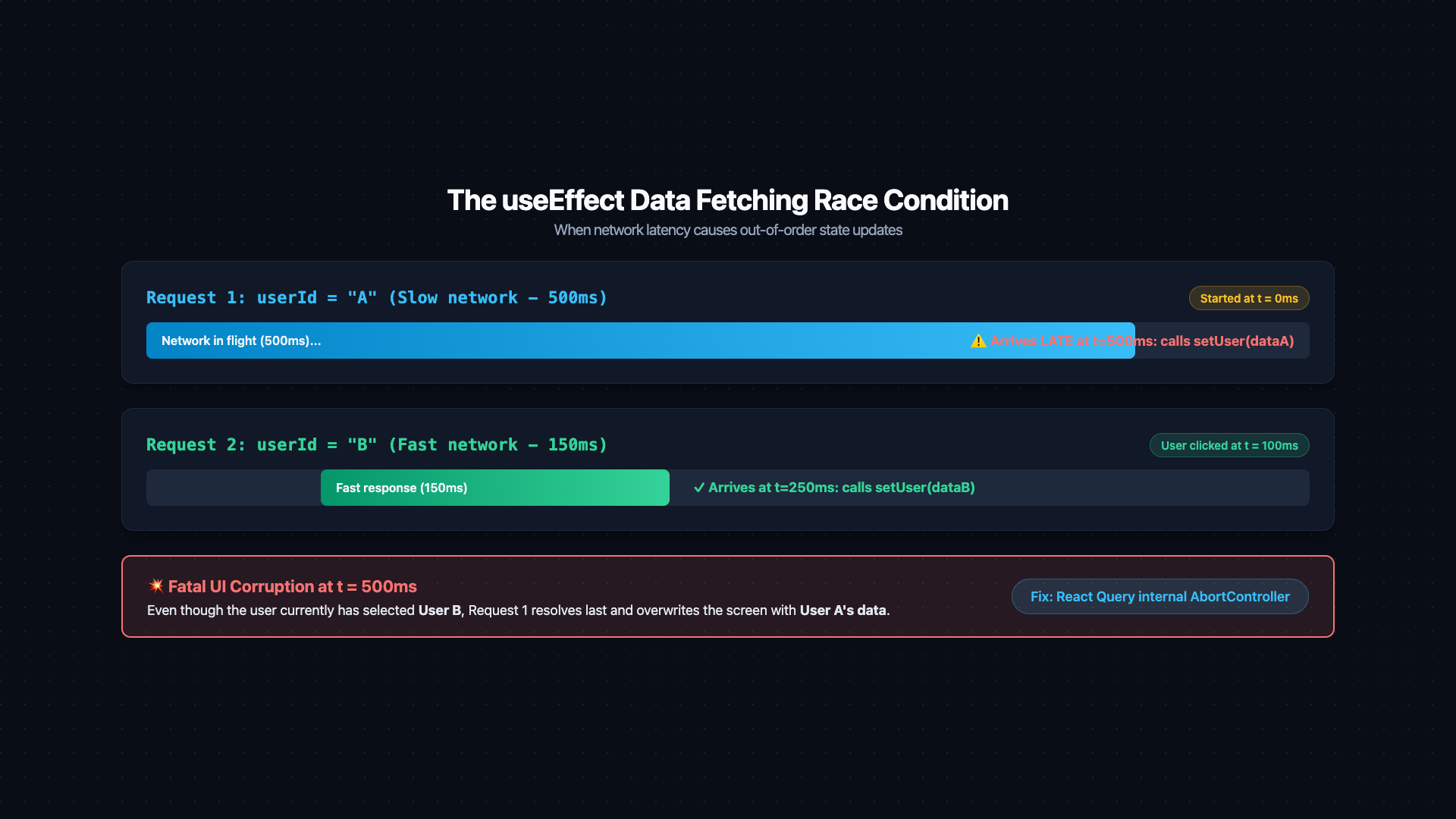
Problem 1: Race conditions. If userId changes from 'A' to 'B' while the fetch for 'A' is still in flight, both responses will call setUser. The slower response wins — the UI ends up displaying data for the wrong user.
Problem 2: No request deduplication. If three components on the page all need the same user, three parallel requests fire. There is no shared cache.
Problem 3: No background revalidation. The user navigates away and comes back 5 minutes later. The data is stale but the component shows it without refetching.
Problem 4: No cache. Every mount fires a new network request, even if the data was fetched seconds ago on a previous render.
3. TanStack Query (React Query): The Correct Tool
TanStack Query treats server state as a first-class concern. It provides a cache keyed by queryKey, handles the async lifecycle, deduplicates in-flight requests, and revalidates data in the background.
Every problem from the useEffect pattern is resolved:
- Race condition: React Query uses an internal abort controller. When
userIdchanges, the previous request's response is discarded. - Deduplication: Three components using
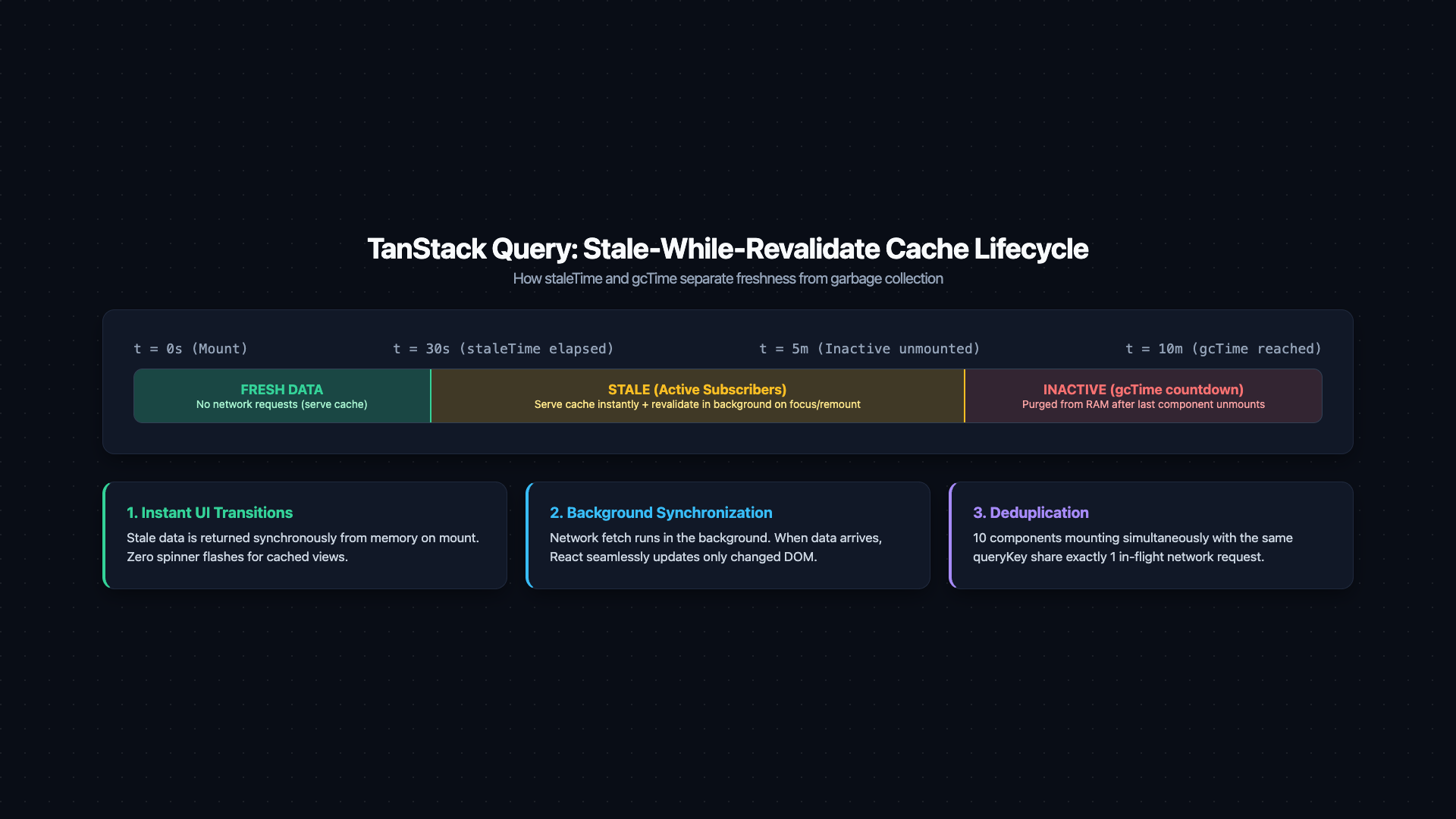
useQuery({ queryKey: ['users', '123'] })fire exactly one request. - Background revalidation: When the component remounts after
staleTimehas elapsed, React Query refetches in the background while serving the cached data — the user sees content immediately. - Cache: The result is stored and served instantly on subsequent mounts within
staleTime.
3.1 QueryKey Design — The Cache Address
The queryKey is a serialized cache address. Its design determines how granular your invalidation can be:
Design your queryKey hierarchy the way you'd design a REST URL — broad category first, then identifiers, then filters. When you invalidateQueries({ queryKey: ['users', userId] }), it invalidates the user and all their nested queries (posts, comments, etc.) in one call. A flat queryKey loses this granularity.
3.2 Stale-While-Revalidate Strategy
The stale-while-revalidate model: serve stale data immediately (fast UX), then refetch in the background and update. The user never sees a loading spinner for already-cached data.
4. Mutations and Cache Invalidation
invalidateQueries marks the cache entry as stale and triggers a background refetch if there are active subscribers. This is the correct way to keep the UI consistent after mutations — not manually calling setUser(updatedUser).
5. Optimistic Updates
Optimistic UI updates the local cache before the server confirms the mutation, then rolls back on failure. This makes mutations feel instantaneous.
6. SWR — Lightweight Alternative
SWR (stale-while-revalidate) by Vercel covers the same core use case with a simpler API and smaller bundle:
When to choose SWR over React Query:
- Simpler key structure (URL strings vs. array-based keys)
- Lighter bundle weight matters
- No need for mutations, complex invalidation, or optimistic updates
When to choose React Query over SWR:
- Complex mutation lifecycle (optimistic updates, rollback)
- Hierarchical cache invalidation
- Infinite queries / pagination
- DevTools for debugging cache state
7. Next.js App Router & React Server Components
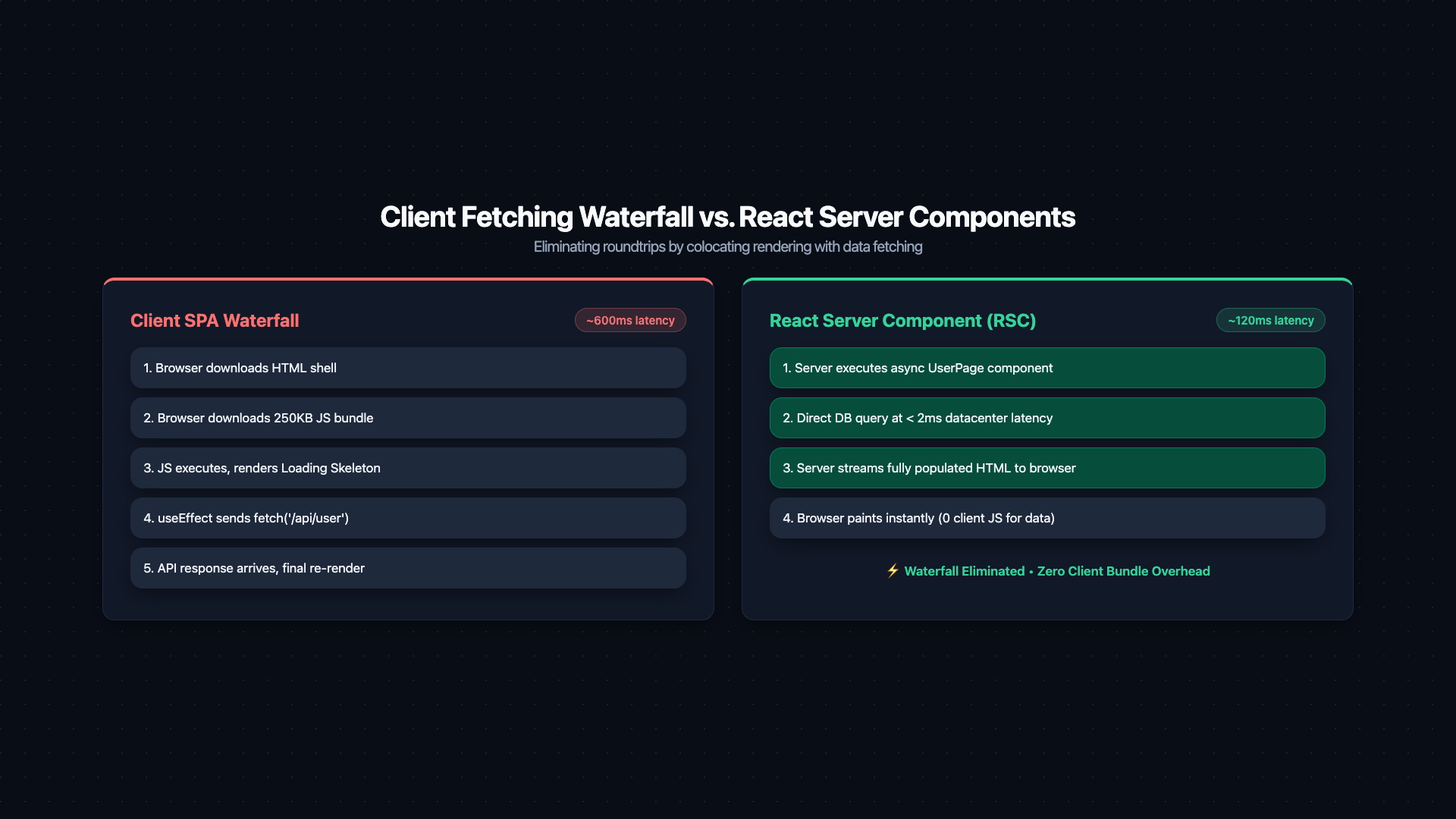
The RSC model solves a fundamentally different problem: eliminating the client-server waterfall entirely by fetching data on the server before any JavaScript ships to the browser.
The Server/Client boundary is explicit: Server Components fetch data, Client Components handle browser interactivity.
Push the 'use client' boundary as far down the tree as possible. Server Components don't ship JavaScript, don't need hydration, and can directly access databases, filesystems, and secrets. Keeping the server/client split at leaf-level interactive elements maximizes performance.
8. Server Actions: The Mutation Path in RSC
Server Actions close the mutation loop for RSC applications:
revalidatePath purges the Next.js Data Cache for the specified route, triggering a fresh server-side fetch on the next request. No queryClient.invalidateQueries needed — the revalidation happens on the server, close to the data.
9. References
This article was developed with AI-assisted deep search, specification cross-referencing, and technical research synthesis.
