Siddhant Deval
Siddhant DevalAuthor
Senior Full-Stack Engineer·Aug 27, 2026·14 min read

Concurrent React, XState Actor Model & Testing State in Isolation

React 18's concurrent model, XState's actor-based statecharts, and isolation testing complete the senior-level state architecture curriculum. This article covers useTransition, useDeferredValue, state tearing and useSyncExternalStore, React 19's useOptimistic, XState hierarchical machines, and testing state logic with renderHook and MSW.

Technical Series

Frontend State Architecture

Part 8 of 8

Concurrent React, XState Actor Model & Testing State in Isolation

This is the final article in the series — and deliberately so. The topics here are the advanced ceiling: they require everything from the previous seven parts to be meaningful. Concurrent React only makes sense once you understand the render cycle (Part 1). XState only makes sense once you've hit the limits of useReducer FSMs (Part 2). Testing state in isolation only makes sense once you have state worth isolating (Parts 1–7).
The unifying theme is the fourth pillar: data flow over data storage. Both concurrent React and XState are frameworks for reasoning about how state changes flow through a system — not just where state lives.

1. The Concurrent React Model: Urgency Tiers

React 18 introduced a fundamentally new execution model: interruptible rendering. In the synchronous model (React ≤ 17), every state update triggered a render that ran to completion — no interruptions. In concurrent mode, React can pause a render, handle a more urgent update, and then resume or discard the paused work.
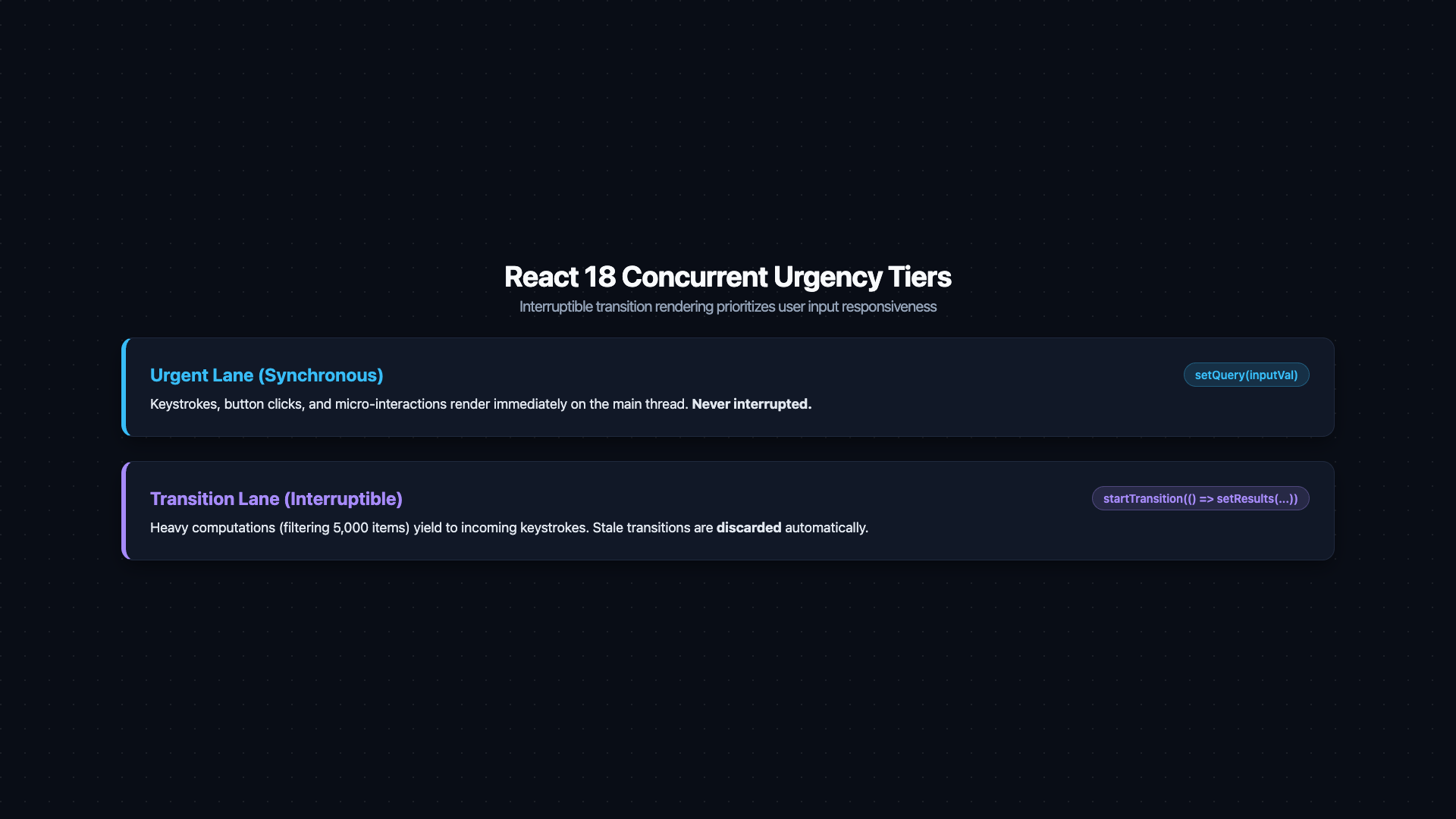
This creates two tiers of update urgency:
TierExamplesBehavior
UrgentTyping in an input, clicking a buttonRenders synchronously — user must see immediate feedback
TransitionFiltering a large list, navigating tabsCan be interrupted — if a more urgent update arrives, this work is discarded and restarted
Timeline diagram illustrating React 18 concurrent urgency tiers. Horizontal time axis with three keystrokes at t=0ms, t=100ms, t=200ms. Top track 'Urgent updates (input value)': each keystroke produces an immediate vertical bar showing synchronous update — the input always reflects the latest character instantly. Bottom track 'Transition updates (filtered list)': a grey computation block starts at t=0ms. At t=100ms (next keystroke), the computation is struck through with a red X labeled 'interrupted — discarded'. A new computation starts at t=100ms, again struck through at t=200ms. Only the computation from t=200ms runs to completion. An 'isPending=true' indicator spans interrupted periods. Caption: 'startTransition marks state updates as interruptible — React prioritises user input over expensive list filtering, keeping the UI responsive at all times'.
Figure: Timeline diagram illustrating React 18 concurrent urgency tiers. Horizontal time axis with three keystrokes at t=0ms, t=100ms, t=200ms. Top track 'Urgent updates (input value)': each keystroke produces an immediate vertical bar showing synchronous update — the input always reflects the latest character instantly. Bottom track 'Transition updates (filtered list)': a grey computation block starts at t=0ms. At t=100ms (next keystroke), the computation is struck through with a red X labeled 'interrupted — discarded'. A new computation starts at t=100ms, again struck through at t=200ms. Only the computation from t=200ms runs to completion. An 'isPending=true' indicator spans interrupted periods. Caption: 'startTransition marks state updates as interruptible — React prioritises user input over expensive list filtering, keeping the UI responsive at all times'.
The API for expressing this distinction is startTransition:
typescript
import { useState, useTransition } from 'react'

function SearchPage() {
  const [query, setQuery] = useState('')
  const [results, setResults] = useState<Product[]>([])
  const [isPending, startTransition] = useTransition()

  const handleSearch = (e: React.ChangeEvent<HTMLInputElement>) => {
    // Urgent: update the input immediately — the user must see their keystroke
    setQuery(e.target.value)

    // Transition: computing results is non-urgent — can be interrupted
    startTransition(() => {
      setResults(filterProducts(allProducts, e.target.value))
    })
  }

  return (
    <>
      <input value={query} onChange={handleSearch} placeholder="Search..." />
      {isPending && <span>Updating results...</span>}
      <ProductGrid products={results} />
    </>
  )
}
setQuery updates synchronously — the input shows the new character immediately. startTransition(() => setResults(...)) tells React: "this result update can wait. If the user types another character before it finishes, throw away the old render and start fresh." isPending is true while the transition is in progress — useful for showing a non-blocking indicator.
Mental Model Check
startTransition is the architectural expression of "this UI update is not blocking the user." Without it, a slow filter computation on every keystroke would make the input feel sluggish because React would synchronously rerender the entire filtered list before returning control to the browser. With it, React keeps the input snappy while the list catches up.

2. useDeferredValue: Debounce Without a Timer

useDeferredValue defers the update of a derived value to a lower-priority render, without the complexity of setTimeout-based debouncing:
typescript
import { useState, useDeferredValue, useMemo } from 'react'

function SearchResults({ query }: { query: string }) {
  // The deferred value lags behind `query` by one render cycle during transitions
  const deferredQuery = useDeferredValue(query)

  // This expensive computation runs with the *deferred* value — not the latest one
  const results = useMemo(
    () => filterProducts(allProducts, deferredQuery),
    [deferredQuery]  // only runs when deferredQuery changes
  )

  // Visual feedback: results are slightly stale while the user is typing fast
  const isStale = query !== deferredQuery

  return (
    <div style={{ opacity: isStale ? 0.7 : 1 }}>
      {results.map((p) => <ProductCard key={p.id} product={p} />)}
    </div>
  )
}
useTransition vs. useDeferredValue:
  • useTransition wraps the state update — you control when the state change is marked as a transition.
  • useDeferredValue wraps the derived value — you defer the consumption of an already-updated value. Use this when you don't control the state update (e.g., prop received from a parent).

3. State Tearing and useSyncExternalStore

State tearing is a subtle concurrency bug: in a single concurrent render pass, React might call a component's render function multiple times. If an external store (Zustand, Redux, MobX) is read during these multiple calls and its value changes between them, two calls can read different values — causing an inconsistent UI.
React's solution is useSyncExternalStore, a hook that guarantees a synchronous, consistent snapshot of external store state during a concurrent render:
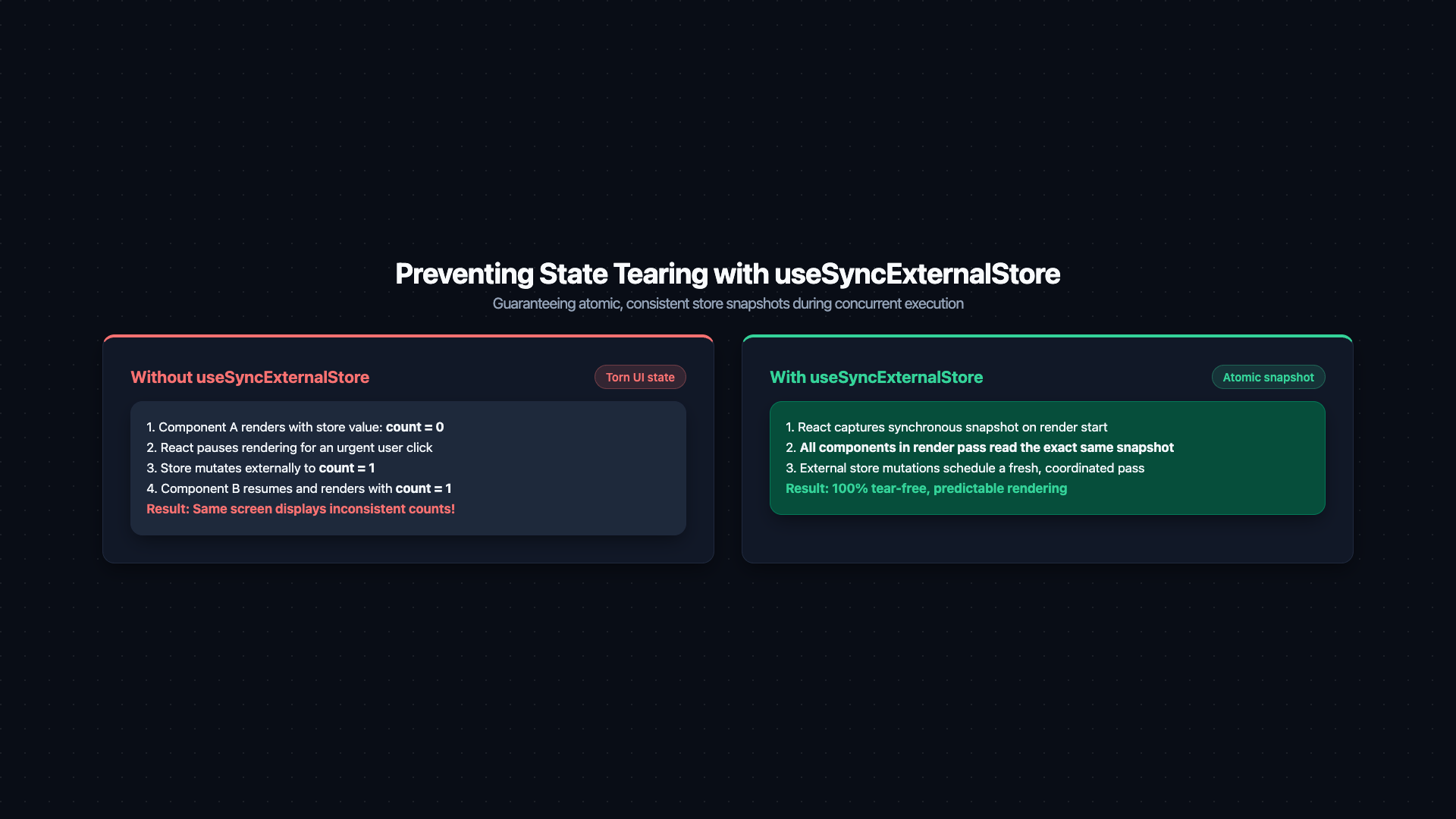
Two-panel diagram illustrating state tearing. Left panel 'Without useSyncExternalStore (tearing risk)': a single React render pass is shown split into two time slices by a vertical dashed line labeled 'React pauses here (concurrent interrupt)'. First slice: 'Component A reads store — count = 0'. During pause: 'External store updates — count becomes 1'. Second slice: 'Component B reads store — count = 1'. Resulting UI shows ComponentA=0 and ComponentB=1 highlighted red with label 'TORN: inconsistent values in same render'. Right panel 'With useSyncExternalStore': React takes a synchronous snapshot at render start (count=0). Both slices use the snapshot. ComponentA=0, ComponentB=0, highlighted green with label 'CONSISTENT: single snapshot for entire render pass'. Caption: 'useSyncExternalStore prevents tearing by taking a synchronous, immutable snapshot of external store state before any concurrent rendering begins'.
Figure: Two-panel diagram illustrating state tearing. Left panel 'Without useSyncExternalStore (tearing risk)': a single React render pass is shown split into two time slices by a vertical dashed line labeled 'React pauses here (concurrent interrupt)'. First slice: 'Component A reads store — count = 0'. During pause: 'External store updates — count becomes 1'. Second slice: 'Component B reads store — count = 1'. Resulting UI shows ComponentA=0 and ComponentB=1 highlighted red with label 'TORN: inconsistent values in same render'. Right panel 'With useSyncExternalStore': React takes a synchronous snapshot at render start (count=0). Both slices use the snapshot. ComponentA=0, ComponentB=0, highlighted green with label 'CONSISTENT: single snapshot for entire render pass'. Caption: 'useSyncExternalStore prevents tearing by taking a synchronous, immutable snapshot of external store state before any concurrent rendering begins'.
typescript
import { useSyncExternalStore } from 'react'

// Custom store (simplified Zustand-like implementation)
function createExternalStore<T>(initialState: T) {
  let state = initialState
  const listeners = new Set<() => void>()

  return {
    getState: () => state,
    setState: (updater: (s: T) => T) => {
      state = updater(state)
      listeners.forEach((l) => l())
    },
    subscribe: (listener: () => void) => {
      listeners.add(listener)
      return () => listeners.delete(listener)
    },
  }
}

const store = createExternalStore({ count: 0 })

function Counter() {
  // useSyncExternalStore guarantees no tearing:
  // - subscribe: called to register for updates
  // - getSnapshot: called synchronously to read current state
  const count = useSyncExternalStore(
    store.subscribe,
    store.getState,  // client snapshot
    () => 0          // server snapshot (for SSR)
  )
  return <span>{count}</span>
}
Crucial Requirement
This is why Zustand (v4+), Redux (v8+), and other major stores were rewritten to use useSyncExternalStore internally. If you are using an older version of a state library with React 18's concurrent features enabled, you may encounter tearing bugs. Upgrade to versions that explicitly support React 18 concurrent mode.

4. React 19 useOptimistic and useActionState

React 19 promoted optimistic UI from a pattern into a first-class API:
typescript
import { useOptimistic, useTransition } from 'react'

type Message = { id: string; text: string; sending?: boolean }

function ChatThread({ messages }: { messages: Message[] }) {
  const [, startTransition] = useTransition()

  // useOptimistic takes the current state and a merge function
  const [optimisticMessages, addOptimisticMessage] = useOptimistic(
    messages,
    (currentMessages: Message[], newMessage: Message) => [
      ...currentMessages,
      { ...newMessage, sending: true },  // flag as pending
    ]
  )

  const sendMessage = async (text: string) => {
    const tempMessage = { id: crypto.randomUUID(), text }

    startTransition(() => {
      // Immediately add the optimistic message to the list
      addOptimisticMessage(tempMessage)
    })

    // Actual network call — when it resolves, React replaces the optimistic state
    // with the server-confirmed state. On error, optimistic state is rolled back.
    await postMessage(text)
  }

  return (
    <ul>
      {optimisticMessages.map((msg) => (
        <li key={msg.id} style={{ opacity: msg.sending ? 0.6 : 1 }}>
          {msg.text}
        </li>
      ))}
    </ul>
  )
}
useActionState (React 19) connects form state to Server Actions:
Architectural Note
useOptimistic rollback behaviour: The optimistic state is automatically replaced when the underlying actual state changes (on successful action + revalidation). On failure, if the action throws and no revalidation occurs, the optimistic state persists until the actual state updates. For best UX, always pair useOptimistic with an error notification so users understand why their change didn't persist — a silent snap-back is confusing.
useActionState (React 19) connects form state to Server Actions:
typescript
import { useActionState } from 'react'
import { submitContactForm } from '@/app/actions'

function ContactForm() {
  const [state, action, isPending] = useActionState(submitContactForm, null)

  return (
    <form action={action}>
      <input name="email" required />
      <textarea name="message" required />
      {state?.error && <p>{state.error}</p>}
      {state?.success && <p>Message sent!</p>}
      <button type="submit" disabled={isPending}>
        {isPending ? 'Sending...' : 'Send'}
      </button>
    </form>
  )
}

5. XState: Beyond Flat Reducers

The useReducer FSM from Part 2 works well for simple four-state machines. It breaks when:
  • States have sub-states (a modal that is open can be in idle, submitting, or error sub-states)
  • States run in parallel (a media player can be playing AND muted simultaneously)
  • States communicate across features (a checkout wizard step depends on state from the payment step)
XState's statecharts model all three:
typescript
import { createMachine, assign } from 'xstate'

// Checkout flow — hierarchical states with parallel billing/shipping validation
const checkoutMachine = createMachine({
  id: 'checkout',
  initial: 'cart',
  context: { items: [], shippingAddress: null, paymentMethod: null },

  states: {
    cart: {
      on: {
        PROCEED: 'shipping',
        ADD_ITEM: { actions: assign({ items: ({ context, event }) => [...context.items, event.item] }) },
      },
    },

    shipping: {
      initial: 'editing',
      states: {
        editing: {
          on: {
            SUBMIT_ADDRESS: { target: 'validating', actions: assign({ shippingAddress: ({ event }) => event.address }) },
          },
        },
        validating: {
          // invoke runs an async service — transitions on done/error
          invoke: {
            src: 'validateAddress',
            onDone: { target: 'valid' },
            onError: { target: 'editing' },
          },
        },
        valid: { type: 'final' },
      },
      onDone: 'payment',  // when sub-machine reaches final state, proceed
      on: { BACK: 'cart' },
    },

    payment: {
      on: {
        SUBMIT_PAYMENT: 'confirming',
        BACK: 'shipping',
      },
    },

    confirming: {
      invoke: {
        src: 'processPayment',
        onDone: { target: 'success' },
        onError: { target: 'payment' },
      },
    },

    success: { type: 'final' },
  },
})
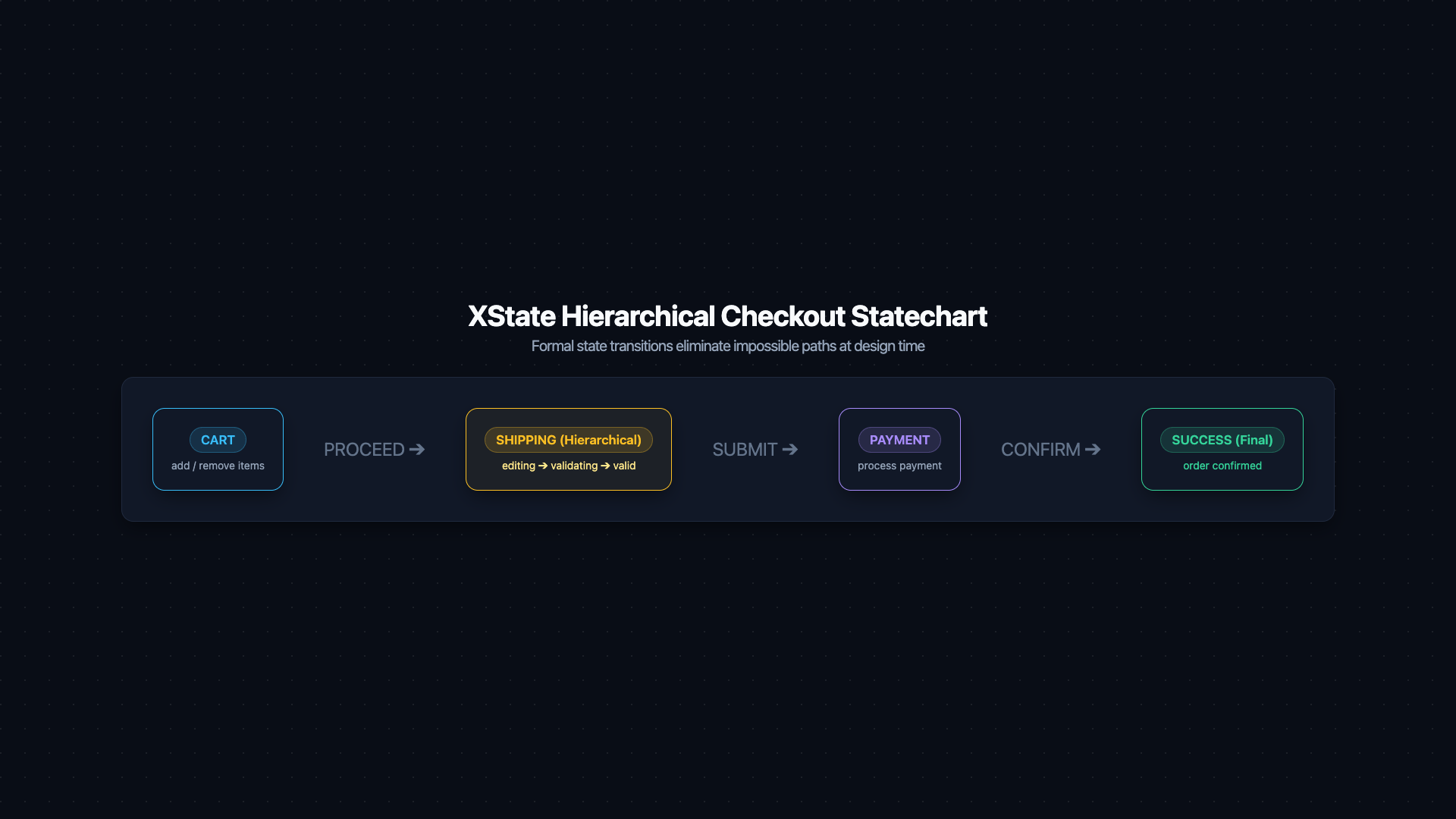
Hierarchical statechart diagram for the checkout machine. Five top-level state nodes in horizontal flow: 'cart', 'shipping', 'payment', 'confirming', 'success'. The 'shipping' node is expanded to show three nested sub-states stacked vertically: 'editing' → 'validating (invoke: validateAddress)' → 'valid (final)'. Transition arrows labeled: PROCEED (cart→shipping), BACK (shipping→cart, payment→shipping), SUBMIT_ADDRESS (editing→validating), onDone/validateAddress (validating→valid), onError (validating→editing), shipping-onDone (shipping→payment), SUBMIT_PAYMENT (payment→confirming), processPayment.onDone (confirming→success), processPayment.onError (confirming→payment). A red annotation box reads: 'Direct cart → confirming transition is structurally impossible — no such arrow exists in the machine definition'. Caption: 'XState statecharts enforce legal transitions at the machine level — invalid state sequences are impossible by construction, not just by convention'.
Figure: Hierarchical statechart diagram for the checkout machine. Five top-level state nodes in horizontal flow: 'cart', 'shipping', 'payment', 'confirming', 'success'. The 'shipping' node is expanded to show three nested sub-states stacked vertically: 'editing' → 'validating (invoke: validateAddress)' → 'valid (final)'. Transition arrows labeled: PROCEED (cart→shipping), BACK (shipping→cart, payment→shipping), SUBMIT_ADDRESS (editing→validating), onDone/validateAddress (validating→valid), onError (validating→editing), shipping-onDone (shipping→payment), SUBMIT_PAYMENT (payment→confirming), processPayment.onDone (confirming→success), processPayment.onError (confirming→payment). A red annotation box reads: 'Direct cart → confirming transition is structurally impossible — no such arrow exists in the machine definition'. Caption: 'XState statecharts enforce legal transitions at the machine level — invalid state sequences are impossible by construction, not just by convention'.
XState's statecharts make impossible states structurally impossible at the machine level. The confirming state can only be entered from payment — there is no way to get to confirming from cart or shipping directly, because the machine doesn't define that transition.

6. Testing State in Isolation

6.1 Testing Custom Hooks with renderHook

typescript
import { renderHook, act } from '@testing-library/react'
import { useCounter } from './useCounter'

describe('useCounter', () => {
  it('increments correctly', () => {
    const { result } = renderHook(() => useCounter(0))

    expect(result.current.count).toBe(0)

    act(() => {
      result.current.increment()
    })

    expect(result.current.count).toBe(1)
  })

  it('does not go below minimum', () => {
    const { result } = renderHook(() => useCounter(0, { min: 0 }))
    act(() => { result.current.decrement() })
    expect(result.current.count).toBe(0)
  })
})

6.2 Testing React Query with MSW

MSW (Mock Service Worker) intercepts network requests at the network level — no mocking of fetch, no patching globals:
typescript
import { http, HttpResponse } from 'msw'
import { setupServer } from 'msw/node'
import { renderHook, waitFor } from '@testing-library/react'
import { QueryClient, QueryClientProvider } from '@tanstack/react-query'
import { useUser } from './useUser'

const server = setupServer(
  http.get('/api/users/:id', ({ params }) => {
    return HttpResponse.json({ id: params.id, name: 'Alice', role: 'admin' })
  })
)

beforeAll(() => server.listen())
afterEach(() => server.resetHandlers())
afterAll(() => server.close())

function createWrapper() {
  const queryClient = new QueryClient({
    defaultOptions: { queries: { retry: false } },  // don't retry in tests
  })
  return ({ children }: { children: React.ReactNode }) => (
    <QueryClientProvider client={queryClient}>{children}</QueryClientProvider>
  )
}

describe('useUser', () => {
  it('fetches and returns user data', async () => {
    const { result } = renderHook(() => useUser('123'), {
      wrapper: createWrapper(),
    })

    await waitFor(() => expect(result.current.isSuccess).toBe(true))

    expect(result.current.data?.name).toBe('Alice')
    expect(result.current.data?.role).toBe('admin')
  })

  it('handles 404 gracefully', async () => {
    server.use(
      http.get('/api/users/:id', () => HttpResponse.json(null, { status: 404 }))
    )

    const { result } = renderHook(() => useUser('nonexistent'), {
      wrapper: createWrapper(),
    })

    await waitFor(() => expect(result.current.isError).toBe(true))
  })
})

6.3 Testing Zustand Stores

Reset store state between tests to prevent test pollution:
typescript
import { useAppStore } from './store'

afterEach(() => {
  // Reset to initial state after every test
  useAppStore.setState({ count: 0, theme: 'dark' })
})

describe('cart store', () => {
  it('adds an item', () => {
    const { addItem } = useAppStore.getState()
    addItem({ id: '1', name: 'Widget', price: 9.99 })
    expect(useAppStore.getState().items).toHaveLength(1)
  })
})
Performance / Safety Warning
React 18 Strict Mode double-invocation: In development, React 18 with Strict Mode calls useEffect setup and cleanup functions twice on mount to detect side effects. This can cause WebSocket connections, timers, or subscriptions to be created twice. Your cleanup functions must be idempotent. This is intentional — it surfaces bugs that would otherwise be invisible in development.

7. Closing: The Architecture You're Building Toward

Across all eight parts, the goal has been the same: design an architecture where the UI is a pure, predictable reflection of your data streams.
When that discipline is applied:
  • Components are thin — they render, they dispatch, they subscribe. No business logic.
  • State is owned at the right level — local by default, global only when justified.
  • Server state is never duplicated into local state — React Query or RSCs own it.
  • Real-time events merge cleanly into a typed, machine-controlled state model.
  • Every piece of state logic is testable in isolation — no DOM required.
At that point, the choice of actual state management library becomes almost irrelevant. Zustand or Redux, Jotai or Context — they are implementation details of a well-designed system.

8. References

  1. React — useTransition
  2. React — useDeferredValue
  3. React — useSyncExternalStore
  4. React 19 — useOptimistic
  5. XState — Statecharts
  6. MSW — Mock Service Worker
  7. React Testing Library — renderHook
  8. React — Strict Mode & Effect double-invocation
Research & Synthesis Note

This article was developed with AI-assisted deep search, specification cross-referencing, and technical research synthesis.

#React#Concurrent React#useTransition#useDeferredValue#XState#Actor Model#Testing#MSW#React 19#useOptimistic
Siddhant Deval

Written by Siddhant Deval

Senior Full-Stack Engineer building high-scale architectures, browser performance engineering systems, and SaaS platforms.