Siddhant Deval
Siddhant DevalAuthor
Senior Full-Stack Engineer·Aug 27, 2026·14 min read

Crossing the Tree: Context, Lifting State & Global UI Architectures

Global state is the last resort, not the starting template. This article traces the full decision path — from colocating state at the lowest possible node, to lifting it to a common ancestor, to using Context as dependency injection, to choosing between Redux, Jotai, and Zustand for genuinely global UI state.

Crossing the Tree: Context, Lifting State & Global UI Architectures

The third pillar: global state is a last resort, not a starting template. Every piece of state that escapes into a global store is state you've committed to managing for the lifetime of the application, state that can be accessed and mutated from anywhere, and state that makes bugs significantly harder to trace. The discipline is to resist that escape as long as possible.
This article traces the full decision path — from keeping state in the component that owns it, to lifting it one level up, to reaching for Context as a targeted escape, to evaluating the three major global UI state patterns: Flux/Redux, atomic state, and proxy-based state.

1. State Colocation: The Default Rule

State should live at the lowest component node that needs it.
This is not an optimization — it's the architectural default. Moving state upward should require a clear justification.

1.1 Progressive Lifting — A Worked Example

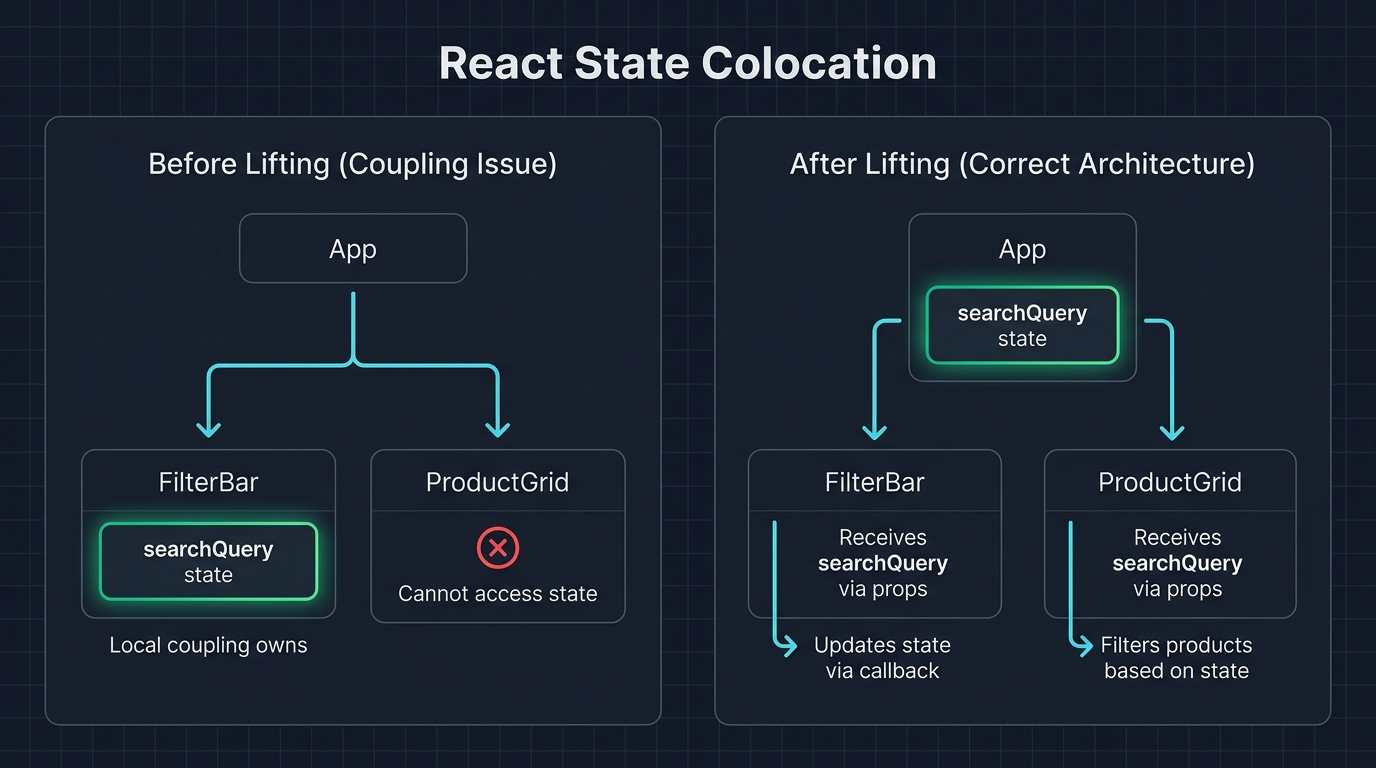
Imagine a FilterBar component with a local search input, and a ProductGrid that needs to know the search query to filter results:
App
├── FilterBar (owns searchQuery — but ProductGrid also needs it)
└── ProductGrid (needs searchQuery — currently can't access it)
The solution is to lift the state to the closest common ancestor — in this case, App:
tsx
// ✅ searchQuery lifted to App — the lowest common ancestor of FilterBar and ProductGrid
function App() {
  const [searchQuery, setSearchQuery] = useState('')

  return (
    <>
      <FilterBar query={searchQuery} onQueryChange={setSearchQuery} />
      <ProductGrid query={searchQuery} />
    </>
  )
}
Component tree diagram illustrating state colocation and lifting. Left panel labeled 'Before Lifting (Incorrect)': a tree with 'App' at root, 'FilterBar' left child containing a green box 'searchQuery state', and 'ProductGrid' right child with a red X and label 'cannot access searchQuery'. A dashed red border around FilterBar. Right panel labeled 'After Lifting (Correct)': same tree, but 'searchQuery state' box has moved up to the 'App' node, highlighted green. Arrows from App flow down to both FilterBar (labeled 'query prop') and ProductGrid (labeled 'query prop'). A caption reads: 'Lift state to the lowest common ancestor of all components that need to read it'.
Figure: Component tree diagram illustrating state colocation and lifting. Left panel labeled 'Before Lifting (Incorrect)': a tree with 'App' at root, 'FilterBar' left child containing a green box 'searchQuery state', and 'ProductGrid' right child with a red X and label 'cannot access searchQuery'. A dashed red border around FilterBar. Right panel labeled 'After Lifting (Correct)': same tree, but 'searchQuery state' box has moved up to the 'App' node, highlighted green. Arrows from App flow down to both FilterBar (labeled 'query prop') and ProductGrid (labeled 'query prop'). A caption reads: 'Lift state to the lowest common ancestor of all components that need to read it'.
Mental Model Check
Ask: "What is the lowest node in the tree that is an ancestor of every component that reads this state?" That node is where the state belongs. Lifting higher than that is premature globalisation.

2. Prop Drilling: When Is It Actually a Problem?

Prop drilling — passing props through intermediate components that don't use them — is often cited as a reason to reach for Context. The reality is more nuanced.
Prop drilling is acceptable when:
  • The intermediary component is shallow (1–2 levels).
  • The prop is semantically important to the intermediary's API (e.g., a <Form> passing isSubmitting to a <SubmitButton>).
Prop drilling becomes genuinely painful when:
  • The prop passes through 3+ components that don't use it.
  • The intermediary components need to be changed when the prop's type changes.
  • You're threading the same prop through separate branches of the tree.
At that point, Context is the appropriate tool — but for the right reason: eliminating coupling, not "making state global."

3. Context as Dependency Injection

The correct mental model for React Context is dependency injection, not state management.
tsx
// Define the shape of what's injected
type ThemeContextValue = {
  theme: 'light' | 'dark'
  setTheme: (t: 'light' | 'dark') => void
}

const ThemeContext = createContext<ThemeContextValue | null>(null)

// The provider owns the state — Context is just the injection mechanism
export function ThemeProvider({ children }: { children: React.ReactNode }) {
  const [theme, setTheme] = useState<'light' | 'dark'>('dark')
  return (
    <ThemeContext.Provider value={{ theme, setTheme }}>
      {children}
    </ThemeContext.Provider>
  )
}

// A typed hook that throws if used outside the provider — fail fast
export function useTheme(): ThemeContextValue {
  const ctx = useContext(ThemeContext)
  if (!ctx) throw new Error('useTheme must be used within ThemeProvider')
  return ctx
}
Any component inside ThemeProvider can call useTheme() and get the current theme without the parent explicitly threading the prop through every intermediary.
Architectural Note
Context re-renders every component that calls useContext(MyContext) whenever the Provider's value prop changes. If value is a new object literal on every parent render, every consumer re-renders — even if the actual data hasn't changed. Always memoize the value or split into separate contexts.

4. Splitting StateContext from DispatchContext

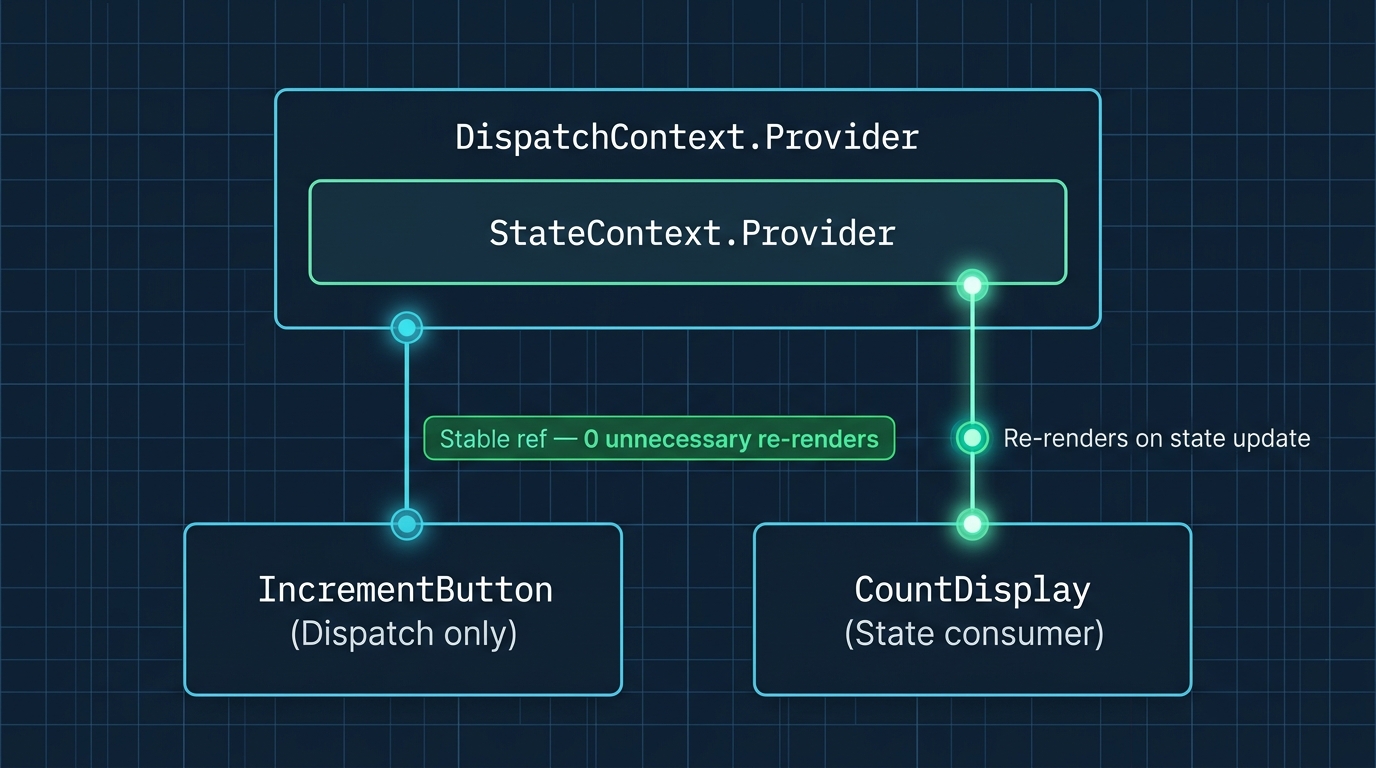
The most impactful Context optimization: separate the data from the updater.
tsx
type State = { count: number; theme: 'light' | 'dark' }
type Action = { type: 'INCREMENT' } | { type: 'SET_THEME'; payload: 'light' | 'dark' }

const StateContext = createContext<State | null>(null)
const DispatchContext = createContext<React.Dispatch<Action> | null>(null)

export function AppProvider({ children }: { children: React.ReactNode }) {
  const [state, dispatch] = useReducer(reducer, { count: 0, theme: 'dark' })

  return (
    <DispatchContext.Provider value={dispatch}>
      <StateContext.Provider value={state}>
        {children}
      </StateContext.Provider>
    </DispatchContext.Provider>
  )
}
The key insight: dispatch is a stable function reference — React guarantees it never changes across renders. So components that only dispatch actions (buttons, form handlers) consume DispatchContext and never re-render when state changes. Only components that consume StateContext re-render.
tsx
// This button NEVER re-renders when count changes — it only dispatches
function IncrementButton() {
  const dispatch = useContext(DispatchContext)!
  return <button onClick={() => dispatch({ type: 'INCREMENT' })}>+</button>
}

// This display re-renders only when count changes
function CountDisplay() {
  const { count } = useContext(StateContext)!
  return <span>{count}</span>
}
Architecture diagram of the StateContext and DispatchContext split pattern. A vertical stack of nested provider boxes: outer box labeled 'DispatchContext.Provider' containing inner box labeled 'StateContext.Provider'. Below, three component boxes with connection lines. 'IncrementButton' has a line only to DispatchContext, labeled 'reads dispatch only'. A render-cycle indicator (static clock) shows it never re-renders on state change. 'CountDisplay' has a line only to StateContext, labeled 're-renders when count changes', with an active pulsing render-cycle indicator. 'AdminPanel' has lines to both contexts. A key insight callout: 'dispatch from useReducer has stable identity — React guarantees it never changes'. Caption: 'Separating read and write contexts prevents write-only components from paying the cost of read re-renders'.
Figure: Architecture diagram of the StateContext and DispatchContext split pattern. A vertical stack of nested provider boxes: outer box labeled 'DispatchContext.Provider' containing inner box labeled 'StateContext.Provider'. Below, three component boxes with connection lines. 'IncrementButton' has a line only to DispatchContext, labeled 'reads dispatch only'. A render-cycle indicator (static clock) shows it never re-renders on state change. 'CountDisplay' has a line only to StateContext, labeled 're-renders when count changes', with an active pulsing render-cycle indicator. 'AdminPanel' has lines to both contexts. A key insight callout: 'dispatch from useReducer has stable identity — React guarantees it never changes'. Caption: 'Separating read and write contexts prevents write-only components from paying the cost of read re-renders'.

5. The Flux / Redux Pattern

Redux formalizes the one-way data flow principle into an architectural pattern with four actors:
ActorRole
StoreSingle source of truth — holds the entire application state tree
ActionPlain object describing what happened ({ type: 'USER_LOGGED_IN', payload: user })
ReducerPure function: (state, action) → nextState
SelectorPure function: extracts and derives a slice of state for a component

5.1 Redux Toolkit — The Modern API

The pre-RTK Redux API required enormous boilerplate (action type constants, action creators, manual normalization). Redux Toolkit's createSlice collapses this:
typescript
import { createSlice, createSelector, PayloadAction } from '@reduxjs/toolkit'

type CartItem = { id: string; name: string; quantity: number; price: number }
type CartState = { items: CartItem[] }

const cartSlice = createSlice({
  name: 'cart',
  initialState: { items: [] } as CartState,
  reducers: {
    addItem(state, action: PayloadAction<CartItem>) {
      // RTK uses Immer internally — mutable syntax produces immutable updates
      state.items.push(action.payload)
    },
    removeItem(state, action: PayloadAction<string>) {
      state.items = state.items.filter((i) => i.id !== action.payload)
    },
    updateQuantity(state, action: PayloadAction<{ id: string; quantity: number }>) {
      const item = state.items.find((i) => i.id === action.payload.id)
      if (item) item.quantity = action.payload.quantity
    },
  },
})

// Memoized selector — derived state computed once per state change, not per component render
export const selectCartTotal = createSelector(
  (state: RootState) => state.cart.items,
  (items) => items.reduce((total, i) => total + i.price * i.quantity, 0)
)

export const { addItem, removeItem, updateQuantity } = cartSlice.actions
export default cartSlice.reducer
Pro Tip & Optimization
Redux Toolkit's createSelector (built on Reselect) memoizes derived data. The selectCartTotal function above runs the reduce only when cart.items changes — not on every render of every component that uses it. This is the correct place for expensive derivations over global state.
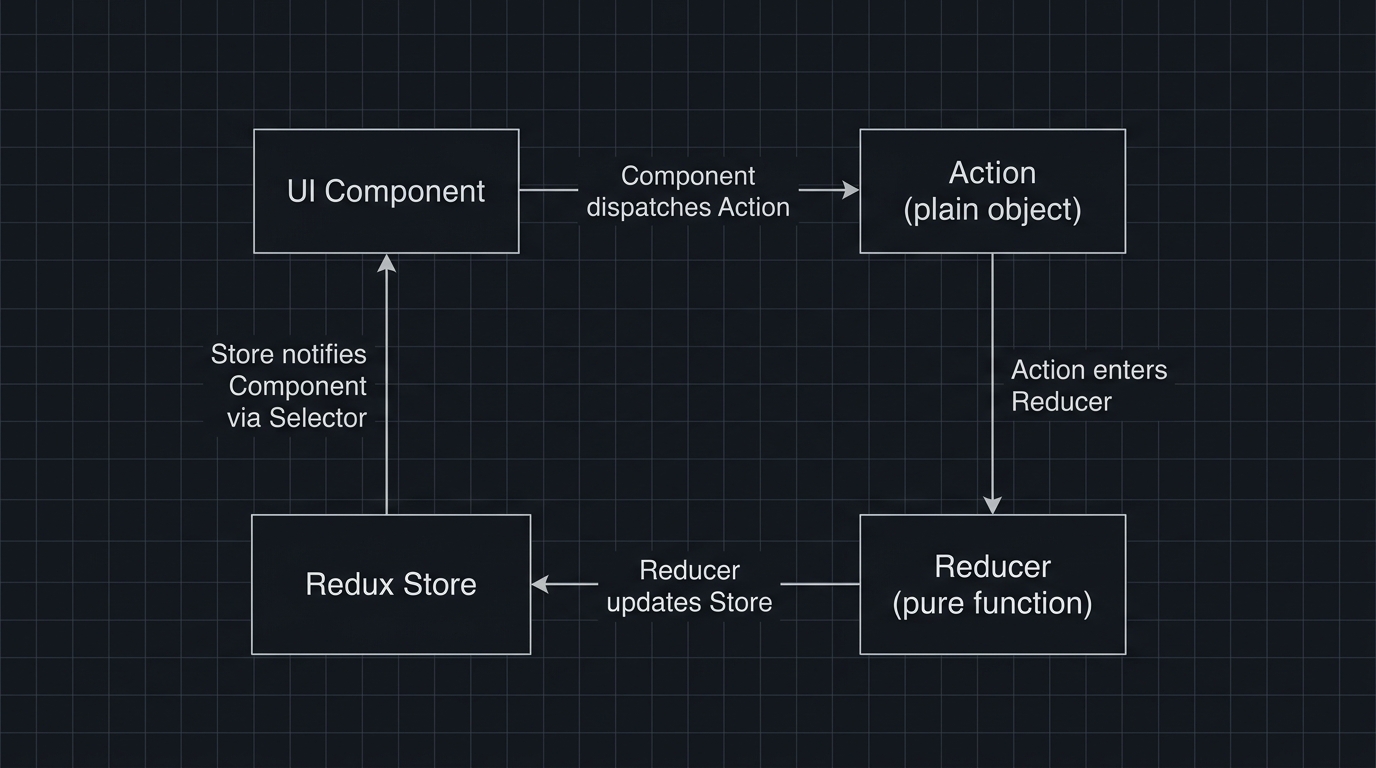
Circular flow diagram of the Redux/Flux unidirectional architecture. Four nodes arranged clockwise: 'UI Component' at top-left, 'Action { type, payload }' at top-right, 'Reducer (state, action) → nextState' at bottom-right, 'Store (single source of truth)' at bottom-left. Arrows flow clockwise: Component dispatches Action, Action enters Reducer, Reducer returns new state to Store, Store notifies Component via Selector. A 'Selector (state) → slice' node sits on the Store-to-Component arrow, shown as a filter. Annotations: Action is a plain object describing what happened, Reducer is a pure function with no side effects, Selector is memoized via Reselect. Caption: 'Redux enforces one-way data flow — all state changes are explicit, traceable events that pass through a single pure function'.
Figure: Circular flow diagram of the Redux/Flux unidirectional architecture. Four nodes arranged clockwise: 'UI Component' at top-left, 'Action { type, payload }' at top-right, 'Reducer (state, action) → nextState' at bottom-right, 'Store (single source of truth)' at bottom-left. Arrows flow clockwise: Component dispatches Action, Action enters Reducer, Reducer returns new state to Store, Store notifies Component via Selector. A 'Selector (state) → slice' node sits on the Store-to-Component arrow, shown as a filter. Annotations: Action is a plain object describing what happened, Reducer is a pure function with no side effects, Selector is memoized via Reselect. Caption: 'Redux enforces one-way data flow — all state changes are explicit, traceable events that pass through a single pure function'.

6. Atomic State: Jotai

The atomic model inverts the Redux model. Instead of one centralized store, you define independent atoms — tiny units of state. Components subscribe only to the atoms they read.
typescript
import { atom, useAtom, useAtomValue, useSetAtom } from 'jotai'

// Primitive atoms — independent state units
const countAtom = atom(0)
const themeAtom = atom<'light' | 'dark'>('dark')

// Derived atom — computed from other atoms (like createSelector, but reactive)
const doubleCountAtom = atom((get) => get(countAtom) * 2)

// Async atom — fetches data, suspends while loading
const userAtom = atom(async (get) => {
  const res = await fetch(`/api/users/${get(userIdAtom)}`)
  return res.json() as Promise<User>
})
Usage in components:
tsx
function Counter() {
  const [count, setCount] = useAtom(countAtom)
  // Only re-renders when countAtom changes — themeAtom changes are invisible here
  return <button onClick={() => setCount((c) => c + 1)}>{count}</button>
}

function ThemeToggle() {
  const setTheme = useSetAtom(themeAtom)
  // Never re-renders — it only writes, never reads
  return <button onClick={() => setTheme((t) => t === 'dark' ? 'light' : 'dark')}>Toggle</button>
}

7. Proxy-Based State: Zustand

Zustand uses JavaScript Proxies to track which parts of the store a component actually accesses and only re-renders that component when those parts change.
typescript
import { create } from 'zustand'

type BearStore = {
  bears: number
  fish: number
  addBear: () => void
  eatFish: () => void
}

const useStore = create<BearStore>((set) => ({
  bears: 0,
  fish: 100,
  addBear: () => set((state) => ({ bears: state.bears + 1 })),
  eatFish: () => set((state) => ({ fish: state.fish - 1 })),
}))

// This component only re-renders when `bears` changes — `fish` changes are ignored
function BearCounter() {
  const bears = useStore((state) => state.bears)
  return <div>Bears: {bears}</div>
}

// This component only re-renders when `fish` changes
function FishCounter() {
  const fish = useStore((state) => state.fish)
  return <div>Fish: {fish}</div>
}
The selector (state) => state.bears is what achieves fine-grained subscriptions. Without a selector (i.e., useStore() with no argument), the component subscribes to the entire store and re-renders on every change.

8. Choosing the Right Architecture

CriterionContext + ReducerRedux ToolkitJotaiZustand
Team familiarityReact built-inWidely knownGrowingGrowing
Bundle size (gzipped)0 KB~16 KB (RTK + react-redux)~3.8 KB~0.8 KB
DevToolsLimitedExcellentGoodGood
BoilerplateLowMediumLowVery low
Re-render granularityContext-levelSelector-levelAtom-levelSelector-level
Best forSmall apps, specific domains (auth, theme)Large teams, complex domain logicFine-grained atoms, derived async stateSimple to moderate global UI state
Mental Model Check
None of these libraries solve different problems — they all solve the same problem (shared mutable state with subscriptions) with different APIs and trade-offs. The "best" choice is the one your team will use consistently and correctly. A codebase with one clearly-applied pattern is always better than one with three partially-applied ones.

9. References

  1. React — Sharing State Between Components
  2. Redux Toolkit — createSlice
  3. Jotai Documentation
  4. Zustand Documentation
  5. React — Context with useReducer pattern
Research & Synthesis Note

This article was developed with AI-assisted deep search, specification cross-referencing, and technical research synthesis.

#React#Context API#Redux#Zustand#Jotai#State Management#Global State#Architecture
Siddhant Deval

Written by Siddhant Deval

Senior Full-Stack Engineer building high-scale architectures, browser performance engineering systems, and SaaS platforms.