Siddhant Deval
Siddhant DevalAuthor
Senior Full-Stack Engineer·Aug 27, 2026·9 min read

The Underrated State Stores: URL Params & Form State

The URL and the DOM input already hold state. Duplicating them into useState wastes renders, breaks the browser back button, and destroys shareability. This article covers URL-as-state with useSearchParams, the security boundaries of URL params, and why React Hook Form's uncontrolled-by-default approach eliminates render cascades in large forms.

The Underrated State Stores: URL Params & Form State

The first pillar — compute, don't store — applies with maximum force to two domains that most developers reflexively reach for useState to handle: UI filters/search/pagination driven by the URL, and form input values.
The URL already holds state. The DOM input already holds state. Duplicating them into React state is wasteful, breaks the browser back button, destroys shareability, and introduces the two-sources-of-truth problem. This article covers how to use these free state stores correctly — and where their boundaries are.

1. The URL as the Ultimate Global State

Query parameters have properties that no library-based global state store can match:
PropertyURL ParamsRedux / Zustand
Bookmarkable✅ Yes❌ No
Shareable✅ Yes❌ No
Browser back/forward✅ Native❌ Manual
Server-renderable✅ Yes❌ No
Survives page refresh✅ Yes❌ No
Zero library cost✅ Yes❌ ~1–11 KB
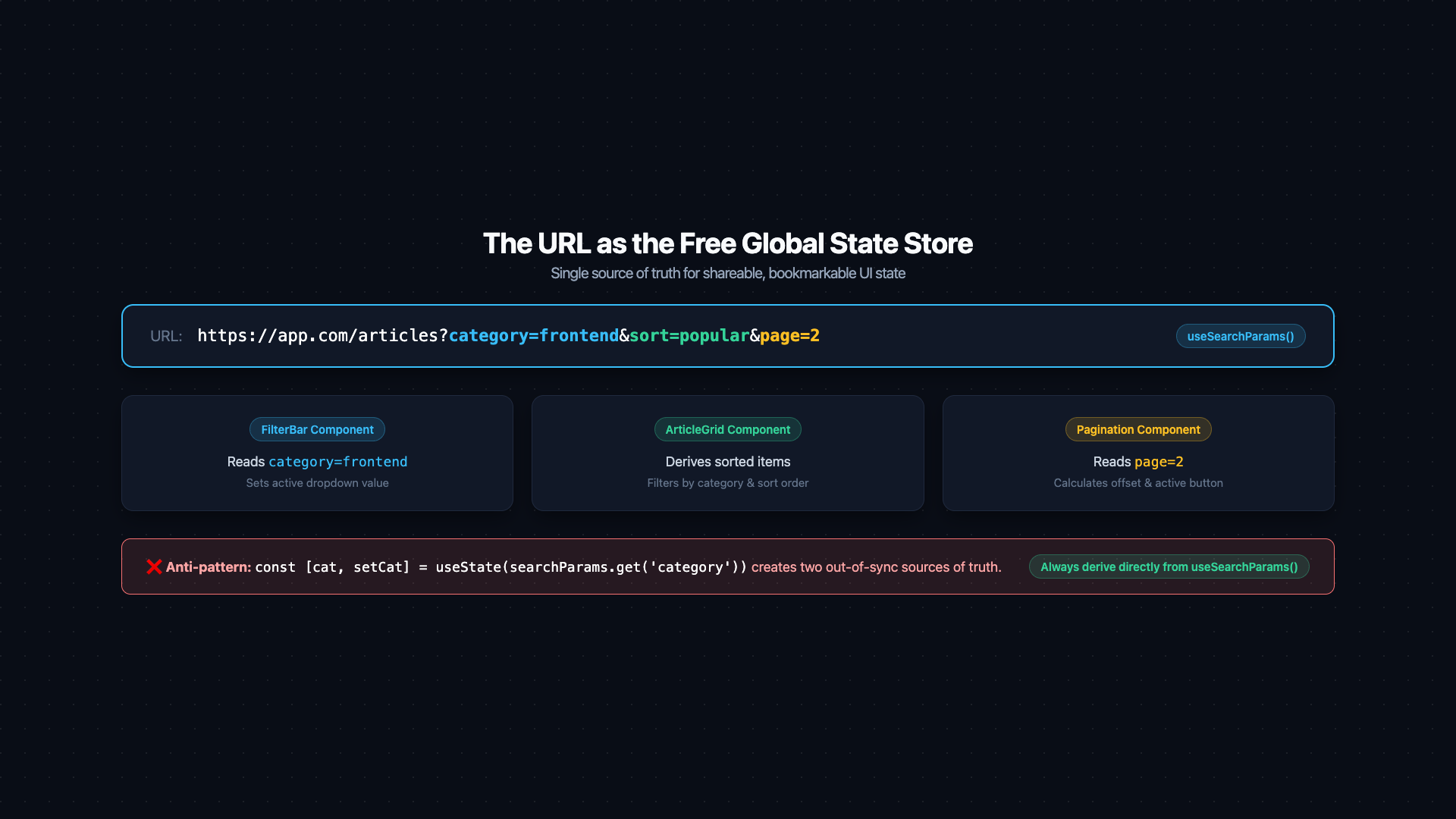
Architecture diagram titled 'URL as the Global State Store'. A browser address bar at top displays '?category=frontend&sort=popular&page=2' with each param highlighted in a different color. Three downward arrows point to three component boxes: 'FilterBar' (reads category, sort), 'ArticleGrid' (derives filtered+sorted list from category, sort), 'Pagination' (reads page). A comparison inset on the right shows the wrong approach: a 'useState mirror' box with a red X, labeled 'Creates two sources of truth — breaks on browser back/forward'. The URL box is labeled with its properties: 'Bookmarkable • Shareable • Server-renderable • Survives refresh • Free'. Caption: 'Read URL params directly in every consuming component — never mirror them into local state'.
Figure: Architecture diagram titled 'URL as the Global State Store'. A browser address bar at top displays '?category=frontend&sort=popular&page=2' with each param highlighted in a different color. Three downward arrows point to three component boxes: 'FilterBar' (reads category, sort), 'ArticleGrid' (derives filtered+sorted list from category, sort), 'Pagination' (reads page). A comparison inset on the right shows the wrong approach: a 'useState mirror' box with a red X, labeled 'Creates two sources of truth — breaks on browser back/forward'. The URL box is labeled with its properties: 'Bookmarkable • Shareable • Server-renderable • Survives refresh • Free'. Caption: 'Read URL params directly in every consuming component — never mirror them into local state'.
Filters, sort order, search queries, active tab, pagination offset — these are all UI state that belongs in the URL. A user should be able to share the URL ?category=frontend&sort=popular&page=2 with a colleague and have them land on the exact same view.

2. useSearchParams in Next.js

The useSearchParams hook reads the current URL's query string as a URLSearchParams instance:
tsx
'use client'
import { useSearchParams, useRouter, usePathname } from 'next/navigation'
import { useCallback } from 'react'

export function ArticleFilters() {
  const searchParams = useSearchParams()
  const router = useRouter()
  const pathname = usePathname()

  // Read current filter values directly from the URL — no local state mirror
  const category = searchParams.get('category') ?? 'all'
  const sort = searchParams.get('sort') ?? 'latest'
  const page = Number(searchParams.get('page') ?? '1')

  // Write new values back to the URL — this becomes the source of truth
  const updateFilter = useCallback(
    (key: string, value: string) => {
      const params = new URLSearchParams(searchParams.toString())
      if (value === '' || value === 'all') {
        params.delete(key)
      } else {
        params.set(key, value)
      }
      // Reset page when filter changes
      if (key !== 'page') params.delete('page')
      router.push(`${pathname}?${params.toString()}`, { scroll: false })
    },
    [searchParams, router, pathname]
  )

  return (
    <div>
      <select
        value={category}
        onChange={(e) => updateFilter('category', e.target.value)}
      >
        <option value="all">All</option>
        <option value="frontend">Frontend</option>
        <option value="backend">Backend</option>
      </select>

      <select
        value={sort}
        onChange={(e) => updateFilter('sort', e.target.value)}
      >
        <option value="latest">Latest</option>
        <option value="popular">Popular</option>
      </select>
    </div>
  )
}
Pro Tip & Optimization
Never mirror URL params into local useState. The pattern const [category, setCategory] = useState(searchParams.get('category')) creates two sources of truth that immediately diverge when the user hits the back button. Read directly from searchParams on every render — it is reactive and always reflects the current URL.
The consuming component derives its filtered list directly from the URL values:
tsx
// This component derives its display directly from URL params — no state at all
export function ArticleGrid({ articles }: { articles: Article[] }) {
  const searchParams = useSearchParams()
  const category = searchParams.get('category') ?? 'all'
  const sort = searchParams.get('sort') ?? 'latest'

  const filtered = useMemo(() => {
    return articles
      .filter((a) => category === 'all' || a.category === category)
      .sort((a, b) => sort === 'popular'
        ? b.views - a.views
        : new Date(b.publishedAt).getTime() - new Date(a.publishedAt).getTime()
      )
  }, [articles, category, sort])

  return <>{filtered.map((a) => <ArticleCard key={a.slug} article={a} />)}</>
}

3. URL Security Boundaries

URL state comes with a critical constraint that must be understood before using it:
Performance / Safety Warning
URL query parameters are not private. They are:
  • Logged by web servers in access logs (e.g., NGINX, Apache).
  • Logged by CDN/proxy providers (Cloudflare, AWS CloudFront) in their request logs.
  • Stored in browser history, accessible to other users of the same device.
  • Sent in the Referer header when a user clicks a link from your page to an external site.
Never put in query parameters:
  • Access tokens, session IDs, API keys
  • Passwords or password reset tokens (use POST body + short-lived tokens)
  • Personally Identifiable Information (PII) like SSNs, credit card numbers
  • Anything that grants permissions or proves identity
Safe for query parameters:
  • Filters (?category=frontend)
  • Sort order (?sort=popular)
  • Pagination (?page=3)
  • Search queries (?q=react+hooks)
  • Non-sensitive resource IDs (?postId=abc123)

4. Controlled vs. Uncontrolled Inputs

React inputs exist on a spectrum:
tsx
// Fully controlled — React is the source of truth
function ControlledInput() {
  const [value, setValue] = useState('')
  return <input value={value} onChange={(e) => setValue(e.target.value)} />
}

// Fully uncontrolled — the DOM is the source of truth
function UncontrolledInput() {
  const ref = useRef<HTMLInputElement>(null)
  const handleSubmit = () => console.log(ref.current?.value)
  return <input ref={ref} defaultValue="" />
}
Controlled inputs give React full ownership: every keystroke fires onChange, which calls setState, which re-renders. This is the right choice when:
  • You need to validate or transform input in real time.
  • The input value needs to drive other UI changes immediately (e.g., live search).
  • You need to programmatically clear or reset the field.
Uncontrolled inputs let the DOM hold the value: React only reads it on demand (submit, blur). This is the right choice when:
  • You have a large form with many fields.
  • Real-time validation is not needed.
  • Performance is a concern.

5. The Controlled Form Render Cascade

Here is the hidden cost of all-controlled forms at scale:
tsx
// A 20-field form where every field is controlled:
function LargeForm() {
  const [firstName, setFirstName] = useState('')
  const [lastName, setLastName] = useState('')
  // ... 18 more useState calls

  // Every keystroke in ANY field:
  // 1. Fires onChange
  // 2. Calls the setState for that field
  // 3. React schedules a re-render of LargeForm
  // 4. All 20 fields re-render (even the 19 that didn't change)
  // 5. All child components (labels, error messages, buttons) re-render
}
With 20 fields, a user typing a name triggers 20-component re-renders per character. On fast hardware this is imperceptible. On a 4× CPU throttle (mobile device) or in a complex form with heavy validation logic, it becomes measurable jank.
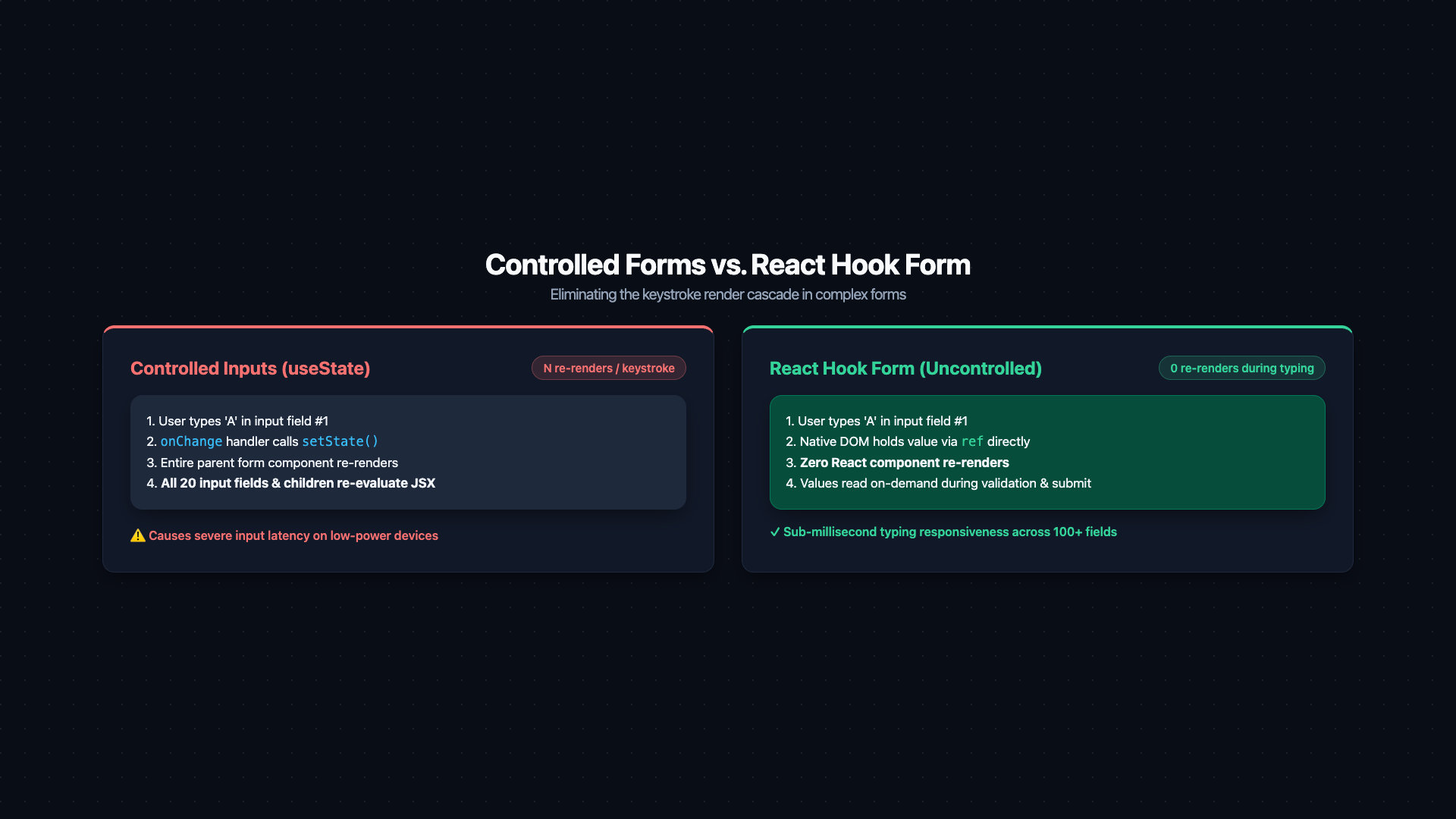
Two-panel comparison diagram titled 'Controlled Inputs vs React Hook Form'. Left panel 'Fully Controlled Form': a keyboard icon triggers 'onChange handler', which calls 'setState', which schedules 'React re-render', which re-renders all N input fields. A render counter badge increments on every keystroke (shown as 1, 2, 3...). Right panel 'React Hook Form (Uncontrolled by default)': a keyboard icon writes directly to the DOM input via ref. A dotted horizontal line labeled 'RHF reads DOM ref value only on: submit / blur / explicit watch()'. Render counter stays at 0 during typing, only increments when formState changes (errors, isDirty, isSubmitting). A highlighted callout: 'Zero renders during typing — formState updates only'. Caption: 'RHF eliminates the onChange re-render cascade by letting the DOM hold field values and only reading them on demand'.
Figure: Two-panel comparison diagram titled 'Controlled Inputs vs React Hook Form'. Left panel 'Fully Controlled Form': a keyboard icon triggers 'onChange handler', which calls 'setState', which schedules 'React re-render', which re-renders all N input fields. A render counter badge increments on every keystroke (shown as 1, 2, 3...). Right panel 'React Hook Form (Uncontrolled by default)': a keyboard icon writes directly to the DOM input via ref. A dotted horizontal line labeled 'RHF reads DOM ref value only on: submit / blur / explicit watch()'. Render counter stays at 0 during typing, only increments when formState changes (errors, isDirty, isSubmitting). A highlighted callout: 'Zero renders during typing — formState updates only'. Caption: 'RHF eliminates the onChange re-render cascade by letting the DOM hold field values and only reading them on demand'.

6. React Hook Form: Uncontrolled by Default

React Hook Form (RHF) solves this by using DOM refs to read field values rather than React state. Fields are registered once; the library reads .value from the DOM ref on submit or on validation trigger — no onChange cascade.
tsx
import { useForm, SubmitHandler } from 'react-hook-form'
import { zodResolver } from '@hookform/resolvers/zod'
import { z } from 'zod'

const schema = z.object({
  email: z.string().email('Invalid email address'),
  password: z.string().min(8, 'Password must be at least 8 characters'),
  confirmPassword: z.string(),
}).refine((data) => data.password === data.confirmPassword, {
  message: 'Passwords do not match',
  path: ['confirmPassword'],
})

type FormValues = z.infer<typeof schema>

function SignupForm() {
  const {
    register,       // connects a DOM input to RHF's tracking
    handleSubmit,   // wraps your onSubmit with validation
    formState: { errors, isSubmitting, isDirty },
    reset,
    watch,          // subscribe to a field's value reactively (use sparingly)
  } = useForm<FormValues>({
    resolver: zodResolver(schema),
    defaultValues: { email: '', password: '', confirmPassword: '' },
  })

  const onSubmit: SubmitHandler<FormValues> = async (data) => {
    await createAccount(data)
    reset()
  }

  return (
    <form onSubmit={handleSubmit(onSubmit)}>
      <div>
        <input {...register('email')} placeholder="Email" />
        {errors.email && <span>{errors.email.message}</span>}
      </div>

      <div>
        <input {...register('password')} type="password" placeholder="Password" />
        {errors.password && <span>{errors.password.message}</span>}
      </div>

      <div>
        <input {...register('confirmPassword')} type="password" placeholder="Confirm" />
        {errors.confirmPassword && <span>{errors.confirmPassword.message}</span>}
      </div>

      <button type="submit" disabled={isSubmitting || !isDirty}>
        {isSubmitting ? 'Creating account...' : 'Sign up'}
      </button>
    </form>
  )
}
The entire form above causes zero re-renders during typing. RHF only triggers re-renders for formState changes (error states, isSubmitting, isDirty), not for field value changes.
Crucial Requirement
watch('fieldName') in React Hook Form is a reactive subscription — it does cause re-renders on every change to that field. Use it only when you genuinely need to react to a field value in real-time (e.g., showing a character count, conditionally rendering other fields). Avoid watch in form-level components; prefer getValues() inside event handlers instead.

7. The State Management Decision for Forms

NeedTool
Simple form, no real-time validationUncontrolled inputs + ref
Large form, submit-time validationReact Hook Form + Zod
Multi-step wizard with shared stateReact Hook Form useFormContext
Real-time live search inputControlled useState with debounce
Filter/sort/pagination UIURL params (useSearchParams)
Complex cross-field validationZod superRefine or refine

8. References

  1. Next.js — useSearchParams
  2. React Hook Form — Documentation
  3. Zod — TypeScript-first schema validation
  4. React — Uncontrolled Components
  5. OWASP — Query String Security
Research & Synthesis Note

This article was developed with AI-assisted deep search, specification cross-referencing, and technical research synthesis.

#React#URL State#useSearchParams#React Hook Form#Form State#Zod#State Management
Siddhant Deval

Written by Siddhant Deval

Senior Full-Stack Engineer building high-scale architectures, browser performance engineering systems, and SaaS platforms.