Siddhant Deval
Siddhant DevalAuthor
Senior Full-Stack Engineer·Aug 27, 2026·12 min read

Real-time & Persistent State: WebSockets, SSE, BroadcastChannel & IndexedDB

Pull-based server state (React Query) and push-based server state (WebSockets, SSE) are architecturally distinct domains. This article covers the third state domain: real-time event streams, the merge-vs-invalidate decision, cross-tab synchronization with BroadcastChannel, and local persistence with IndexedDB and Zustand persist middleware.

Real-time & Persistent State: WebSockets, SSE, BroadcastChannel & IndexedDB

The series has so far covered two state domains: UI state (Parts 1–3, 6) and pull-based server state (Part 4). Both assume a request-response model: the UI asks, the server answers.
But a large and growing class of modern applications lives outside that model: chat, collaborative editing, live dashboards, trading feeds, notifications, online presence indicators. For these, the server pushes updates without being asked. This is push-based server state — the third domain, with its own architecture, its own failure modes, and its own set of tools.
This article also covers local persistence — the browser's storage layer — and cross-tab synchronization, which becomes critical when push-based state changes in one tab and must propagate to others.

1. Pull vs. Push: The Architectural Divide

Pull-BasedPush-Based
InitiationClient fetches on demandServer sends when data changes
Caching modelStale-while-revalidate, invalidationEvent stream, append or replace
React Query fit✅ Natural — polling, caching, refetching⚠️ Awkward — requires manual integration
ProtocolHTTP request-responseWebSocket, SSE, WebRTC
State merge logicInvalidate and refetchMerge incoming event into local state
Primary challengeStaleness, waterfallConnection lifecycle, reconnect, ordering
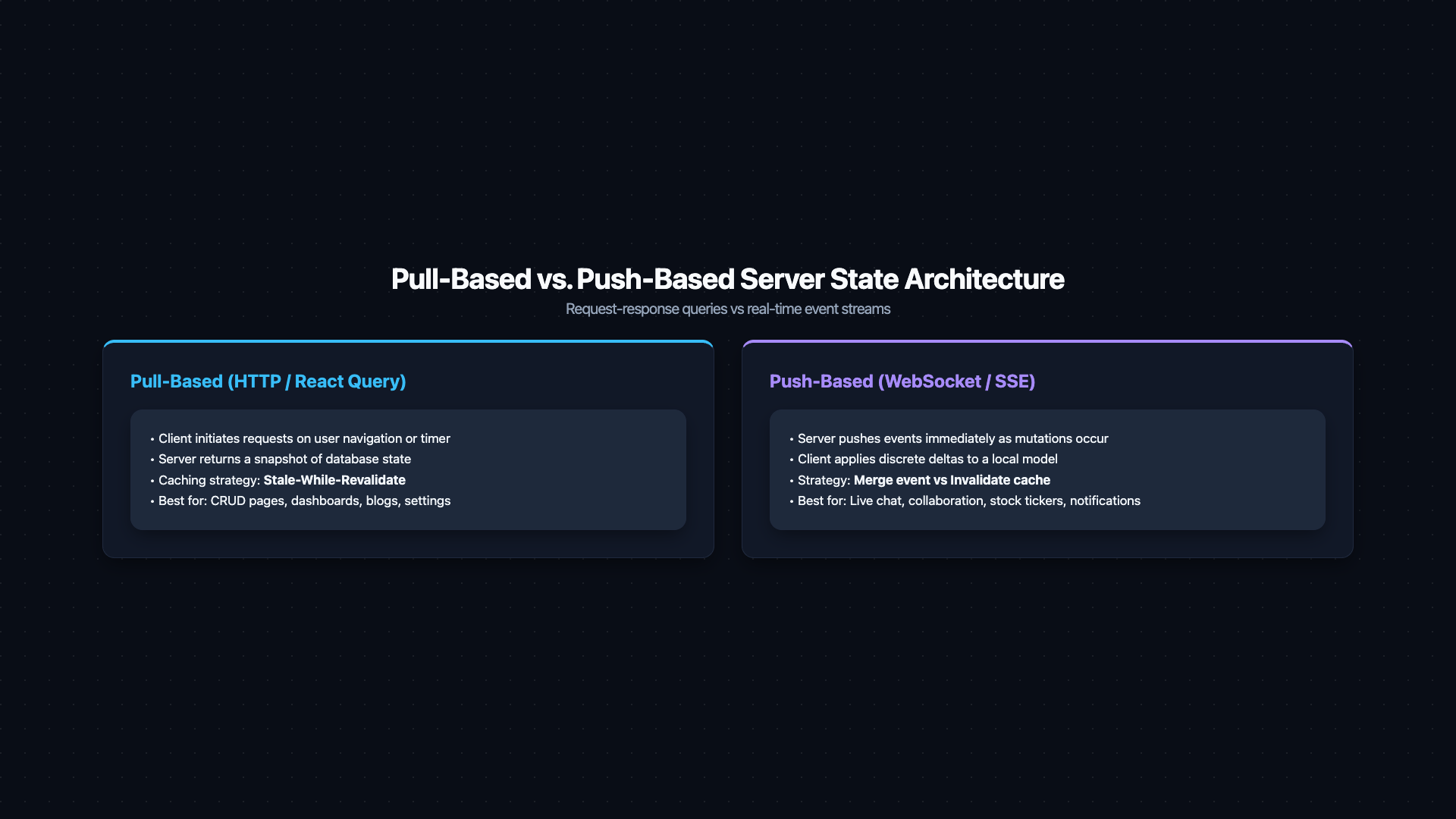
Architecture comparison diagram titled 'Pull-Based vs Push-Based Server State'. Left panel 'Pull-Based (React Query)': Browser box sends a 'GET /api/data' request arrow to Server box. Response arrow returns with data. A 'Cache Layer' box inside the browser shows a freshness indicator fading from green (fresh) to yellow (stale) over time, with a 'refetchInterval' clock. Right panel 'Push-Based (WebSocket / SSE)': Server box sends a continuous stream of event arrows downward to Browser box without any request. Browser shows an 'Incoming event stream → merge into local state model' process box. A key contrast annotation: Pull = snapshot that ages and must be polled. Push = stream of events that must be applied. Caption: 'Pull-based and push-based server state are architecturally distinct — they require different caching strategies and different mental models'.
Figure: Architecture comparison diagram titled 'Pull-Based vs Push-Based Server State'. Left panel 'Pull-Based (React Query)': Browser box sends a 'GET /api/data' request arrow to Server box. Response arrow returns with data. A 'Cache Layer' box inside the browser shows a freshness indicator fading from green (fresh) to yellow (stale) over time, with a 'refetchInterval' clock. Right panel 'Push-Based (WebSocket / SSE)': Server box sends a continuous stream of event arrows downward to Browser box without any request. Browser shows an 'Incoming event stream → merge into local state model' process box. A key contrast annotation: Pull = snapshot that ages and must be polled. Push = stream of events that must be applied. Caption: 'Pull-based and push-based server state are architecturally distinct — they require different caching strategies and different mental models'.
Mental Model Check
Think of pull-based state as a snapshot that ages (solved by React Query's stale-while-revalidate). Think of push-based state as a stream of events that must be applied to a local state model (solved by WebSocket/SSE + a merge strategy). The two require different architectural thinking.

2. WebSocket Connection as a State Machine

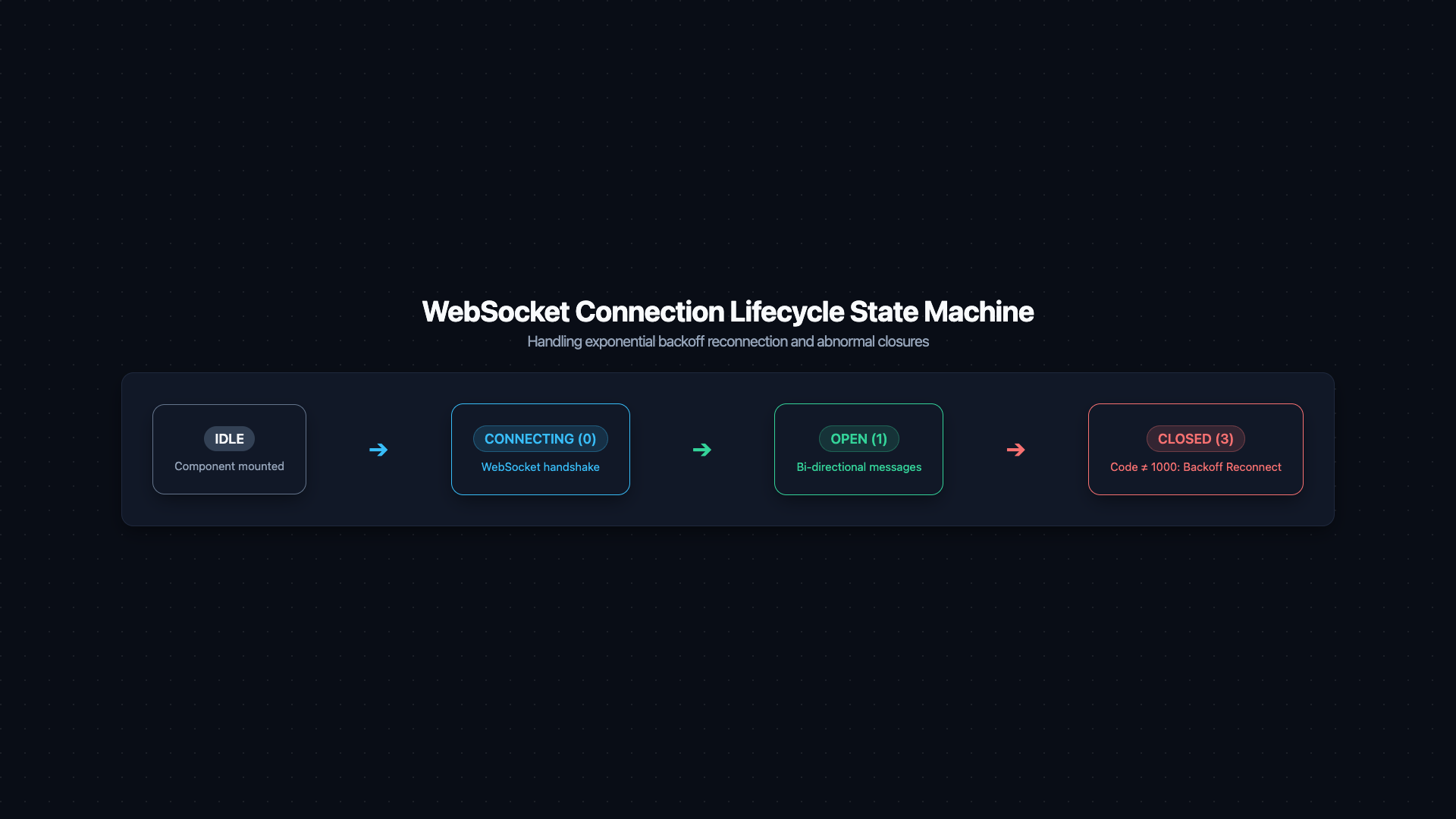
A WebSocket connection has a native lifecycle with four states:
CONNECTING (0) → OPEN (1) → CLOSING (2) → CLOSED (3)
Model this as a state machine — not as a bag of booleans:
typescript
type WsState =
  | { status: 'idle' }
  | { status: 'connecting' }
  | { status: 'open'; socket: WebSocket }
  | { status: 'closed'; code: number; reason: string }
  | { status: 'error'; error: Event }

// A robust WebSocket hook with exponential backoff reconnection
function useWebSocket(url: string) {
  const [state, setState] = useState<WsState>({ status: 'idle' })
  const reconnectDelay = useRef(1000)
  const socketRef = useRef<WebSocket | null>(null)
  const isMounted = useRef(true)

  const connect = useCallback(() => {
    setState({ status: 'connecting' })
    const ws = new WebSocket(url)
    socketRef.current = ws

    ws.onopen = () => {
      if (!isMounted.current) return
      reconnectDelay.current = 1000  // reset backoff on successful connect
      setState({ status: 'open', socket: ws })
    }

    ws.onclose = (event) => {
      if (!isMounted.current) return
      setState({ status: 'closed', code: event.code, reason: event.reason })

      // Exponential backoff reconnect — only for abnormal closures
      if (event.code !== 1000) {
        const delay = reconnectDelay.current
        reconnectDelay.current = Math.min(delay * 2, 30_000)  // cap at 30 seconds
        setTimeout(connect, delay)
      }
    }

    ws.onerror = (error) => {
      if (!isMounted.current) return
      setState({ status: 'error', error })
    }
  }, [url])

  useEffect(() => {
    isMounted.current = true
    connect()
    return () => {
      isMounted.current = false
      socketRef.current?.close(1000, 'Component unmounted')
    }
  }, [connect])

  return { state, socket: socketRef.current }
}
State machine diagram for WebSocket connection lifecycle. Five state nodes: 'idle' (grey), 'connecting' (blue, dashed border), 'open' (green, solid), 'closed' (dark grey), 'error' (red). Directed transition arrows: idle → connecting on 'connect()'. connecting → open on 'ws.onopen'. connecting → error on 'ws.onerror'. open → closed on 'ws.onclose (code=1000 — normal closure)'. open → connecting on 'ws.onclose (code≠1000 — abnormal)' with a curved arrow showing exponential backoff timer: '1s → 2s → 4s → 8s → max 30s'. An inset legend shows readyState integer values: CONNECTING=0, OPEN=1, CLOSING=2, CLOSED=3. Caption: 'Model the WebSocket as a state machine — abnormal closure triggers exponential-backoff reconnection, capped at 30 seconds'.
Figure: State machine diagram for WebSocket connection lifecycle. Five state nodes: 'idle' (grey), 'connecting' (blue, dashed border), 'open' (green, solid), 'closed' (dark grey), 'error' (red). Directed transition arrows: idle → connecting on 'connect()'. connecting → open on 'ws.onopen'. connecting → error on 'ws.onerror'. open → closed on 'ws.onclose (code=1000 — normal closure)'. open → connecting on 'ws.onclose (code≠1000 — abnormal)' with a curved arrow showing exponential backoff timer: '1s → 2s → 4s → 8s → max 30s'. An inset legend shows readyState integer values: CONNECTING=0, OPEN=1, CLOSING=2, CLOSED=3. Caption: 'Model the WebSocket as a state machine — abnormal closure triggers exponential-backoff reconnection, capped at 30 seconds'.

3. Server-Sent Events (SSE): Simpler Unidirectional Push

SSE is often the correct choice over WebSockets when data flows only from server to client. Its advantages:
  • HTTP/2 multiplexed — no separate TCP connection needed
  • Automatic reconnect built into the browser's EventSource API
  • Passes through proxies and CDNs without special configuration (no WebSocket upgrade)
  • Text-based, human-readable — easier to debug
typescript
function useServerSentEvents<T>(url: string, onMessage: (data: T) => void) {
  useEffect(() => {
    const source = new EventSource(url, { withCredentials: true })

    source.onmessage = (event) => {
      try {
        onMessage(JSON.parse(event.data) as T)
      } catch {
        console.error('Failed to parse SSE payload:', event.data)
      }
    }

    source.onerror = () => {
      // EventSource automatically attempts reconnection — log but don't intervene
      console.warn('SSE connection error — browser will reconnect automatically')
    }

    return () => source.close()
  }, [url, onMessage])
}

// Usage — live notification feed
function NotificationBell({ userId }: { userId: string }) {
  const [notifications, setNotifications] = useState<Notification[]>([])

  const handleNotification = useCallback((notif: Notification) => {
    setNotifications((prev) => [notif, ...prev].slice(0, 50))  // keep last 50
  }, [])

  useServerSentEvents(`/api/notifications/stream?userId=${userId}`, handleNotification)

  return <Bell count={notifications.filter((n) => !n.read).length} />
}
Pro Tip & Optimization
SSE vs. WebSocket decision rule: If data flows only server → client (notifications, live prices, progress updates), use SSE — simpler, more reliable through infrastructure. If the client needs to send data continuously too (chat, collaborative editing, gaming), use WebSockets.

4. The Merge vs. Invalidate Decision

When an incoming server event arrives, you face a fundamental architectural choice:
Merge: Apply the event to the local state immediately. Invalidate: Mark the cached data as stale and refetch from the server.
typescript
// MERGE — appropriate for chat messages (append to list)
ws.onmessage = (event) => {
  const newMessage: Message = JSON.parse(event.data)
  queryClient.setQueryData<Message[]>(['messages', roomId], (prev = []) => [
    ...prev,
    newMessage,
  ])
}

// INVALIDATE — appropriate for inventory counts (server is source of truth)
ws.onmessage = (event) => {
  const { productId } = JSON.parse(event.data)
  queryClient.invalidateQueries({ queryKey: ['products', productId] })
}
Merge is correct when:
  • The incoming event is the state change (a new chat message, a new log entry)
  • You can apply the event locally without round-tripping to the server
  • Out-of-order delivery would be tolerable or handled client-side
Invalidate is correct when:
  • The event is a signal that something changed, not the data itself
  • Multiple concurrent users might have changed the same field (inventory, votes)
  • Local merge logic would be complex or error-prone
  • Consistency with server state is more important than immediate update speed

5. BroadcastChannel: Cross-Tab State Sync

When a user has your application open in multiple tabs, push-based state changes in one tab are invisible to the others. BroadcastChannel bridges this:
typescript
// The logout-everywhere pattern — fewer than 10 lines
const AUTH_CHANNEL = 'auth-events'

// In the auth logic (fires after logout):
function broadcastLogout() {
  const channel = new BroadcastChannel(AUTH_CHANNEL)
  channel.postMessage({ type: 'LOGGED_OUT' })
  channel.close()
}

// In the app root (every tab listens):
function useAuthSync() {
  useEffect(() => {
    const channel = new BroadcastChannel(AUTH_CHANNEL)

    channel.onmessage = (event) => {
      if (event.data.type === 'LOGGED_OUT') {
        // Clear local auth state and redirect to login
        queryClient.clear()
        router.push('/login')
      }
    }

    return () => channel.close()
  }, [])
}
BroadcastChannel works across tabs of the same origin (same protocol, domain, and port). It does not work across different origins or across devices.
Alternative for broader support: The storage event fires in all tabs when localStorage is modified by another tab:
typescript
useEffect(() => {
  const handleStorageChange = (e: StorageEvent) => {
    if (e.key === 'auth-session' && e.newValue === null) {
      // Another tab cleared the session — logout here too
      handleLogout()
    }
  }
  window.addEventListener('storage', handleStorageChange)
  return () => window.removeEventListener('storage', handleStorageChange)
}, [])
Architectural Note
The storage event does NOT fire in the tab that made the change — only in other tabs. This is intentional: the modifying tab already has the latest value in memory.
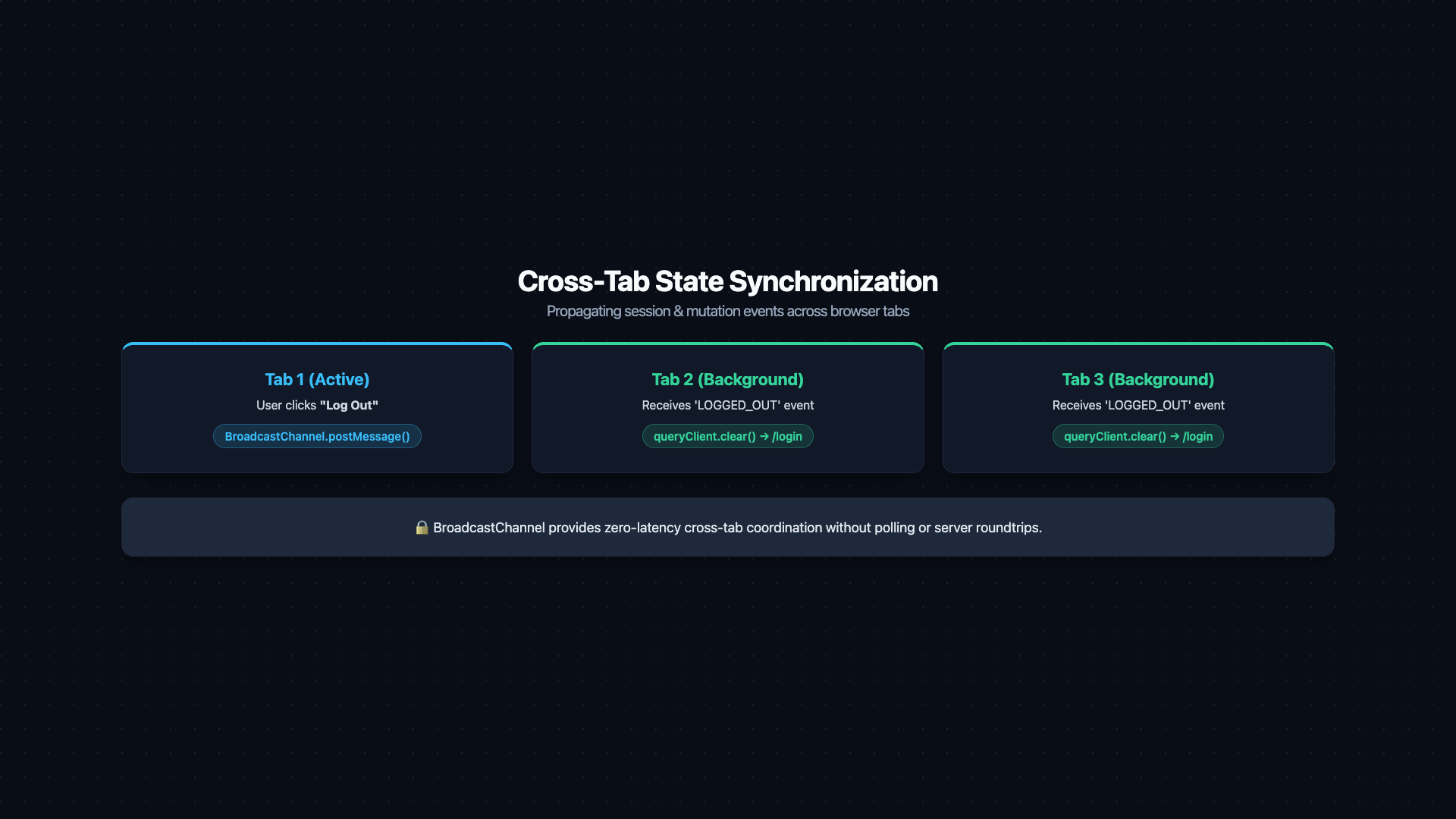
Browser window diagram showing three open tabs of the same origin. Tab 1 labeled 'User clicks Logout'. A BroadcastChannel broadcast arrow fans out from Tab 1 to Tab 2 and Tab 3 simultaneously, labeled 'BroadcastChannel.postMessage({ type: LOGGED_OUT })'. Both Tab 2 and Tab 3 show 'onmessage → queryClient.clear() → router.push(/login)' resulting in a login page redirect. Below, an alternative mechanism: Tab 1 calls 'localStorage.removeItem(auth-token)'. A 'storage event' arrow (dashed, labeled 'NOT fired in Tab 1 — only in other tabs') points to Tab 2 and Tab 3. A callout: 'BroadcastChannel: explicit message passing. storage event: implicit side-channel via localStorage writes'. Caption: 'Two mechanisms for cross-tab state sync — BroadcastChannel for explicit events, storage event for localStorage-based signalling'.
Figure: Browser window diagram showing three open tabs of the same origin. Tab 1 labeled 'User clicks Logout'. A BroadcastChannel broadcast arrow fans out from Tab 1 to Tab 2 and Tab 3 simultaneously, labeled 'BroadcastChannel.postMessage({ type: LOGGED_OUT })'. Both Tab 2 and Tab 3 show 'onmessage → queryClient.clear() → router.push(/login)' resulting in a login page redirect. Below, an alternative mechanism: Tab 1 calls 'localStorage.removeItem(auth-token)'. A 'storage event' arrow (dashed, labeled 'NOT fired in Tab 1 — only in other tabs') points to Tab 2 and Tab 3. A callout: 'BroadcastChannel: explicit message passing. storage event: implicit side-channel via localStorage writes'. Caption: 'Two mechanisms for cross-tab state sync — BroadcastChannel for explicit events, storage event for localStorage-based signalling'.

6. Local Persistence as a State Layer

The browser provides four storage mechanisms for persisting state across page loads:
StoreCapacityScopeSync/AsyncXSS accessibleUse case
localStorage~5–10 MBOrigin, all tabsSynchronous✅ Yes (dangerous)Non-sensitive UI preferences
sessionStorage~5 MBOrigin, this tab onlySynchronous✅ YesTab-scoped temporary state
IndexedDBHundreds of MBOriginAsynchronous✅ YesOffline data, drafts, large structured data
Cookie (httpOnly)~4 KBConfigurableVia HTTP header❌ NoAuth tokens, session IDs
Performance / Safety Warning
Never store auth tokens, API keys, or secrets in localStorage or sessionStorage. Any injected script — via XSS — has full read access to these stores via localStorage.getItem(). Auth tokens belong in httpOnly cookies, which are inaccessible to JavaScript entirely.

6.1 Zustand Persist Middleware

For non-sensitive UI state (theme preference, sidebar open/closed, draft content), Zustand's persist middleware synchronizes store state to localStorage automatically:
typescript
import { create } from 'zustand'
import { persist, createJSONStorage } from 'zustand/middleware'

type PreferenceStore = {
  theme: 'light' | 'dark'
  sidebarCollapsed: boolean
  setTheme: (t: 'light' | 'dark') => void
  toggleSidebar: () => void
}

const usePreferenceStore = create<PreferenceStore>()(
  persist(
    (set) => ({
      theme: 'dark',
      sidebarCollapsed: false,
      setTheme: (theme) => set({ theme }),
      toggleSidebar: () => set((s) => ({ sidebarCollapsed: !s.sidebarCollapsed })),
    }),
    {
      name: 'app-preferences',     // localStorage key
      version: 2,                  // increment when store shape changes
      storage: createJSONStorage(() => localStorage),

      // Migration function — handles shape changes between versions
      migrate: (persistedState: unknown, version: number) => {
        if (version === 1) {
          // Version 1 had `darkMode: boolean` instead of `theme: 'light' | 'dark'`
          const old = persistedState as { darkMode: boolean }
          return {
            theme: old.darkMode ? 'dark' : 'light',
            sidebarCollapsed: false,
          }
        }
        return persistedState as PreferenceStore
      },
    }
  )
)
Crucial Requirement
Always include a version field in your persist config. When you change the shape of persisted state (rename a field, change a type), increment the version and write a migrate function. Without this, old persisted data with a different shape will silently corrupt the store on load.

7. Offline-First: Queue, Sync, Replay

For applications that need to work without a network connection:
typescript
// A simple offline mutation queue using IndexedDB (via idb library)
import { openDB } from 'idb'

const db = await openDB('offline-queue', 1, {
  upgrade(db) {
    db.createObjectStore('mutations', { keyPath: 'id', autoIncrement: true })
  },
})

// Queue a mutation when offline
async function queueMutation(mutation: { type: string; payload: unknown }) {
  await db.add('mutations', { ...mutation, createdAt: Date.now() })
}

// Drain the queue when back online
async function drainQueue() {
  const mutations = await db.getAll('mutations')
  for (const mutation of mutations) {
    try {
      await applyMutation(mutation)
      await db.delete('mutations', mutation.id)
    } catch {
      break  // stop on first failure — maintain ordering
    }
  }
}

// Listen for network restoration
window.addEventListener('online', drainQueue)

8. References

  1. MDN — WebSockets API
  2. MDN — Server-Sent Events
  3. MDN — BroadcastChannel
  4. MDN — IndexedDB API
  5. Zustand — Persist Middleware
  6. idb — IndexedDB with Promises
  7. OWASP — HTML5 Security Cheat Sheet (localStorage)
Research & Synthesis Note

This article was developed with AI-assisted deep search, specification cross-referencing, and technical research synthesis.

#React#WebSockets#SSE#BroadcastChannel#IndexedDB#Real-time#Offline-first#Zustand#State Management
Siddhant Deval

Written by Siddhant Deval

Senior Full-Stack Engineer building high-scale architectures, browser performance engineering systems, and SaaS platforms.