Siddhant Deval
Siddhant DevalAuthor
Senior Full-Stack Engineer·Aug 27, 2026·12 min read

Local State: useState, useReducer & the Finite State Machine Pattern

State that only one component needs has no business living anywhere else. This article covers the full local state toolkit — from useState snapshots and immutable updates, through useReducer as a pure function contract, to Finite State Machines that make impossible UI states structurally unrepresentable.

Local State: useState, useReducer & the Finite State Machine Pattern

The second pillar of senior-level state thinking is colocate by default. State that only one component needs has no business living in a global store, a parent's useState, or a Context provider. The instinct to hoist state "just in case" is one of the most common sources of unnecessary complexity in React codebases.
This article covers the full local state toolkit — when each tool applies, where each one breaks down, and how the Finite State Machine pattern eliminates an entire category of UI bugs by making impossible states structurally unrepresentable.

1. useState: A Snapshot, Not a Live Reference

The mental model most developers carry for useState is close but subtly wrong: they think of it as a mutable variable React watches. The correct model is: useState gives you a snapshot of state at the moment of this render.
typescript
const [count, setCount] = useState(0)
  • count is a constant within this render invocation. It will never change mid-render.
  • setCount schedules a re-render with the new value. It does not mutate count in-place.
  • After the next render, you get a new count constant with the updated value.

1.1 The Stale Closure Trap

typescript
// ❌ Stale closure — count is 0 in all three closures
function handleTripleIncrement() {
  setCount(count + 1) // count = 0, schedules update to 1
  setCount(count + 1) // count is still 0 in this closure, schedules update to 1
  setCount(count + 1) // count is still 0, schedules update to 1
  // Net result: count becomes 1, not 3
}

// ✅ Functional update — reads the latest queued state
function handleTripleIncrement() {
  setCount((prev) => prev + 1) // 0 → 1
  setCount((prev) => prev + 1) // 1 → 2
  setCount((prev) => prev + 1) // 2 → 3
  // Net result: count becomes 3
}
Always use the functional form setState(prev => next) when the new state depends on the previous state, especially inside event handlers that call setState multiple times.
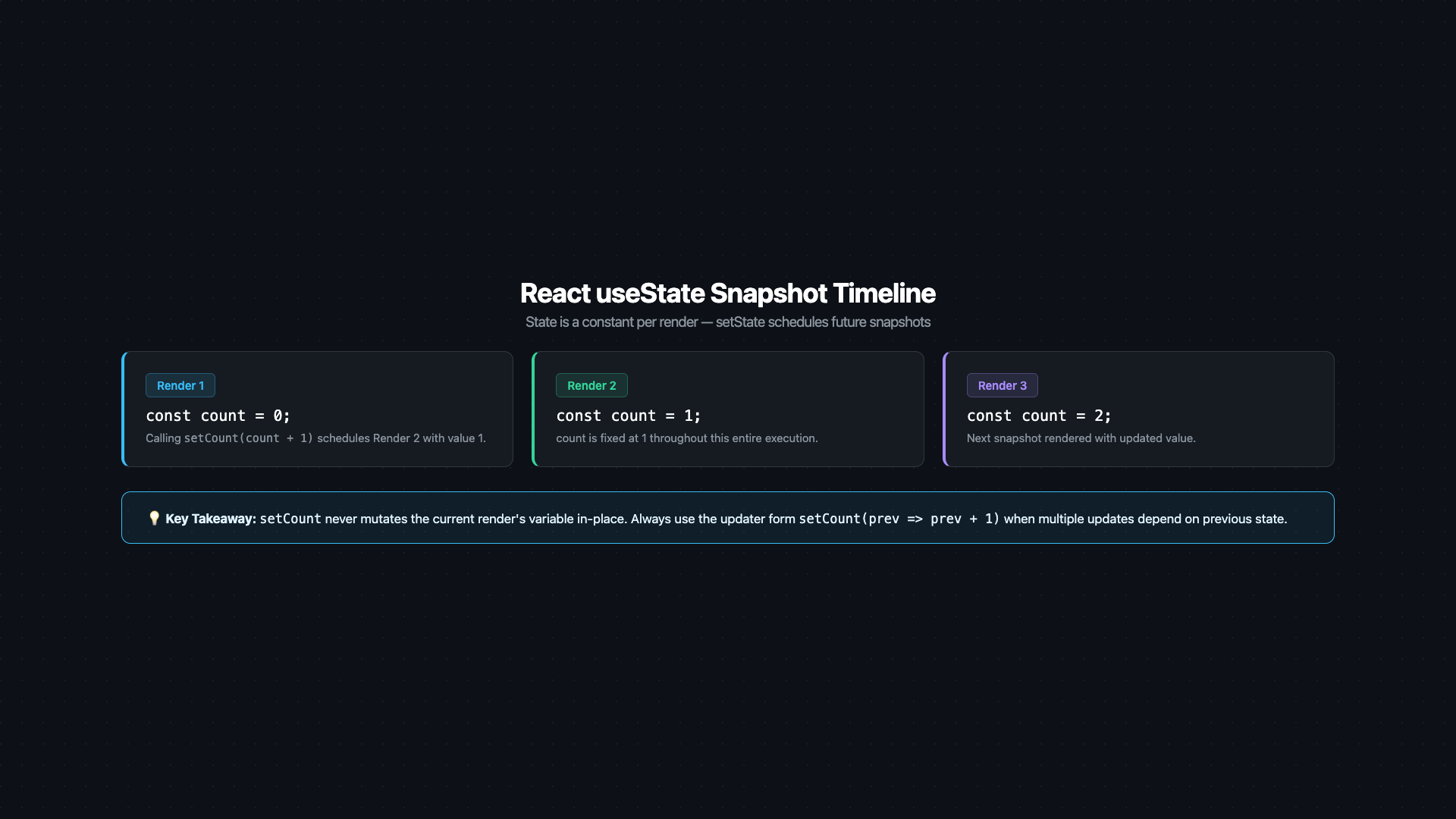
Timeline diagram illustrating the useState snapshot model. Three horizontal rows labeled 'Render 1', 'Render 2', 'Render 3'. Each render shows a 'count' constant frozen at its snapshot value (0, 1, 2 respectively). A vertical 'setCount(1)' arrow between Render 1 and Render 2 shows the state update scheduling the next render — it does NOT mutate the current row's constant. A callout box reads: 'count inside Render 1 is always 0 — setState schedules a new render, it does not mutate the existing snapshot'. Caption: 'useState gives you a constant per render — reading count after setCount in the same event handler returns the stale snapshot, not the new value'.
Figure: Timeline diagram illustrating the useState snapshot model. Three horizontal rows labeled 'Render 1', 'Render 2', 'Render 3'. Each render shows a 'count' constant frozen at its snapshot value (0, 1, 2 respectively). A vertical 'setCount(1)' arrow between Render 1 and Render 2 shows the state update scheduling the next render — it does NOT mutate the current row's constant. A callout box reads: 'count inside Render 1 is always 0 — setState schedules a new render, it does not mutate the existing snapshot'. Caption: 'useState gives you a constant per render — reading count after setCount in the same event handler returns the stale snapshot, not the new value'.

1.2 Lazy Initialization

If the initial state requires an expensive computation, pass a function to useState — it's called only once, on mount:
typescript
// ❌ Runs on every render — even though only the first result is used
const [data, setData] = useState(parseHeavyJSON(rawInput))

// ✅ Lazy initializer — runs once on mount only
const [data, setData] = useState(() => parseHeavyJSON(rawInput))

2. Managing Complex Objects Immutably

useState works fine for primitives. When the state shape becomes an object, immutability discipline matters:
typescript
type UserForm = {
  firstName: string
  lastName: string
  address: { city: string; zip: string }
}

const [form, setForm] = useState<UserForm>({
  firstName: 'Alice',
  lastName: 'Smith',
  address: { city: 'Mumbai', zip: '400001' },
})

// ✅ Shallow spread for top-level fields
const handleFirstNameChange = (value: string) => {
  setForm((prev) => ({ ...prev, firstName: value }))
}

// ✅ Nested spread for nested fields — chain spreads down the path
const handleCityChange = (value: string) => {
  setForm((prev) => ({
    ...prev,
    address: { ...prev.address, city: value },
  }))
}
Performance / Safety Warning
When nested spreads reach three or four levels deep, the code is signalling a schema problem. Either flatten the state shape, split it into multiple useState calls (one per logical group), or move to useReducer with Immer.

3. useReducer: The Pure Function Contract

useReducer is the right tool when:
  • Multiple state fields must change together atomically.
  • The next state depends on the previous state in a non-trivial way.
  • You want the state transition logic decoupled from the component (the reducer is a pure function, easily unit-tested).
typescript
type State = {
  items: CartItem[]
  couponCode: string | null
  discountPercent: number
}

type Action =
  | { type: 'ADD_ITEM'; payload: CartItem }
  | { type: 'REMOVE_ITEM'; payload: string }
  | { type: 'APPLY_COUPON'; payload: { code: string; discount: number } }
  | { type: 'CLEAR_COUPON' }

function cartReducer(state: State, action: Action): State {
  switch (action.type) {
    case 'ADD_ITEM':
      return { ...state, items: [...state.items, action.payload] }

    case 'REMOVE_ITEM':
      return { ...state, items: state.items.filter((i) => i.id !== action.payload) }

    case 'APPLY_COUPON':
      return {
        ...state,
        couponCode: action.payload.code,
        discountPercent: action.payload.discount,
      }

    case 'CLEAR_COUPON':
      return { ...state, couponCode: null, discountPercent: 0 }

    default:
      return state
  }
}

// In the component:
const [cart, dispatch] = useReducer(cartReducer, { items: [], couponCode: null, discountPercent: 0 })
dispatch({ type: 'ADD_ITEM', payload: newItem })
Mental Model Check
A reducer is a pure state machine transition function: given the current state and an event (action), return the next state. It has no side effects, no async operations, no DOM access. This purity is what makes it trivially unit-testable — no mocking required, just call the function with inputs and assert on the output.

4. Finite State Machines: Making Impossible States Impossible

This is the most high-leverage pattern in local state architecture. Consider a standard data-fetching component:
typescript
// ❌ The classic multi-boolean anti-pattern
const [isLoading, setIsLoading] = useState(false)
const [isError, setIsError] = useState(false)
const [data, setData] = useState<User | null>(null)
This representation has illegal states that are structurally possible but semantically impossible:
isLoadingisErrordataValid?
truefalsenull✅ Loading
falsefalseUser✅ Success
falsetruenull✅ Error
truetruenullImpossible — loading AND error?
falsefalsenullAmbiguous — idle or never fetched?
truefalseUserImpossible — loading AND has data?
The fix is a Finite State Machine with an explicit status discriminant:
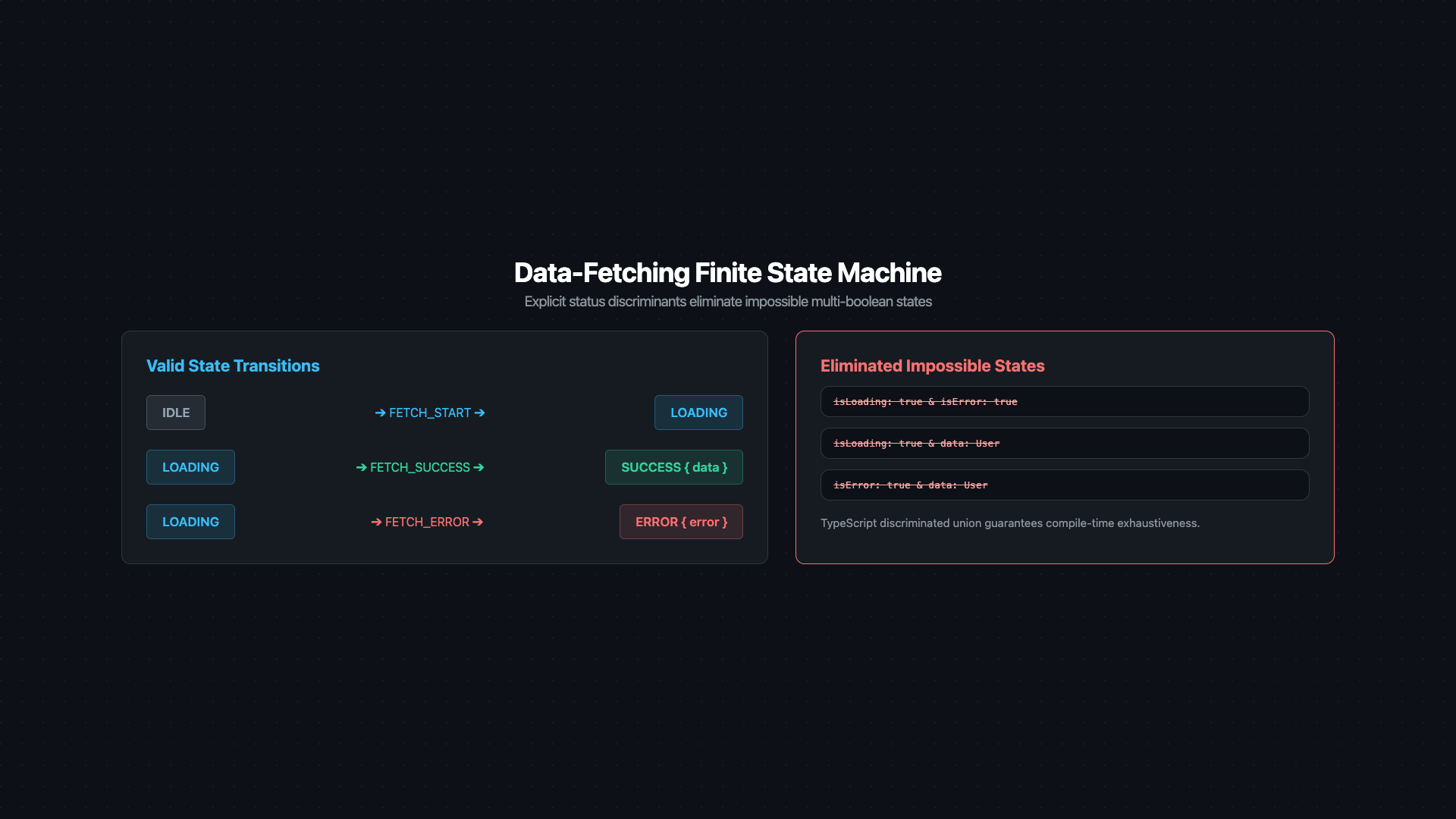
State machine transition diagram for a data-fetching component. Four state nodes arranged in a flow: 'idle' (grey circle) top-left, 'loading' (blue circle) top-right, 'success' (green circle) bottom-right, 'error' (red circle) bottom-left. Labeled directional arrows: 'FETCH_START' from idle to loading, 'FETCH_SUCCESS' from loading to success, 'FETCH_ERROR' from loading to error, 'RESET' from both success and error back to idle. A separate red box on the right labeled 'Impossible State Combinations' lists crossed-out pairs: 'isLoading=true AND isError=true', 'isLoading=true AND data=User'. A green annotation reads: 'Union type status makes these combinations unrepresentable at compile time'. Caption: 'A status discriminant collapses 2^N boolean combinations down to exactly N valid states'.
Figure: State machine transition diagram for a data-fetching component. Four state nodes arranged in a flow: 'idle' (grey circle) top-left, 'loading' (blue circle) top-right, 'success' (green circle) bottom-right, 'error' (red circle) bottom-left. Labeled directional arrows: 'FETCH_START' from idle to loading, 'FETCH_SUCCESS' from loading to success, 'FETCH_ERROR' from loading to error, 'RESET' from both success and error back to idle. A separate red box on the right labeled 'Impossible State Combinations' lists crossed-out pairs: 'isLoading=true AND isError=true', 'isLoading=true AND data=User'. A green annotation reads: 'Union type status makes these combinations unrepresentable at compile time'. Caption: 'A status discriminant collapses 2^N boolean combinations down to exactly N valid states'.
typescript
type FetchState<T> =
  | { status: 'idle' }
  | { status: 'loading' }
  | { status: 'success'; data: T }
  | { status: 'error'; error: Error }

type FetchAction<T> =
  | { type: 'FETCH_START' }
  | { type: 'FETCH_SUCCESS'; payload: T }
  | { type: 'FETCH_ERROR'; payload: Error }
  | { type: 'RESET' }

function fetchReducer<T>(state: FetchState<T>, action: FetchAction<T>): FetchState<T> {
  switch (action.type) {
    case 'FETCH_START':   return { status: 'loading' }
    case 'FETCH_SUCCESS': return { status: 'success', data: action.payload }
    case 'FETCH_ERROR':   return { status: 'error', error: action.payload }
    case 'RESET':         return { status: 'idle' }
    default:              return state
  }
}
Usage with TypeScript exhaustive narrowing:
tsx
function UserProfile({ userId }: { userId: string }) {
  const [state, dispatch] = useReducer(fetchReducer<User>, { status: 'idle' })

  useEffect(() => {
    dispatch({ type: 'FETCH_START' })
    fetchUser(userId)
      .then((data) => dispatch({ type: 'FETCH_SUCCESS', payload: data }))
      .catch((err) => dispatch({ type: 'FETCH_ERROR', payload: err }))
  }, [userId])

  // TypeScript guarantees exhaustive narrowing — no impossible state can render
  switch (state.status) {
    case 'idle':    return <button onClick={() => dispatch({ type: 'FETCH_START' })}>Load</button>
    case 'loading': return <Spinner />
    case 'error':   return <ErrorMessage error={state.error} />
    case 'success': return <UserCard user={state.data} />
  }
}
Crucial Requirement
With the FSM pattern, TypeScript's control flow narrows the type inside each case. In the 'success' branch, state.data is guaranteed to be User — not User | undefined. There is no optional chaining needed; the type system enforces the invariant.

5. useRef: The Escape Hatch

useRef returns a mutable container whose .current property persists across renders without triggering a re-render when changed. There are exactly three legitimate use cases:

5.1 Stable DOM Node Reference

tsx
function AutoFocusInput() {
  const inputRef = useRef<HTMLInputElement>(null)

  useEffect(() => {
    inputRef.current?.focus()
  }, [])

  return <input ref={inputRef} />
}

5.2 Storing Mutable Values That Must Not Trigger Re-renders

typescript
function useInterval(callback: () => void, delay: number) {
  const savedCallback = useRef(callback)

  // Keep the ref in sync without adding `callback` to the interval's dependency
  useEffect(() => {
    savedCallback.current = callback
  }, [callback])

  useEffect(() => {
    const id = setInterval(() => savedCallback.current(), delay)
    return () => clearInterval(id)
  }, [delay])
}

5.3 Tracking the Previous Value

typescript
function usePrevious<T>(value: T): T | undefined {
  const ref = useRef<T>()
  useEffect(() => {
    ref.current = value
  })
  return ref.current  // the value from the previous render
}
Performance / Safety Warning
Using useRef to store values that should trigger re-renders when they change is a recognised anti-pattern. If you find yourself writing ref.current = newValue and then manually triggering a re-render somewhere else, you should be using useState instead. useRef is an escape hatch for values that intentionally live outside React's rendering model.

6. Choosing the Right Local State Tool

ScenarioTool
Single boolean, number, or stringuseState
Multiple independent simple valuesMultiple useState calls
Object with fields that change independentlyMultiple useState calls
Object with fields that must change atomicallyuseReducer
Complex async lifecycle (idle/loading/success/error)useReducer + FSM
DOM node referenceuseRef
Timer ID, WebSocket instance, scroll position trackeruseRef
Value that changes but should not cause re-renderuseRef
State shared between siblingsLift to parent (Part 3)
State used by many components across the treeContext or global store (Part 3)

7. References

  1. useState — React Docs
  2. useReducer — React Docs
  3. useRef — React Docs
  4. You Might Not Need an Effect — React Docs
  5. XState — Finite State Machines & Statecharts
  6. Immer — Write Immutable Updates with Mutable Syntax
Research & Synthesis Note

This article was developed with AI-assisted deep search, specification cross-referencing, and technical research synthesis.

#React#useState#useReducer#useRef#Finite State Machine#State Management#Immutability
Siddhant Deval

Written by Siddhant Deval

Senior Full-Stack Engineer building high-scale architectures, browser performance engineering systems, and SaaS platforms.