Siddhant Deval
Siddhant DevalAuthor
Senior Full-Stack Engineer·Aug 27, 2026·11 min read

Re-render Budgets: Performance & Scalability in State Architecture

Performance in React is an architectural concern before it's a memoization problem. This article covers the full re-render budget: what triggers renders, when useMemo and useCallback earn their cost, how granular selectors prevent cascade, how custom hooks decouple business logic, and how code splitting improves Time to Interactive.

Re-render Budgets: Performance & Scalability in State Architecture

The fourth and final pillar: data flow over data storage. The most performant React applications aren't the ones with the most useMemo calls — they're the ones where the state architecture makes unnecessary renders structurally impossible before any memoization is applied.
React.memo, useMemo, and useCallback are not performance solutions. They are suppressors of a symptom. The architectural cure is designing state boundaries, store shapes, and component decomposition so that the renders that do fire are the ones that need to fire — and only those.

1. What Actually Causes a Re-render

A complete list:
TriggerNotes
setState / dispatchOwn state changed
Props value changedShallow comparison — new object reference triggers re-render even if contents are identical
useContext value changedEvery consumer re-renders when Provider value changes
Parent component re-renderedDefault behavior — children re-render unless wrapped in React.memo
The fourth trigger surprises most developers. A parent re-render causes all children to re-render by default, regardless of whether their props changed. This is why React.memo exists — but as the architectural question is: why is the parent re-rendering unnecessarily in the first place?
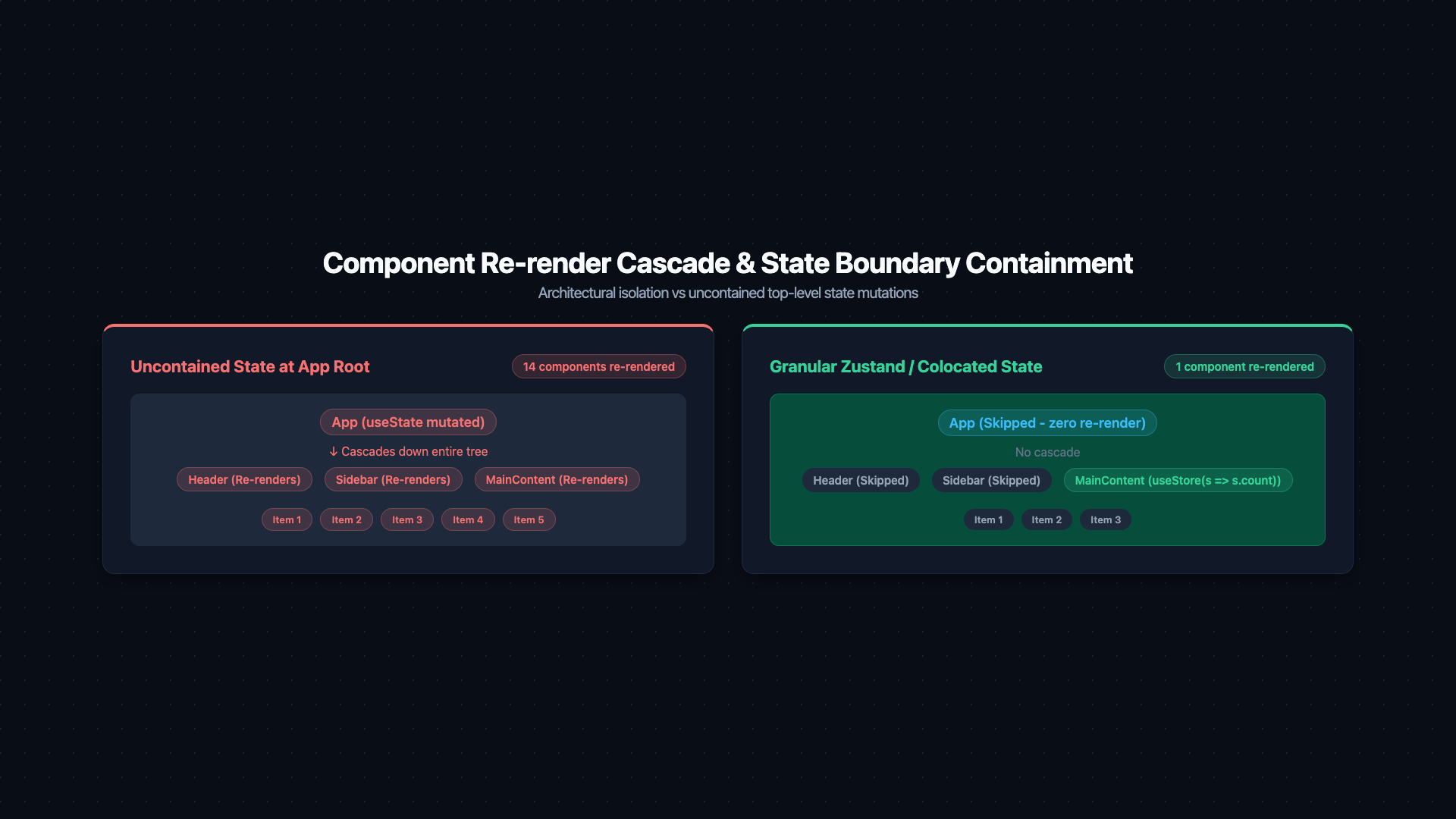
Two component tree diagrams side by side. Left tree labeled 'Without Architectural Containment': root 'App' state change highlighted orange, propagates down via orange fill to all children — Header, Sidebar, ProductList, Footer — and all their grandchildren. A badge reads '12 components re-rendered'. Right tree labeled 'With Granular State Selectors + Boundary Design': only 'ProductList' and its two children are orange; Header, Sidebar, and Footer remain grey with label 'skipped — not subscribed to this state slice'. A badge reads '3 components re-rendered'. A caption reads: 'Design state ownership so cascades are structurally impossible — memoization is a last resort, not a first-line strategy'.
Figure: Two component tree diagrams side by side. Left tree labeled 'Without Architectural Containment': root 'App' state change highlighted orange, propagates down via orange fill to all children — Header, Sidebar, ProductList, Footer — and all their grandchildren. A badge reads '12 components re-rendered'. Right tree labeled 'With Granular State Selectors + Boundary Design': only 'ProductList' and its two children are orange; Header, Sidebar, and Footer remain grey with label 'skipped — not subscribed to this state slice'. A badge reads '3 components re-rendered'. A caption reads: 'Design state ownership so cascades are structurally impossible — memoization is a last resort, not a first-line strategy'.
Mental Model Check
Profiling workflow: (1) Identify the component that re-renders too often using React DevTools Profiler. (2) Check what triggered the render — is it a state change, a prop change, or parent cascade? (3) Fix the source of the unnecessary trigger before reaching for memoization.

2. useMemo — When It Earns Its Cost

useMemo caches a computed value between renders. It has a real cost: memory allocation for the cached value, and comparison work on every render. It only earns that cost in two cases:

Case 1: Genuinely Expensive Computation

typescript
// ✅ Worth memoizing — O(n log n) sort + filter over potentially thousands of items
const processedData = useMemo(
  () =>
    rawData
      .filter((item) => item.active)
      .sort((a, b) => b.score - a.score)
      .slice(0, pageSize),
  [rawData, pageSize]
)

Case 2: Stable Reference for a Memoized Child

typescript
// ❌ NOT worth memoizing — primitive operations are cheaper than memo overhead
const displayName = useMemo(
  () => `${user.firstName} ${user.lastName}`,
  [user.firstName, user.lastName]
)
// String concatenation costs ~0.001ms; memo overhead costs ~0.03ms. Net loss.

// ✅ Worth memoizing — the result is an object, passed to a React.memo child
const chartConfig = useMemo(
  () => ({ type: 'bar', color: theme.primary, data: chartData }),
  [theme.primary, chartData]
)
Performance / Safety Warning
Wrapping every value in useMemo is cargo-cult performance engineering. For primitive return values (strings, numbers, booleans), useMemo adds overhead, not performance. Profile first; memoize only the computations the profiler identifies as expensive.

3. useCallback — Stable Function Identity

useCallback memoizes a function reference. The only reason to use it is when the function is passed as a prop to a React.memo-wrapped component and you want to prevent that child from re-rendering:
typescript
// ✅ Correct use — the callback is passed to a memoized child
const handleSubmit = useCallback(
  (formData: FormData) => {
    submitForm(formData, userId)
  },
  [userId]  // function identity changes only when userId changes
)

return <MemoizedForm onSubmit={handleSubmit} />
The common mistake is memoizing the callback without memoizing the child:
typescript
// ❌ useCallback without React.memo on the child — pointless
const handleClick = useCallback(() => doSomething(), [])
return <NormalButton onClick={handleClick} />
// NormalButton re-renders on every parent render regardless — the stable callback
// reference is completely irrelevant without React.memo on the child.

4. Granular Selectors: The Correct Prevention

The most effective re-render prevention is granular store subscriptions — subscribing only to the slice of state that matters:
typescript
// ❌ Full store subscription — re-renders on ANY store change
function BadCounter() {
  const store = useStore()  // subscribes to everything
  return <span>{store.count}</span>
}

// ✅ Granular selector — re-renders ONLY when count changes
function GoodCounter() {
  const count = useStore((state) => state.count)
  return <span>{count}</span>
}
With Zustand's selector pattern, two sibling components can subscribe to different fields of the same store and update completely independently:
typescript
const useAppStore = create<AppStore>()((set) => ({
  count: 0,
  theme: 'dark',
  sidebarOpen: false,
  incrementCount: () => set((s) => ({ count: s.count + 1 })),
  toggleSidebar: () => set((s) => ({ sidebarOpen: !s.sidebarOpen })),
}))

// These three components are completely decoupled in their render cycles:
const CountDisplay = () => <span>{useAppStore((s) => s.count)}</span>
const ThemeIcon = () => <Icon name={useAppStore((s) => s.theme)} />
const Sidebar = () => {
  const open = useAppStore((s) => s.sidebarOpen)
  return <aside className={open ? 'open' : 'closed'} />
}
// Toggling the sidebar does NOT re-render CountDisplay or ThemeIcon.

5. Context Splitting for Fine-Grained Renders

When using Context, split contexts by the rate of change of their values, not by logical domain:
tsx
// ❌ One large context — every consumer re-renders when anything changes
const AppContext = createContext({ user, theme, cart, notifications })

// ✅ Split by rate of change
const UserContext = createContext(user)          // changes on login/logout only
const ThemeContext = createContext(theme)        // changes on theme toggle only
const CartContext = createContext(cart)          // changes on add/remove item
const NotifContext = createContext(notifications) // changes frequently (websocket)
A component that only needs user and theme now never re-renders when a notification arrives.

6. Custom Hooks: Business Logic Decoupling

Custom hooks are the primary mechanism for separating what state exists from how the UI renders it:
typescript
// ❌ Business logic embedded in the component — hard to test, hard to reuse
function ProductPage({ productId }: { productId: string }) {
  const [product, setProduct] = useState<Product | null>(null)
  const [quantity, setQuantity] = useState(1)
  const [isWishlisted, setIsWishlisted] = useState(false)

  useEffect(() => { fetchProduct(productId).then(setProduct) }, [productId])

  const canAddToCart = product !== null && product.stock > 0 && quantity <= product.stock
  const handleAddToCart = () => addToCart(productId, quantity)
  const handleWishlistToggle = () => setIsWishlisted((w) => !w)

  // ... 80 more lines of logic mixed with JSX
}
typescript
// ✅ Logic extracted into a custom hook — component is a pure render function
function useProductActions(productId: string) {
  const { data: product } = useQuery({ queryKey: ['products', productId], queryFn: () => fetchProduct(productId) })
  const [quantity, setQuantity] = useState(1)
  const [isWishlisted, setIsWishlisted] = useState(false)

  const canAddToCart = Boolean(product && product.stock > 0 && quantity <= product.stock)
  const handleAddToCart = useCallback(() => addToCart(productId, quantity), [productId, quantity])
  const handleWishlistToggle = useCallback(() => setIsWishlisted((w) => !w), [])

  return { product, quantity, setQuantity, isWishlisted, canAddToCart, handleAddToCart, handleWishlistToggle }
}

// The component only renders — no business logic
function ProductPage({ productId }: { productId: string }) {
  const actions = useProductActions(productId)
  if (!actions.product) return <Spinner />
  return <ProductView {...actions} />
}
The hook useProductActions can be tested with renderHook from React Testing Library without rendering any UI. The component can be tested by mocking the hook entirely.

7. Code Splitting & Lazy Loading

State-heavy modules (rich text editors, charting libraries, PDF viewers) should not be bundled with the initial page load. React.lazy defers loading until the component is actually needed:
tsx
import { lazy, Suspense } from 'react'

// The bundle for RichEditor is NOT loaded on initial page load
const RichEditor = lazy(() => import('./RichEditor'))
const ChartDashboard = lazy(() => import('./ChartDashboard'))

function ArticleEditor({ mode }: { mode: 'edit' | 'view' }) {
  return (
    <Suspense fallback={<Skeleton height={400} />}>
      {mode === 'edit' ? <RichEditor /> : <ArticleView />}
    </Suspense>
  )
}
The Suspense fallback renders immediately; the actual component chunk loads in parallel. This directly reduces Time to Interactive (TTI) — the browser has less JavaScript to parse and execute before the page is usable.
Pro Tip & Optimization
In Next.js, use next/dynamic for the same effect with SSR control:
typescript
const HeavyChart = dynamic(() => import('./HeavyChart'), {
  ssr: false,       // don't attempt to render on server
  loading: () => <Skeleton />,
})

8. Design System Components as Contracts

A design system component (<Button>, <Input>, <Modal>) is a published API. It should:
  1. Accept only what it needs — no passthrough props for parent state.
  2. Return stable prop shapes — changes are breaking changes.
  3. Be React.memo-wrapped by default — they render frequently and their props are typically stable references.
typescript
// ✅ Design system Button — pure function, stable API, memoized
const Button = React.memo(function Button({
  onClick,
  disabled = false,
  variant = 'primary',
  children,
}: ButtonProps) {
  return (
    <button
      className={buttonVariants({ variant })}
      onClick={onClick}
      disabled={disabled}
    >
      {children}
    </button>
  )
})
When the parent component re-renders, Button only re-renders if onClick, disabled, variant, or children changed. Since onClick is often a useCallback-wrapped handler, and the others are usually stable, Button essentially never re-renders unless it has to.

9. References

  1. React — useMemo
  2. React — useCallback
  3. React — Code Splitting
  4. Zustand — Using Selectors
  5. React DevTools Profiler
  6. Before You memo() — Dan Abramov
Research & Synthesis Note

This article was developed with AI-assisted deep search, specification cross-referencing, and technical research synthesis.

#React#Performance#useMemo#useCallback#Re-renders#Code Splitting#Architecture#Scalability
Siddhant Deval

Written by Siddhant Deval

Senior Full-Stack Engineer building high-scale architectures, browser performance engineering systems, and SaaS platforms.