
requestAnimationFrame & VSync: How JavaScript Syncs to the Screen
Trace the hardware signal path from monitor VSync interrupt through the OS, GPU Process, and Renderer's event loop to understand exactly when rAF fires and why setTimeout is architecturally wrong for animation.
Event Loop Mastery
requestAnimationFrame & VSync: How JavaScript Syncs to the Screen
The browser does not have a hardcoded "aim for 60 fps" timer buried in its source code. Instead, it is entirely reactive: it listens for a hardware signal from your monitor and synchronises its render cycle to that signal. requestAnimationFrame is the API that lets your code participate in that signal's cadence.
Understanding the full signal path — from monitor hardware, through the OS display driver, into the GPU Process, across an IPC channel, and finally into the Renderer's event loop — removes all the mystery around why setTimeout(fn, 16) produces janky animations while requestAnimationFrame produces smooth ones.
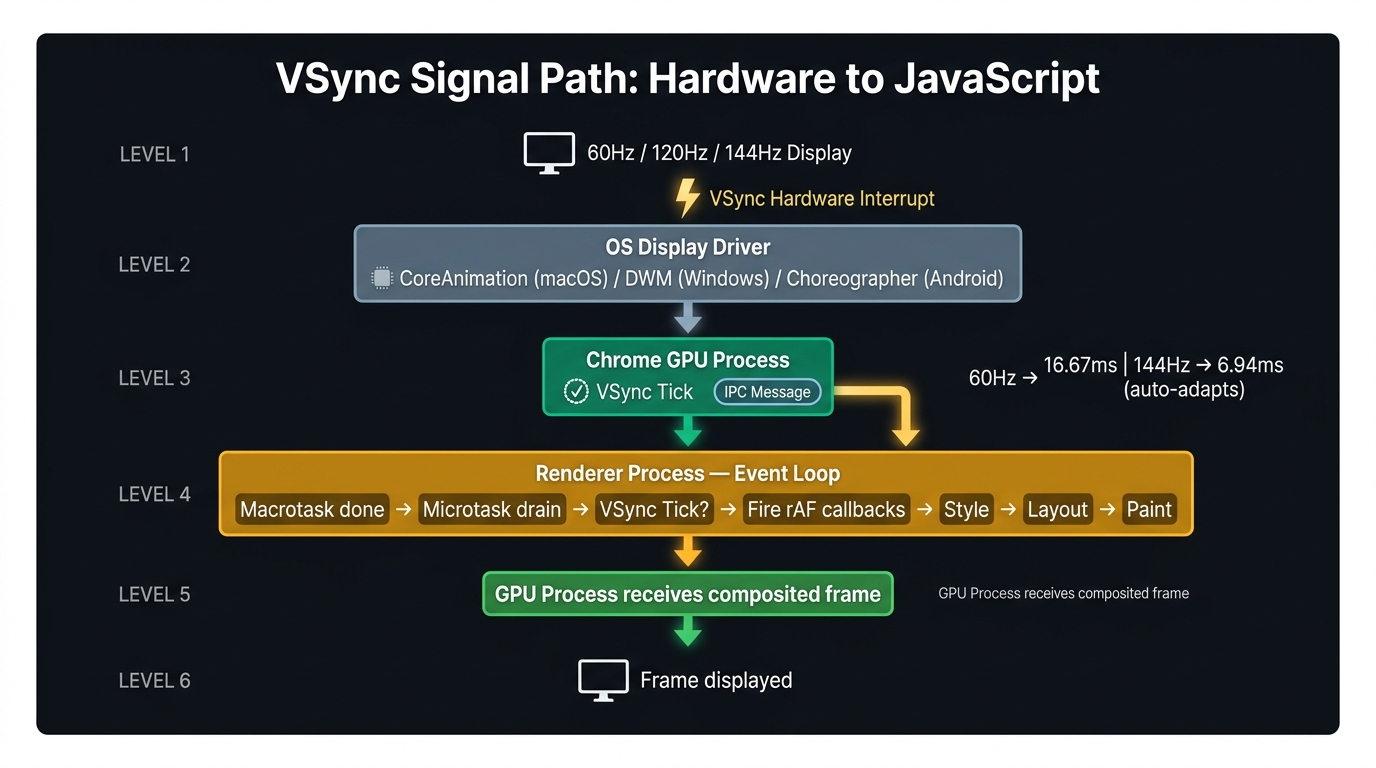
1. The VSync Signal Path
1.1 The Monitor (The Metronome)
Your physical display panel has a fixed or variable hardware refresh rate — the number of times per second it redraws its pixel grid. On a 60 Hz display, this happens 60 times per second, every 16.67 ms.
When the panel finishes displaying the current frame and is ready to receive new pixel data, it sends a VSync interrupt — a hardware signal — to the connected GPU. This signal is the clock that drives all smooth rendering.
1.2 The Operating System Display Subsystem
The GPU's driver receives the VSync interrupt and surfaces it to userspace through a platform-specific display API:
| Platform | Display API |
|---|---|
| macOS | Core Animation / CVDisplayLink |
| Windows | DirectX / DWM (Desktop Window Manager) |
| Linux | DRM/KMS (Direct Rendering Manager) |
| Android | Choreographer |
The OS fires a software callback at the VSync rate, exposed to processes that have registered interest. The browser's GPU Process is one such process.
1.3 The Browser GPU Process
The GPU Process maintains a registration with the OS display API. Every time the VSync callback fires, the GPU Process performs two actions:
- It submits the most recently composited frame to the OS display pipeline for display.
- It sends an IPC message — the "VSync Tick" — to every Renderer Process that has a visible window.
If you drag a browser window from a 60 Hz monitor to a 144 Hz monitor, the OS display API updates its callback frequency from 16.67 ms to 6.94 ms. The GPU Process begins sending VSync Ticks to Renderer Processes at the new rate automatically. No code change is needed. requestAnimationFrame adapts because it is tied to the VSync Tick, not to a software timer.
1.4 The Renderer Process: The Event Loop
When the Renderer Process's event loop finishes its current Macrotask and drains the Microtask queue, it checks for a pending VSync Tick:
- Tick has arrived: Enter the render detour — fire all
requestAnimationFramecallbacks, then run Style Calculation, Layout, Paint, and Composite. - No tick yet: Skip rendering entirely and pick up the next Macrotask from the queue.
This is the mechanism by which the browser avoids wasting CPU on rendering when no new frame is due.
2. requestAnimationFrame Is Not a Timer
requestAnimationFrame is commonly described as "like setTimeout but for animations." This framing is misleading and produces incorrect mental models.
setTimeout is driven by the browser's software clock — an internal counter that is completely decoupled from VSync. It fires approximately after the requested delay, regardless of where the monitor is in its refresh cycle.
requestAnimationFrame is not driven by a software clock at all. It is a callback queue that is drained at one specific moment in the event loop: immediately after the VSync Tick IPC message arrives and the Render Check passes. It has no "delay" parameter because there is no delay to specify — it fires exactly when the hardware says it is time to paint.
2.1 The Tearing Problem with setTimeout
If setTimeout fires 2 ms before a VSync tick, the Main Thread sets the transform, the Compositor reads it, and the frame is composited. But if setTimeout fires 12 ms into a 16.67 ms frame — after the Compositor has already read the previous frame's state — the mutation is too late. The browser has two choices: show the old state for this frame (a dropped frame), or delay compositing (tearing). Neither is smooth.
Every call to requestAnimationFrame schedules the callback for the next VSync tick. The callback receives a high-resolution DOMHighResTimeStamp representing the start of the frame, which you can use to calculate delta time and make animations frame-rate independent.
3. Frame-Rate Independent Animation with Delta Time
A common mistake with requestAnimationFrame is tying animation speed to the callback frequency:
On a 60 Hz display, deltaMs ≈ 16.67 → 300 × 0.01667 = 5 px/frame.
On a 120 Hz display, deltaMs ≈ 8.33 → 300 × 0.00833 = 2.5 px/frame.
The element still travels at 300 pixels per second on both displays.
4. Background Throttling and Battery Saver Mode
When a browser tab loses focus or the window is minimised, Chromium throttles the VSync Tick to approximately 1 Hz (or stops it entirely). This means:
requestAnimationFramecallbacks run at most once per second in background tabs.setTimeout(fn, 16)in a background tab is also throttled, but less aggressively and on a different schedule.
Use the Page Visibility API to pause requestAnimationFrame loops when a tab is hidden, to avoid queuing up animation callbacks that will fire in a burst when the tab regains focus.
5. The Complete Signal Timeline
6. References
This article was developed with AI-assisted deep search, specification cross-referencing, and technical research synthesis.
