
JavaScript Modules, Chunks & Dynamic Import: The Bundler Foundation
Module Federation is not magic — it is dynamic import() with a runtime negotiation layer. Before configuring it, you must understand what a chunk is, why it lives on the network, and why two chunks sharing a library is a problem no bundler can solve alone.
Micro-Frontend Architecture
JavaScript Modules, Chunks & Dynamic Import: The Bundler Foundation
A micro-frontend is not a smaller app — it is a domain boundary enforced at the deployment layer. If you can't explain the business capability it owns, you haven't drawn the boundary yet.
In Part 1, you decided that your team topology justifies a micro-frontend boundary. Now a colleague opens a tutorial on Module Federation and pastes this into your build config:
If you don't know what singleton: true is protecting against, you will copy this configuration correctly, ship it to production, and then spend three days debugging a broken useContext call that only fails in the composed app — never in isolation. The bug will be invisible in local development and untraceable in production logs.
This article is the foundation that makes that bug obvious before you write a single line of federation configuration. Everything in Parts 3–9 is a direct consequence of what this article explains.
1. The Module System: From Scripts to ESM
1.1 The Problem That Modules Solve
Before JavaScript had a module system, every script file was a global. If two scripts defined a function called formatDate, whichever loaded last won. Dependencies had to be loaded in a precise order. There was no mechanism for a file to declare what it needed.
The ecosystem invented workarounds: IIFE wrappers ((function() { ... })()), AMD (define/require), and CommonJS (module.exports / require()). Each solved the namespace problem differently, but all shared a fundamental limitation: they were runtime patterns, invisible to tools that needed to understand dependencies at build time.
1.2 CommonJS: Synchronous, Runtime-Resolved
Node.js popularized CommonJS, which is still the default in many codebases today:
require() is synchronous and dynamic — you can put it inside a conditional, inside a loop, or build the module path at runtime:
Because require() is fully dynamic, a bundler that encounters it must either include every possible module (bloated output) or skip static analysis entirely (no tree-shaking).
1.3 ESM: Static, Analyzable, the Foundation of Module Federation 2.0
ECMAScript Modules (ESM) are the JavaScript standard, now supported natively in every modern browser and Node.js 12+:
The critical difference: import statements must appear at the top level of a module and cannot be inside conditionals or functions. This constraint is what makes ESM statically analyzable — a bundler can read any file, trace every import, and know the complete dependency graph before executing a single line of code.
Module Federation 2.0 (@module-federation/enhanced) is ESM-first. Understanding the difference between static import and dynamic import() is not background knowledge — it is the entire conceptual foundation of how Federation works at runtime.
2. What a Bundler Actually Does
2.1 From Source to Chunk
When you run npx webpack or vite build, the bundler performs exactly four operations:
The output is not just one file. A modern bundler produces multiple chunks — separate JavaScript files, each containing a subset of your application's code:
Each chunk is a separate network request. The browser loads main.js immediately, then fetches additional chunks on demand. This is code splitting.
2.2 Static import vs. Dynamic import(): A Network Request
Here is the most important distinction in this entire article:
A dynamic import() is not a function call — it is a network fetch that returns a Promise. The browser makes an HTTP request to retrieve the chunk file, evaluates it, and resolves the Promise with the module's exports. This is identical in mechanism to fetch().
Every import() is a fetch(). It has latency, it can fail, it can be cached, and it can be served from a different origin than your main bundle. Module Federation extends this model by letting the chunk come from a completely different deployment — a remote application running on a separate server.
3. Code Splitting in Practice
3.1 Route-Based Splitting
The most common use of dynamic import is splitting by route — each page is a separate chunk, loaded only when the user navigates to it:
The build output for this app:
A user who only visits /catalog never downloads CheckoutPage.js or ProfilePage.js. This is the performance benefit of code splitting.
3.2 The Network Waterfall
The relationship between static and dynamic imports creates a loading waterfall:
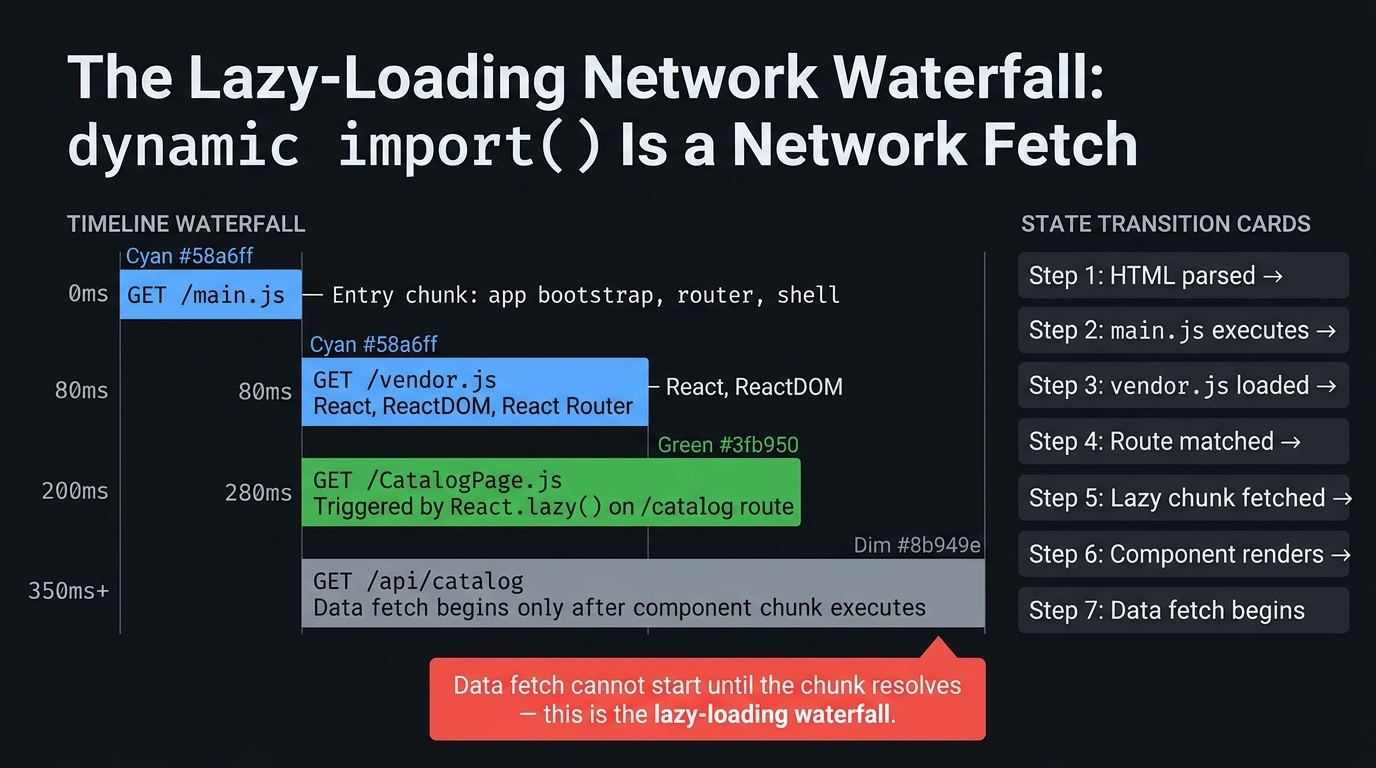
This waterfall has a consequence that matters for micro-frontends: a remote component cannot begin rendering — and its data cannot begin fetching — until the network request for its chunk resolves. Module Federation adds one more request to this waterfall: the federation runtime must negotiate which version of the remote chunk to load before fetching it.
4. The Duplicate Dependency Problem
4.1 What Happens When Two Chunks Bundle the Same Library
Now consider a micro-frontend scenario: two independently built applications, each with their own webpack build. Both include React as a dependency in package.json. Both bundle independently:
When the host app loads the checkout remote at runtime, the browser now has two separate copies of React executing in the same JavaScript environment. This is not a performance problem — it is a correctness problem.
4.2 Why Two React Instances Breaks Hooks and Context
React's hook system (useState, useEffect, useContext, useRef) depends on a module-level variable that tracks the "currently rendering fiber." There is one such variable per React instance:
When the host app renders a component from the checkout remote, the remote's React instance is managing that component's fiber. But if the host's React.createContext() is called — which creates a context object in the host's React instance — and the remote's component tries to useContext() — which reads from the remote's React instance — they are talking to different registries. The context value is invisible across the boundary.
This bug does not throw. It does not appear in React DevTools as an error. The component renders, hooks execute, and the value is simply wrong — null where a logged-in user should appear. It is the hardest class of MFE bug to diagnose because it is invisible in isolation.
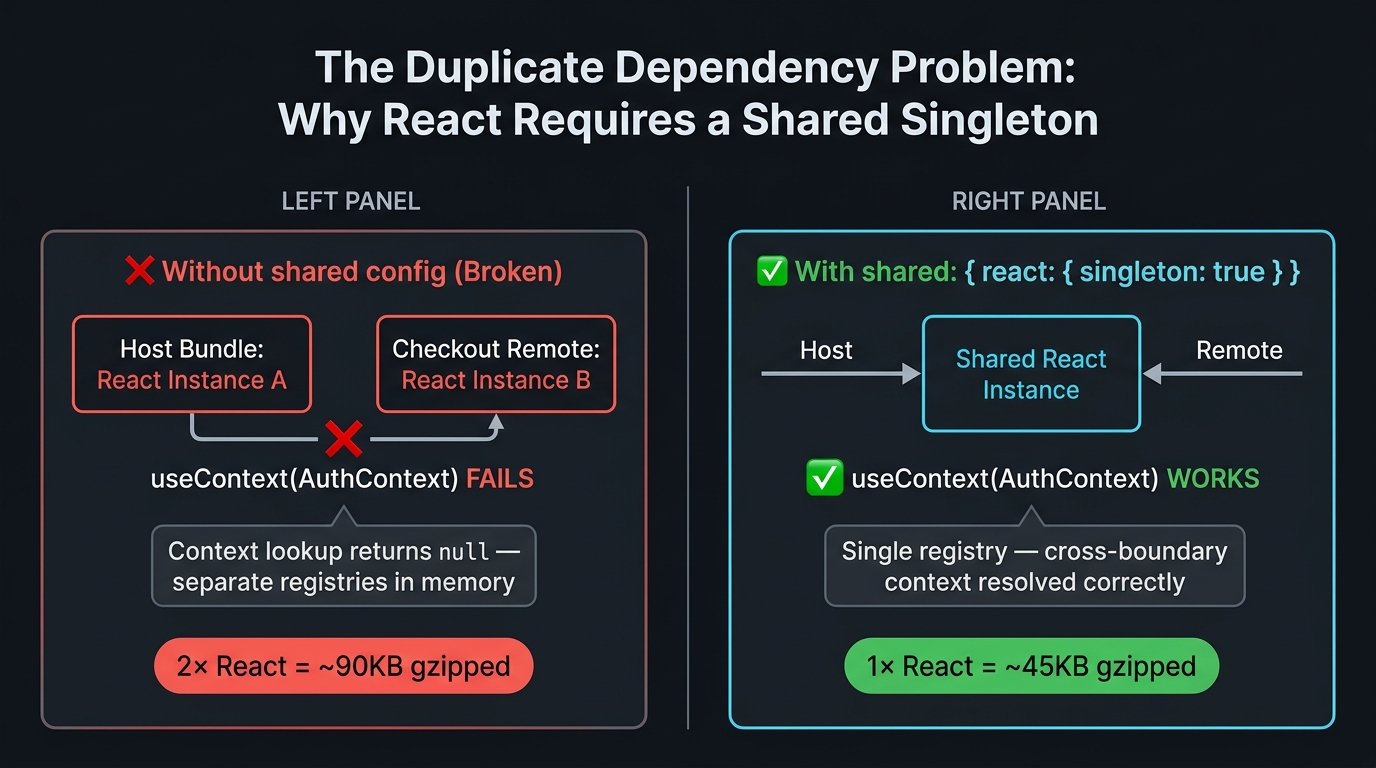
The duplicate React instance bug does not appear in unit tests, integration tests, or Storybook. It only manifests when the host app and remote are both running and the remote component consumes a context created in the host. Plan for integration tests that test this boundary explicitly — Part 7 covers this.
5. The Module Runtime: What the Federation Runtime Injects
5.1 import.meta and the Module Scope
ESM introduces import.meta — an object that contains metadata about the current module. In a browser:
The federation runtime uses import.meta to inject coordination metadata into each chunk — which version it is, which modules it exposes, which shared dependencies it requires, and where to find the remote manifest.
5.2 What the Federation Runtime Injects
When you use Module Federation, webpack injects a runtime bootstrap into each chunk:
This negotiation is what singleton: true controls. Without it, the runtime uses the first-loaded version but does not prevent a second instance from loading. With singleton: true, it enforces that only one instance can ever exist in the shared scope — a second loader finds the existing instance and uses it.
You do not need to understand the webpack runtime internals to use Module Federation correctly. But understanding why the shared configuration exists — to coordinate the module registry across independently loaded chunks — makes every configuration decision in Part 3 mechanical rather than cargo-culted.
6. Recognising the Monolith Ceiling
Coming from a React SaaS monolith, the transition to micro-frontends is triggered by specific, observable pain points. These are the signals that the coordination surface has grown large enough to justify runtime composition:
| Signal | What It Looks Like | The MFE Answer |
|---|---|---|
| Deployment coupling | Checkout team's broken test delays Profile team's release | Independent deployment pipelines per bounded context |
| Chunk size regression | One team's added dependency bloats the global vendor bundle | Each remote bundles its own non-shared dependencies |
| Context bleed | Two teams modifying the same AuthContext provider create race conditions |
Shell owns auth; remotes consume via event/cookie (Part 6) |
| Local dev complexity | Running the full app requires starting 5 services | Remote override pattern: point locally to staging remotes (Part 9) |
| Type contract drift | A remote's exported component's props change and the host silently breaks | @module-federation/dts-plugin type bundles (Part 4) |
If you are reading this from a monolith that has not yet hit these signals, do not adopt Module Federation preemptively. The correct path is: monolith with module boundaries → monorepo with affected builds → runtime composition when the coordination pain is measurable. Skip steps only when the signals are already present.
Summary
| Concept | Rule |
|---|---|
Static import |
Build-time — code is included in the bundle, no runtime request |
Dynamic import() |
Runtime — a network request; returns a Promise; can fail |
| Code splitting | Each import() creates a separate chunk file in the build output |
| Duplicate React instance | Silent correctness bug — context invisible across instances, no error thrown |
| Module Federation | shared config coordinates the module registry across independently loaded chunks |
| Singleton requirement | singleton: true prevents a second React instance from loading in the shared scope |
What's Next
In Part 3, the foundation built here becomes operational. We configure
ModuleFederationPlugin, trace exactly what happens when a host callsimport('remote/Cart'), and solve the singleton problem throughsharedconfiguration. The mental model from this article transforms Module Federation from a black box into a predictable system. Part 3 → Module Federation Core
References
This article was developed with AI-assisted deep search, specification cross-referencing, and technical research synthesis.
