
Module Federation Core: Hosts, Remotes, and the Singleton Problem
Module Federation is a runtime dependency graph, not a deployment trick. Every shared configuration decision is a bet on which module version all remotes will agree to — and getting it wrong produces silent correctness bugs that are nearly impossible to trace in production.
Micro-Frontend Architecture
Module Federation Core: Hosts, Remotes, and the Singleton Problem
A micro-frontend is not a smaller app — it is a domain boundary enforced at the deployment layer. If you can't explain the business capability it owns, you haven't drawn the boundary yet.
Part 2 established that Module Federation is dynamic import() with a runtime negotiation layer, and that two independently loaded chunks sharing a library without coordination produces a silent correctness bug. Now we configure the system — and every decision we make in the configuration is a direct consequence of that foundation.
The failure mode this article prevents: copying a Module Federation config from a tutorial, shipping to production with react missing from the shared array, and watching your useContext calls silently return null for logged-in users — only in the composed environment, never in CI.
1. The Architecture: Host and Remote
1.1 Roles and Responsibilities
Module Federation divides applications into two roles:
Remote — An independently deployed application that exposes modules (components, hooks, utilities) for other applications to consume at runtime. The remote has its own build, its own CI/CD pipeline, and its own deployment URL. It does not know who is consuming it.
Host — An application that consumes modules from one or more remotes at runtime. The host declares which remotes it knows about and imports from them using dynamic import(). The host may also be consumed by another host — the roles are not mutually exclusive.
The key property: the Checkout remote and Catalog remote are deployed to separate CDNs on separate schedules. The App Shell does not rebuild when either remote deploys — it fetches the latest version at runtime.
1.2 The ModuleFederationPlugin Anatomy
Every Module Federation application configures the plugin in its build config. Here is a complete, annotated configuration for the Checkout remote using Rspack (the recommended toolchain in 2026):
And the host (App Shell) configuration:
publicPath: 'auto' is required for Module Federation to resolve chunk URLs correctly when the remote is served from a CDN. Without it, chunk requests use the host's origin instead of the remote's — producing 404s for all remote assets.
2. The Request Lifecycle: From Import to Render
When the App Shell encounters import('checkout/Cart') for the first time, the following sequence executes:
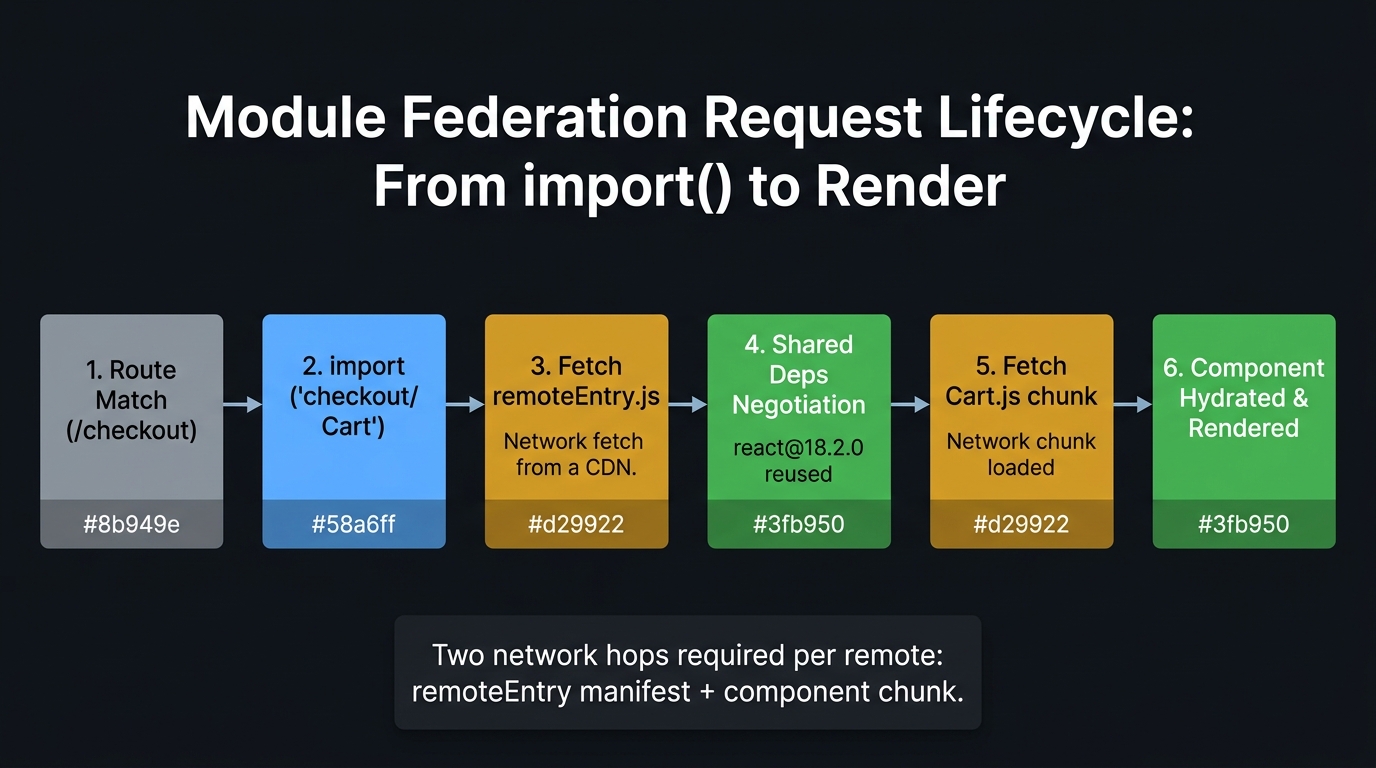
This sequence has several implications for production systems:
- Two network requests minimum —
remoteEntry.js+ the component chunk. Both can fail. Both can be cached. Neither is guaranteed to be fast. - Singleton negotiation happens at step 6 — this is where
sharedconfiguration is evaluated. Ifreactis already in the host's shared scope, the remote reuses it. If not, the remote loads its own copy — which is the bug from Part 2. - The first import is slower than subsequent ones —
remoteEntry.jsis cached after the first load. Subsequentimport('checkout/Cart')calls skip steps 3–5 and go directly to step 7 if the chunk is also cached.
3. The Singleton Problem in Depth
3.1 The Three shared Configuration Strategies
The shared configuration field is not just a list of libraries to share. Each entry is a negotiation contract between the host and remote. There are three key options:
| Strategy | When to Use | Version Mismatch Behavior |
|---|---|---|
| No singleton | Stateless utility libraries | Each consumer loads its own version — no coordination |
singleton: true |
Stateful libraries with module-level singletons | Warning in console; host version is used |
singleton + strictVersion |
Libraries with breaking API changes between versions | Hard runtime error — prevents silently wrong behavior |
singleton: true without strictVersion: true will silently use the host's React version even if the remote requires an incompatible one. A remote built for React 18 hooks loaded into a React 17 host will call hooks that do not exist — producing runtime errors that are difficult to trace to a version mismatch. Use strictVersion: true for React.
3.2 What Gets Shared vs. What Gets Bundled Locally
Not every node_modules package should be shared. The decision rule is straightforward:
Sharing a domain-specific library creates an implicit coupling between remotes. If the Checkout remote upgrades @stripe/react-stripe-js to v3, and the shell's shared entry points to v2, the version negotiation produces an unexpected result. Keep domain-specific dependencies in each remote's local bundle.
4. Rspack: The Recommended Toolchain
4.1 Why Rspack in 2026
Rspack is a Rust-based webpack-compatible bundler developed by ByteDance. It is the recommended choice for new MFE projects in 2026 for two reasons:
Performance: Rspack's Rust core delivers 5–10× faster cold builds compared to webpack 5 on the same configuration. For a multi-remote MFE system where each remote builds independently, this compounds — eight remotes each saving 30 seconds is four minutes per CI run.
First-class Module Federation 2.0: Rspack ships @module-federation/enhanced support out of the box. The webpack 5 MF plugin and the Rspack MF plugin share the same runtime and the same configuration schema — migration from webpack 5 to Rspack requires changing two lines:
4.2 The @module-federation/vite Caveat
@module-federation/vite does not support the full Module Federation 2.0 feature set as of 2026. Specifically: @module-federation/dts-plugin (type sharing, Part 4) is not compatible, runtime plugins API is partially implemented, and the shared scope negotiation has known edge cases with singleton: true in development mode. If your team prefers Vite for local development, use Rspack for production builds. Document this decision in your architecture decision record.
5. Design System as a Worked Example
5.1 The Shared Component Library Problem
Every MFE system eventually asks: how do we share a UI component library (Button, Input, Modal, Table) across all remotes while maintaining visual consistency?
There are two architectural choices, with fundamentally different trade-off profiles:
Option A: Singleton Remote — The design system is deployed as its own remote and exposed to all consumers:
Option B: Versioned NPM Package — The design system is published to npm and each remote installs the version it needs:
| Criterion | Singleton Remote | Versioned NPM Package |
|---|---|---|
| Visual consistency | ✅ Always latest — all remotes use the same version | ❌ Remotes may be on different versions |
| Independent upgrades | ❌ All remotes get updates simultaneously | ✅ Each remote upgrades on its own schedule |
| Deployment coupling | ❌ Design system release affects all remotes | ✅ No coupling |
| Bundle size | ✅ Loaded once, shared across all remotes | ❌ Each remote bundles its own copy |
| Rollback scope | ❌ Rolling back affects all remotes | ✅ Isolated rollback per remote |
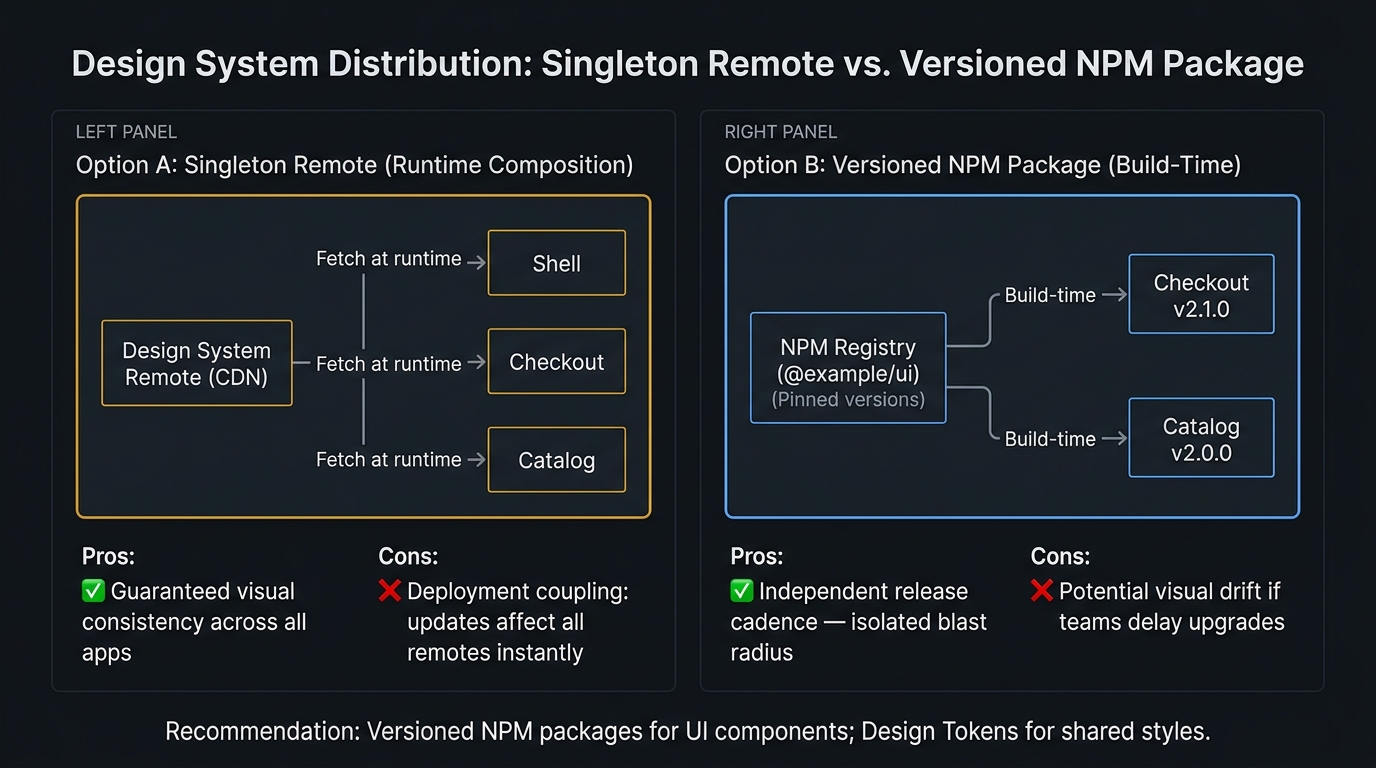
The correct choice depends on your team's release culture. If your design system team releases frequently and breaking changes are rare, a singleton remote gives visual consistency with no duplication cost. If your design system has breaking changes on minor versions, a versioned NPM package with each remote upgrading independently is safer. Most mature organizations use the NPM approach for stability.
Summary
| Concept | Rule |
|---|---|
| Remote | Exposes modules via exposes config; deployed independently |
| Host | Consumes remotes via remotes config; never rebuilds when remotes deploy |
singleton: true |
Allows only one instance in the shared scope; host version wins on conflict |
strictVersion: true |
Version mismatch is a hard runtime error, not a warning |
| Share what is stateful | React, Router, Zustand — always shared; domain libs — always local |
| Rspack vs webpack | Same MF config, 5–10× faster builds; prefer Rspack for new projects |
@module-federation/vite |
Not production-stable for complex shared graphs in 2026 |
What's Next
In Part 4, we upgrade to Module Federation 2.0 — replacing hardcoded remote URLs with CDN-hosted manifests, adding cross-boundary TypeScript safety via
@module-federation/dts-plugin, and intercepting the federation lifecycle with runtime plugins for circuit-breaking and telemetry. Part 4 → Module Federation 2.0: Dynamic Remotes, Type Safety, and Runtime Plugins
References
This article was developed with AI-assisted deep search, specification cross-referencing, and technical research synthesis.
