Siddhant Deval
Siddhant DevalAuthor
Senior Full-Stack Engineer·Oct 6, 2026·14 min read

Cross-App State, Communication, and Authentication

Share as little state as possible across micro-frontend boundaries — and when you must share it, share it via the platform (URL, events, cookies) not via JavaScript objects in window. This article covers the three communication layers, their coupling costs, and the auth patterns every MFE system gets wrong.

Cross-App State, Communication, and Authentication

A micro-frontend is not a smaller app — it is a domain boundary enforced at the deployment layer. If you can't explain the business capability it owns, you haven't drawn the boundary yet.
The most seductive mistake in micro-frontend architecture is the global state object. You have five independently deployed apps that all need to know whether the user is logged in. Someone puts window.__auth = { user, token } in the shell's bootstrap script. It works. It works for six months. Then the Catalog remote starts storing its own data on window.__catalog. The Checkout remote reads from window.__auth in a useEffect. A memory leak appears when remotes unmount without cleaning up their listeners. Two years later, window is a shared mutable state object that no team fully understands and everyone is afraid to change.
The rule for this article: share as little state as possible, and when you must share it, share it via the platform — not via JavaScript objects that cross the boundary invisibly.

1. The Isolation Principle

1.1 Why window Is the Wrong Boundary

window is globally accessible to every JavaScript module running in the browser tab. When you store cross-app state on window, you create:
Invisible coupling — Any remote can read or write any key on window. There is no TypeScript type, no contract, and no enforcement preventing the Checkout remote from accidentally overwriting the Catalog remote's cached product list.
Memory leaks — Remote applications mount and unmount as users navigate. If a remote stores event listeners or data on window and does not clean up on unmount, the data persists indefinitely. In a single-page application where remotes mount and unmount frequently, this accumulates.
Race conditions — When multiple remotes write to the same window key concurrently, the last writer wins. There is no transaction, no locking, and no notification to other readers that the value changed.
typescript
// ❌ The pattern that causes all of the above problems
// shell/src/bootstrap.ts
window.__auth = { user: currentUser, token: accessToken }

// checkout/src/CartButton.tsx
function CartButton() {
  // Reads from window — no type safety, no change notification, no cleanup
  const user = (window as any).__auth?.user
  return <button>{user?.name}</button>
}
The fix is not "use a better key naming convention." The fix is eliminating window as a communication channel entirely.

2. The Three Communication Layers

Every legitimate cross-app communication need maps to exactly one of three mechanisms, ordered by coupling cost:
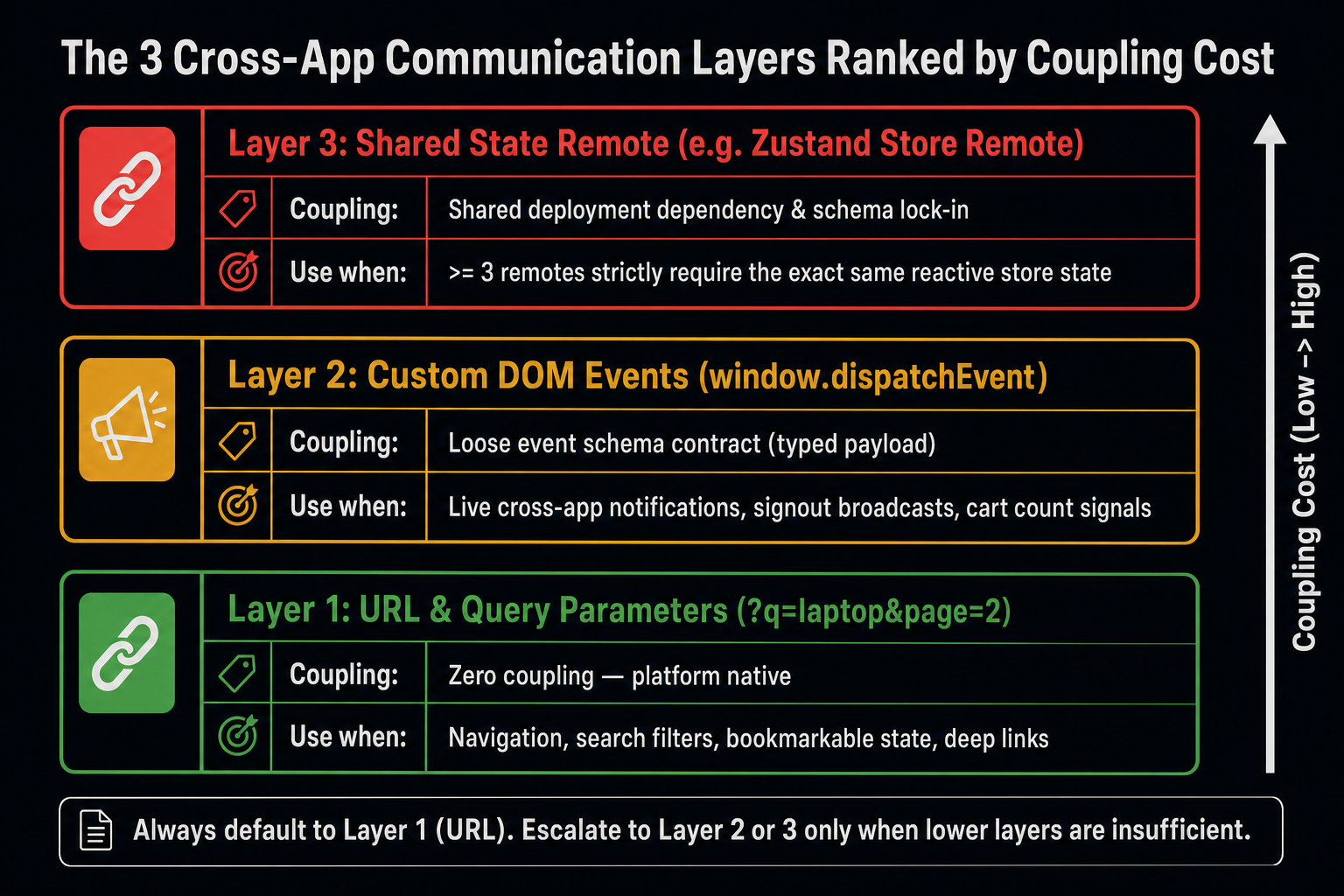
Mental model diagram showing three horizontal communication layers arranged vertically from bottom (lowest coupling) to top (highest coupling). Bottom layer (green, widest): 'URL & Query Parameters — Coupling: None'. Middle label: 'survives reload, bookmarking, cross-origin navigation, browser Back button'. Center layer (amber, medium width): 'Custom DOM Events — Coupling: Event schema'. Middle label: 'loosely coupled pub/sub, no shared JS object, works across Shadow DOM boundaries'. Top layer (red, narrowest): 'Shared State Remote — Coupling: Shared deployment dependency'. Middle label: 'use only when ≥3 remotes need the same state and lower layers are insufficient'. Right side of diagram shows a vertical 'Coupling Cost' axis with arrow pointing upward from Low to High. Each layer has a 'When to use' annotation: URL — navigation state, shareable content, filter params. Events — notifications, lifecycle signals, auth broadcasts. Shared Remote — user session, feature flags, global cart count. Caption: 'Choose the lowest-coupling mechanism that satisfies the requirement — escalate only when lower layers are genuinely insufficient.'
Choose the lowest-coupling mechanism that satisfies the requirement — escalate only when lower layers are genuinely insufficient.

2.1 Layer 1: URL and Query Parameters

The URL is the most durable state container in the browser. It survives page reloads, can be shared as a link, is captured in analytics, and is readable by any remote without any coordination:
typescript
// catalog/src/SearchPage.tsx — Catalog remote writes state to URL
import { useSearchParams } from 'react-router-dom'

function SearchPage() {
  const [params, setParams] = useSearchParams()

  // State lives in the URL — not in React state, not in window
  const query    = params.get('q') ?? ''
  const category = params.get('category') ?? 'all'
  const page     = Number(params.get('page') ?? '1')

  function handleSearch(newQuery: string) {
    setParams({ q: newQuery, category, page: '1' })
    // URL becomes: /catalog/search?q=laptop&category=all&page=1
    // Any remote can read this. The user can share this link.
  }

  return <SearchUI query={query} category={category} page={page} onSearch={handleSearch} />
}
URL state is the correct mechanism for:
  • Navigation and filter state the user might bookmark or share
  • Cross-remote coordination that is driven by navigation events
  • Any state that must survive a page refresh

2.2 Layer 2: Custom DOM Events

When two remotes need to communicate without the user navigating, and the communication does not need to survive a page reload, Custom DOM Events are the correct mechanism:
typescript
// shell/src/events.ts — shared event schema (published as an NPM package or shared remote)
// This is the ONLY contract between remotes — a strongly typed event schema

export interface AuthSignoutEvent extends CustomEvent {
  type: 'auth:signout'
  detail: { reason: 'user_action' | 'session_expired' | 'security_event' }
}

export interface CartUpdatedEvent extends CustomEvent {
  type: 'cart:updated'
  detail: { itemCount: number }
}

// Type-safe event dispatcher
export function dispatchAuthSignout(reason: AuthSignoutEvent['detail']['reason']) {
  window.dispatchEvent(
    new CustomEvent<AuthSignoutEvent['detail']>('auth:signout', {
      detail: { reason },
      bubbles: true,
      composed: true,  // crosses Shadow DOM boundaries — required for Web Component remotes
    })
  )
}

// Type-safe event listener
export function onCartUpdated(handler: (event: CartUpdatedEvent) => void) {
  const listener = (e: Event) => handler(e as CartUpdatedEvent)
  window.addEventListener('cart:updated', listener)
  return () => window.removeEventListener('cart:updated', listener)  // returns cleanup
}
typescript
// checkout/src/Cart.tsx — Checkout remote dispatches events
import { dispatchAuthSignout } from '@example/mfe-events'  // shared schema package

function Cart() {
  function handleCheckoutComplete() {
    window.dispatchEvent(
      new CustomEvent('cart:updated', { detail: { itemCount: 0 } })
    )
  }
}
typescript
// shell/src/Nav.tsx — Shell listens for cart updates
import { onCartUpdated } from '@example/mfe-events'

function CartIcon() {
  const [count, setCount] = useState(0)

  useEffect(() => {
    // Returns cleanup function — no memory leak on unmount
    return onCartUpdated((event) => setCount(event.detail.itemCount))
  }, [])

  return <CartBadge count={count} />
}
Crucial Requirement
Event schema governance is critical. The event type strings ('cart:updated', 'auth:signout') are the contract between teams. Publish the schema as a versioned NPM package or a shared remote (@example/mfe-events). Never hardcode event type strings as magic strings in individual remotes — they become unrefactorable.

2.3 Layer 3: Shared State Remote

When ≥3 remotes need the same piece of state and URL/events are insufficient, a shared state remote is justified:
typescript
// state-remote/src/store.ts — deployed as its own remote
import { create } from 'zustand'

interface GlobalStore {
  featureFlags: Record<string, boolean>
  userPreferences: { theme: 'light' | 'dark'; language: string }
  setFeatureFlag: (key: string, value: boolean) => void
}

export const useGlobalStore = create<GlobalStore>((set) => ({
  featureFlags: {},
  userPreferences: { theme: 'dark', language: 'en' },
  setFeatureFlag: (key, value) =>
    set((s) => ({ featureFlags: { ...s.featureFlags, [key]: value } })),
}))
javascript
// state-remote/rspack.config.js
exposes: {
  './useGlobalStore': './src/store',
}
shared: {
  react:    { singleton: true },
  zustand:  { singleton: true },  // CRITICAL — store must be a singleton
}
Performance / Safety Warning
A shared state remote creates a deployment coupling: all consuming remotes must be compatible with the store's interface. Adding a new field is safe; removing or renaming one is a breaking change. Treat the store's exported interface as a versioned API and introduce changes through deprecation cycles, not renames.

3. Authentication Across Origins

3.1 Why Auth Is Different

Authentication state is the most widely shared state in any MFE system — every remote needs to know who the user is. It is also the state with the highest security consequences if handled incorrectly.
The naive pattern — storing the JWT access token in localStorage or on window — exposes it to every script running in the browser tab. In a micro-frontend system where multiple independently deployed origins load JavaScript, this means any of those origins (including compromised third-party dependencies) can read the token.
The correct mechanism for sharing authentication across MFE origins is an httpOnly cookie scoped to the shared domain:
architecture:
  shell:    https://app.example.com
  checkout: https://cdn.checkout.example.com   (same eTLD+1: example.com)
  catalog:  https://cdn.catalog.example.com    (same eTLD+1: example.com)

auth cookie:
  Name:     session_token
  Domain:   .example.com          ← shared across all subdomains
  HttpOnly: true                  ← not readable by JavaScript
  Secure:   true                  ← HTTPS only
  SameSite: Lax                   ← sent on same-site navigation, not cross-site requests
With this setup, the browser automatically sends the session_token cookie with every API request to any subdomain of example.com. No JavaScript can read the token value — it is opaque to all running scripts. The auth server validates the cookie on each request.
Performance / Safety Warning
SameSite: Strict blocks the cookie on cross-origin navigations (e.g., a user clicking an external link back to your site). SameSite: Lax is the correct value for most authentication cookies — it blocks cross-site POST requests (CSRF protection) while allowing same-site navigation. SameSite: None requires Secure: true and is only appropriate when cross-site cookie sending is explicitly required (e.g., embedded iframes from different origins).

3.3 OAuth/PKCE Callback Ownership

When using OAuth with the PKCE flow, the authorization server redirects back to your application with a ?code= query parameter. In a micro-frontend system, exactly one application must handle this callback:
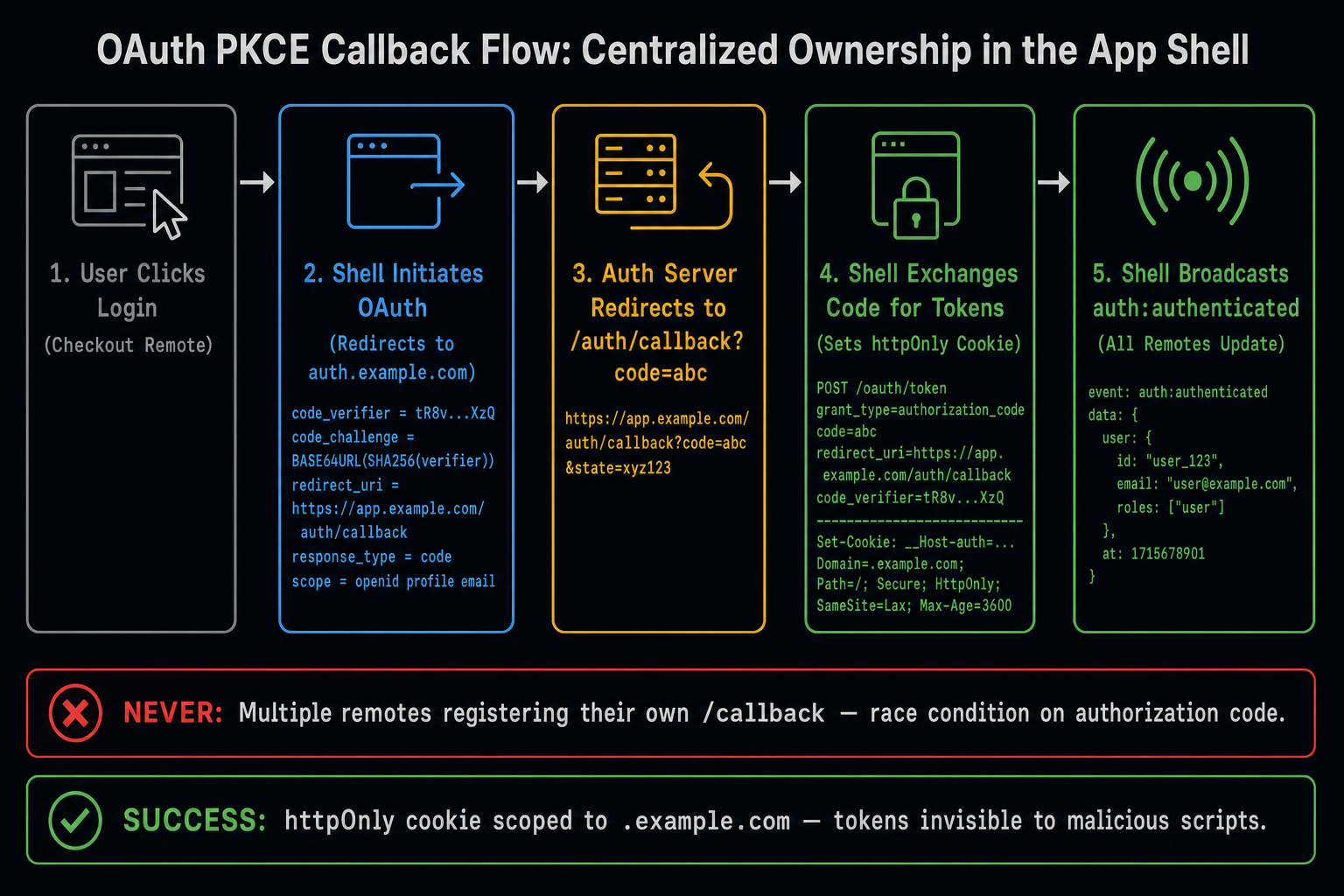
Flow trace diagram showing OAuth PKCE callback ownership in a MFE system. Seven stages shown left to right. Stage 1 (dim): 'User clicks "Sign In" in Checkout remote'. Stage 2 (dim): 'Checkout dispatches auth:login-required Custom Event'. Stage 3 (cyan): 'App Shell handles event — Shell owns OAuth flow'. Stage 4 (amber, network): 'Browser redirects to auth.example.com/authorize?client_id=...&code_challenge=...'. Stage 5 (amber, network): 'Auth server redirects back: app.example.com/auth/callback?code=abc123'. Stage 6 (cyan): 'Shell /auth/callback route handles code — exchanges for tokens, sets httpOnly cookie via POST /api/auth/token'. Stage 7 (green): 'Shell dispatches auth:authenticated CustomEvent — all remotes receive user info'. Red warning annotation between Stages 1 and 3: 'NEVER: multiple remotes register their own /callback — race condition on ?code= param'. Green annotation at Stage 7: 'User identity distributed via event, not window object'. Caption: 'The App Shell owns the OAuth callback — it is the only remote with a stable, predictable callback URL registered with the auth server.'
The App Shell owns the OAuth callback — it is the only remote with a stable, predictable callback URL registered with the auth server.
typescript
// shell/src/pages/AuthCallback.tsx — Shell owns the /auth/callback route
import { useEffect } from 'react'
import { useNavigate, useSearchParams } from 'react-router-dom'

export function AuthCallback() {
  const [params] = useSearchParams()
  const navigate = useNavigate()

  useEffect(() => {
    const code = params.get('code')
    const state = params.get('state')

    if (!code) {
      navigate('/error?reason=auth_failed')
      return
    }

    // Exchange code for tokens — server sets httpOnly cookie
    fetch('/api/auth/token', {
      method: 'POST',
      body: JSON.stringify({ code, code_verifier: sessionStorage.getItem('pkce_verifier') }),
      credentials: 'include',  // receives the Set-Cookie header
    })
      .then((res) => res.json())
      .then((user) => {
        // Broadcast authenticated state to all remotes via Custom Event
        window.dispatchEvent(
          new CustomEvent('auth:authenticated', { detail: { user } })
        )
        navigate(state ?? '/')  // redirect to original destination
      })
  }, [])

  return <AuthLoadingSpinner />
}

3.4 Session Invalidation Propagation

When the user signs out — from any remote — all remotes must respond:
typescript
// shell/src/auth.ts — Shell handles signout
export function signOut() {
  // Clear the server-side session
  fetch('/api/auth/signout', { method: 'POST', credentials: 'include' })
    .then(() => {
      // Broadcast to all mounted remotes
      window.dispatchEvent(
        new CustomEvent('auth:signout', {
          detail: { reason: 'user_action' },
          bubbles: true,
          composed: true,
        })
      )
      // Shell navigates to login
      navigate('/login')
    })
}

// checkout/src/hooks/useAuth.ts — Checkout remote listens
export function useAuth() {
  const [user, setUser] = useState<User | null>(null)

  useEffect(() => {
    // Listen for auth events from the shell
    const handleAuth     = (e: CustomEvent) => setUser(e.detail.user)
    const handleSignout  = () => setUser(null)

    window.addEventListener('auth:authenticated', handleAuth)
    window.addEventListener('auth:signout', handleSignout)

    return () => {
      window.removeEventListener('auth:authenticated', handleAuth)
      window.removeEventListener('auth:signout', handleSignout)
    }
  }, [])

  return { user, isAuthenticated: user !== null }
}

Summary

ConceptRule
window as shared stateNever — invisible coupling, memory leaks, race conditions
URL parametersFirst choice — survives reload, zero coupling, shareable
Custom DOM EventsSecond choice — composed: true for Shadow DOM; typed schema in shared package
Shared state remoteThird choice — only when ≥3 remotes and lower layers are insufficient
Auth tokenshttpOnly cookie on shared eTLD+1 domain — never localStorage or window
OAuth callbackOwned by exactly one remote (the Shell) — multiple registrations cause race conditions

What's Next

In Part 7, we redesign the testing pyramid for distributed frontend systems. Unit tests stay local; contract tests guard the remote boundary using Pact; E2E tests cover the 3–5 most critical user journeys only. We also cover the type contract approach — using @module-federation/dts-plugin as a build-time integration test gate. Part 7 → Testing Strategy: Contracts, Integration Boundaries, and E2E Scope

References

  1. MDN — CustomEvent
  2. MDN — SameSite cookies
  3. OAuth 2.0 PKCE — RFC 7636
  4. Zustand — Documentation
  5. OWASP — Session Management
  6. MDN — composed event property
Research & Synthesis Note

This article was developed with AI-assisted deep search, specification cross-referencing, and technical research synthesis.

#Micro-Frontends#State Management#Authentication#OAuth#Custom Events#Cross-Origin
Siddhant Deval

Written by Siddhant Deval

Senior Full-Stack Engineer building high-scale architectures, browser performance engineering systems, and SaaS platforms.