
The Normalized Cache: Your Client's Replica of the Server Graph
Apollo Client's InMemoryCache is not a speed optimization — it is a flat-key replica of the server's data graph. Every cache inconsistency in production is a symptom of treating it as the former.
GraphQL Frontend Engineering
The Normalized Cache: Your Client's Replica of the Server Graph
Here is a production bug that takes most teams two days to debug. A useMutation call succeeds — the server returns HTTP 200, the mutation result has the updated data — and nothing on the screen changes. The component's useQuery is still showing the old value. No error, no loading indicator. Just stale data, silently wrong.
The fix, once you understand it, is one cache.modify call. But to understand why cache.modify is the fix — and why the intuitive fix (refetch()) is wrong in this scenario — you need to understand what the Apollo InMemoryCache actually is. Not "a cache that stores query results." That description is exactly what makes the bug happen.
A GraphQL client is not a data fetcher — it is a local replica of your server's data graph. The InMemoryCache is that replica: a flat, normalized object store where every entity lives at a __typename:id key, and every query is a read from that store. This article makes that model precise.
1. The Replica Model
The word "cache" is misleading. A cache stores responses and replays them. The InMemoryCache does something different: it normalizes every response into a flat entity store, and then reconstructs the response shape on every read.
1.1 What Normalization Means
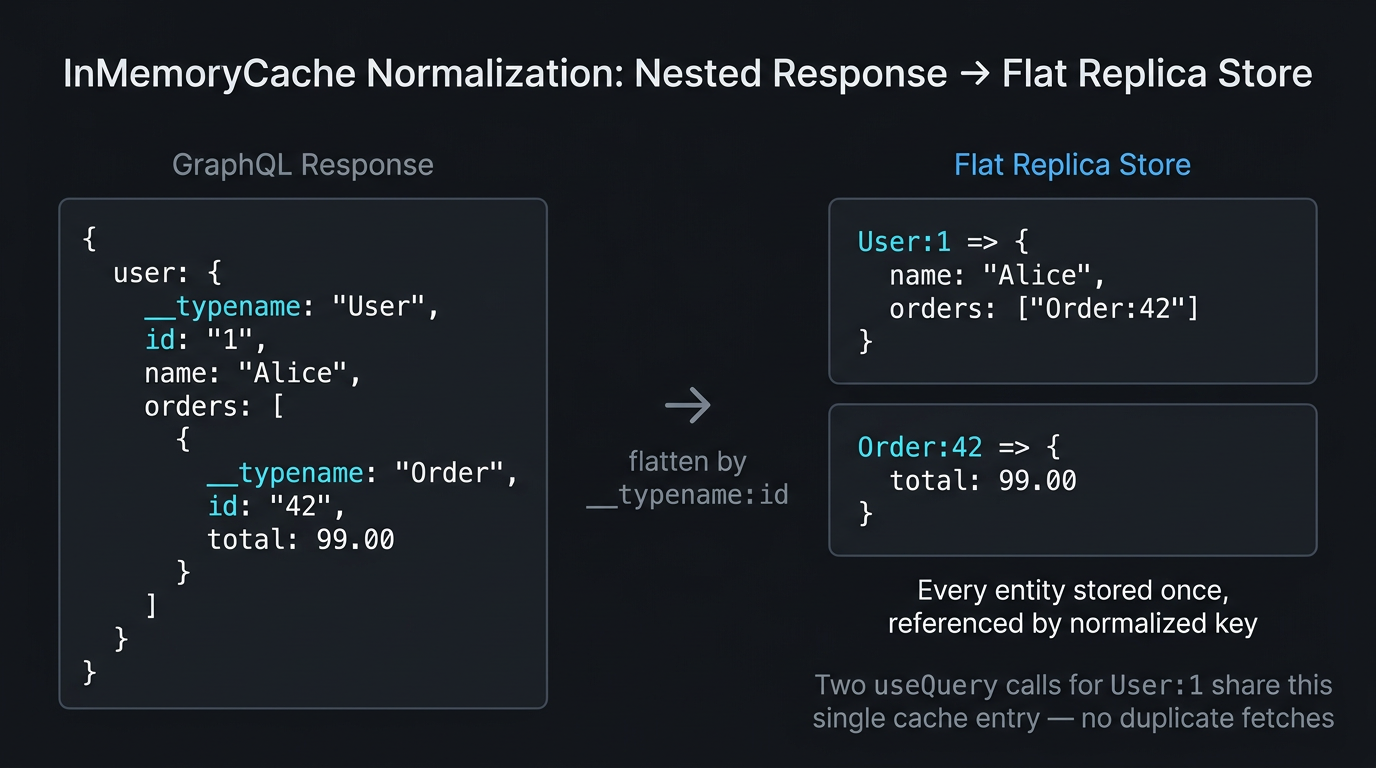
Given this query response:
The InMemoryCache does not store this nested object. It extracts every entity and stores each one at a flat key:
When useQuery reads this data back, it reconstructs the nested shape from these flat keys on the fly.
1.2 Why This Is the Replica Model
If a different query also fetches User:1 — say, a sidebar that shows the current user's name — that query reads from the same User:1 entry in the store. There is exactly one copy of every entity, no matter how many queries have fetched it. When User:1.name changes (via mutation or subscription), every component that has read User:1.name re-renders automatically.
This is what "local replica" means: the store is a single authoritative copy of every entity the client has ever fetched, exactly as a replica database maintains a synchronized copy of its primary.
Every useQuery call is a read from the replica store, not a network request. The network request happens to populate the store. Once an entity is in the store, all queries for that entity read from the same flat entry — they share data, not copies of data.
2. Choosing Your Client
The normalized cache is Apollo Client's core differentiator. Before configuring it, verify it's the right tool:
| Client | Cache Model | Best For |
|---|---|---|
| Apollo Client 3.x | Normalized InMemoryCache |
Graph-shaped APIs, optimistic UI, fragment colocation |
| Relay v15+ | Normalized (Rust compiler, strictest) | Maximum type safety, Relay-spec servers, large teams |
TanStack Query + fetch |
Response-level (not normalized) | REST APIs, simple GraphQL, non-graph data shapes |
TanStack Query is not inferior to Apollo Client — it is the correct choice when your data is not a graph. If entities don't reference each other by ID, normalization adds complexity without benefit. Use TanStack Query for flat lists, paginated feeds, and REST-shaped APIs.
Relay v15's Rust compiler generates per-fragment TypeScript types with zero runtime overhead and enforces fragment colocation at the compiler level. For teams with strict type-safety requirements and a Relay-spec server, it is the gold standard. Apollo Client is the pragmatic choice for teams that need normalization without Relay's constraints.
3. keyFields: The Silent Cache-Miss Root Cause
Apollo's normalization model works by default when every entity has an id: ID! field. When schemas use non-standard identifiers, the default breaks silently.
3.1 The Default Assumption
By default, InMemoryCache identifies entities by __typename + id. For User:1, it looks for __typename: "User" and id: "1". If both are present in the response, normalization works automatically.
3.2 Non-Standard Identifiers
Many schemas use uuid, _id (MongoDB), or composite keys:
3.3 Configuring keyFields
Fix this in InMemoryCache type policies:
If keyFields is misconfigured, Apollo silently stores entities at a non-canonical key. Two useQuery calls for the same entity create two unsynchronized entries — mutations update one but not the other. This is the root cause of most "cache inconsistency" bugs.
4. Field Policies: merge and read Functions
Field policies let you control how the cache handles specific fields — particularly useful for pagination, where Apollo can't automatically know how to combine paginated results.
4.1 The Pagination Problem
By default, Apollo treats these as two separate field results and overwrites the first with the second. The correct behavior is to merge them.
4.2 Cursor-Based Pagination with fetchMore
Then fetch the next page from a component:
The read function lets you transform cached data before it's returned to a component — for example, sorting a cached list by a field without a network request. Use read for derived views of existing cache data.
5. Cache Invalidation: The Three Operations
This is where the opening bug is finally explained. After a mutation updates User:1.name on the server, the client's replica has stale data. There are three operations to update it — and only one is correct for most mutations.
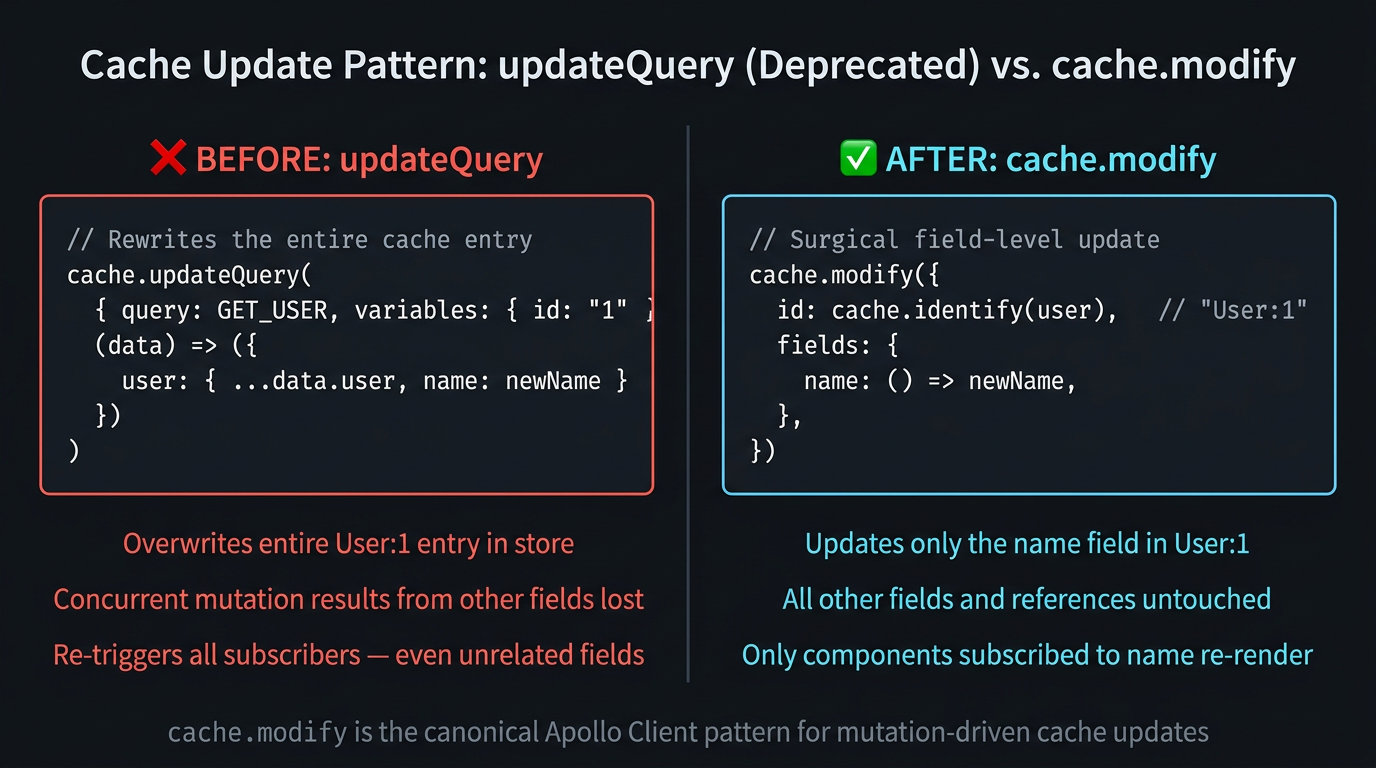
5.1 cache.modify — Surgical Field Update (Correct Default)
cache.modify writes to one field in one entity's cache entry. It is surgical, atomic, and correct. All other components reading User:1.name re-render automatically.
5.2 cache.evict — Delete a Node
Use cache.evict when an entity is deleted server-side:
5.3 refetchQueries — When the Surface Is Too Broad
refetchQueries fires a new network request for the listed queries after the mutation completes. It is not surgical — it re-fetches the entire query result. Use it when the mutation's side effects are too broad to enumerate precisely (e.g., placing an order affects inventory, recommendations, and the user's order history).
Never use updateQuery (it overwrites the entire cache entry and is deprecated in Apollo Client 3.x) or cache.writeQuery (it bypasses normalization and creates unsynchronized copies of entities). The correct post-mutation operations are cache.modify, cache.evict, or refetchQueries.
6. Cache GC: Preventing SPA Memory Leaks
Evicted entities don't disappear from the store immediately. They become unreachable — no query root points to them — but they remain in memory until garbage collection runs.
The retain function prevents a node from being garbage-collected even when no active query references it — useful for entities that should stay in the replica across route changes:
Summary
| Concept | Rule |
|---|---|
| Cache as replica | The normalized cache is a flat object store, not a hierarchical response tree — every useQuery call reconstructs the hierarchy from __typename:id keys on each read. |
| Mutation updates | Cache inconsistency after mutations always means the replica diverged from the server graph — the fix is surgical (cache.modify), never a full re-fetch unless the mutation touches an unpredictable surface. |
keyFields |
keyFields must be configured whenever a schema uses a non-standard identifier — the default id field assumption is the silent cause of most Apollo cache-miss bugs. |
| Pagination | fetchMore + cursor-based field policy merge is the canonical pagination pattern; updateQuery is deprecated and will not correctly handle concurrent mutations. |
| Cache GC | Call cache.gc() on route transitions in long-lived SPAs — without it, evicted nodes accumulate as unreachable memory over the session lifetime. |
What's Next
In Part 3, we configure the Apollo Client itself — the ApolloLink chain that sits between your components and the HTTP layer. Auth, retry, error interception, and logging all plug into this chain, and the order they're wired in is a correctness constraint, not a preference.
This article was developed with AI-assisted deep search, specification cross-referencing, and technical research synthesis.
