Siddhant Deval
Siddhant DevalAuthor
Senior Full-Stack Engineer·Sep 29, 2026·13 min read

The App Shell: Container Architecture, Routing, and Error Boundaries

The App Shell is the only piece of the system with global authority — it must be the thinnest possible layer: layout, routing, and failure containment. Every line of business logic in the shell is a coupling point that will eventually block an independent deployment.

The App Shell: Container Architecture, Routing, and Error Boundaries

A micro-frontend is not a smaller app — it is a domain boundary enforced at the deployment layer. If you can't explain the business capability it owns, you haven't drawn the boundary yet.
In every micro-frontend system, one application has global authority: the App Shell. It is the first thing the browser loads, the last thing that can fail without taking the entire page down, and the only application that knows about all the others.
The failure mode this article prevents: an App Shell that accumulates business logic over time — an isUserSubscribed check here, a cartItemCount state there, a featureFlag evaluation that only the Checkout team understands — until a single deployment of the shell blocks every other team's release and every incident requires a shell expert in the room.
A correct App Shell is boring. It does three things: mount the global layout, own top-level routing, and catch remote crashes before they propagate. Everything else is a coupling point.

1. Container Application Responsibilities

1.1 What the Shell Must Own

The App Shell is the only deployment unit with global scope. Its responsibilities are narrow by design:
tsx
// shell/src/App.tsx — the complete responsibility surface of a correct shell
export function App() {
  return (
    <AuthBootstrap>        {/* Initializes auth state — does NOT own business logic */}
      <GlobalLayout>       {/* Nav, Footer — pure chrome, zero domain logic */}
        <Router>           {/* Top-level route-to-remote mapping */}
          <RemoteRoutes /> {/* Dynamically loads remote applications */}
        </Router>
      </GlobalLayout>
    </AuthBootstrap>
  )
}
Global layout — The navigation bar, footer, and any persistent chrome (notifications tray, chat widget) that is visible on every page. These must be domain-agnostic: the nav renders links to bounded contexts but owns no logic about them.
Auth bootstrapping — The shell initializes the authentication state (token validation, session refresh) and makes it available to remotes. It does not implement authentication — that belongs to an Auth service. It bootstraps and distributes the result.
Centralized routing — The shell maps URL prefixes to remote applications. /checkout/* loads the Checkout remote. /catalog/* loads the Catalog remote. The shell owns the prefix; each remote owns its sub-routes.
Remote registration — The shell declares which remotes exist and where to find them. In a Module Federation 2.0 system, this is the manifest URL config from Part 4.

1.2 What the Shell Must Never Own

tsx
// ❌ Business logic in the shell — each of these is a coupling point

// Don't: domain-specific state
const [cartItemCount, setCartItemCount] = useState(0)  // Checkout owns this

// Don't: domain-specific checks
const isSubscribed = user?.subscription?.tier === 'pro'  // Profile owns this

// Don't: feature flags owned by a specific team
const showNewCheckoutFlow = featureFlags.get('checkout-v2')  // Checkout owns this

// Don't: domain API calls
const { data: products } = useFetch('/api/catalog/featured')  // Catalog owns this
Every line of business logic in the shell is a hidden coupling point. When the Checkout team changes how subscription status is determined, they must coordinate with the shell team. When the Catalog team changes the featured products API, the shell breaks. Independence is lost.
Mental Model Check
Test your shell's purity with this question: "If we deleted this line and replaced it with a hardcoded default, would any non-shell team notice immediately?" If yes, the logic belongs to that team's remote, not the shell.

2. Routing Architecture

2.1 The Two-Level Ownership Rule

Routing in a micro-frontend system has exactly two levels of ownership:
Shell owns:    /checkout       → loads Checkout remote
               /catalog        → loads Catalog remote
               /profile        → loads Profile remote

Checkout owns: /checkout/cart
               /checkout/confirm
               /checkout/gift-cards

Catalog owns:  /catalog/search
               /catalog/product/:id
               /catalog/category/:slug
The shell never knows about /checkout/gift-cards. The Checkout team adds routes in their own remote without touching the shell. This is what routing independence means.
tsx
// shell/src/routes.tsx — shell only knows prefixes
import { lazy, Suspense } from 'react'
import { Routes, Route, Navigate } from 'react-router-dom'

// Each remote is a single lazy-loaded module that exposes its own router
const CheckoutApp = lazy(() => import('checkout/App'))
const CatalogApp  = lazy(() => import('catalog/App'))
const ProfileApp  = lazy(() => import('profile/App'))

export function ShellRoutes() {
  return (
    <Suspense fallback={<GlobalLoadingSpinner />}>
      <Routes>
        <Route path="/"          element={<Navigate to="/catalog" replace />} />
        {/* /* — the shell passes all sub-routing to the remote */}
        <Route path="/checkout/*" element={<CheckoutApp />} />
        <Route path="/catalog/*"  element={<CatalogApp />} />
        <Route path="/profile/*"  element={<ProfileApp />} />
      </Routes>
    </Suspense>
  )
}
tsx
// checkout/src/App.tsx — Checkout remote owns all /checkout/* routes
import { Routes, Route } from 'react-router-dom'

export default function CheckoutApp() {
  return (
    <Routes>
      {/* These routes are relative — /checkout prefix is stripped by the shell */}
      <Route index          element={<CartPage />} />
      <Route path="confirm" element={<ConfirmPage />} />
      <Route path="gift-cards" element={<GiftCardsPage />} />
    </Routes>
  )
}
Performance / Safety Warning
Never hard-code sub-routes from a remote into the shell's routing table. If the Checkout team needs to add /checkout/split-payment, they should be able to do so without opening a PR against the shell. If you find yourself adding remote sub-routes to the shell config, your routing ownership boundary is broken.

3. Error Boundaries: Containing Remote Failures

3.1 Why Remote Crashes Are Different

In a standard React application, an unhandled error in a component throws up the component tree until it hits an Error Boundary — or crashes the entire page if no boundary exists.
In a micro-frontend system, this propagation must be stopped at the remote boundary. A crash in the Checkout remote must not affect the Catalog remote, the Profile remote, or the shell itself:
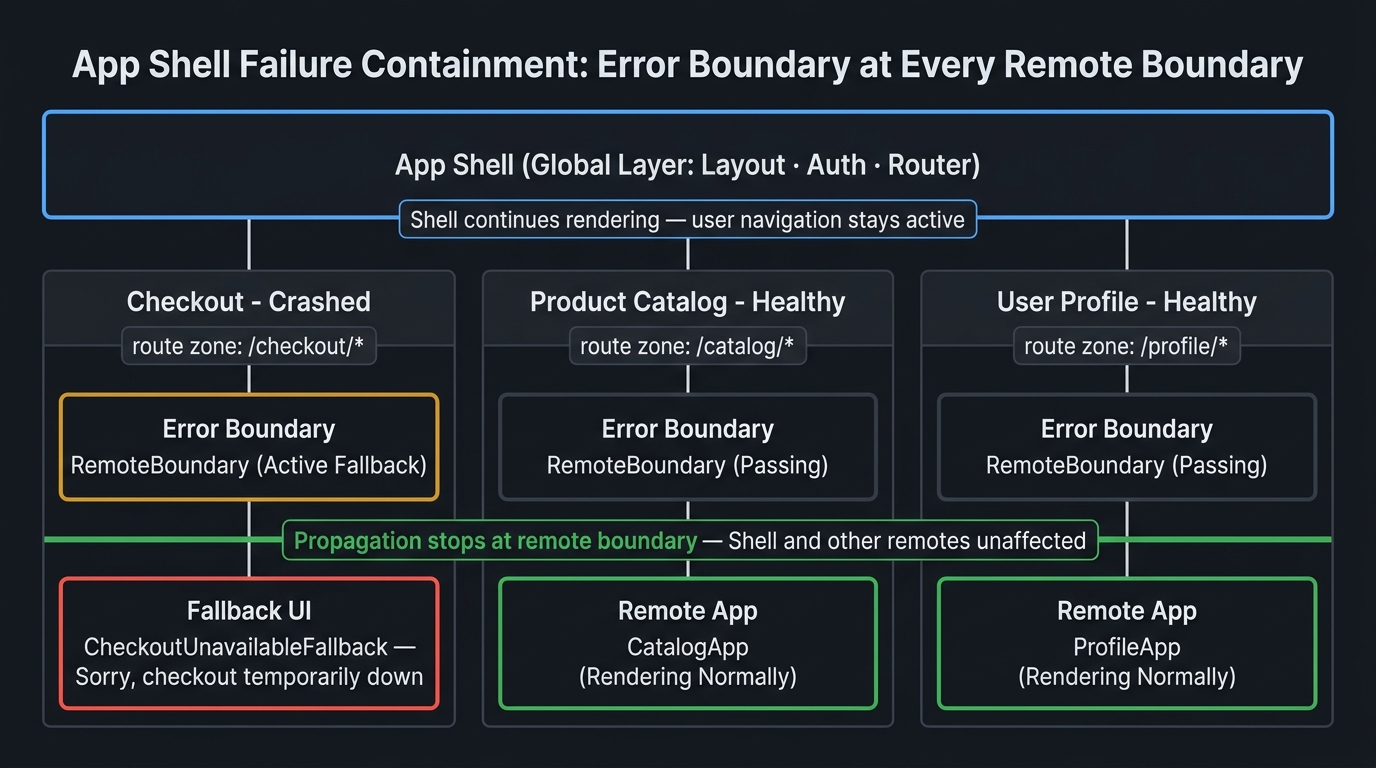
Hierarchy diagram showing App Shell error containment architecture. Top box labeled 'App Shell' (cyan, global layer). Below it, three columns side by side representing mounted remotes. Each column has: a 'Route Zone' box (dim), below it an 'Error Boundary' box (amber), below it a 'Remote App' box (green). Left column: Checkout — Error Boundary shows a 'fallback UI' state (amber, active). Middle column: Catalog — Remote App shows 'rendering normally' (green, active). Right column: Profile — Remote App shows 'rendering normally' (green, active). Red arrow from Checkout Remote App pointing up to Error Boundary, labeled 'crash caught here'. Green barrier line at Error Boundary level, labeled 'propagation stops — shell and other remotes unaffected'. Shell box at top annotated: 'Shell continues rendering — user can still navigate'. Caption: 'Error Boundaries placed at each remote boundary contain failures to their zone — a crashed Checkout does not crash Catalog or the shell.'
Error Boundaries placed at each remote boundary contain failures to their zone — a crashed Checkout does not crash Catalog or the shell.

3.2 The Error Boundary Component

tsx
// shell/src/RemoteBoundary.tsx
import { Component, ReactNode, ErrorInfo } from 'react'

interface Props {
  remoteName: string       // For error attribution — which remote crashed
  fallback: ReactNode      // What to show when the remote fails
  children: ReactNode
}

interface State {
  hasError: boolean
  error: Error | null
}

export class RemoteBoundary extends Component<Props, State> {
  state: State = { hasError: false, error: null }

  static getDerivedStateFromError(error: Error): State {
    return { hasError: true, error }
  }

  componentDidCatch(error: Error, info: ErrorInfo) {
    // Tag the error with the remote name for observability (Part 9)
    console.error(`[RemoteBoundary:${this.props.remoteName}]`, error)

    // Report to error tracking — remote attribution is critical
    errorTracker.captureException(error, {
      tags: {
        'remote.name': this.props.remoteName,
        'remote.boundary': true,
      },
      extra: { componentStack: info.componentStack },
    })
  }

  render() {
    if (this.state.hasError) {
      return this.props.fallback
    }
    return this.props.children
  }
}

3.3 Composing Boundaries with Lazy Loading

Each remote gets exactly one Error Boundary and one Suspense wrapper — placed at the route level:
tsx
// shell/src/routes.tsx — complete boundary composition
function RemoteRoute({
  remoteName,
  loader,
  fallback,
}: {
  remoteName: string
  loader: () => Promise<{ default: ComponentType }>
  fallback: ReactNode
}) {
  const RemoteApp = lazy(loader)

  return (
    <RemoteBoundary
      remoteName={remoteName}
      fallback={fallback}
    >
      <Suspense fallback={<RemoteLoadingState remoteName={remoteName} />}>
        <RemoteApp />
      </Suspense>
    </RemoteBoundary>
  )
}

// Usage — one boundary per remote, fallback is a composed UI not a blank zone
<Routes>
  <Route
    path="/checkout/*"
    element={
      <RemoteRoute
        remoteName="checkout"
        loader={() => import('checkout/App')}
        fallback={<CheckoutUnavailableFallback />}
      />
    }
  />
  <Route
    path="/catalog/*"
    element={
      <RemoteRoute
        remoteName="catalog"
        loader={() => import('catalog/App')}
        fallback={<CatalogUnavailableFallback />}
      />
    }
  />
</Routes>
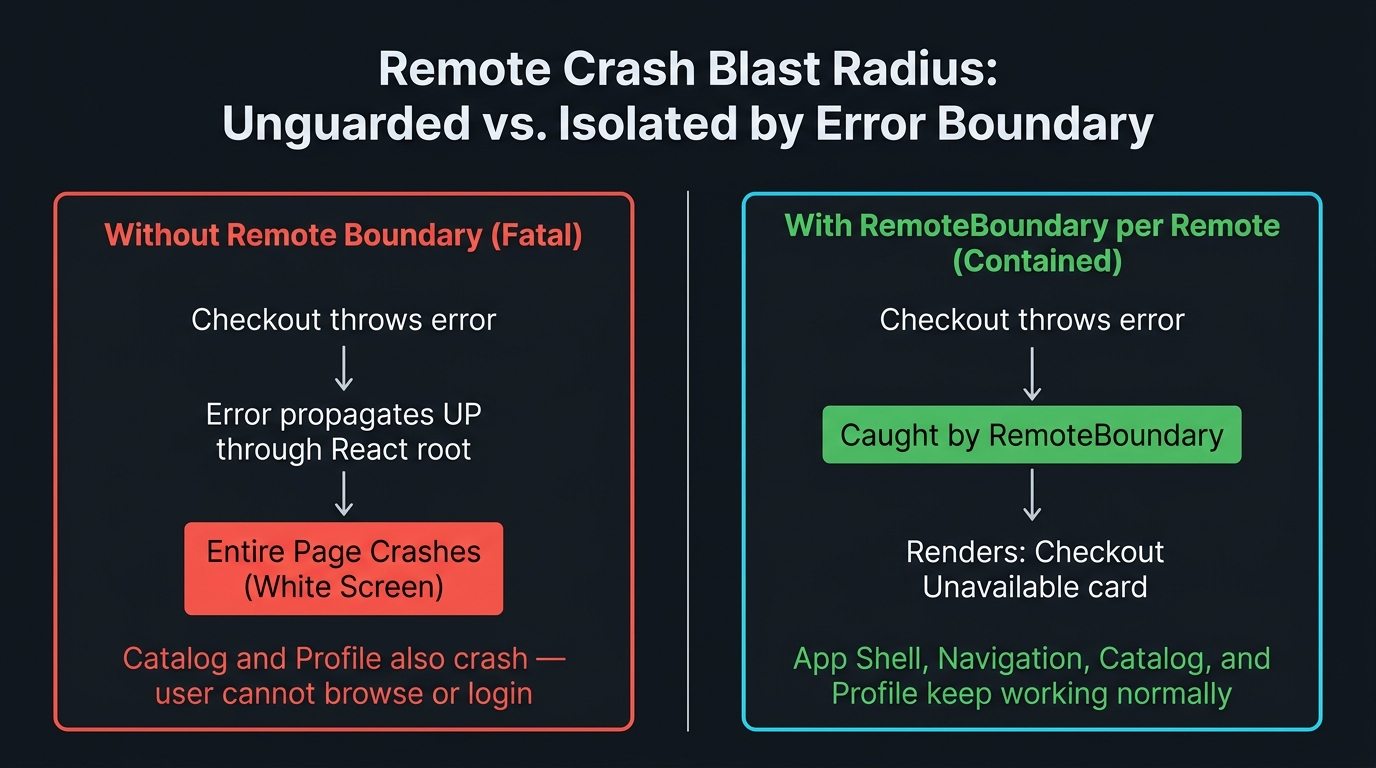
Before/After split diagram showing remote crash propagation behavior. Left panel labeled 'Without Error Boundary (broken)' — dim background. App Shell box at top, with three child remote boxes. Red lightning bolt on Checkout remote box labeled 'cart.useCheckout() throws'. Red propagation arrow going UP through the tree, crossing the shell boundary, hitting a red 'Page Crash' box at the top covering the entire app. Annotation: 'No boundary — entire page white-screens. Catalog and Profile also down.' Right panel labeled 'With RemoteBoundary per remote (correct)' — bright background. App Shell box at top (cyan, still rendering). Under Checkout route: 'CheckoutUnavailableFallback' box (amber) with text 'Sorry, checkout is temporarily unavailable'. Catalog and Profile remote boxes (green) labeled 'rendering normally'. Green barrier line between Checkout fallback and shell labeled 'Error caught, shell continues'. Caption: 'One Error Boundary per remote — a crashed Checkout renders its fallback while Catalog and Profile continue rendering normally.'
One Error Boundary per remote — a crashed Checkout renders its fallback while Catalog and Profile continue rendering normally.

4. Lazy Loading with Timeout Budgets

4.1 The Timeout Problem

React.lazy() + Suspense handles the loading state. But what happens if the remote chunk request takes 30 seconds? The user sees a loading spinner for 30 seconds. This is an SLA violation — not a loading state.
tsx
// shell/src/RemoteRoute.tsx — lazy loading with timeout and retry
function createTimedRemoteLoader(
  loader: () => Promise<{ default: ComponentType }>,
  timeoutMs = 10_000,
) {
  return () =>
    Promise.race([
      loader(),
      new Promise<never>((_, reject) =>
        setTimeout(() => reject(new Error('Remote load timeout')), timeoutMs),
      ),
    ])
}

// Usage — 10 second timeout before the Error Boundary catches the timeout error
const CheckoutApp = lazy(
  createTimedRemoteLoader(() => import('checkout/App'), 10_000)
)

4.2 The Circuit Breaker Integration

The runtime plugin circuit breaker from Part 4 works in combination with the Error Boundary:
Remote request → CircuitBreakerPlugin.beforeRequest()
                        ↓
              Circuit open? → return null → import() rejects
                        ↓
              Circuit closed? → proceed with fetch
                        ↓
              fetch fails? → CircuitBreakerPlugin.afterResolve() records failure
                        ↓
              Error propagates → RemoteBoundary.getDerivedStateFromError()
                        ↓
              Fallback UI renders — user sees degraded, not broken

5. BFF Reference

The App Shell orchestrates frontend composition — not API orchestration. When multiple micro-frontends need data from different backend services, the correct pattern is a Backend-for-Frontend (BFF): a dedicated API gateway that aggregates, transforms, and serves data tailored for the frontend's needs.
The BFF lives in the backend, not in the shell. Each micro-frontend can have its own BFF, or a shared BFF can serve all remotes with namespaced endpoints:
Checkout Remote → GET /bff/checkout/cart
Catalog Remote  → GET /bff/catalog/products
Profile Remote  → GET /bff/profile/account
The shell never calls these endpoints. The shell does not know what data each remote needs. If you find the shell making API calls on behalf of a remote, move those calls into the remote — the shell is leaking domain logic.
Architectural Note
BFF implementation is a backend architecture concern and is out of scope for this series. A practical starting point: Sam Newman — The BFF Pattern.

Summary

ConceptRule
Shell responsibilitiesLayout, auth bootstrapping, top-level routing, remote registration — nothing else
Business logic in shellZero — every domain concern belongs in its owning remote
Routing ownershipShell owns route prefixes; remotes own sub-routes — never cross this boundary
Error Boundary placementOne per mounted remote, at the route level — not at the component level
Fallback UIA crashed remote must render a composed fallback — not a blank zone
Timeout budgetAll React.lazy() remote loaders must have an explicit timeout — no unbounded loading states

What's Next

In Part 6, we address the hardest coordination problem in micro-frontend systems: how to share state and authentication across independently deployed apps without creating invisible coupling. URL parameters, Custom DOM Events, shared state remotes, and the OAuth callback pattern that most guides skip entirely. Part 6 → Cross-App State, Communication, and Authentication

References

  1. React — Error Boundaries
  2. React — React.lazy
  3. React — Suspense
  4. Sam Newman — The BFF Pattern
  5. Module Federation — Shell Pattern
Research & Synthesis Note

This article was developed with AI-assisted deep search, specification cross-referencing, and technical research synthesis.

#Micro-Frontends#App Shell#React#Error Boundaries#Routing#Resilience
Siddhant Deval

Written by Siddhant Deval

Senior Full-Stack Engineer building high-scale architectures, browser performance engineering systems, and SaaS platforms.