
Monorepo Foundations: Workspaces, Symlinks & Package Isolation
A workspace is not a folder structure — it is a symlink resolution graph. This article dissects the package manager hoisting algorithm that silently introduces phantom dependencies and doppelgängers, and shows how pnpm's content-addressable store eliminates both.
Frontend Platform & Scale Architecture
Monorepo Foundations: Workspaces, Symlinks & Package Isolation
Architecture is not about drawing boxes on a whiteboard — it is about enforcing boundary contracts, deterministic caching, and secure data mediation across independent release units. That principle starts before you write a single line of application code. It starts the moment you decide how your packages resolve each other's imports.
Most monorepo guides start with turbo.json. This article starts with the filesystem, because the most expensive production bugs in a multi-package repository are not logic bugs — they are resolution bugs. A package you never declared as a dependency compiles fine locally and silently fails in CI. A library appears twice in your bundle at two different versions, breaking global state without a single error thrown. These failures are invisible until they aren't.
This article builds the mental model you need before touching any build orchestrator: how workspaces physically wire packages together, why the hoisting algorithm is a liability in disguise, and how pnpm's content-addressable store eliminates an entire class of dependency resolution bugs by design.
1. The Structural Decision: Monolith vs. Polyrepo vs. Monorepo
Before configuring a single file, understand what you are choosing and why.
1.1 The Three Structures
| Structure | Description | Organizational Model |
|---|---|---|
| Monolith | One repository, one deployable unit, all code in one build graph | Single team or tightly coupled teams |
| Polyrepo | N repositories, N independent CI pipelines, cross-repo consumption via published packages | Teams that release fully independently; minimal shared code |
| Monorepo | One repository, multiple packages/apps, each independently deployable | Teams sharing code but coordinating locally; shared CI tooling |
None of these is universally correct. The wrong choice costs months of refactoring.
1.2 Conway's Law and Your Repository Structure
Conway's Law states: any organization that designs a system will produce a design whose structure is a copy of the organization's communication structure.
This is not a recommendation — it is a constraint. If your engineering teams are siloed across product lines with independent release cadences and no shared code, a polyrepo mirrors their reality accurately. Forcing them into a monorepo does not create collaboration; it creates merge conflicts.
The monorepo earns its overhead when:
- Two or more teams share code that must stay in sync (a UI component library, a shared API client, utility packages).
- Atomic cross-package changes are frequent: changing a type in
@company/typesand consuming it inapps/checkoutandapps/dashboardin a single commit, with a single PR, tested together. - You want to prevent version drift: shared packages pinned to different versions across separate repos diverge silently over months.
The organizational break-even for a monorepo is 2+ teams sharing code with synchronized release needs. Below that threshold, the tooling overhead (workspace config, task pipelines, boundary rules) costs more than the code sharing earns. A well-structured polyrepo with strict semantic versioning is the correct answer for fully autonomous teams.
1.3 The Monorepo ↔ MFE Decision Bridge
If you are reading this after the Micro-Frontend Architecture series, Part 1 of that series surfaces Monorepo vs. Polyrepo as a top-level architectural decision. The connection is direct:
- A monorepo + Module Federation is the standard topology for MFE teams that share a design system, a state library, or a common auth package — they colocate code while deploying independently.
- A polyrepo + Module Federation is correct when teams have no shared code and need total CI/CD independence — each MFE is its own repository with its own pipeline.
- When your monorepo is well-governed with strong module boundary rules, you may never need MFEs at all. Nx's project graph with strict
@nx/enforce-module-boundariescan provide the same team autonomy guarantees inside a single build graph.
This series (Parts 1 & 2) covers the monorepo mechanics. The MFE series covers the runtime composition layer. Choose one or both based on your team topology — not on what is trending.
2. Package Manager Workspace Primitives
A workspace is the mechanism that makes packages in the same repository aware of each other without publishing to a registry. Every major package manager supports workspaces, with different syntaxes and resolution strategies.
2.1 Declaring Workspaces
pnpm (pnpm-workspace.yaml):
npm (package.json):
yarn (package.json):
The glob patterns resolve to any directory containing a package.json. Running pnpm install (or npm install) from the repository root reads these patterns, discovers all matching packages, and wires them together.
2.2 The workspace: Protocol
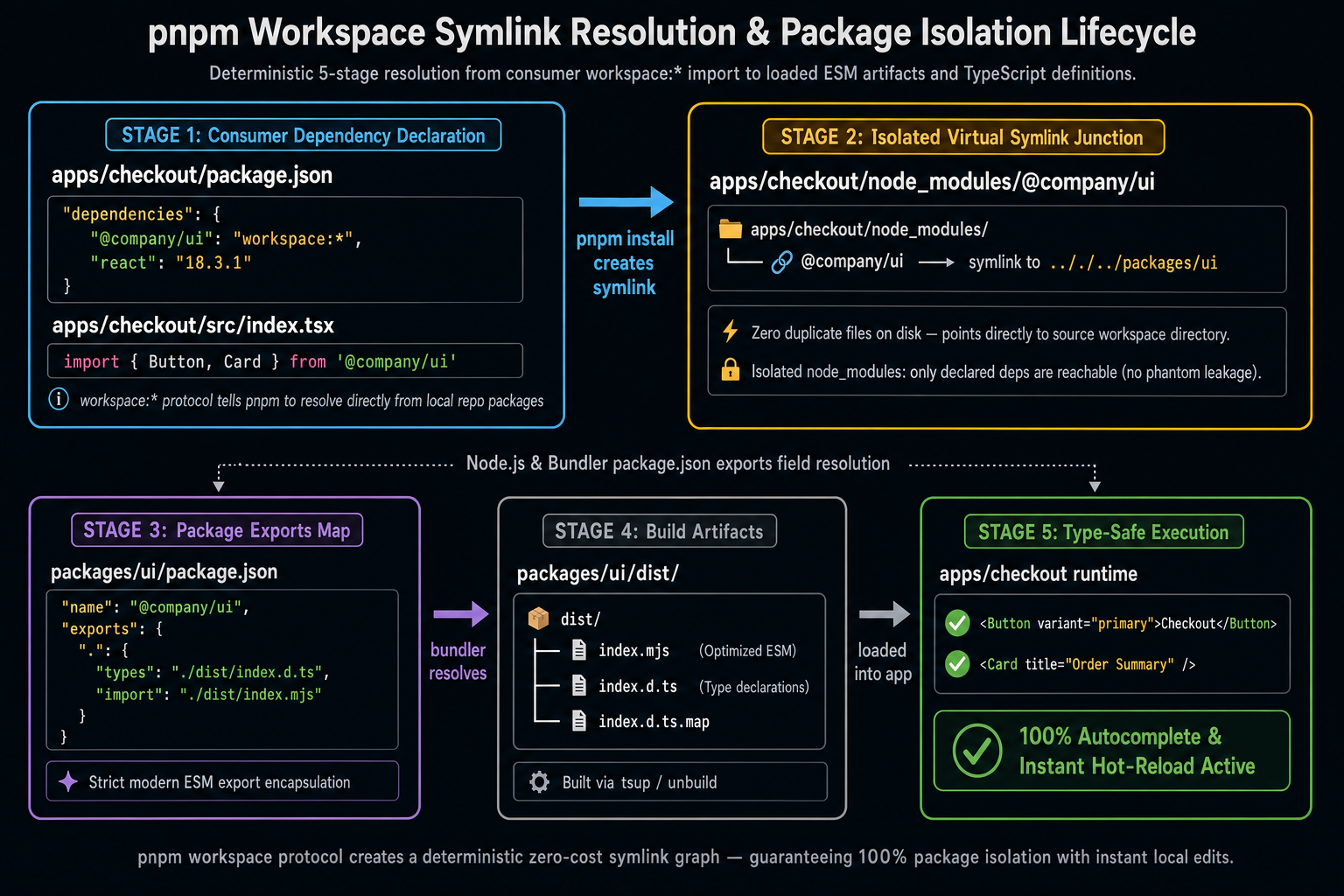
When apps/checkout depends on packages/ui, you do not want npm to resolve @company/ui from the registry — you want it to resolve from the local filesystem. The workspace: protocol enforces this:
workspace:* means: always use the local workspace version, whatever it currently is. workspace:^1.0.0 means: use the local version but only if it satisfies ^1.0.0 — useful for stricter version discipline.
Without the workspace: protocol, a version string like "@company/ui": "^2.0.0" will first check the npm registry. If a published version exists, npm may resolve the registry version instead of your local code. This creates the baffling situation where you edit packages/ui, run your app, and see no changes — because you are running the published version from six months ago.
2.3 A Production-Ready Workspace Layout
Root package.json:
The root package.json must be "private": true. Publishing the root accidentally would expose your internal monorepo configuration to the npm registry. Every CI setup should verify this before publish steps.
3. Symlink Resolution Mechanics
Understanding workspaces requires understanding what a package manager actually does with the filesystem when it installs. This is where most documentation stops — and where the bugs begin.
3.1 The Physical Reality of node_modules
When you run pnpm install in a workspace, the package manager:
- Reads all
package.jsonfiles in the workspace. - Resolves all external dependencies from the registry.
- Creates symlinks in each package's
node_modulesfor workspace siblings.
For apps/checkout that depends on packages/ui:
When Node.js resolves import { Button } from '@company/ui', it traverses:
apps/checkout/node_modules/@company/ui— finds a symlink.- Follows the symlink to
packages/ui. - Reads
packages/ui/package.jsonto find themainorexportsentry. - Loads the module.
This is the fundamental mechanism. It works cleanly when every package declares its dependencies explicitly.
3.2 The Hoisting Algorithm
npm and yarn use a hoisting strategy to flatten node_modules. Instead of each package having its own node_modules subtree, dependencies are hoisted to the root node_modules whenever possible.
The goal is to reduce disk space by sharing a single installation of react across all packages. The consequence is a trap.
4. The Phantom Dependency Problem
This is the most common — and most dangerous — failure mode in monorepos using npm or yarn with hoisting.
4.1 What is a Phantom Dependency?
A phantom dependency is a package that your code imports without declaring in your package.json. It works because the hoisting algorithm placed it in the root node_modules, making it globally importable.
This works locally because apps/dashboard (which does declare lodash) caused it to be hoisted to the root node_modules. packages/ui can reach it through the hoisted tree.
4.2 Why Phantom Dependencies Fail in CI
The moment apps/dashboard removes lodash from its own package.json, lodash is no longer hoisted. Nothing in packages/ui's package.json requires it, so no installer puts it back. packages/ui breaks — but only in CI, only after a seemingly unrelated package change, with an error like Cannot find module 'lodash'.
The bug is real. The fix requires updating packages/ui/package.json to explicitly declare lodash. But by then, you've spent hours bisecting what changed.
4.3 The Doppelgänger Problem
Related but distinct: a doppelgänger occurs when two packages require incompatible versions of the same dependency, causing the package manager to install both.
With hoisting, npm cannot put both at the root. It hoists one (say, 18.x) and places the other (17.x) inside packages/legacy-widget/node_modules/react. Now two versions of React exist in the runtime. React hooks check for a single React instance — two instances means useState in packages/legacy-widget operates against a different React runtime than the host application, causing cryptic errors like:
You are calling hooks correctly. The error is a phantom of the doppelgänger.
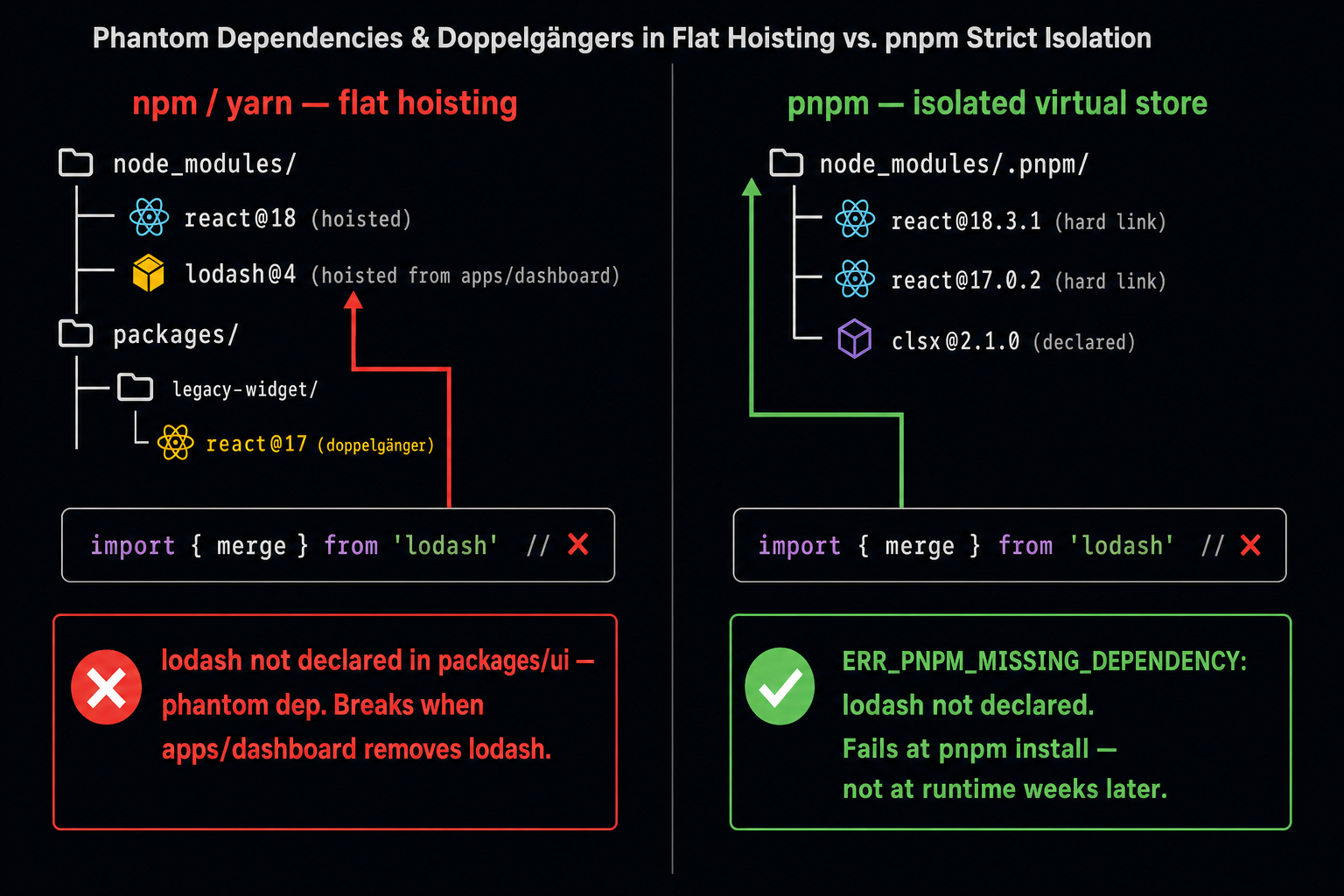
The phantom dependency and doppelgänger bugs are silent by default in npm and yarn. They produce runtime errors that are decoupled in time from the change that caused them — making them among the hardest category of monorepo bugs to debug.
5. pnpm's Content-Addressable Store
pnpm solves both problems structurally by abandoning flat hoisting entirely.
5.1 The Global Content-Addressable Store
pnpm maintains a single global store on your machine at ~/.pnpm-store/. Every package version you ever install is stored once in this store as a set of files keyed by content hash.
When pnpm installs react@18.3.1 into your project, it does not copy the file — it creates a hard link from the project's virtual store to the global store file. A hard link is a filesystem-level alias pointing to the same inode. No disk space is duplicated; no bytes are copied.
5.2 The Virtual Store & Strict Isolation
Instead of a flat node_modules, pnpm creates a virtual store at node_modules/.pnpm/:
Each package in node_modules/.pnpm/ has its own nested node_modules/ containing only the packages it declared as dependencies. Node.js resolution walks up the tree — but from a symlinked path, the "up" goes into the virtual store, not to the root.
5.3 How pnpm Eliminates Phantom Dependencies
When packages/ui tries to import lodash without declaring it:
Node.js resolves the import starting from packages/ui/node_modules/. pnpm only places declared dependencies there. lodash is not declared → lodash is not present → install-time failure with a clear error, not a silent runtime failure six weeks later in a CI pipeline.
The error surfaces at pnpm install, not at runtime. This is the correct behavior.
5.4 How pnpm Handles Doppelgängers
With pnpm, react@18 and react@17 are simply two separate entries in the virtual store. Each consumer resolves to its own declared version cleanly with no contamination. packages/ui always gets react@18, packages/legacy-widget always gets react@17 — neither sees the other's installation.
The doppelgänger still exists in the codebase (two react versions is still a problem for runtime singleton semantics), but pnpm does not corrupt the resolution graph — it isolates each correctly.
6. TypeScript Project References for Monorepos
Workspaces solve the runtime resolution problem. TypeScript project references solve the compile-time resolution and incremental build problem.
6.1 The Problem: Full-Repository Type Checking
Without project references, tsc in the root compiles every TypeScript file in the entire monorepo on every run. In a large repository, this means rebuilding packages/ui's types even when you only changed apps/dashboard. No incremental compilation, no build order — just brute force.
6.2 Configuring Project References
Root tsconfig.base.json — shared compiler options:
packages/ui/tsconfig.json — the referenced package:
"composite": true is mandatory for any package that will be referenced by another. It instructs tsc to emit .d.ts declarations and a .tsbuildinfo file — the incremental build cache.
apps/checkout/tsconfig.json — the referencing app:
Root tsconfig.json — the solution file that references all packages:
6.3 How Incremental Builds Work
With project references configured, tsc --build (or tsc -b):
- Reads the root
tsconfig.jsonreferences. - Topologically sorts the project graph:
packages/types→packages/utils→packages/ui→apps/*. - Checks each package's
.tsbuildinfoagainst source file modification times. - Skips packages with no changes — only rebuilds what has changed.
- Rebuilds dependents in order when an upstream package changes.
Run tsc --build --verbose to see exactly which projects are being rebuilt and which are skipped due to .tsbuildinfo cache hits. This is the fastest way to diagnose a stale incremental build.
6.4 Path Aliases vs. Project References
A common shortcut is to use TypeScript paths aliases in tsconfig.base.json:
This gives you import autocompletion but does not provide incremental build ordering. tsc still compiles everything from source on every run, and there is no guarantee that packages/ui compiles before apps/checkout. Use references for production monorepos, not paths.
7. When to Graduate to a Polyrepo
A monorepo is not permanent. The signals that a team should graduate to a polyrepo:
| Signal | Meaning |
|---|---|
| No shared code | The teams in the monorepo share no packages — the monorepo provides overhead with no benefit. |
| CI times growing unboundedly | Even with affected-task analysis (covered in Part 2), a change to a shared package triggers rebuilds across the entire tree — the blast radius is too large. |
| Independent security boundaries required | A team handling PCI or HIPAA data needs repository-level access controls that a monorepo cannot enforce at the package level. |
| Incompatible toolchain requirements | One team needs Node.js 18 and another needs Node.js 22; one uses webpack and another uses Vite in ways that cannot coexist in a single workspace. |
| Team wants zero coordination on releases | If teams should never coordinate their release pipelines, a polyrepo with published NPM packages and pinned semver is the correct model. |
Summary
| Concept | Rule |
|---|---|
| Workspace declaration | Use pnpm-workspace.yaml; reference local packages with workspace:* protocol |
| Phantom dependencies | Use pnpm strict isolation — phantom deps fail at install time, not at runtime |
| Doppelgängers | Two versions of the same package are allowed in pnpm; they are isolated, not merged |
| TypeScript compilation | Use project references with composite: true for incremental builds and type-safe cross-package imports |
| Monorepo vs. polyrepo | Break-even is 2+ teams sharing code with synchronized release needs |
| Conway's Law | Your repo structure should mirror your team communication structure |
What's Next
In Part 2, we build on this foundation to add task orchestration: how Turborepo and Nx construct Directed Acyclic Graphs of build and test tasks, how computation caching works at the hash level, and how to enforce strict architectural module boundaries with automated lint rules.
This article was developed with AI-assisted deep search, specification cross-referencing, and technical research synthesis.
