Siddhant Deval
Siddhant DevalAuthor
Senior Full-Stack Engineer·Aug 27, 2026·12 min read

`tsconfig` as Architecture: Strict Mode & Beyond

`tsconfig.json` is not a build config file — it is a type-level constraint specification. Every flag is a design decision with direct runtime safety implications. This article decodes the flags that matter most, from `strict`'s seven sub-flags to the modern `verbatimModuleSyntax` and project references.

tsconfig as Architecture: Strict Mode & Beyond

Types are a specification language — not an annotation layer. tsconfig.json is where that language's safety guarantees are set. Every flag is a design decision with direct runtime safety implications. Treating tsconfig.json as a build config file — adjusting it until errors go away — is the compiler equivalent of ignoring test failures. This article decodes the flags that matter, explains why each exists, and gives you the right default for a production codebase.

1. The strict Flag — Seven Guarantees in One

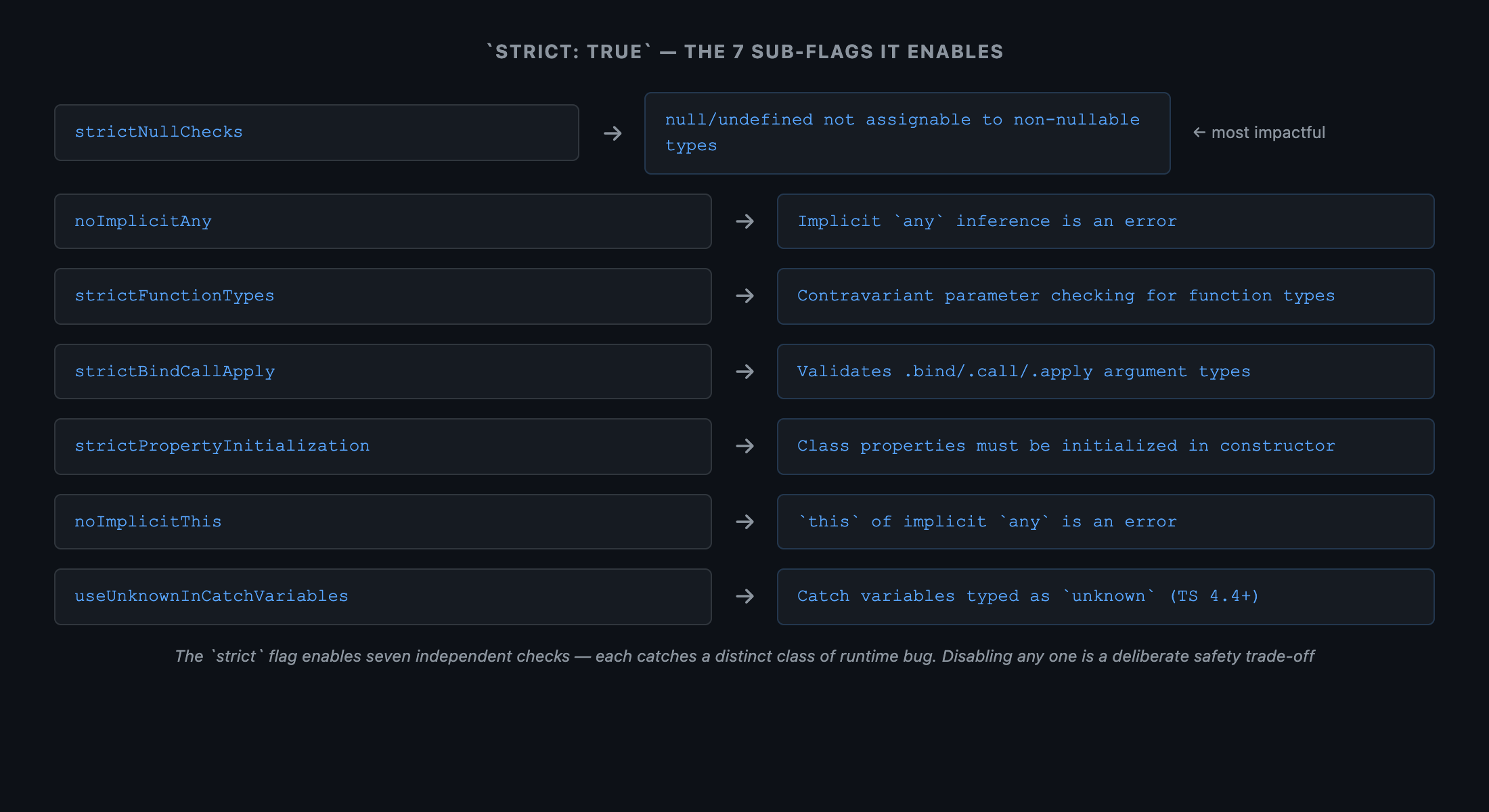
"strict": true is a shorthand that enables seven distinct checks. Each one catches a different class of runtime bug at compile time:
Sub-flagWhat It Catches
strictNullChecksnull and undefined are not assignable to non-nullable types — eliminates the most common class of runtime crashes
strictFunctionTypesFunctions in non-method positions are checked contravariantly — catches unsafe handler substitution (Part 10)
strictBindCallApplyValidates argument types of .bind(), .call(), and .apply()
strictPropertyInitializationClass properties must be initialized in the constructor or declared with ! — prevents uninitialized property reads
noImplicitAnyImplicit any inference is an error — forces you to be explicit about unknown or a concrete type
noImplicitThisthis of implicit any type is an error — prevents context confusion in callbacks
useUnknownInCatchVariablesCatch clause variables are typed as unknown instead of any (TS 4.4+) — forces narrowing before use
typescript
// Without strictNullChecks — this compiles and crashes at runtime
function getLength(str: string): number {
  return str.length  // str could be null or undefined at runtime
}

// With strictNullChecks — forced to handle the null case
function getLength(str: string | null): number {
  if (str === null) return 0
  return str.length  // ✅ safe
}
 Tree diagram. Root node: "strict": true. Seven child nodes, each labeled with the sub-flag name and a one-line description. Color coding: red nodes for null/type safety flags (strictNullChecks, noImplicitAny), amber nodes for function safety (strictFunctionTypes, strictBindCallApply), blue nodes for class/context safety (strictPropertyInitialization, noImplicitThis, useUnknownInCatchVariables). Caption: 'The strict flag enables seven independent checks — each catches a distinct class of runtime bug. Disabling any one of them is a deliberate safety trade-off'.
Figure: Tree diagram. Root node: "strict": true. Seven child nodes, each labeled with the sub-flag name and a one-line description. Color coding: red nodes for null/type safety flags (strictNullChecks, noImplicitAny), amber nodes for function safety (strictFunctionTypes, strictBindCallApply), blue nodes for class/context safety (strictPropertyInitialization, noImplicitThis, useUnknownInCatchVariables). Caption: 'The strict flag enables seven independent checks — each catches a distinct class of runtime bug. Disabling any one of them is a deliberate safety trade-off'.

2. Beyond strict — The Flags That Matter

strict: true is the baseline. These additional flags provide meaningful safety guarantees beyond it:

2.1 exactOptionalPropertyTypes

Without this flag, { x?: string } accepts { x: undefined } — that is, explicitly passing undefined as the value of an optional property is allowed. This is often not what you intend:
typescript
// tsconfig.json: "exactOptionalPropertyTypes": true

interface Options {
  timeout?: number  // Intended: "not provided" vs "provided a number"
}

// ❌ With exactOptionalPropertyTypes, explicitly setting to undefined is an error
const opts: Options = { timeout: undefined }
// Error: Type 'undefined' is not assignable to type 'number' with exactOptionalPropertyTypes

// ✅ Correct: simply omit the property
const opts2: Options = {}  // timeout is absent — that's the intent

2.2 noUncheckedIndexedAccess

Without this flag, arr[0] is typed as T (the element type). But any array index access can return undefined. With noUncheckedIndexedAccess, TypeScript adds | undefined to all indexed access results:
typescript
// Without noUncheckedIndexedAccess (default)
const arr: number[] = [1, 2, 3]
const first: number = arr[0]      // ✅ Compiles — but arr[99] would also be `number`, not `undefined`

// With noUncheckedIndexedAccess
const first2 = arr[0]             // number | undefined — accurately reflects runtime behavior
const value = first2 * 2          // ❌ Error: first2 might be undefined
const value2 = first2 ?? 0 * 2   // ✅ Safe — handle the undefined case
 Side-by-side diagram. Left panel labeled 'Without noUncheckedIndexedAccess': array [1, 2, 3], index access arr[0] shows type number (green). Access arr[99] also shows type number (green) — misleading. Right panel labeled 'With noUncheckedIndexedAccess': same array, arr[0] shows type number | undefined (amber). arr[99] shows number | undefined (amber). A label: 'Both correctly reflect that any index access can produce undefined'. Caption: 'noUncheckedIndexedAccess makes index access types honest — arr[n] returns T | undefined, matching the actual runtime behavior for out-of-bounds indices'.
Figure: Side-by-side diagram. Left panel labeled 'Without noUncheckedIndexedAccess': array [1, 2, 3], index access arr[0] shows type number (green). Access arr[99] also shows type number (green) — misleading. Right panel labeled 'With noUncheckedIndexedAccess': same array, arr[0] shows type number | undefined (amber). arr[99] shows number | undefined (amber). A label: 'Both correctly reflect that any index access can produce undefined'. Caption: 'noUncheckedIndexedAccess makes index access types honest — arr[n] returns T | undefined, matching the actual runtime behavior for out-of-bounds indices'.

2.3 noImplicitOverride

When a subclass method has the same name as a parent method, TypeScript can now require the override keyword to make the relationship explicit:
typescript
class Base {
  render(): string { return '<base>' }
}

// ❌ Without noImplicitOverride — silent override; renamed parent method = runtime bug
class Child extends Base {
  render(): string { return '<child>' }  // Is this intentional? TypeScript doesn't know.
}

// ✅ With noImplicitOverride — intent is explicit
class Child extends Base {
  override render(): string { return '<child>' }  // Compiler verifies the parent method exists
}

3. Module System Flags

3.1 isolatedModules

Vite, SWC, and esbuild transpile TypeScript files one at a time — they do not have access to the full type graph. This means they cannot emit correct JavaScript for constructs that require type information from other files. isolatedModules: true flags these constructs:
typescript
// ❌ `const enum` — requires the full compilation unit to inline values
const enum Direction { Up, Down, Left, Right }

// ❌ Re-exporting a type without `type` keyword
export { SomeType }        // Ambiguous — is this a value or a type-only export?
export type { SomeType }   // ✅ Explicit — esbuild knows to elide this
import type { SomeType } from './types'  // ✅ Always use `import type` for type-only imports

3.2 verbatimModuleSyntax (TypeScript 5.0)

verbatimModuleSyntax supersedes the older importsNotUsedAsValues flag. It requires that import/export statements are written exactly as they will be emitted — no automatic type-only elision:
typescript
// ❌ verbatimModuleSyntax rejects this if User is a type-only import
import { User, processUser } from './types'

// ✅ Explicit split — the compiler can elide `import type` cleanly
import type { User } from './types'
import { processUser } from './utils'

4. The satisfies Operator (TypeScript 4.9)

satisfies validates that a value matches a type without widening the inferred type. This is the correct tool for typed configuration objects and lookup maps:
typescript
type Palette = Record<string, [number, number, number] | string>

// ❌ Type annotation — widens to Palette, losing the specific inferred types
const palette: Palette = {
  red:   [255, 0, 0],
  green: '#00ff00',
}
palette.red    // [number, number, number] | string — too wide
palette.red.map(...)  // ❌ Error — not guaranteed to be an array

// ✅ satisfies — validates shape AND preserves the inferred literal types
const palette2 = {
  red:   [255, 0, 0],
  green: '#00ff00',
} satisfies Palette

palette2.red    // [number, number, number] — specific, not widened
palette2.red.map(v => v / 255)  // ✅ Safe — TypeScript knows it's a tuple
palette2.blue   // ❌ Error — satisfies still validates missing required keys

5. Project References — Monorepo Build Architecture

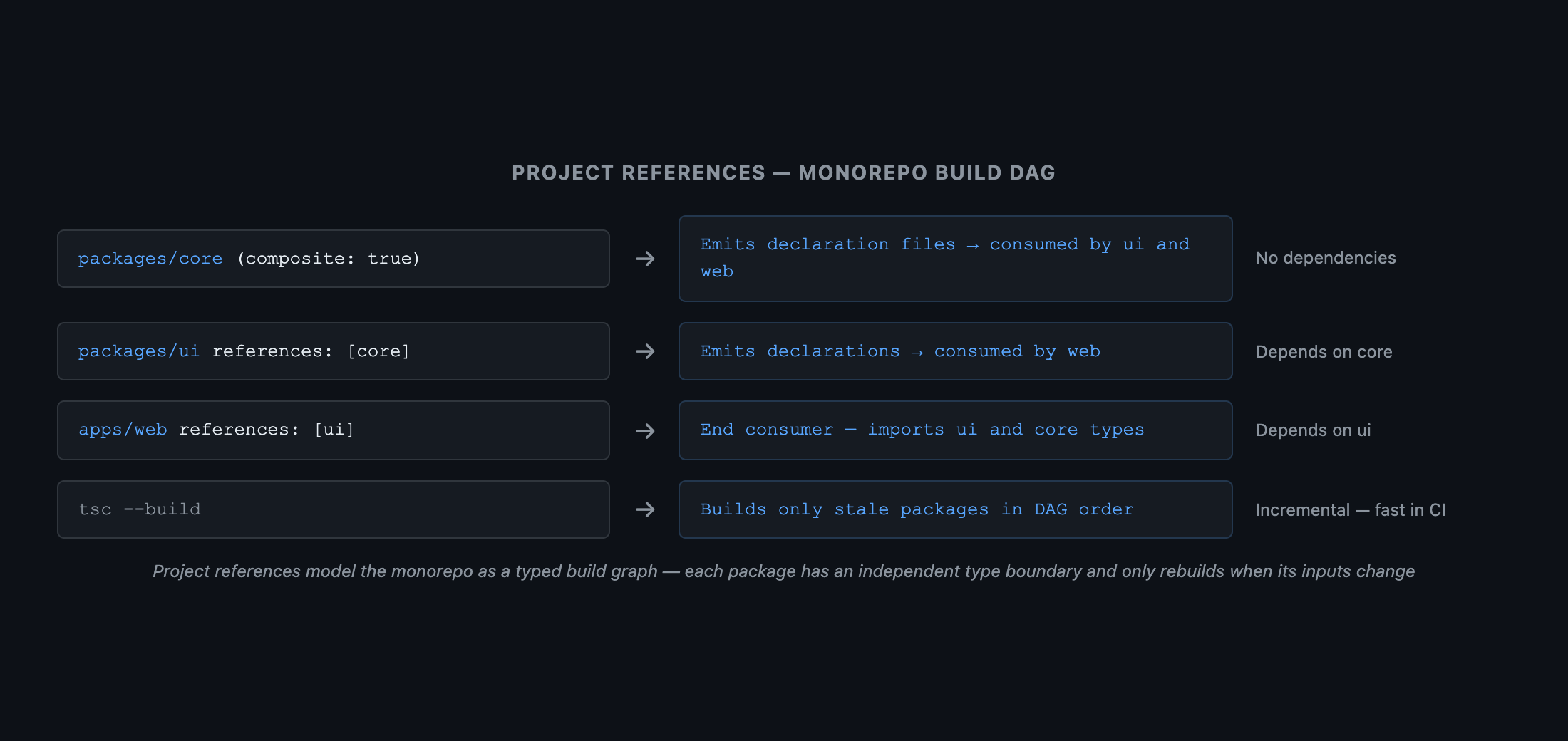
For monorepos with multiple TypeScript packages, project references enable incremental builds and proper type boundaries:
json
// packages/ui/tsconfig.json
{
  "compilerOptions": {
    "composite": true,   // Required for project references
    "outDir": "./dist",
    "declaration": true
  },
  "references": [
    { "path": "../core" }  // Declares a dependency on packages/core
  ]
}
bash
# Build with incremental compilation — only rebuilds changed packages
npx tsc --build

# Check types without emitting
npx tsc --build --dry
 DAG diagram. Three boxes: 'packages/core' (leftmost), 'packages/ui' (center), 'apps/web' (rightmost). Arrow from 'packages/core' to 'packages/ui' labeled 'reference'. Arrow from 'packages/ui' to 'apps/web' labeled 'reference'. Annotation at each box: 'composite: true — emits declaration files for downstream packages'. Bottom label: 'tsc --build traverses the DAG and rebuilds only stale packages — much faster than compiling everything from scratch'. Caption: 'Project references model your monorepo as a typed build graph — each package has an independent type boundary and only rebuilds when its inputs change'.
Figure: DAG diagram. Three boxes: 'packages/core' (leftmost), 'packages/ui' (center), 'apps/web' (rightmost). Arrow from 'packages/core' to 'packages/ui' labeled 'reference'. Arrow from 'packages/ui' to 'apps/web' labeled 'reference'. Annotation at each box: 'composite: true — emits declaration files for downstream packages'. Bottom label: 'tsc --build traverses the DAG and rebuilds only stale packages — much faster than compiling everything from scratch'. Caption: 'Project references model your monorepo as a typed build graph — each package has an independent type boundary and only rebuilds when its inputs change'.

6. A Note on Decorators

experimentalDecorators (the stage-2 metadata-emitting decorator system) and the stage-3 decorator standard (TypeScript 5.0+) are separate systems that are not compatible with each other. Deep coverage of the decorator ecosystem — Angular's dependency injection, NestJS modules, MobX @observable — is intentionally out of scope for this series. If your project requires decorators, consult the official NestJS or Angular documentation for the experimentalDecorators + emitDecoratorMetadata configuration.

Summary

FlagWhen to EnableWhat It Prevents
strictAlwaysNull crashes, implicit any, unsafe this
exactOptionalPropertyTypesAlwaysConflating "absent" with "explicitly undefined"
noUncheckedIndexedAccessAlwaysTreating arr[n] as non-nullable
noImplicitOverrideClass-heavy codebasesSilent method override without override keyword
isolatedModulesWith Vite / SWC / esbuildNon-isolatable constructs (const enum, untagged re-exports)
verbatimModuleSyntaxTS 5.0+ projectsAmbiguous type-vs-value imports
satisfies (operator)Config objects, lookup mapsType widening on object literals
composite + referencesMonoreposFull rebuilds on unchanged packages

What's Next

In Part 8, we cover Declaration Merging and Module Augmentation — the mechanism that lets you extend third-party library types safely, add properties to Express's Request, type process.env, and declare non-JS file imports, all without forking anything.
Research & Synthesis Note

This article was developed with AI-assisted deep search, specification cross-referencing, and technical research synthesis.

#TypeScript#tsconfig#Strict Mode#Configuration#Build Tooling
Siddhant Deval

Written by Siddhant Deval

Senior Full-Stack Engineer building high-scale architectures, browser performance engineering systems, and SaaS platforms.