Siddhant Deval
Siddhant DevalAuthor
Senior Full-Stack Engineer·Aug 27, 2026·13 min read

Runtime Type Safety: Zod, Valibot & Parse-Don't-Validate

TypeScript types are erased at runtime. Any data crossing a trust boundary — API responses, localStorage, environment variables, user input — must be parsed, not cast. An `as ApiResponse` silences the compiler; it does not validate the data.

Runtime Type Safety: Zod, Valibot & Parse-Don't-Validate

Types are a specification language — not an annotation layer. That means they are design-time tools. At runtime, TypeScript types are completely erased — they exist nowhere in the compiled JavaScript. When your application calls fetch('/api/user') and casts the result as User, you have made a bet, not a guarantee. The compiler is silent. The only guarantee comes from parsing. This article is about building those guarantees correctly.

1. The Trust Boundary Problem

Every application has trust boundaries — points where data enters from an untrusted source and must be validated before use. The most common ones:
SourceExampleWhy It's Untrusted
Network (fetch)GET /api/usersUser[]Server may change schema; API may return error shape
localStorageJSON.parse(localStorage.getItem('session'))User may have modified stored data
process.envprocess.env.DATABASE_URLMay be missing or malformed at deploy time
URL parametersnew URLSearchParams(location.search).get('page')User controls the URL
JSON.parse()Parsing uploaded files or webhooksShape is not guaranteed by the caller
The anti-pattern at every boundary is a type cast:
typescript
// ❌ `as User` is a compile-time silencer — it does nothing at runtime
const response = await fetch('/api/user')
const user = (await response.json()) as User

// If the API returns { error: 'Not found' }, user.name is undefined at runtime.
// TypeScript does not know. TypeScript cannot know — the types were erased.
console.log(user.name.toUpperCase())  // 💥 TypeError: Cannot read properties of undefined
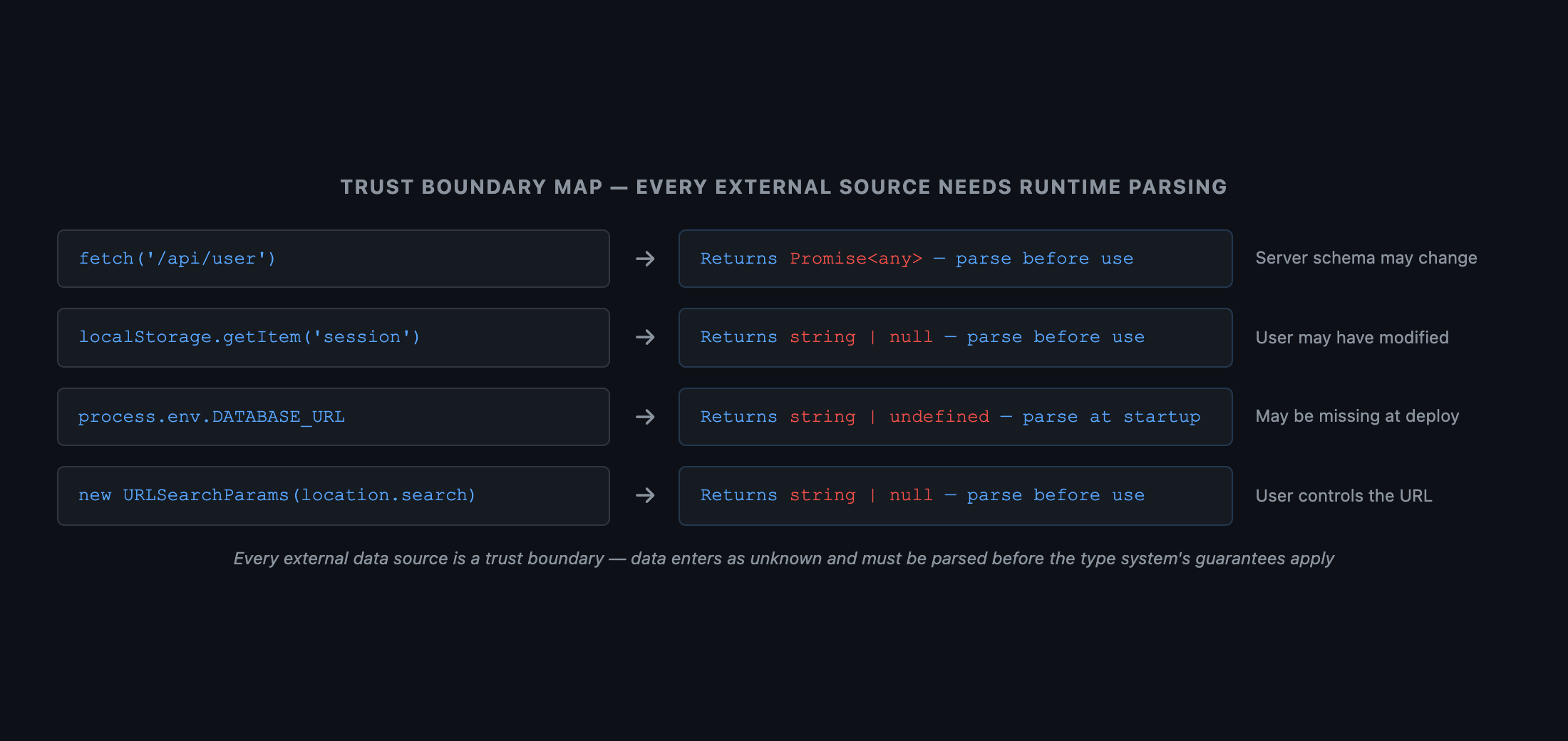
 Diagram with four boundary sources on the left (Network, localStorage, process.env, URL params) all feeding into a central 'Application Code' box. Each connection has a label: the data type on entry is shown as unknown or any. A red zone is highlighted where the data crosses the boundary. A green zone on the right shows 'parsed and typed data' after a schema parser. Caption: 'Every source of external data is a trust boundary — data enters as unknown and must be parsed before the type system's guarantees apply'.
Figure: Diagram with four boundary sources on the left (Network, localStorage, process.env, URL params) all feeding into a central 'Application Code' box. Each connection has a label: the data type on entry is shown as unknown or any. A red zone is highlighted where the data crosses the boundary. A green zone on the right shows 'parsed and typed data' after a schema parser. Caption: 'Every source of external data is a trust boundary — data enters as unknown and must be parsed before the type system's guarantees apply'.

2. Parse-Don't-Validate

The Parse-Don't-Validate principle (Alexis King, 2019) articulates the key insight: validation functions return a boolean — they tell you if data is valid but hand back the same untyped value. Parse functions return a value of the target type — they encode the knowledge that validation passed into the return type itself.
typescript
// ❌ Validate — a boolean tells you nothing; the value is still `unknown`
function validateUser(data: unknown): boolean {
  return typeof (data as any).name === 'string' && typeof (data as any).age === 'number'
}

if (validateUser(data)) {
  // data is still `unknown` here — you have to cast
  const user = data as User  // The cast is no safer than before the check
}

// ✅ Parse — the function returns `User` or throws; knowledge is encoded in the type
function parseUser(data: unknown): User {
  if (
    typeof data !== 'object' || data === null ||
    typeof (data as any).name !== 'string' ||
    typeof (data as any).age !== 'number'
  ) {
    throw new Error(`Invalid user: ${JSON.stringify(data)}`)
  }
  return data as User  // One cast, contained inside the parser — safe
}

const user = parseUser(await response.json())
// user: User — the parse either succeeds or throws; no ambiguity
Zod and Valibot are implementations of this pattern — they provide composable schemas that act as parse functions.

3. Zod — The Standard Schema Library

3.1 Basic Schemas and Type Inference

typescript
import { z } from 'zod'

const UserSchema = z.object({
  id:    z.string().uuid(),
  name:  z.string().min(1),
  email: z.string().email(),
  age:   z.number().int().positive().optional(),
  role:  z.enum(['admin', 'user', 'moderator']),
})

// Derive the TypeScript type from the schema — single source of truth
type User = z.infer<typeof UserSchema>
// {
//   id: string;
//   name: string;
//   email: string;
//   age?: number | undefined;
//   role: 'admin' | 'user' | 'moderator';
// }

3.2 .parse() vs .safeParse()

typescript
// .parse() — throws ZodError on invalid input; use in environments where throws are acceptable
try {
  const user = UserSchema.parse(await response.json())
  // user: User — guaranteed valid
} catch (err) {
  if (err instanceof z.ZodError) {
    console.error(err.issues)  // Structured error list with paths and messages
  }
}

// ✅ .safeParse() — never throws; returns a discriminated union
const result = UserSchema.safeParse(await response.json())

if (result.success) {
  const user = result.data  // User — fully typed
  console.log(user.name)
} else {
  const errors = result.error.issues  // ZodIssue[] — structured field errors
  console.error(errors)
}
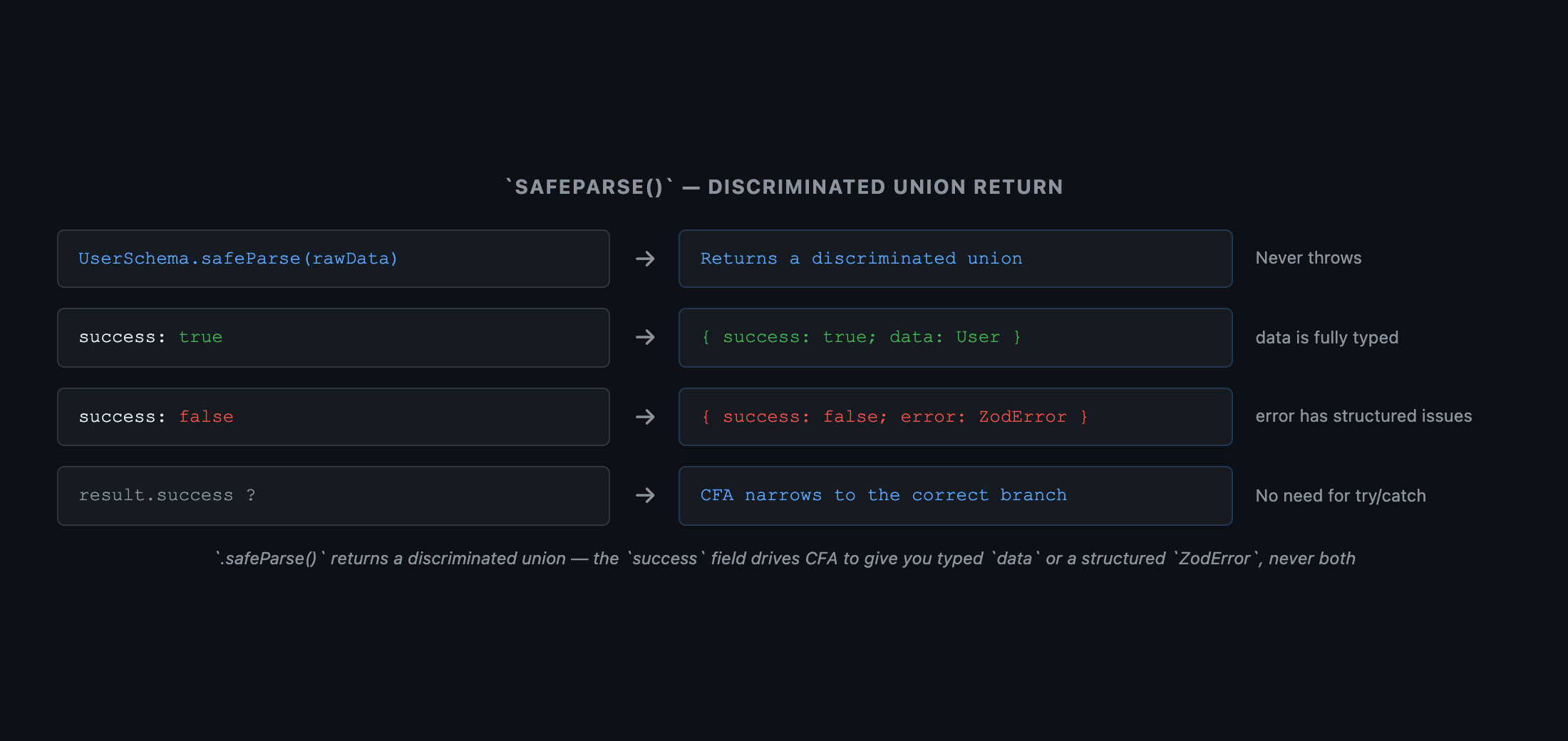
 Diagram showing .safeParse() return value as a discriminated union. Top branch labeled 'success: true' — arrow points to box { success: true; data: User } with a green checkmark. Bottom branch labeled 'success: false' — arrow points to box { success: false; error: ZodError } with a red X. Center decision diamond: '.safeParse(rawData)'. Caption: '.safeParse() returns a discriminated union — the success field drives CFA to give you a fully typed data or a structured ZodError, never both'.
Figure: Diagram showing .safeParse() return value as a discriminated union. Top branch labeled 'success: true' — arrow points to box { success: true; data: User } with a green checkmark. Bottom branch labeled 'success: false' — arrow points to box { success: false; error: ZodError } with a red X. Center decision diamond: '.safeParse(rawData)'. Caption: '.safeParse() returns a discriminated union — the success field drives CFA to give you a fully typed data or a structured ZodError, never both'.

3.3 Schema Composition

typescript
const BaseItemSchema = z.object({
  id:        z.string().uuid(),
  createdAt: z.string().datetime(),
})

// .extend() — add fields
const UserSchema = BaseItemSchema.extend({
  name:  z.string(),
  email: z.string().email(),
})

// .pick() / .omit() — subset or exclusion
const PublicUserSchema = UserSchema.omit({ email: true })

// .refine() — custom validation with a message
const AgeSchema = z.number().int().refine(n => n >= 0 && n <= 150, {
  message: 'Age must be between 0 and 150',
})

// .superRefine() — multiple issues, access to the full context
const PasswordSchema = z.string().superRefine((val, ctx) => {
  if (val.length < 8) ctx.addIssue({ code: 'too_small', minimum: 8, type: 'string', inclusive: true, message: 'Min 8 chars' })
  if (!/[A-Z]/.test(val)) ctx.addIssue({ code: 'custom', message: 'Must contain uppercase' })
})
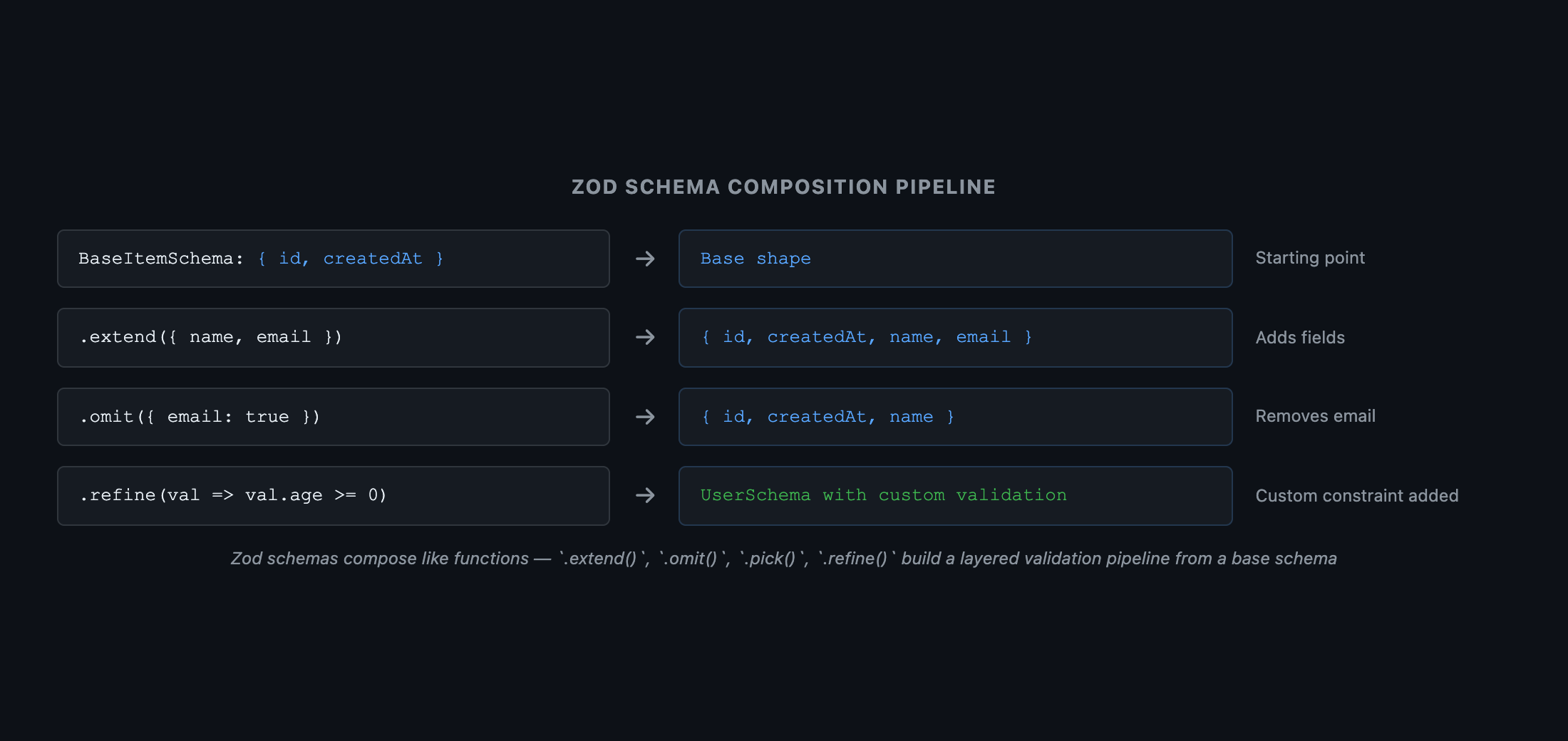
 Pipeline diagram. Left box: 'BaseItemSchema: { id, createdAt }'. First arrow: .extend({ name, email }). Center box: 'UserSchema: { id, createdAt, name, email }'. Second arrow: .omit({ email: true }). Right box: 'PublicUserSchema: { id, createdAt, name }'. Below the pipeline: annotations showing .refine() and .superRefine() as additional validation layers applied on top of any schema. Caption: 'Zod schemas compose like functions — .extend(), .omit(), .pick(), .refine(), and .superRefine() build up a layered validation pipeline from a base schema'.
Figure: Pipeline diagram. Left box: 'BaseItemSchema: { id, createdAt }'. First arrow: .extend({ name, email }). Center box: 'UserSchema: { id, createdAt, name, email }'. Second arrow: .omit({ email: true }). Right box: 'PublicUserSchema: { id, createdAt, name }'. Below the pipeline: annotations showing .refine() and .superRefine() as additional validation layers applied on top of any schema. Caption: 'Zod schemas compose like functions — .extend(), .omit(), .pick(), .refine(), and .superRefine() build up a layered validation pipeline from a base schema'.

4. Valibot — When Bundle Size Matters

Zod and Valibot have near-identical APIs. The meaningful difference is bundle size:
LibraryMin sizeGzip sizeArchitecture
Zod (v3)~57 KB~14 KBMonolithic — full library in one import
Valibot~10 KB~3.6 KBModular — tree-shakeable; you pay only for what you use
typescript
// Zod — one import, full library bundled
import { z } from 'zod'
const schema = z.object({ name: z.string() })

// Valibot — modular imports; unused validators are tree-shaken out
import * as v from 'valibot'
const schema = v.object({ name: v.string() })

// Valibot also supports named imports for maximum tree-shaking
import { object, string, parse, safeParse } from 'valibot'
const schema = object({ name: string() })
const result = safeParse(schema, rawData)
Pro Tip & Optimization
For client-side applications where bundle size is a concern (especially mobile web), prefer Valibot. For server-side Node.js applications or existing Zod-heavy codebases, Zod's larger ecosystem (React Hook Form resolver, tRPC, Drizzle) often outweighs the size difference.

5. Validating process.env at Startup

This is the highest-value, lowest-effort application of runtime parsing — it catches missing or malformed environment variables at startup, not when the affected code path first runs in production:
typescript
// src/env.ts
import { z } from 'zod'

const EnvSchema = z.object({
  NODE_ENV:     z.enum(['development', 'staging', 'production']),
  DATABASE_URL: z.string().url(),
  API_KEY:      z.string().min(1),
  PORT:         z.coerce.number().int().positive().default(3000),
})

// Parse at module initialization — throws on startup if env is invalid
export const env = EnvSchema.parse(process.env)

// Usage — fully typed, no `|| ''` workarounds needed
const db = createConnection(env.DATABASE_URL)  // string
const port = env.PORT  // number (coerced from string)

Summary

ConceptRule
as T at runtimeDoes nothing — type assertions are compile-time only; they are not runtime casts
Trust boundaryEvery external data source (network, env, storage, URL) needs runtime parsing
Parse-don't-validateReturn the typed value, not a boolean — encode the validation result in the type
.parse()Throws ZodError on failure — use in server-side code where throws are acceptable
.safeParse()Returns a discriminated union — the correct choice at every UI/API boundary
Valibot vs. ZodValibot is ~4× smaller with equivalent API — prefer for client-side bundles
process.envValidate with a Zod schema at startup — catch missing vars before they cause runtime errors

What's Next

In Part 10, we cover the ceiling of TypeScript mastery — Variance, Branded Types, and Exhaustiveness. These are the patterns that encode business rules into the type system so that illegal states are literally unrepresentable.
Research & Synthesis Note

This article was developed with AI-assisted deep search, specification cross-referencing, and technical research synthesis.

#TypeScript#Zod#Valibot#Runtime Safety#Schema Validation
Siddhant Deval

Written by Siddhant Deval

Senior Full-Stack Engineer building high-scale architectures, browser performance engineering systems, and SaaS platforms.