Siddhant Deval
Siddhant DevalAuthor
Senior Full-Stack Engineer·Aug 27, 2026·11 min read

Template Literal Types & String Manipulation

Template literal types make TypeScript aware of string structure — enabling type-safe event systems, route contracts, and CSS property validation without any runtime overhead. They are the mechanism underpinning the ergonomics of tRPC, Prisma, and ts-pattern.

Template Literal Types & String Manipulation

Types are a specification language — not an annotation layer. Template literal types are the proof that this applies to strings, not just objects. TypeScript can be aware that "/users/:id/posts/:postId" contains two extractable parameters of type string. It can enforce that your event handler map has exactly onClick, onFocus, and onBlur — no more, no less. It does all of this at compile time, with zero runtime overhead.

1. Template Literal Type Syntax

Template literal types use the same backtick syntax as JavaScript template strings, but at the type level:
typescript
type Greeting = `Hello, ${string}`
// The set of all strings that start with "Hello, "

const a: Greeting = 'Hello, World'   // ✅
const b: Greeting = 'Hello, Alice'   // ✅
const c: Greeting = 'Hi, Bob'        // ❌ — does not match the template
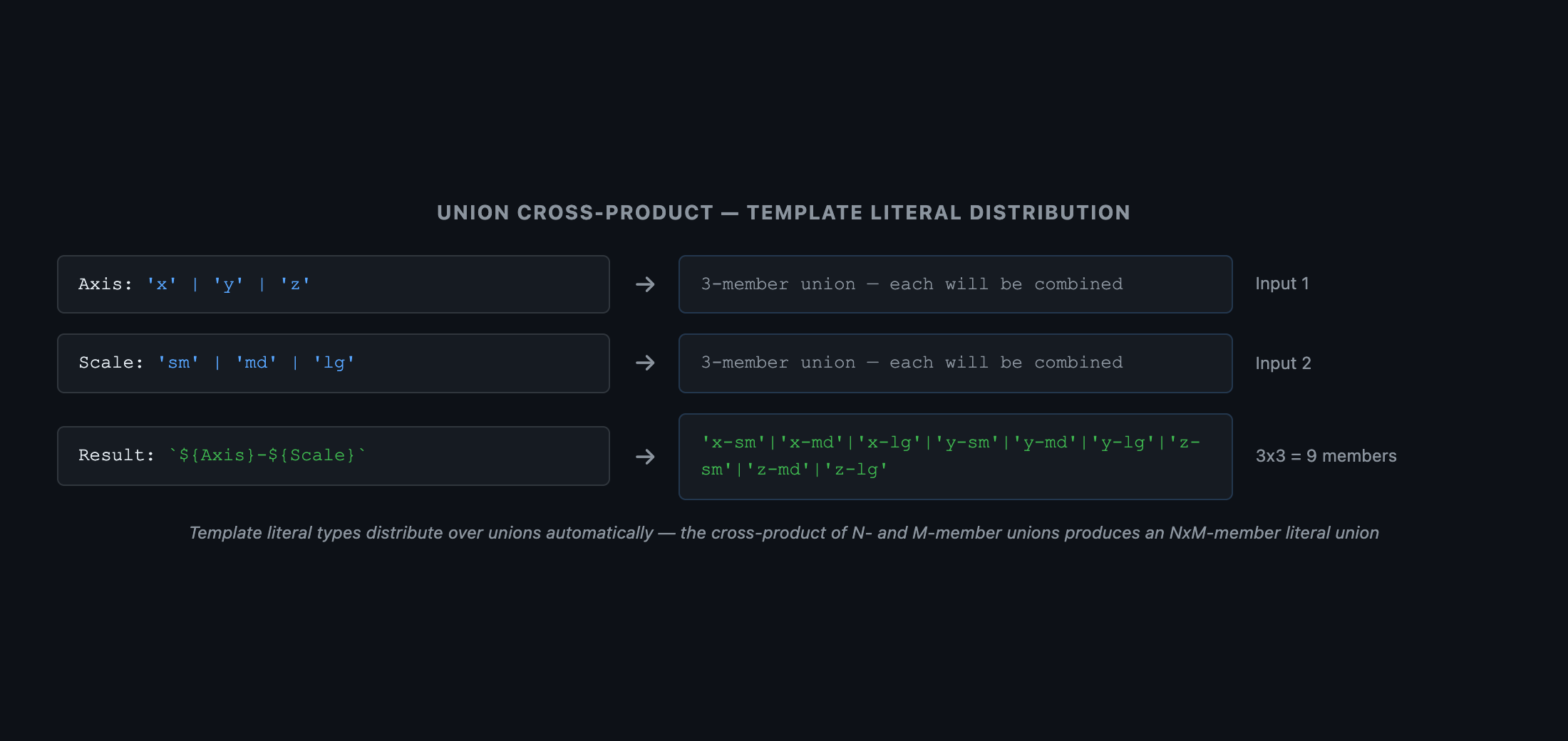
When unions are substituted, the template distributes to produce a cross-product:
typescript
type Axis  = 'x' | 'y' | 'z'
type Scale = 'sm' | 'md' | 'lg'

type AxisScale = `${Axis}-${Scale}`
// "x-sm" | "x-md" | "x-lg" | "y-sm" | "y-md" | "y-lg" | "z-sm" | "z-md" | "z-lg"
// 3 × 3 = 9-member literal union
 Grid diagram showing union cross-product. Row labels (Axis): 'x', 'y', 'z'. Column labels (Scale): 'sm', 'md', 'lg'. Each cell shows the template literal result: 'x-sm', 'x-md', 'x-lg', 'y-sm', etc. A header label reads: \${Axis}-${Scale}`` produces 3×3 = 9 members. Caption: 'Template literal types distribute over unions automatically — the cross-product of two n-member and m-member unions produces an n×m-member literal union'.
Figure: Grid diagram showing union cross-product. Row labels (Axis): 'x', 'y', 'z'. Column labels (Scale): 'sm', 'md', 'lg'. Each cell shows the template literal result: 'x-sm', 'x-md', 'x-lg', 'y-sm', etc. A header label reads: \${Axis}-${Scale}`` produces 3×3 = 9 members. Caption: 'Template literal types distribute over unions automatically — the cross-product of two n-member and m-member unions produces an n×m-member literal union'.

2. Built-in String Manipulation Types

TypeScript ships four intrinsic types that transform string literal types. These are compiler primitives — they cannot be implemented in user-land TypeScript:
TypeTransforms
Uppercase<S>"hello""HELLO"
Lowercase<S>"HELLO""hello"
Capitalize<S>"hello""Hello"
Uncapitalize<S>"Hello""hello"
typescript
type EventNames = 'click' | 'focus' | 'blur' | 'change'

// Generate handler names: "onClick" | "onFocus" | "onBlur" | "onChange"
type HandlerNames = `on${Capitalize<EventNames>}`

3. Typing Event Handler Maps

This is the canonical real-world use case for template literal types — generating a complete, exhaustive event handler interface from a union of event names:
typescript
// ❌ Manually written — misses events, typos silently compile
interface HTMLElementEventHandlers {
  onClick:   (e: MouseEvent) => void
  onFocus:   (e: FocusEvent) => void
  onBlur:    (e: FocusEvent) => void
  onChnage:  (e: Event) => void  // Typo — onChnage instead of onChange
}

// ✅ Generated from a source-of-truth union — exhaustive and typo-proof
type DOMEventMap = {
  click:  MouseEvent
  focus:  FocusEvent
  blur:   FocusEvent
  change: Event
  input:  InputEvent
  keydown: KeyboardEvent
}

type EventHandlers = {
  [K in keyof DOMEventMap as `on${Capitalize<string & K>}`]: (e: DOMEventMap[K]) => void
}

// {
//   onClick:   (e: MouseEvent) => void
//   onFocus:   (e: FocusEvent) => void
//   onBlur:    (e: FocusEvent) => void
//   onChange:  (e: Event) => void
//   onInput:   (e: InputEvent) => void
//   onKeydown: (e: KeyboardEvent) => void
// }
Architectural Note
string & K is required because keyof can produce string | number | symbol. Intersecting with string narrows to just the string keys, which is required for template literal substitution.
![ Flow diagram. Left box: DOMEventMap = { click: MouseEvent; focus: FocusEvent; ... }. Center box shows the mapped type with key remapping: [K in keyof DOMEventMap as \on${Capitalize<string & K>}`]. Right box: EventHandlers = { onClick: (e: MouseEvent) => void; onFocus: (e: FocusEvent) => void; ... }. Arrows trace: 'click'Capitalize'Click'→ prepend'on''onClick'`. Caption: 'Template literal key remapping auto-generates a complete handler map from an event source-of-truth — adding an event to the map automatically adds the handler'.](/assets/blog/frontend/typescript-template-literal-types/fig-02.png)

4. Route Parameter Extraction with infer

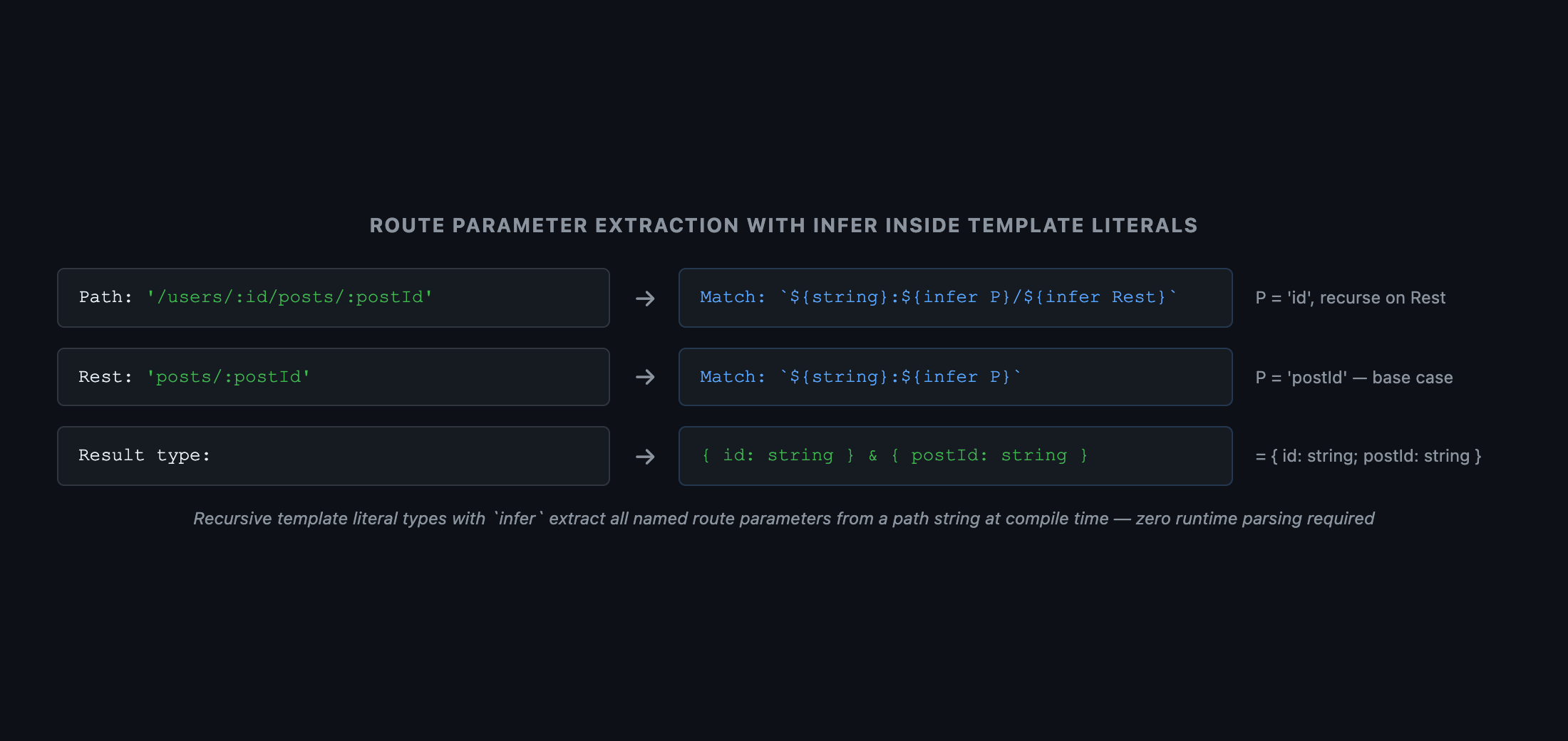
Combining template literal types with infer enables extracting named parameters from route strings — the core of tRPC and Prisma's type ergonomics:
typescript
// Extract a single param: "/users/:id" → { id: string }
type ExtractParam<Path extends string> =
  Path extends `${string}:${infer Param}/${string}`
    ? { [K in Param]: string }
    : Path extends `${string}:${infer Param}`
      ? { [K in Param]: string }
      : {}

type A = ExtractParam<'/users/:id'>           // { id: string }
type B = ExtractParam<'/static/page'>         // {}

// Full recursive extraction: "/users/:id/posts/:postId" → { id: string; postId: string }
type ExtractParams<Path extends string> =
  Path extends `${string}:${infer Param}/${infer Rest}`
    ? { [K in Param]: string } & ExtractParams<`/${Rest}`>
    : Path extends `${string}:${infer Param}`
      ? { [K in Param]: string }
      : {}

type Params = ExtractParams<'/users/:id/posts/:postId'>
// { id: string } & { postId: string }
// = { id: string; postId: string }
 Diagram showing route parameter extraction. Top box: path string "/users/:id/posts/:postId" with :id and :postId highlighted in yellow. Center box: recursive conditional type pattern matching. Bottom box: extracted params object { id: string; postId: string }. Arrows trace the two recursive passes: pass 1 extracts 'id', pass 2 extracts 'postId'. Caption: 'Recursive template literal types with infer extract all named route parameters from a path string at compile time — zero runtime regex required'.
Figure: Diagram showing route parameter extraction. Top box: path string "/users/:id/posts/:postId" with :id and :postId highlighted in yellow. Center box: recursive conditional type pattern matching. Bottom box: extracted params object { id: string; postId: string }. Arrows trace the two recursive passes: pass 1 extracts 'id', pass 2 extracts 'postId'. Caption: 'Recursive template literal types with infer extract all named route parameters from a path string at compile time — zero runtime regex required'.

5. CSS Custom Properties — Type-Safe var()

typescript
// Enforce that CSS custom property names are properly prefixed
type CSSCustomProperty = `--${string}`

function setCustomProperty(name: CSSCustomProperty, value: string): void {
  document.documentElement.style.setProperty(name, value)
}

setCustomProperty('--color-primary', '#58a6ff')  // ✅
setCustomProperty('color-primary', '#58a6ff')    // ❌ — must start with '--'

6. How tRPC, Prisma, and ts-pattern Use Template Literals

These libraries appear to have magical type inference. The mechanism is always the same: template literal types combined with infer:
  • tRPC: Router keys are merged as template literals ("user.getById", "post.create") — the dot-separated structure is parsed at the type level with infer to route calls to the correct procedure type.
  • Prisma: Model field accessor patterns ("user_name", "post_title") are generated as template literal types from the schema introspection.
  • ts-pattern: The .with(P.string.includes('hello')) pattern DSL uses branded template literal types to carry constraint information through the pattern language.
Architectural Note
These libraries demonstrate that template literal types are not a niche feature — they are the mechanism enabling the modern TypeScript library ergonomics developers take for granted. Understanding them puts you in a position to build similar APIs.

Summary

ConceptRule
Template literal type`Hello, ${string}` — type-level string pattern; backtick syntax, compile-time only
Cross-product distributionUnion substitution produces all combinations — N × M members for two N- and M-member unions
Uppercase / Capitalize / etc.Compiler intrinsics — cannot be implemented in user-land TypeScript
string & KRequired to use keyof results in template literals — keyof may include number / symbol
infer in template literalsExtracts string segments by position — powers route param extraction
Recursive extractionCombine template literals + infer recursively to extract all params from a path
Zero runtime costTemplate literal type checking happens entirely at compile time — no runtime overhead

What's Next

In Part 7, we cover tsconfig as Architecture — each compiler flag is a type-level design decision with direct runtime safety implications. We decode strict's seven sub-flags, exactOptionalPropertyTypes, noUncheckedIndexedAccess, verbatimModuleSyntax, and project references for monorepo builds.
Research & Synthesis Note

This article was developed with AI-assisted deep search, specification cross-referencing, and technical research synthesis.

#TypeScript#Template Literal Types#String Manipulation#Advanced TypeScript#Type Safety
Siddhant Deval

Written by Siddhant Deval

Senior Full-Stack Engineer building high-scale architectures, browser performance engineering systems, and SaaS platforms.