Siddhant Deval
Siddhant DevalAuthor
Senior Full-Stack Engineer·Aug 27, 2026·11 min read

Declaration Merging, Module Augmentation & Ambient Types

Declaration merging is how TypeScript resolves multiple declarations of the same name. It is the mechanism that lets you extend third-party library types safely — adding properties to Express's Request, typing process.env, or declaring non-JS file imports — without forking anything.

Declaration Merging, Module Augmentation & Ambient Types

Types are a specification language — not an annotation layer. When a third-party library's types are incomplete or wrong, the instinct is to cast: (req as any).user. That cast is a lie. The correct tool is declaration merging — TypeScript's mechanism for reopening and extending existing type declarations. It is how you add properties to Express's Request, type process.env, and declare that .svg imports return strings, all without modifying the library source.

1. Declaration Merging — Interface vs. Type

The foundational rule: only interface declarations merge. type aliases do not.
typescript
// ✅ Interfaces with the same name merge into a single combined type
interface Window {
  analytics: AnalyticsClient
}
interface Window {
  featureFlags: FeatureFlags
}
// Result: Window now has both `analytics` and `featureFlags` properties

// ❌ Type aliases with the same name produce an error — no merging
type Config = { host: string }
type Config = { port: number }  // ❌ Error: Duplicate identifier 'Config'
When two interfaces merge, all members are combined. If two merged declarations include the same method signature, the later signature is checked first (function overload resolution order). This is intentional — it allows augmenters to override or specialize behavior.
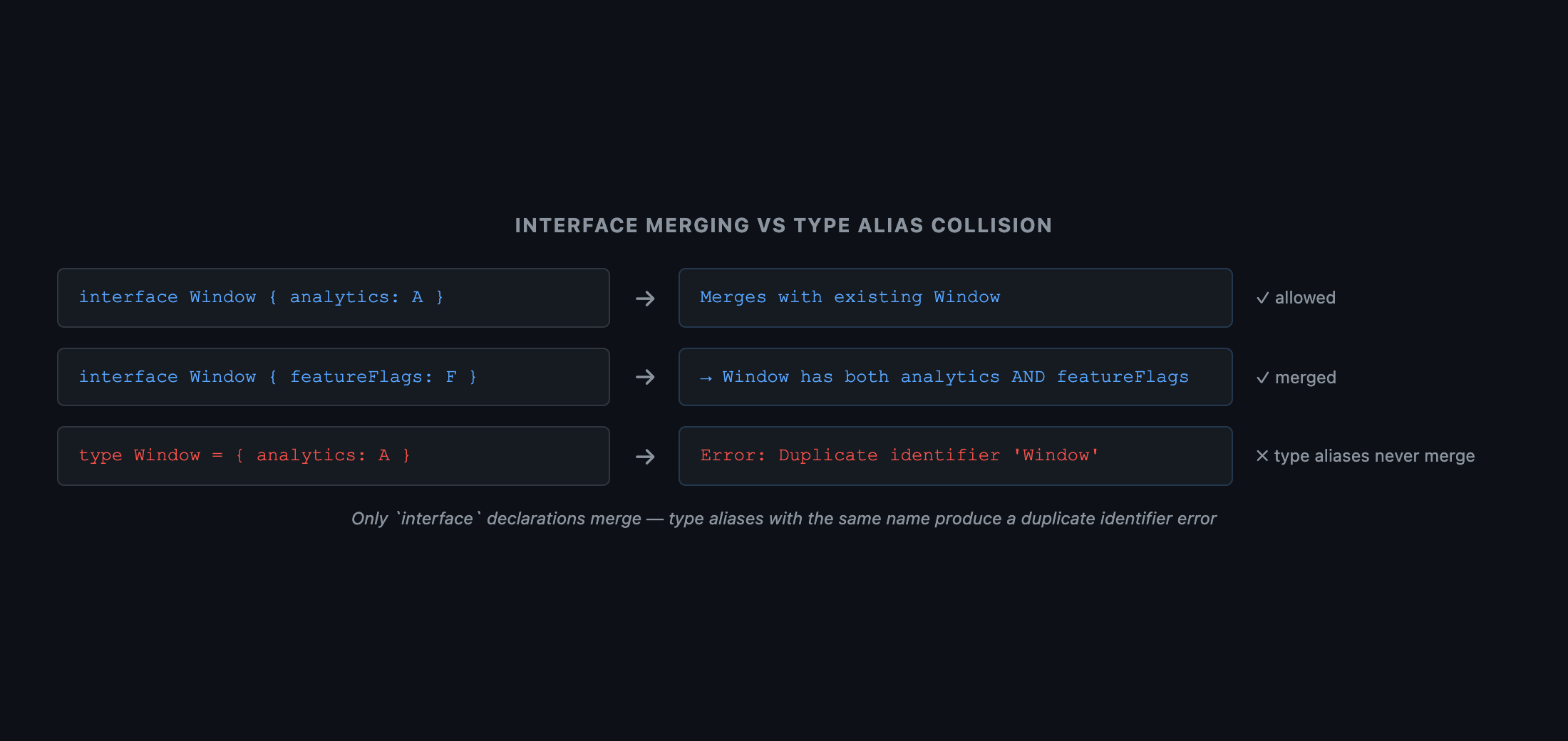
 Two-panel diagram. Left panel: 'Before merge' — two separate boxes both labeled interface Window. First has analytics: AnalyticsClient. Second has featureFlags: FeatureFlags. An arrow labeled 'TypeScript declaration merge' points to the right panel. Right panel: 'After merge' — single box labeled interface Window containing both analytics: AnalyticsClient and featureFlags: FeatureFlags. Below: a red X box labeled type Window (second) with 'Error: Duplicate identifier'. Caption: 'Only interface declarations merge — two type aliases with the same name produce a compile error'.
Figure: Two-panel diagram. Left panel: 'Before merge' — two separate boxes both labeled interface Window. First has analytics: AnalyticsClient. Second has featureFlags: FeatureFlags. An arrow labeled 'TypeScript declaration merge' points to the right panel. Right panel: 'After merge' — single box labeled interface Window containing both analytics: AnalyticsClient and featureFlags: FeatureFlags. Below: a red X box labeled type Window (second) with 'Error: Duplicate identifier'. Caption: 'Only interface declarations merge — two type aliases with the same name produce a compile error'.

2. Module Augmentation — Extending Third-Party Types

Module augmentation is the targeted form of declaration merging — you reopen a specific module's namespace and add to it:

2.1 Extending Express's Request

typescript
// ❌ The common "fix" — silences the compiler, lies to the type system
app.get('/profile', (req, res) => {
  const user = (req as any).user  // No type safety — any property name compiles
  res.json(user.name)
})

// ✅ Module augmentation — extend Express's Request type safely
// File: src/types/express.d.ts
import { User } from '../models/user'  // The import makes this a module file

declare module 'express-serve-static-core' {
  interface Request {
    user?: User  // Now `req.user` is typed as `User | undefined`
  }
}

// Usage — fully typed, no cast required
app.get('/profile', (req, res) => {
  if (!req.user) return res.status(401).send('Unauthorized')
  res.json(req.user.name)  // ✅ req.user is User — .name is safe
})
Architectural Note
Express augments express-serve-static-core, not express directly — check the library's type definitions to find the correct module name for augmentation.
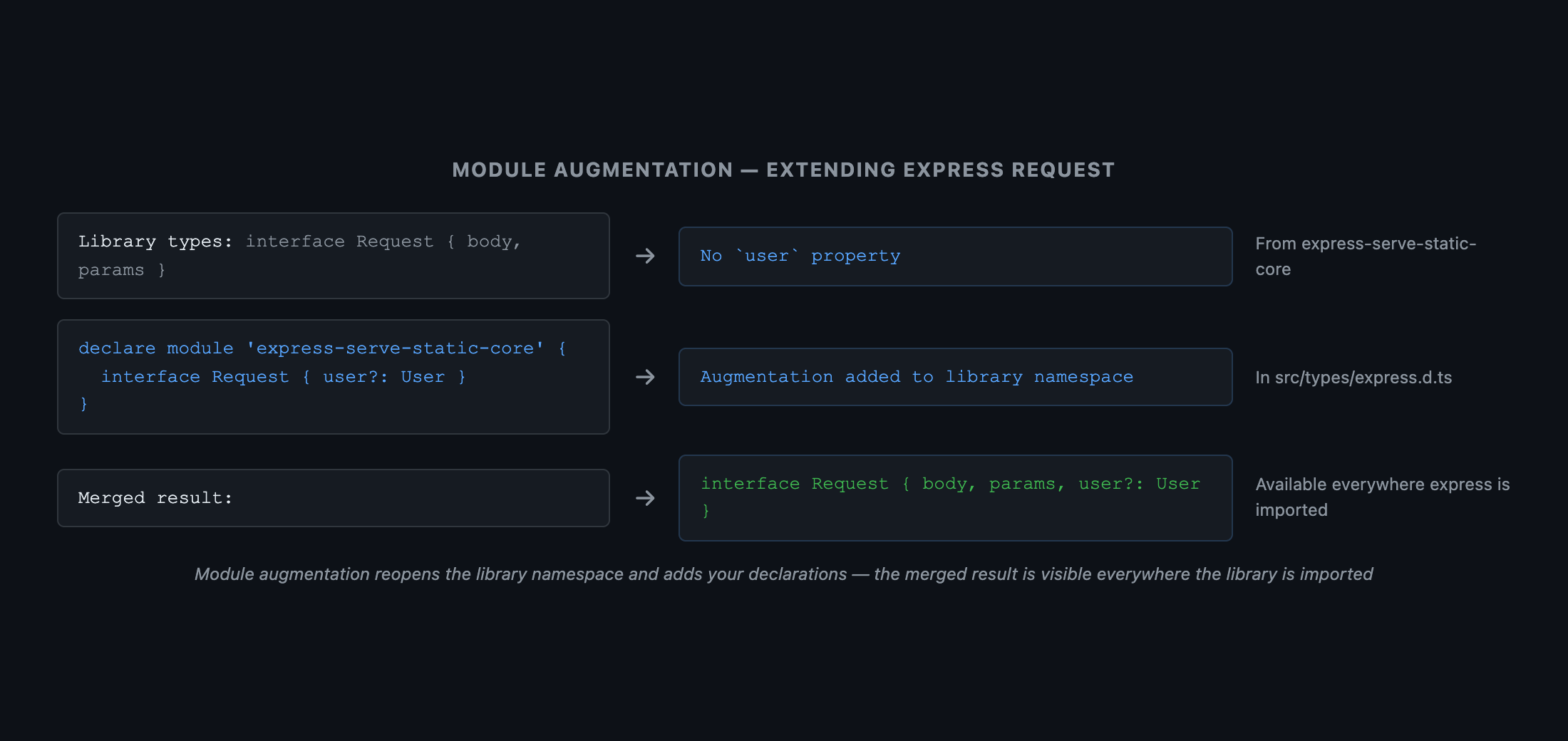
 Three-box flow diagram. Left box: 'Library types (node_modules): interface Request { body: any; params: any; } — no user property'. Center box: 'Your augmentation file (src/types/express.d.ts): declare module "express-serve-static-core" { interface Request { user?: User } }'. Right box: 'Merged result — TypeScript sees: interface Request { body: any; params: any; user?: User; }'. Arrows: left box + center box → right box, labeled 'Declaration merge'. Caption: 'Module augmentation reopens the library's namespace and adds your declarations — the merged result is visible everywhere the library is imported'.
Figure: Three-box flow diagram. Left box: 'Library types (node_modules): interface Request { body: any; params: any; } — no user property'. Center box: 'Your augmentation file (src/types/express.d.ts): declare module "express-serve-static-core" { interface Request { user?: User } }'. Right box: 'Merged result — TypeScript sees: interface Request { body: any; params: any; user?: User; }'. Arrows: left box + center box → right box, labeled 'Declaration merge'. Caption: 'Module augmentation reopens the library's namespace and adds your declarations — the merged result is visible everywhere the library is imported'.

3. Global Augmentation — Extending the Global Scope

Sometimes you need to extend the global namespace — window, globalThis, or process.env:
typescript
// ✅ Correct pattern — `declare global` extends the global scope from a module file
// File: src/types/globals.d.ts
import { AnalyticsClient } from './analytics'  // This import makes the file a module

declare global {
  interface Window {
    analytics: AnalyticsClient
  }

  // Extend NodeJS global (for server-side code)
  namespace NodeJS {
    interface ProcessEnv {
      NODE_ENV: 'development' | 'production' | 'test'
      DATABASE_URL: string
      API_KEY: string
    }
  }
}

export {}  // Necessary if there are no other imports — ensures the file is a module

// Usage
const env = process.env.NODE_ENV  // 'development' | 'production' | 'test' — not string
const dbUrl = process.env.DATABASE_URL  // string — required, will error if missing from .env
Crucial Requirement
The distinction between global scope and module scope is critical: a .d.ts file with no import or export statements is ambient (global) by default. Adding any import or export makes it a module — after which you must use declare global { } to write to the global scope. Always add export {} when in doubt.

4. d.ts Files — Global vs. Module Scope

typescript
// ambient.d.ts — NO imports or exports — this file is globally scoped
interface GlobalUser {
  id: string
  name: string
}
// GlobalUser is now available everywhere without any import

// module.d.ts — HAS an export — this file is module scoped
export interface ModuleUser {
  id: string
  name: string
}
// ModuleUser must be explicitly imported — it is not globally available
The scope rule comes directly from the TypeScript module resolution spec: a file is a module if and only if it contains at least one top-level import or export. Otherwise it is a script (ambient / global).

5. Ambient Modules — Typing Non-JS Imports

Bundlers like Webpack and Vite transform non-JS files before TypeScript sees them. Without declarations, TypeScript complains about these imports:
typescript
// Without ambient declarations — TypeScript errors
import logo from './logo.svg'      // ❌ Cannot find module './logo.svg'
import styles from './app.module.css'  // ❌ Cannot find module

// ✅ Wildcard ambient module declarations (place in a .d.ts file)
// src/types/assets.d.ts
declare module '*.svg' {
  const content: string  // SVGs are typically inlined as a URL string
  export default content
}

declare module '*.png' {
  const content: string
  export default content
}

declare module '*.module.css' {
  const styles: { readonly [className: string]: string }
  export default styles
}

// Now fully typed:
import logo from './logo.svg'    // string
import styles from './app.module.css'  // { [className: string]: string }
 Three-row diagram. Each row shows: a file import statement (left), the matching wildcard ambient module declaration (center), and the resulting inferred type (right). Row 1: import logo from './logo.svg' → declare module '*.svg' { const content: string } → logo: string. Row 2: import styles from './app.module.css' → declare module '*.module.css' { const styles: { [k: string]: string } } → styles: { [k: string]: string }. Row 3: import data from './data.json' → declare module '*.json' { const value: unknown; export default value } → data: unknown. Caption: 'Wildcard ambient modules provide TypeScript with a typed declaration for any file matching the glob pattern — the bundler handles the actual transformation at runtime'.
Figure: Three-row diagram. Each row shows: a file import statement (left), the matching wildcard ambient module declaration (center), and the resulting inferred type (right). Row 1: import logo from './logo.svg' → declare module '*.svg' { const content: string } → logo: string. Row 2: import styles from './app.module.css' → declare module '*.module.css' { const styles: { [k: string]: string } } → styles: { [k: string]: string }. Row 3: import data from './data.json' → declare module '*.json' { const value: unknown; export default value } → data: unknown. Caption: 'Wildcard ambient modules provide TypeScript with a typed declaration for any file matching the glob pattern — the bundler handles the actual transformation at runtime'.

6. DefinitelyTyped as Real-World Examples

The @types/* packages on npm are all real-world ambient declaration files. Reading them is the fastest way to see these patterns in production use:
  • @types/express — uses module augmentation to compose the Request and Response types across multiple files
  • @types/node — uses declare global and declare namespace NodeJS to type process, Buffer, and __dirname
  • @types/react — uses ambient module declarations for JSX and namespace merging for React hooks
bash
# Read the source of any @types package
cat node_modules/@types/express/index.d.ts
cat node_modules/@types/node/globals.d.ts

Summary

ConceptRule
Interface mergingSame-name interface declarations merge; type aliases do not
Module augmentationdeclare module 'library' { interface X { ... } } reopens the module's namespace
Global augmentationdeclare global { ... } extends the global scope from inside a module file
File scope ruleNo import/export → ambient (global); any import/export → module (local)
export {}Minimal way to make a .d.ts file a module when no other exports exist
Ambient modulesdeclare module '*.svg' types all .svg imports matching the pattern
declare namespace NodeJSThe correct way to extend process.env with custom environment variable types

What's Next

In Part 9, we cover Runtime Type Safety — because TypeScript's types are erased at runtime and as T does nothing at runtime. Every network boundary, localStorage read, and environment variable is an untrusted source. The correct tool is a schema parser like Zod or Valibot — not a type cast.
Research & Synthesis Note

This article was developed with AI-assisted deep search, specification cross-referencing, and technical research synthesis.

#TypeScript#Declaration Merging#Module Augmentation#Ambient Types#d.ts
Siddhant Deval

Written by Siddhant Deval

Senior Full-Stack Engineer building high-scale architectures, browser performance engineering systems, and SaaS platforms.