Siddhant Deval
Siddhant DevalAuthor
Senior Full-Stack Engineer·Aug 27, 2026·12 min read

Generics & Constraints: Beyond <T>

Generics are functions over types. Constraints are their parameter types. Mastering them eliminates entire categories of unsafe `any` usage and unlocks type-safe utility functions that preserve all the specificity of their inputs.

Generics & Constraints: Beyond <T>

Types are a specification language — not an annotation layer. Nowhere is that more evident than in generics. A function that accepts any and returns any has no specification at all — it is a black box. A function that accepts T and returns T makes a precise promise: whatever type you give me, I give you back. The difference between those two functions is the entire difference between a type-annotated codebase and a type-safe one. Generics preserve type information that any destroys.

1. What Generics Actually Are

A generic is a function over types. Just as a regular function takes value parameters and returns values, a generic type takes type parameters and returns types. This is not metaphorical — the analogy is exact.

1.1 Generic Functions — The Identity Function

typescript
// ❌ `any` version — type information is destroyed
function identity(value: any): any {
  return value
}

const result = identity('hello')
// result: any — the compiler has no idea what came back
result.toUpperCase()  // No error. Also no guarantee it works.

// ✅ Generic version — type information flows through
function identity<T>(value: T): T {
  return value
}

const result = identity('hello')
// result: string — TypeScript inferred T = string from the argument
result.toUpperCase()  // ✅ Safe — string has toUpperCase
TypeScript infers the type argument from the function's arguments. You rarely need to specify it explicitly: identity<string>('hello') and identity('hello') are identical when TypeScript can infer T.

1.2 Generic Types and Interfaces

Generics are not limited to functions — types and interfaces can be parameterized too:
typescript
// A generic container type
interface Box<T> {
  value: T
  transform: <U>(fn: (val: T) => U) => Box<U>
}

// A generic API response wrapper
type ApiResult<T, E = Error> =
  | { status: 'success'; data: T }
  | { status: 'error'; error: E }

// Usage — T is inferred from the data property
const result: ApiResult<User> = { status: 'success', data: { name: 'Alice', email: 'alice@example.com' } }
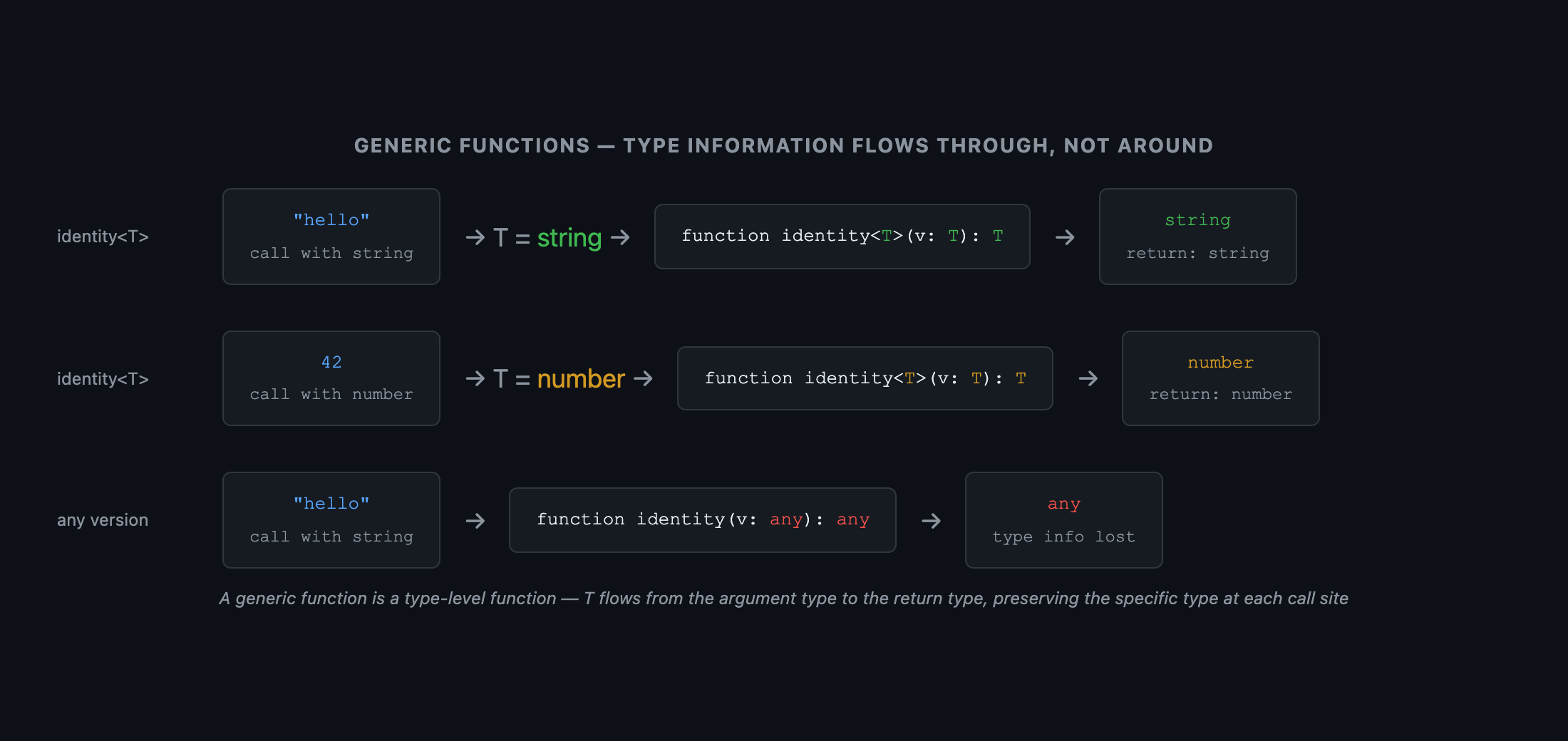
 Diagram showing a generic function identity<T>. A left box labeled 'Call Site: identity("hello")' has two arrows: one solid arrow labeled 'value argument → infers T = string' pointing into a center box labeled 'Function Body: T → T'. A solid arrow labeled 'return value: T = string' points from the center box to a right box labeled 'Result: string'. Below, a second row shows the same function called with identity(42) — T = number flows through identically. Caption: 'A generic function is a type-level function — the type parameter T flows from the argument type to the return type, preserving specificity'.
Figure: Diagram showing a generic function identity<T>. A left box labeled 'Call Site: identity("hello")' has two arrows: one solid arrow labeled 'value argument → infers T = string' pointing into a center box labeled 'Function Body: T → T'. A solid arrow labeled 'return value: T = string' points from the center box to a right box labeled 'Result: string'. Below, a second row shows the same function called with identity(42) — T = number flows through identically. Caption: 'A generic function is a type-level function — the type parameter T flows from the argument type to the return type, preserving specificity'.

2. Constraints — Bounding Type Parameters

A type parameter without a constraint accepts any type. Constraints narrow what is acceptable, enabling you to access properties and methods specific to the constraint type.

2.1 extends as a Constraint

typescript
// ❌ Without constraint — T could be anything, so no properties are safe to access
function getLength<T>(value: T): number {
  return value.length  // ❌ Error: Property 'length' does not exist on type 'T'
}

// ✅ With constraint — T is guaranteed to have a `length` property
function getLength<T extends { length: number }>(value: T): number {
  return value.length  // ✅ Safe — T is a subset of {length: number}
}

getLength('hello')      // ✅ string has length
getLength([1, 2, 3])    // ✅ number[] has length
getLength({ length: 5 }) // ✅ explicit shape satisfies the constraint
getLength(42)            // ❌ number has no length property
Mental Model Check
extends in a generic constraint is not inheritance — it is a subset check. T extends Constraint means "T must be assignable to Constraint" — T must be a subset of the constraint's set. The word "extends" is the same keyword as in class inheritance, but the meaning is purely set-theoretic here.

2.2 keyof — Constraining to Valid Property Keys

The canonical use of constrained generics is type-safe property access:
typescript
// ❌ Unsafe — the key might not exist on obj
function getProperty(obj: object, key: string): unknown {
  return (obj as any)[key]
}

// ✅ Type-safe — K is constrained to the actual keys of T
function getProperty<T, K extends keyof T>(obj: T, key: K): T[K] {
  return obj[key]
}

const user = { name: 'Alice', age: 30, email: 'alice@example.com' }

const name = getProperty(user, 'name')    // string — T[K] = User['name']
const age  = getProperty(user, 'age')     // number — T[K] = User['age']
getProperty(user, 'password')             // ❌ 'password' is not a key of user
The return type T[K] is an indexed access type — it looks up the type of key K in type T. This gives you the exact type of the property, not just unknown.
 Three-column table diagram showing constraint validation. Column headers: 'T', 'K extends keyof T', 'Valid call?'. Rows: Row 1: { name: string; age: number }, 'name', ✅ (green); Row 2: { name: string; age: number }, 'age', ✅; Row 3: { name: string; age: number }, 'email', ❌ (red, 'email' not in keyof T); Row 4: string[], number, ✅ (array index). Caption: 'K extends keyof T constrains K to the literal union of T's property names — invalid keys are caught at the call site'.
Figure: Three-column table diagram showing constraint validation. Column headers: 'T', 'K extends keyof T', 'Valid call?'. Rows: Row 1: { name: string; age: number }, 'name', ✅ (green); Row 2: { name: string; age: number }, 'age', ✅; Row 3: { name: string; age: number }, 'email', ❌ (red, 'email' not in keyof T); Row 4: string[], number, ✅ (array index). Caption: 'K extends keyof T constrains K to the literal union of T's property names — invalid keys are caught at the call site'.

3. Default Type Parameters

Type parameters can have defaults, making generics ergonomic for common cases without sacrificing flexibility:
typescript
// T defaults to string if not specified
interface Paginated<T = string> {
  items: T[]
  total: number
  page: number
}

const stringPage: Paginated = { items: ['a', 'b'], total: 2, page: 1 }  // T = string
const userPage: Paginated<User> = { items: [user], total: 1, page: 1 }  // T = User

// Multiple parameters with defaults
type ApiResult<T, E = Error> =
  | { ok: true; value: T }
  | { ok: false; error: E }

// E defaults to Error for the common case
const result: ApiResult<User> = { ok: true, value: user }
// Custom error type when needed
const result2: ApiResult<User, ValidationError> = { ok: false, error: validationError }

4. const Type Parameters (TypeScript 5.0)

By default, TypeScript widens literal types in generic inference. const type parameters prevent this:
typescript
// ❌ Standard generic — T is inferred as string[], losing the literal types
function makeArray<T>(items: T[]): T[] {
  return items
}

const arr = makeArray(['north', 'south', 'east', 'west'])
// arr: string[] — widened; the literal union is lost

// ✅ `const` type parameter — T is inferred as the literal tuple
function makeArray<const T>(items: T): T {
  return items
}

const arr2 = makeArray(['north', 'south', 'east', 'west'] as const)
// arr2: readonly ["north", "south", "east", "west"] — literal tuple preserved
type Direction = typeof arr2[number]  // "north" | "south" | "east" | "west"
 Two-row comparison. Top row labeled 'Without const type param': a code snippet shows makeArray(['a', 'b', 'c']). Arrow labeled 'T inferred as' points to string[] (with a yellow label 'widened — literal types lost'). Bottom row labeled 'With const type param': same call shows. Arrow labeled 'T inferred as' points to readonly ["a", "b", "c"] (with a green label 'literal tuple preserved'). Caption: 'const type parameters (TS 5.0) opt into literal inference — without them, array arguments always widen to their base element type'.
Figure: Two-row comparison. Top row labeled 'Without const type param': a code snippet shows makeArray(['a', 'b', 'c']). Arrow labeled 'T inferred as' points to string[] (with a yellow label 'widened — literal types lost'). Bottom row labeled 'With const type param': same call shows. Arrow labeled 'T inferred as' points to readonly ["a", "b", "c"] (with a green label 'literal tuple preserved'). Caption: 'const type parameters (TS 5.0) opt into literal inference — without them, array arguments always widen to their base element type'.

5. Common Anti-Patterns

5.1 any Where a Generic Would Suffice

typescript
// ❌ `any` destroys type information — the caller gets nothing useful back
function first(arr: any[]): any {
  return arr[0]
}

// ✅ Generic preserves type information
function first<T>(arr: T[]): T | undefined {
  return arr[0]
}

const n = first([1, 2, 3])    // n: number | undefined
const s = first(['a', 'b'])   // s: string | undefined

5.2 Over-Constraining

typescript
// ❌ Over-constrained — forces callers to pass a specific type unnecessarily
function processUser<T extends User>(value: T): string {
  return value.name  // Only uses `name` — the User constraint is what we need, not T extends User
}

// ✅ Use the direct type when you don't need to preserve T through the return type
function processUser(value: User): string {
  return value.name
}

// ✅ Use T extends User when you need to return the full T, not just User
function processUserFull<T extends User>(value: T): T {
  console.log(value.name)
  return value  // Returns the full T, preserving any extra properties
}

Summary

ConceptRule
Generic function<T> preserves type info from input to output; any destroys it
extends constraintSubset check — T must be assignable to the constraint type
K extends keyof TConstrains K to valid property names of T; use with T[K] for safe indexed access
Default type parameter<T = string> provides an ergonomic default without sacrificing flexibility
const type parameterPrevents literal widening on inference (TS 5.0+)
When to use genericsWhen you need to preserve the specific type of an input through to the output
When not to use genericsWhen you don't need to thread the type through — just use the concrete type

What's Next

In Part 4, we cover Utility Types & Mapped Types — the standard library of type-level transformations. You'll read the source code of Partial<T>, Required<T>, and Readonly<T>, then build deeper utilities like DeepReadonly<T> and Flatten<T> from scratch.
Research & Synthesis Note

This article was developed with AI-assisted deep search, specification cross-referencing, and technical research synthesis.

#TypeScript#Generics#Constraints#Type Inference#Type Safety
Siddhant Deval

Written by Siddhant Deval

Senior Full-Stack Engineer building high-scale architectures, browser performance engineering systems, and SaaS platforms.