Siddhant Deval
Siddhant DevalAuthor
Senior Full-Stack Engineer·Aug 27, 2026·14 min read

TypeScript with React: Components, Hooks & Patterns

React's generic component model and hook return types are the most common TypeScript surface area for frontend engineers — yet most teams reach for `any` or `as` unnecessarily. Every pattern here eliminates one of those shortcuts with a typed, composable alternative.

Technical Series

TypeScript Mastery

Part 11 of 11

TypeScript with React: Components, Hooks & Patterns

Types are a specification language — not an annotation layer. In React codebases, that principle is violated most often with component props: either any appears in a generic component because the developer didn't know how to thread the type parameter, or as appears in a hook to "fix" a narrowing issue that a correctly typed signature would prevent entirely. This article removes both shortcuts by building every common React typing pattern from first principles.

1. Functional Components — FC<Props> vs. Plain Function

The older React.FC<Props> pattern adds an implicit children prop to every component, whether or not it accepts children. This is almost always wrong:
typescript
import React from 'react'

// ❌ FC<Props> — adds implicit `children?: ReactNode` even if this component has no children
const Button: React.FC<{ label: string; onClick: () => void }> = ({ label, onClick }) => (
  <button onClick={onClick}>{label}</button>
)

// Callers can pass children silently:
<Button label="Submit" onClick={fn}>Unexpected children</Button>  // No error — but wrong

// ✅ Plain function with explicit Props interface — no implicit children
interface ButtonProps {
  label:   string
  onClick: () => void
}

function Button({ label, onClick }: ButtonProps) {
  return <button onClick={onClick}>{label}</button>
}

<Button label="Submit" onClick={fn}>Unexpected children</Button>
// ❌ Error: Type '{ children: ...; }' is not assignable to type 'ButtonProps' — correct
Architectural Note
In React 18, FC no longer includes an implicit children prop. The plain function pattern is still preferred for its explicitness — the Props interface is the canonical place for all prop declarations.

2. Generic Components

Generic components are where most developers reach for any. The correct tool is a type parameter on the function:
typescript
// ❌ Non-generic — loses type information; consumers get `any[]`
function List({ items, renderItem }: {
  items:      any[]
  renderItem: (item: any) => React.ReactNode
}) {
  return <ul>{items.map((item, i) => <li key={i}>{renderItem(item)}</li>)}</ul>
}

// ✅ Generic — type flows from `items` through to `renderItem`'s argument
function List<T>({ items, renderItem }: {
  items:      T[]
  renderItem: (item: T) => React.ReactNode
}) {
  return <ul>{items.map((item, i) => <li key={i}>{renderItem(item)}</li>)}</ul>
}

// TypeScript infers T = User from the items prop
<List
  items={users}
  renderItem={(user) => <span>{user.name}</span>}  // user: User — fully typed
/>
Performance / Safety Warning
In .tsx files, the TypeScript parser may confuse <T> at the start of a generic component with a JSX element. Use the <T,> trailing comma or <T extends unknown> syntax to disambiguate: function Component<T extends unknown>({ ... }).
 Three-box flow diagram. Left box: items: User[] with T = User highlighted. Center box: generic function List<T> with the arrow labeled 'T = User inferred from items'. Right box: renderItem: (item: User) => ReactNode — item is typed as User, not any. A second row below shows the same diagram with items: Product[] → T = Product → renderItem: (item: Product) => ReactNode. Caption: 'The generic type parameter T flows from the items array element type to the renderItem callback argument — both are typed without any annotations on the call site'.
Figure: Three-box flow diagram. Left box: items: User[] with T = User highlighted. Center box: generic function List<T> with the arrow labeled 'T = User inferred from items'. Right box: renderItem: (item: User) => ReactNode — item is typed as User, not any. A second row below shows the same diagram with items: Product[] → T = Product → renderItem: (item: Product) => ReactNode. Caption: 'The generic type parameter T flows from the items array element type to the renderItem callback argument — both are typed without any annotations on the call site'.

3. Extending Component Props

3.1 ComponentProps<typeof Component>

When wrapping a component, extend its props exactly — so changes to the wrapped component's API automatically propagate:
typescript
import { ComponentProps } from 'react'

function PrimaryButton({ className, ...rest }: ComponentProps<'button'>) {
  return <button className={`btn btn-primary ${className ?? ''}`} {...rest} />
}

// ComponentProps infers all standard button props (type, disabled, onClick, etc.)
// You never need to manually enumerate them

// For custom components:
function IconButton({
  icon,
  ...rest
}: ComponentProps<typeof Button> & { icon: React.ReactNode }) {
  return <Button {...rest}><span>{icon}</span>{rest.label}</Button>
}

3.2 ComponentPropsWithRef vs ComponentPropsWithoutRef

typescript
// `ComponentPropsWithoutRef` — does not include the `ref` prop
function Input({ placeholder, ...rest }: ComponentPropsWithoutRef<'input'>) {
  return <input placeholder={placeholder} {...rest} />
}

// `ComponentPropsWithRef` — includes the `ref` prop for forwarding
// Usually you want forwardRef instead (see section 4)

4. forwardRef with Generics

forwardRef requires explicit typing for the ref and props:
typescript
import { forwardRef, useImperativeHandle, Ref } from 'react'

interface InputProps {
  label:       string
  placeholder?: string
}

// forwardRef<RefType, PropsType> — both type params are required
const Input = forwardRef<HTMLInputElement, InputProps>(function Input(
  { label, placeholder },
  ref
) {
  return (
    <label>
      <span>{label}</span>
      <input ref={ref} placeholder={placeholder} />
    </label>
  )
})

// Usage — ref is HTMLInputElement, not `any`
const inputRef = useRef<HTMLInputElement>(null)
<Input ref={inputRef} label="Name" />

// After mount: inputRef.current is HTMLInputElement | null
inputRef.current?.focus()  // ✅ Safe — fully typed
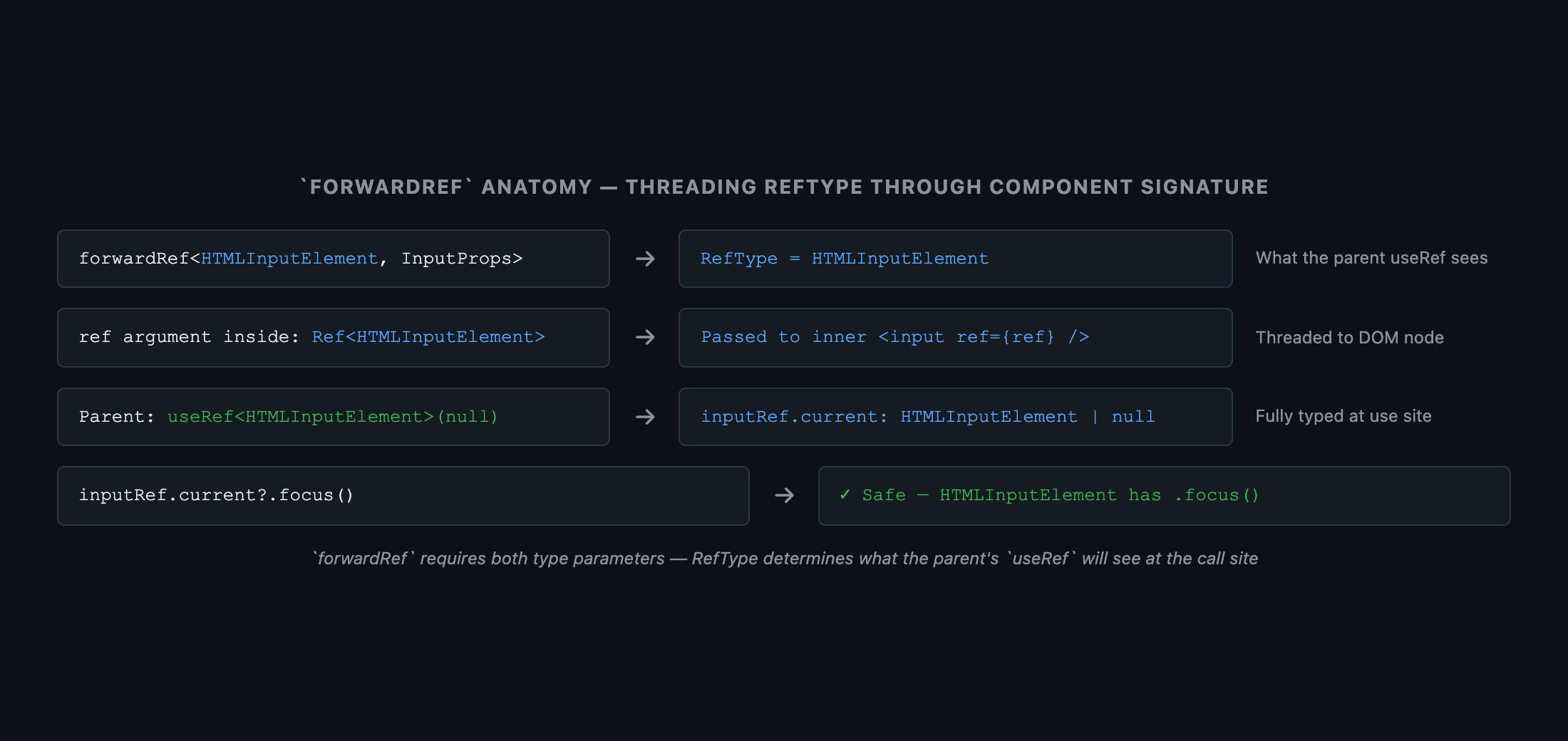
 Anatomy diagram showing the forwardRef call. The function signature forwardRef<HTMLInputElement, InputProps> is expanded into three labeled sections: 'Ref type parameter: HTMLInputElement — the type of the DOM node or imperative handle'; 'Props type parameter: InputProps — the component's own props'; 'ref argument: Ref<HTMLInputElement> — threaded through to the input element'. An arrow from the ref={ref} prop on the inner <input> element traces back to the useRef<HTMLInputElement>(null) at the call site, labeled 'ref flows from parent useRef to the inner DOM node'. Caption: 'forwardRef<RefType, PropsType> requires both type parameters — the ref type determines what the parent's useRef will see, not the component's internal structure'.
Figure: Anatomy diagram showing the forwardRef call. The function signature forwardRef<HTMLInputElement, InputProps> is expanded into three labeled sections: 'Ref type parameter: HTMLInputElement — the type of the DOM node or imperative handle'; 'Props type parameter: InputProps — the component's own props'; 'ref argument: Ref<HTMLInputElement> — threaded through to the input element'. An arrow from the ref={ref} prop on the inner <input> element traces back to the useRef<HTMLInputElement>(null) at the call site, labeled 'ref flows from parent useRef to the inner DOM node'. Caption: 'forwardRef<RefType, PropsType> requires both type parameters — the ref type determines what the parent's useRef will see, not the component's internal structure'.

5. Typing Event Handlers

typescript
// ❌ Generic `Event` loses the element type
function handleChange(e: Event) {
  // e.target is EventTarget — no `value` property
  console.log((e.target as any).value)  // Requires a cast
}

// ✅ React's typed event classes carry the element type
function handleChange(e: React.ChangeEvent<HTMLInputElement>) {
  console.log(e.target.value)  // string — no cast needed
}

function handleClick(e: React.MouseEvent<HTMLButtonElement>) {
  e.currentTarget.disabled = true  // HTMLButtonElement — typed correctly
}

function handleKeyDown(e: React.KeyboardEvent<HTMLInputElement>) {
  if (e.key === 'Enter') {
    e.currentTarget.blur()  // HTMLInputElement
  }
}

6. useRef — Two Distinct Modes

useRef serves two distinct purposes, and each requires a different initial value:
typescript
// Mode 1: DOM ref — stores a reference to a DOM node
// Initialize with `null`; the generic is the element type
const inputRef = useRef<HTMLInputElement>(null)
// inputRef.current: HTMLInputElement | null

// Mode 2: Mutable container — stores a mutable value that doesn't trigger re-renders
// Initialize with the value itself; the generic matches the value type
const timerRef = useRef<ReturnType<typeof setInterval>>(0)
// timerRef.current: number

// Why the distinction?
// null initializer → TypeScript infers `RefObject<T>` (readonly `.current`)
// value initializer → TypeScript infers `MutableRefObject<T>` (writable `.current`)
Crucial Requirement
Passing null to useRef<HTMLInputElement>(null) makes .current readonly (a RefObject) — this is what ref={...} on JSX elements expects. Passing a value (e.g., useRef<number>(0)) makes .current writable (a MutableRefObject). Mixing these up is a common source of TypeScript errors.

7. Typed useReducer with Discriminated Union Actions

useReducer with a discriminated union action type gives you exhaustive dispatch — the compiler catches missing cases when a new action is added:
typescript
// State shape
interface CounterState {
  count: number
  error: string | null
}

// Discriminated union — each action carries only its relevant payload
type CounterAction =
  | { type: 'increment'; amount: number }
  | { type: 'decrement'; amount: number }
  | { type: 'reset' }
  | { type: 'setError'; message: string }

// Reducer — exhaustive switch over action.type
function counterReducer(state: CounterState, action: CounterAction): CounterState {
  switch (action.type) {
    case 'increment':
      return { ...state, count: state.count + action.amount, error: null }
    case 'decrement':
      return { ...state, count: Math.max(0, state.count - action.amount), error: null }
    case 'reset':
      return { count: 0, error: null }
    case 'setError':
      return { ...state, error: action.message }
    // No default needed — TypeScript verifies all cases are handled
  }
}

// Usage
const [state, dispatch] = useReducer(counterReducer, { count: 0, error: null })

dispatch({ type: 'increment', amount: 5 })  // ✅ amount: number — typed
dispatch({ type: 'reset' })                  // ✅ no payload needed
dispatch({ type: 'increment' })              // ❌ Error: Property 'amount' is missing
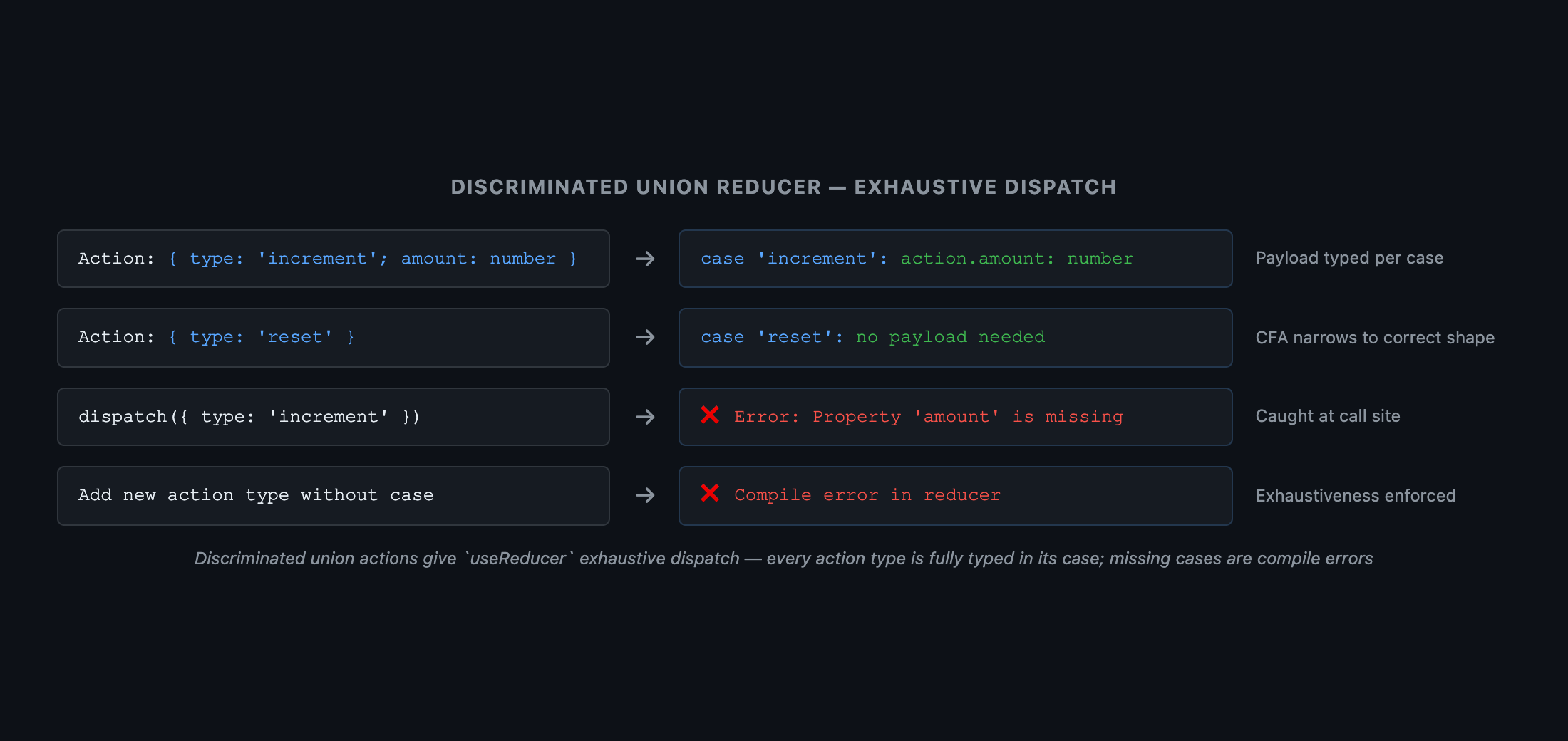
 Three-panel diagram. Left panel: CounterAction discriminated union — four boxes labeled 'increment | amount: number', 'decrement | amount: number', 'reset', 'setError | message: string'. Center panel: switch (action.type) with four case branches. Right panel: each branch shows the narrowed action type — case 'increment' → { type: 'increment'; amount: number }, case 'reset' → { type: 'reset' }. An annotation below: 'All cases are exhaustive — adding a new action type without a case causes a compile error in the reducer'. Caption: 'Discriminated union actions give useReducer exhaustive dispatch — every action type is fully typed in its corresponding case'.
Figure: Three-panel diagram. Left panel: CounterAction discriminated union — four boxes labeled 'increment | amount: number', 'decrement | amount: number', 'reset', 'setError | message: string'. Center panel: switch (action.type) with four case branches. Right panel: each branch shows the narrowed action type — case 'increment' → { type: 'increment'; amount: number }, case 'reset' → { type: 'reset' }. An annotation below: 'All cases are exhaustive — adding a new action type without a case causes a compile error in the reducer'. Caption: 'Discriminated union actions give useReducer exhaustive dispatch — every action type is fully typed in its corresponding case'.

8. Context Typing — The Narrowing Custom Hook Pattern

createContext with null as the default combined with a narrowing hook eliminates the optional chaining boilerplate at every call site:
typescript
interface UserContextValue {
  user:   User
  logout: () => void
}

// Initialize with null — forces the type parameter to include null
const UserContext = React.createContext<UserContextValue | null>(null)

// Provider — wraps the authenticated section of the app
function UserProvider({ children }: { children: React.ReactNode }) {
  const [user, setUser] = useState<User>(currentUser)
  return (
    <UserContext.Provider value={{ user, logout: () => setUser(null as any) }}>
      {children}
    </UserContext.Provider>
  )
}

// Narrowing custom hook — throws if used outside the provider
function useUser(): UserContextValue {
  const ctx = useContext(UserContext)
  if (ctx === null) throw new Error('useUser must be used within UserProvider')
  return ctx  // Narrowed to UserContextValue — null is eliminated
}

// Consumer — no optional chaining needed
function Profile() {
  const { user, logout } = useUser()
  // user: User (not User | null) — the hook guarantees non-null
  return <div>{user.name}<button onClick={logout}>Logout</button></div>
}

Summary

ConceptRule
FC<Props>Avoid — adds implicit children prop; use plain function with explicit interface
Generic componentfunction List<T>({ items }: { items: T[] }) — T flows from items to renderItem
ComponentProps<typeof X>Correct way to extend a component's props in a wrapper — tracks changes automatically
forwardRef<RefType, PropsType>Both type params required — RefType is what the parent's useRef sees
React.ChangeEvent<HTMLInputElement>Use React's typed events — not the browser's Event which loses the element type
useRef<T>(null)DOM ref — .current is T | null, readonly (RefObject)
useRef<T>(value)Mutable container — .current is T, writable (MutableRefObject)
Discriminated union actionsuseReducer + union actions → exhaustive dispatch; compiler catches missing cases
createContext<T | null>(null)Use null default + narrowing hook — consumers get non-null type without casting
Research & Synthesis Note

This article was developed with AI-assisted deep search, specification cross-referencing, and technical research synthesis.

#TypeScript#React#Components#Hooks#Generic Components
Siddhant Deval

Written by Siddhant Deval

Senior Full-Stack Engineer building high-scale architectures, browser performance engineering systems, and SaaS platforms.