
Design System Distribution: NPM Topologies, Runtime Federation & Deprecation Governance
Distributing design system components as live runtime singletons is a deployment coupling decision disguised as a convenience. This article maps three distribution topologies — static NPM, Module Federation remote singleton, and hybrid — with a clear recommendation and a deprecation governance workflow using jscodeshift codemods.
Frontend Platform & Scale Architecture
Design System Distribution: NPM Topologies, Runtime Federation & Deprecation Governance
Architecture is not about drawing boxes on a whiteboard — it is about enforcing boundary contracts, deterministic caching, and secure data mediation across independent release units. In Part 3, we designed those boundaries inside the design system. Now we face the question that determines whether those boundaries hold in production: how do you get the tokens and components from a centralized repository into fifteen independently deployed applications?
The answer to this question is not a technology choice. It is an organizational commitment. Every distribution topology carries a different blast radius, a different upgrade cadence, and a different failure mode. This article maps three topologies honestly — including the failure scenarios that most design system talks omit — and arrives at the hybrid architecture that is the production standard for multi-team organizations.
1. The Distribution Problem
An e-commerce platform has twelve independently deployed micro-frontends: Product Catalog, Cart, Checkout, User Profile, Search, Recommendations, Order History, Returns, Loyalty, Notifications, Admin, and Analytics Dashboard. Every one of them renders Button, consumes color.brand.primary, and mounts inside the same GlobalNavigation.
This creates three tensions:
| Tension | Description |
|---|---|
| Visual Consistency vs. Team Autonomy | The design team wants to enforce pixel-perfect consistency. Product teams want to ship without waiting for design system approval. |
| Instant Updates vs. Blast Radius | A bug fix in Button should reach all twelve apps immediately. But a breaking prop change should not crash all twelve simultaneously. |
| Version Drift vs. Upgrade Paralysis | Teams pinned to old versions cause visual inconsistency. But mandatory synchronous upgrades block feature work. |
No topology solves all three tensions. The correct question is: which trade-offs can your organization absorb?
2. Topology A — Build-Time NPM Distribution
2.1 How It Works
The design system is published to an npm registry (public or private) as versioned packages:
Consuming apps declare explicit version ranges in package.json:
Each app builds independently. At build time, the declared versions are resolved from the registry and compiled into the app's bundle. No runtime dependency on a shared remote — the tokens and components are fully owned by the app's build.
2.2 The Version Drift Problem
Twelve teams, twelve package.json files. After six months:
Five different versions of Button render in the same user session. The product looks like a patchwork. The checkout team is blocked because v3.x introduced a breaking change they haven't had time to migrate.
2.3 Automated Drift Remediation with Renovate
Renovate Bot automates the upgrade PR workflow:
The requiredStatusChecks list is the key: visual-regression runs Playwright component snapshots against the upgraded version before auto-merging. If a token change shifts button padding by 2px, the visual regression test fails, the PR is not auto-merged, and a human reviews it.
Set automerge: true only for patch version bumps of token packages. For UI component packages, require human review on any minor or major version bump — prop interface changes can be subtle and visually regression-test-evasive.
2.4 NPM Distribution Failure Modes
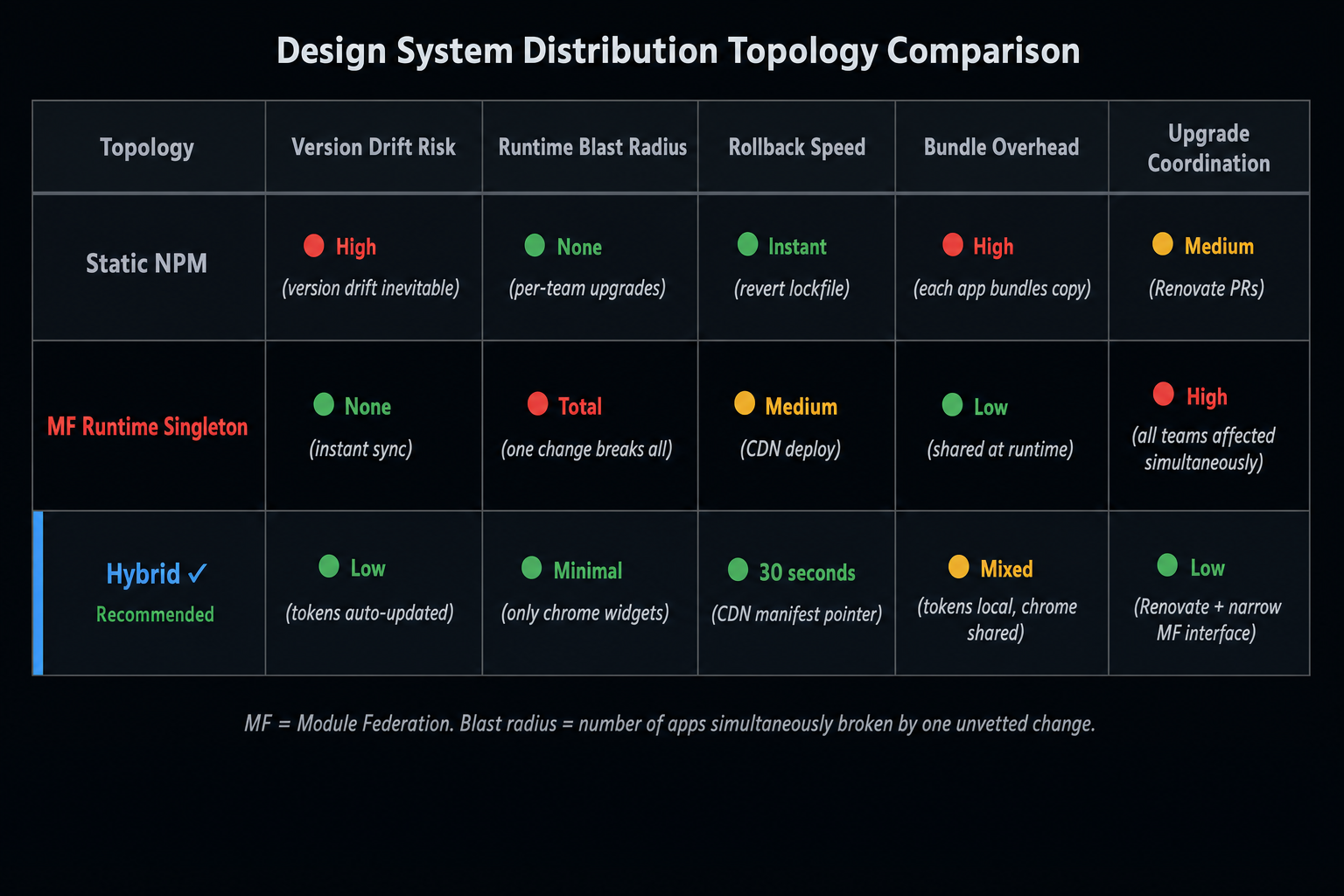
| Failure Mode | Trigger | Impact |
|---|---|---|
| Version drift | Teams don't upgrade | Visual inconsistency across apps |
| Upgrade paralysis | Major breaking changes | Teams blocked for weeks |
| Bundle duplication | Each app bundles its own copy | Larger total bundle weight |
| Stale cache | npm registry cache not invalidated | Apps serve old component versions after a critical fix |
3. Topology B — Runtime Module Federation Remote Singleton
3.1 How It Works
The design system is exposed as a live Module Federation remote. Apps load the design system at runtime from a CDN URL instead of bundling it at build time:
When the design system team ships a new version, they update the CDN. All twelve apps immediately load the new version on the next user request — no rebuild, no redeployment of any consuming app.
3.2 The Promise and Why It Is Dangerous
The promise is real: instant visual synchronization across all apps, zero coordinated deployments. The danger is equally real.
With a runtime singleton remote, this change is deployed to the CDN and simultaneously breaks all twelve apps. Every <Button variant="primary" label="Submit" onClick={...}> across every micro-frontend throws a runtime error. There is no staging rollout, no canary, no per-team opt-in. The blast radius is the entire product.
Never federate a full UI component library as a runtime singleton remote. The blast radius of a breaking prop change is total and simultaneous across all consumers. The only safe candidates for runtime federation are components with extremely narrow, stable prop interfaces (e.g., GlobalNavigation with a fixed user prop and a links array) that are explicitly versioned through a manifest.
3.3 When Runtime Federation Is Acceptable
Runtime federation for design system components is acceptable when:
- The component's prop interface is narrow and stable (≤ 5 props, no breaking changes in 12+ months).
- The component is globally visible (renders in every app —
GlobalNavigation,UniversalFooter,CookieBanner). - The deployment uses a manifest (not a hardcoded CDN URL) enabling rollback within seconds.
- Visual regression tests run against the remote before it is promoted to the CDN.
4. Topology C — The Hybrid Architecture (Recommended)
4.1 The Architecture
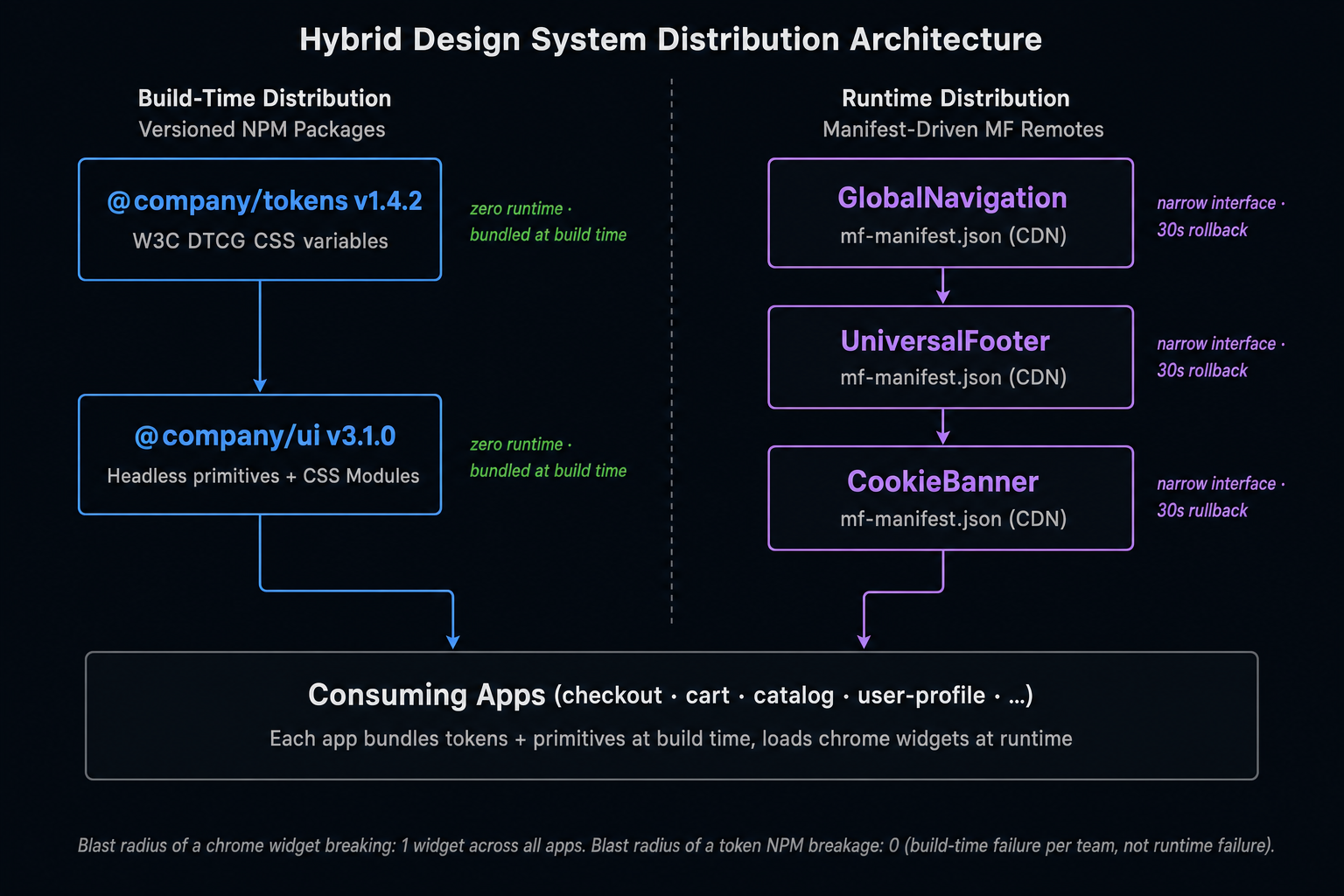
Layer 1 tokens and Layer 2 headless primitives are distributed statically via versioned NPM. They have zero runtime dependency, so there is no blast radius — a broken token package only affects the teams who choose to upgrade.
The three global chrome widgets — GlobalNavigation, UniversalFooter, CookieBanner — are federated at runtime because they are genuinely global (every app must show the same navigation simultaneously), they have stable, narrow prop interfaces, and instant visual sync on navigation updates is a product requirement.
4.2 The Manifest-Driven Remote
For the federated chrome widgets, use @module-federation/manifest to decouple the CDN URL from the consuming app's build:
Rolling back a broken GlobalNavigation is now a CDN manifest pointer update — no consuming app needs to be redeployed. The rollback takes 30 seconds.
5. Static Asset, Font & Icon Distribution
5.1 Preventing Duplicate @font-face Requests
The correct approach depends on your architecture:
- Same-origin apps: Host fonts at a shared CDN path (
/shared-assets/fonts/). Each app references the same URL. The browser caches once. - Cross-origin MFEs: Load fonts once from the App Shell using
<link rel="preload">. Remotes that render in the same browser context inherit the already-loaded font faces.
5.2 SVG Icon Distribution
| Strategy | Mechanism | Bundle Impact |
|---|---|---|
| Inline SVG components | import { ArrowRight } from '@company/icons' |
Only imported icons in bundle |
| SVG sprite sheet | One <svg> with <symbol> elements, referenced by <use href="#icon-arrow"> |
One network request; all icons available |
| Federated icon remote | Icon components loaded as MF remote | Adds federation overhead for small assets |
For most teams, inline SVG components with tree-shaking is the optimal choice — only the icons actually used are included in each app's bundle.
6. Deprecation Lifecycle & Automated Codemods
6.1 The Three-Phase Lifecycle
6.2 Phase 1 — ESLint Deprecation Warning
6.3 Phase 2 — Automated Codemod with jscodeshift
Ship a codemod alongside the hard deprecation so teams can migrate in seconds:
Running the codemod across all consuming apps:
Never ship a major version removal without shipping the codemod first. A codemod that runs in under 5 seconds converts what would be a multi-day migration into a one-line command. Teams that dread design system upgrades have almost always experienced a breaking change without a codemod.
Summary
| Concept | Rule |
|---|---|
| NPM topology | Best for tokens and headless primitives; use Renovate + visual regression for automated upgrades |
| MF singleton remote | Only for narrow-interface global chrome components with manifest-driven rollback |
| Hybrid (recommended) | Static NPM for tokens/primitives + runtime MF for GlobalNav, Footer, CookieBanner |
| Font distribution | Host at shared CDN path; load once from App Shell via <link rel="preload"> |
| Deprecation | Three phases: Soft → Hard (with codemod) → Removal |
| Codemod rule | Never ship a major breaking change without a jscodeshift codemod |
What's Next
In Part 5, we move from the frontend distribution layer to the backend integration layer — building a Backend-for-Frontend that aggregates downstream microservices, slims payloads to exactly what the client needs, and handles partial failures gracefully so a slow recommendations service never drops a product page.
This article was developed with AI-assisted deep search, specification cross-referencing, and technical research synthesis.
