Siddhant Deval
Siddhant DevalAuthor
Senior Full-Stack Engineer·Sep 15, 2026·11 min read

Client Configuration & the Apollo Link Chain

The Apollo Link chain is the nervous system of every Apollo Client setup — authentication, error interception, retry logic, APQ, and observability all wire into it. Copying a link setup without understanding the chain model guarantees silent failures at the layer you didn't understand.

Client Configuration & the Apollo Link Chain

Every Apollo Client setup has an ApolloClient constructor call somewhere. Most of them look like this:
typescript
// ❌ The setup that fails silently in production
const client = new ApolloClient({
  uri: '/graphql',
  headers: {
    Authorization: `Bearer ${localStorage.getItem('token')}`,
  },
  cache: new InMemoryCache(),
})
This setup works — until it silently doesn't. The Authorization header is read once at module load time. When the token expires and a refresh returns a new token, this client still sends the old one. There is no retry on network failures. There is no central place to intercept UNAUTHENTICATED errors and redirect to login. Every error handling decision gets made per-component, inconsistently.
The answer is not to add an onError callback to each useQuery. The answer is an ApolloLink chain — where each cross-cutting concern lives in its own link, the order of links is explicit and correct, and every request passes through all of them automatically.
A GraphQL client is not a data fetcher — it is a local replica of your server's data graph. The link chain is the nervous system through which every operation flows before reaching the network and every response flows back before updating the replica.

An ApolloLink is a function that receives an operation (the GraphQL document + variables + context) and either:
  • Calls forward(operation) to pass it to the next link in the chain, or
  • Returns an Observable directly (for terminating links, which send the actual request).
typescript
import { ApolloLink, Observable } from '@apollo/client'

// A simple logging link
const loggingLink = new ApolloLink((operation, forward) => {
  console.log(`[GraphQL] ${operation.operationName}`)
  return forward(operation)  // ← Pass to next link
})
Terminating links end the chain — they send the operation to the network and return an Observable of the result. HttpLink is the standard terminating link. It must always be last in the chain.
Non-terminating links intercept the operation, optionally modify it, and call forward(operation) to continue the chain. Auth links, retry links, and error links are all non-terminating.
typescript
// ✅ Correct chain — terminating link is always last
const link = from([
  authLink,    // Non-terminating: adds Authorization header
  retryLink,   // Non-terminating: retries on network failure
  errorLink,   // Non-terminating: intercepts errors from HttpLink
  httpLink,    // Terminating: sends the HTTP request
])

1.2 Why Order Is a Correctness Constraint

typescript
// ❌ Wrong order — ErrorLink before RetryLink
const link = from([authLink, errorLink, retryLink, httpLink])
// Problem: errorLink intercepts network errors before retryLink can retry them
// Result: retry never fires on a network failure

// ✅ Correct order — RetryLink wraps ErrorLink
const link = from([authLink, retryLink, errorLink, httpLink])
// RetryLink wraps everything after it — retries the full remaining chain
// ErrorLink sees the final error only after all retry attempts are exhausted
The chain is like a middleware stack. Links closer to the front of the array wrap those closer to the end. retryLink at position 2 wraps errorLink at position 3 and httpLink at position 4 — which means RetryLink can re-execute those links on each retry attempt.
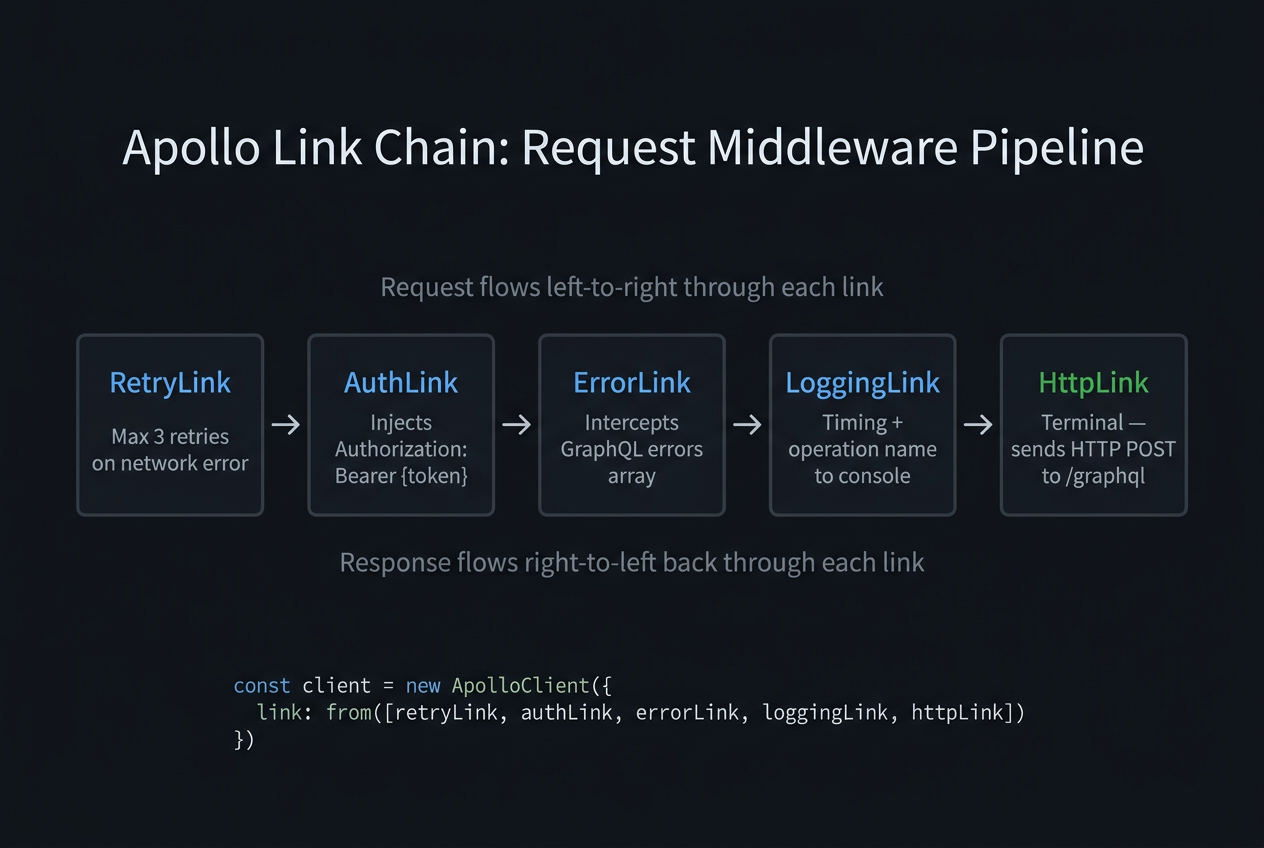
A single GraphQL operation traversing the link chain: AuthLink attaches the token, RetryLink wraps subsequent links, ErrorLink intercepts terminal failures, HttpLink sends the request
A single GraphQL operation traversing the link chain: AuthLink attaches the token, RetryLink wraps subsequent links, ErrorLink intercepts terminal failures,…

The setContext link reads the token at request time, not at initialization time:
typescript
import { setContext } from '@apollo/client/link/context'

const authLink = setContext(async (_, { headers }) => {
  // ✅ Token read on every request — always current
  const token = await getAccessToken()  // could be from memory, cookie, or refresh logic

  return {
    headers: {
      ...headers,
      Authorization: token ? `Bearer ${token}` : '',
    },
  }
})
Crucial Requirement
setContext receives the current headers and must return the updated headers. Always spread ...headers — other links (logging, tracing) may have already set headers upstream.
typescript
import { RetryLink } from '@apollo/client/link/retry'

const retryLink = new RetryLink({
  delay: {
    initial: 300,    // 300ms before first retry
    max: 5000,       // max 5s between retries
    jitter: true,    // randomize to avoid thundering herd
  },
  attempts: {
    max: 3,
    retryIf: (error, _operation) => {
      // ✅ Only retry on network errors, not GraphQL execution errors
      return !!error && error.statusCode !== 401
    },
  },
})
Performance / Safety Warning
RetryLink retries the entire remaining chain — including HttpLink. Do not use it to retry mutations unless your mutations are idempotent. A non-idempotent mutation (e.g., placeOrder) retried three times will create three orders.
typescript
import { onError } from '@apollo/client/link/error'

const errorLink = onError(({ graphQLErrors, networkError, operation, forward }) => {
  if (graphQLErrors) {
    for (const error of graphQLErrors) {
      switch (error.extensions?.code) {
        case 'UNAUTHENTICATED':
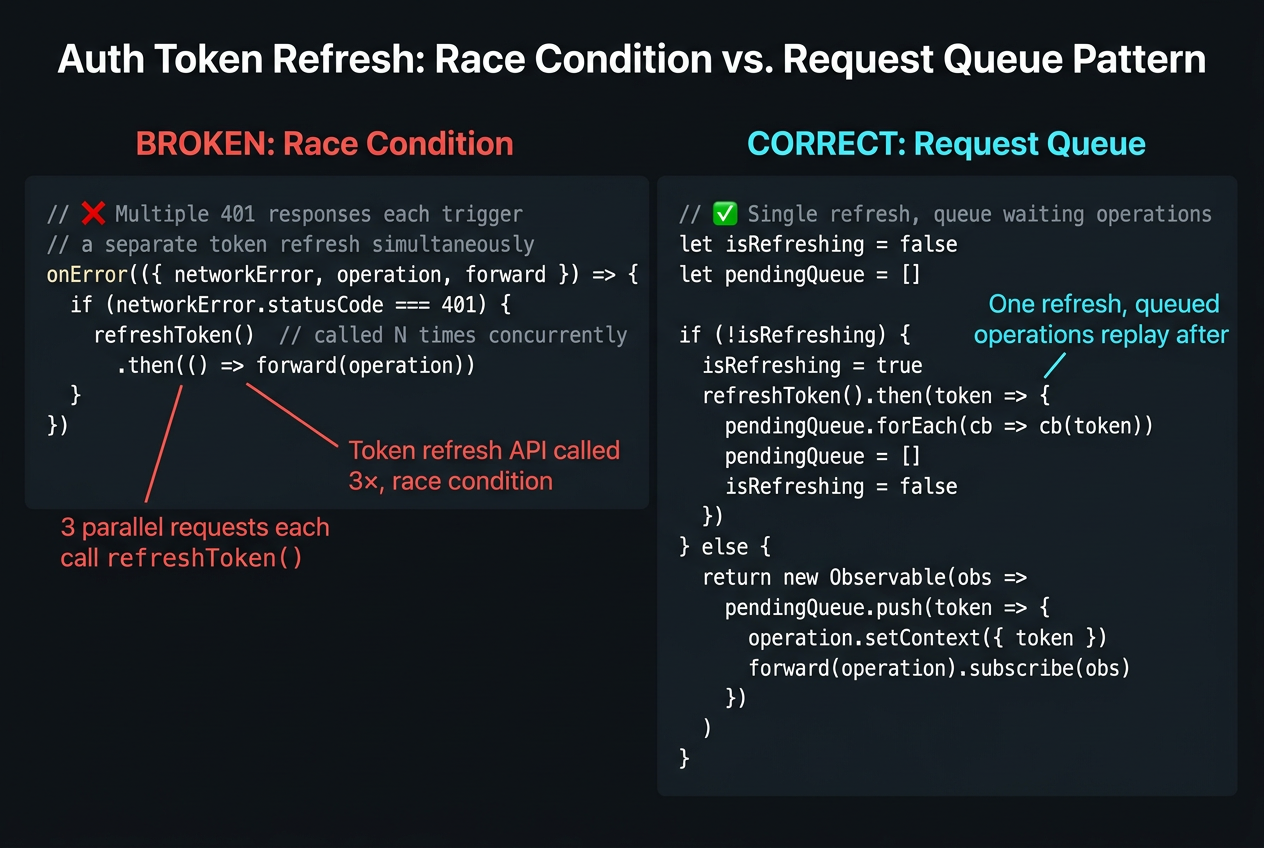
          // Token expired — refresh and retry the operation
          return fromPromise(
            refreshToken().then(newToken => {
              const oldHeaders = operation.getContext().headers
              operation.setContext({
                headers: { ...oldHeaders, Authorization: `Bearer ${newToken}` },
              })
            })
          ).flatMap(() => forward(operation))

        case 'FORBIDDEN':
          // Redirect to access-denied page — don't retry
          router.push('/access-denied')
          break
      }
    }
  }

  if (networkError) {
    console.error(`[Network error]: ${networkError}`)
    // networkError.statusCode is available for HTTP-level errors
  }
})
Architectural Note
onError receives graphQLErrors (resolver-level failures in the errors array) separately from networkError (transport-level HTTP failures). These correspond to the two GraphQL error categories covered in Part 6.
typescript
import { HttpLink } from '@apollo/client'

const httpLink = new HttpLink({
  uri: '/graphql',
  credentials: 'same-origin',  // Include cookies for same-origin requests
  fetchOptions: {
    method: 'POST',
  },
})

2.5 Assembling the Chain

typescript
import { ApolloClient, InMemoryCache, from } from '@apollo/client'

const client = new ApolloClient({
  link: from([authLink, retryLink, errorLink, httpLink]),
  cache: new InMemoryCache({
    typePolicies: {
      // keyFields, field policies — covered in Part 2
    },
  }),
})
Monolithic ApolloClient constructor with inline headers (broken: stale token, no retry) vs composed link chain (correct: per-request auth, isolated retry logic)

3. ApolloProvider Setup

3.1 Client Initialization and Provider Placement

typescript
// app/providers.tsx (Next.js App Router) or src/main.tsx (Vite)
'use client'

import { ApolloClient, InMemoryCache, ApolloProvider, from } from '@apollo/client'
import { authLink, retryLink, errorLink, httpLink } from './links'

const client = new ApolloClient({
  link: from([authLink, retryLink, errorLink, httpLink]),
  cache: new InMemoryCache(),
})

export function Providers({ children }: { children: React.ReactNode }) {
  return <ApolloProvider client={client}>{children}</ApolloProvider>
}
The ApolloProvider must wrap every component that calls useQuery, useMutation, or useSubscription. Place it at the root of your component tree — above routing, above layout, above everything.

3.2 SSR with Next.js App Router

The ApolloWrapper pattern for Next.js App Router uses useMemo to create the client once per render context:
typescript
'use client'

import { useMemo } from 'react'
import { ApolloClient, InMemoryCache, ApolloProvider } from '@apollo/client'

function makeClient() {
  return new ApolloClient({
    link: from([authLink, retryLink, errorLink, httpLink]),
    cache: new InMemoryCache(),
    ssrMode: typeof window === 'undefined',  // Prevents cache from persisting between SSR requests
  })
}

export function ApolloWrapper({ children }: { children: React.ReactNode }) {
  const client = useMemo(() => makeClient(), [])
  return <ApolloProvider client={client}>{children}</ApolloProvider>
}
Crucial Requirement
The ssrMode: true flag prevents the Apollo Client from using window and disables features that assume a browser environment. Set it to typeof window === 'undefined' so it's only active during server-side rendering.

4. makeVar and Reactive Variables

The replica store (the InMemoryCache) holds server-derived data. But some client state — whether a modal is open, the current theme, an unsaved form draft — needs to survive component unmounts without being a server entity.
Reactive variables (makeVar) are Apollo's local state primitive. They live outside the cache but integrate with the reactive update system.

4.1 Defining and Using Reactive Variables

typescript
import { makeVar, useReactiveVar } from '@apollo/client'

// Define at module level — survives component unmounts
const isModalOpenVar = makeVar<boolean>(false)
const draftCommentVar = makeVar<string>('')

function CommentModal() {
  const isOpen = useReactiveVar(isModalOpenVar)
  const draft = useReactiveVar(draftCommentVar)

  return isOpen ? (
    <Modal>
      <textarea
        value={draft}
        onChange={e => draftCommentVar(e.target.value)}  // ← Write by calling as function
      />
      <button onClick={() => isModalOpenVar(false)}>Close</button>
    </Modal>
  ) : null
}

4.2 The Boundary: Replica Data vs. UI State

typescript
// ❌ Storing server data in a reactive variable
const currentUserVar = makeVar<User | null>(null)
// Problem: this creates a second, unsynchronized copy of User:1
// Mutations that update the cache won't update this variable

// ✅ Reading server data from the cache directly
function useCurrentUser() {
  const { data } = useQuery(GET_ME)
  return data?.me  // ← Reads from the replica — stays synchronized automatically
}

// ✅ Reactive variables for ephemeral UI state only
const selectedTabVar = makeVar<'profile' | 'orders'>('profile')
Mental Model Check
If the data should persist across page reloads, it belongs in the server (and in the cache when fetched). If it should reset on page reload, it belongs in a reactive variable. If it should reset on component unmount, it belongs in useState.

BatchHttpLink combines multiple GraphQL operations fired in the same tick into a single HTTP request:
typescript
import { BatchHttpLink } from '@apollo/client/link/batch-http'

const httpLink = new BatchHttpLink({
  uri: '/graphql',
  batchMax: 5,      // Max operations per batch
  batchInterval: 20, // Wait 20ms to collect operations before sending
})
Use BatchHttpLink only for HTTP/1.1. In HTTP/1.1, each request occupies a connection (max 6 per domain). Batching reduces connection contention. In HTTP/2, multiplexing sends all requests concurrently on one connection — the batchInterval delay degrades time-to-first-byte without any connection benefit.
typescript
// Detect HTTP/2 support and use the appropriate link
const isHTTP2 = typeof window !== 'undefined' && 'connection' in navigator
const httpLink = isHTTP2
  ? new HttpLink({ uri: '/graphql' })
  : new BatchHttpLink({ uri: '/graphql', batchMax: 5, batchInterval: 20 })
SchemaLink executes operations against a local schema without HTTP. It is the correct client for integration tests:
typescript
import { SchemaLink } from '@apollo/client/link/schema'
import { schema } from '../server/schema'

// In test setup — no fetch mock, no HTTP server
const client = new ApolloClient({
  link: new SchemaLink({ schema }),
  cache: new InMemoryCache(),
})
Pro Tip & Optimization
Use SchemaLink in component tests that exercise the full query-to-render path. It is faster than mocking fetch and more accurate than mocking useQuery — it exercises the actual Apollo Client execution pipeline including field policies and cache normalization.

Summary

ConceptRule
Link chain orderLink chain order is a correctness constraint, not a style preference — placing ErrorLink before RetryLink means retry never fires on network errors.
Cross-cutting concernsEvery cross-cutting concern (auth, logging, retry, APQ) belongs in a dedicated link; embedding them in useQuery options is the monolith anti-pattern for GraphQL clients.
Reactive variablesmakeVar is for UI state that should survive component unmounts but not page reloads — never store server-derived data in a reactive variable; that data belongs in the cache.
HTTP/2 and batchingDisable BatchHttpLink in any HTTP/2 environment — multiplexing handles concurrent requests natively; batching adds an artificial delay that degrades time-to-first-byte.
TestingSchemaLink (executes against a local schema without HTTP) is the correct client for integration tests — use it in test setup instead of mocking fetch.

What's Next

In Part 4, we move from client configuration to the query design discipline that makes the replica useful: fragment colocation. We'll see why fragments are not just a way to share field selections — they are the typed data contract between a component and the server graph, and the only mechanism that prevents silent over-fetching at the component boundary.
Research & Synthesis Note

This article was developed with AI-assisted deep search, specification cross-referencing, and technical research synthesis.

#GraphQL#Apollo Client#ApolloLink#Authentication#Error Handling#Retry#TypeScript
Siddhant Deval

Written by Siddhant Deval

Senior Full-Stack Engineer building high-scale architectures, browser performance engineering systems, and SaaS platforms.