
Fragment Colocation, Optimistic UI & Incremental Delivery
Fragment colocation is not a Relay curiosity — it is the only mechanism that makes your UI's data contract explicit, refactor-safe, and immune to silent over-fetching without a server-side schema change.
GraphQL Frontend Engineering
Fragment Colocation, Optimistic UI & Incremental Delivery
Here is a refactor bug that happens to every team at scale. A designer adds a displayName field to the User type. The backend deploys it. A frontend engineer searches the codebase for UserProfile, finds the component, and adds displayName to the query in pages/profile.tsx. Done — except the exact same user data is also fetched in the sidebar, the search results, and the notification list. Three components still showing the missing field. No grep found them, no TypeScript error fired, no test failed. Just wrong data in production, discovered by a user.
The fix is fragment colocation. Not as a Relay convention or an Apollo optimization — as the only architectural pattern that makes a component's data contract explicit, findable, and refactor-safe without relying on grep.
A GraphQL client is not a data fetcher — it is a local replica of your server's data graph. Fragment colocation makes the replica boundary explicit at the component level: each component owns exactly the slice of the replica it renders, and the fragment is the typed, co-located proof of that ownership.
1. The Colocation Principle
The problem with fetching fields in a page-level query is that the connection between the query and the components that use its data is implicit. profile.tsx fetches user.name and user.avatarUrl — but which component renders avatarUrl? Is it UserAvatar? ProfileHeader? Both?
Fragment colocation makes this connection explicit: the component that renders a field owns the fragment that declares it.
1.1 Without Colocation
When UserAvatar needs a new field, the engineer must modify GET_PROFILE in profile.tsx — a file that UserAvatar doesn't own. When GET_PROFILE is changed, there's no automated way to know which components break.
1.2 With Colocation
Now when UserAvatar needs a new field, the engineer adds it to UserAvatarFragment in UserAvatar.tsx. The page query picks it up automatically on the next graphql-codegen run. The TypeScript type for UserAvatarFragment updates. The change is co-located with the component that owns it.
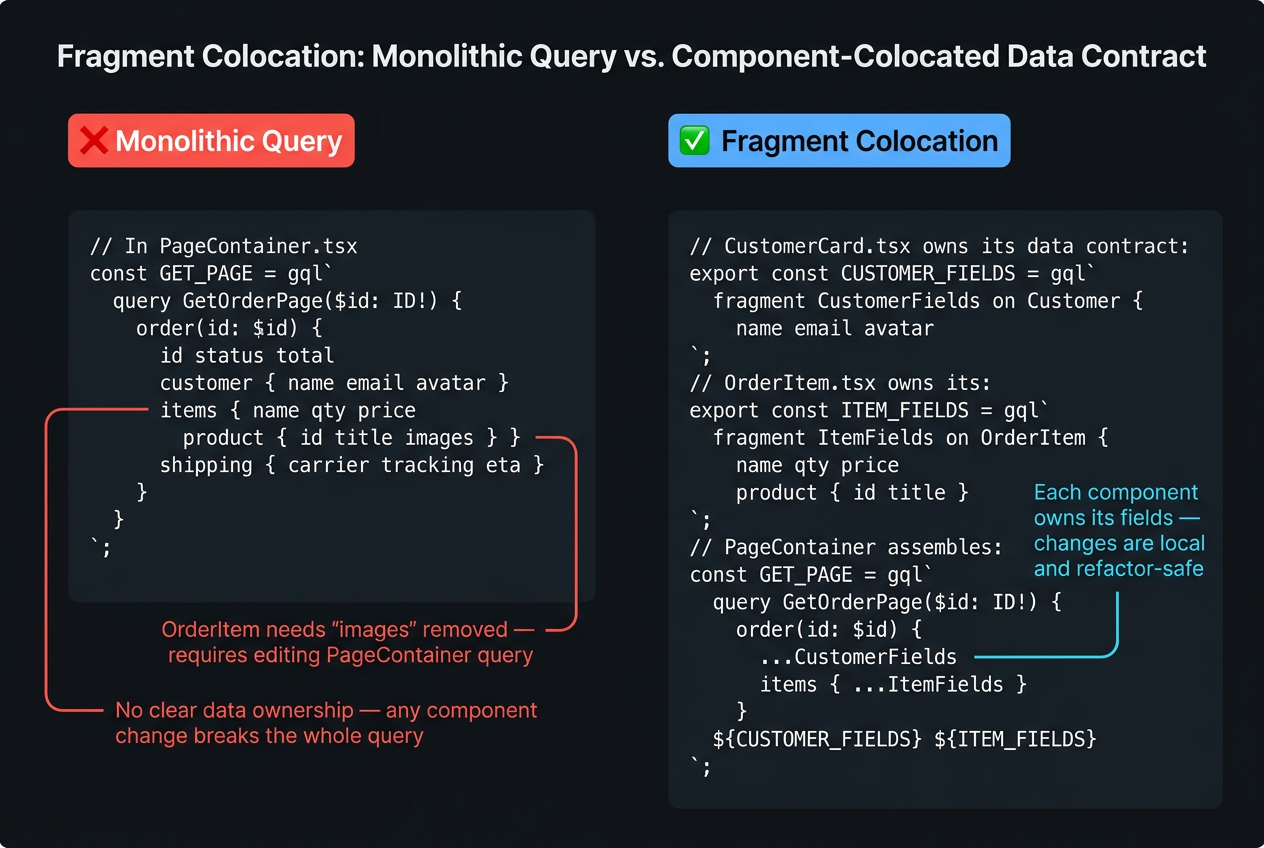
2. Fragment Composition at the Page Level
The page-level query is always exactly one network request. Fragment composition doesn't create multiple requests — it assembles all the fields needed by all child components into a single operation:
This eliminates both over-fetching (each fragment requests only its fields) and waterfall fetching (all fragments are batched into one request). The parent component doesn't need useEffect chains or cascading queries — it declares what it needs once and renders.
When using @graphql-codegen/cli v5 with the client preset, fragments are automatically inlined — you don't need ${FragmentName} template literal interpolation. Import the typed fragment document and spread it directly in the parent operation using the useFragment hook instead.
3. useFragment: Reading the Replica Without Props
Apollo Client 3.8+ introduced useFragment, which reads a fragment directly from the normalized cache without requiring a prop to be passed down:
useFragment re-renders UserAvatar only when avatarUrl or displayName changes in the User:${userId} cache entry — not when other User fields change. This is a significant performance benefit in large component trees where a mutation updates a single user field.
useFragment does not trigger a network request. It reads from the existing replica. The parent component's useQuery populates the cache; useFragment reads it. If User:${userId} is not in the cache, data is null.
4. Concurrent React Integration: Suspense and @defer
React 18's Concurrent features (Suspense, useTransition, startTransition) require a different data-fetching API from the old loading boolean pattern. Apollo Client 3.10+ provides stable useSuspenseQuery for this.
4.1 useSuspenseQuery — The Correct API for React 18
The loading boolean pattern (if (loading) return <Spinner />) is incompatible with React's Concurrent mode. Components that return early during render can't be interrupted and resumed by the scheduler. useSuspenseQuery integrates correctly with React 18's rendering model.
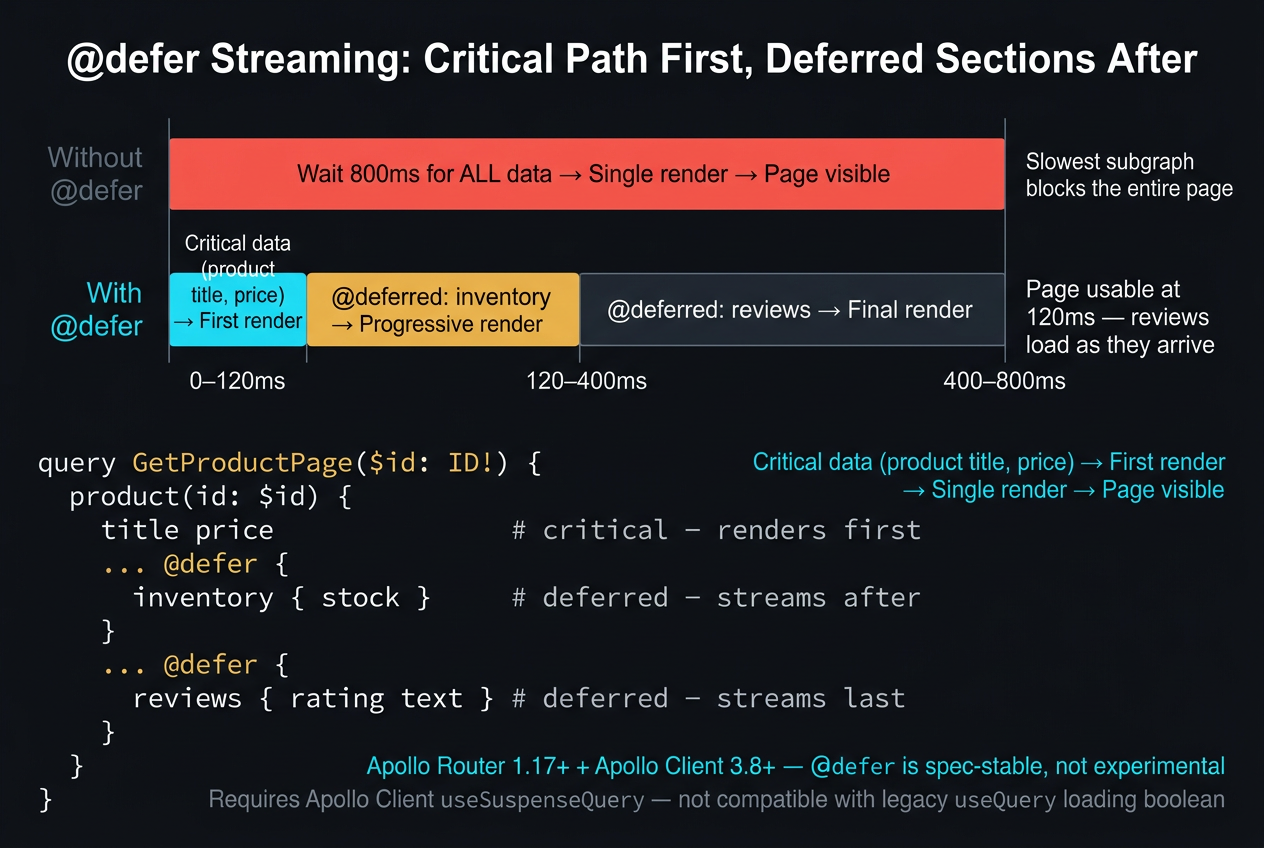
4.2 @defer — Render Critical Fields Immediately
The @defer directive lets a single query deliver fields in multiple chunks — critical fields arrive immediately, slow fields stream in afterward:
@defer requires:
- Apollo Router ≥ 1.17 on the server (handles multipart HTTP streaming)
- Apollo Client 3.8+ on the client (handles the incremental delivery protocol)
- Suspense boundaries around deferred field zones — without them, React doesn't know where to render the loading state
@defer reduces time-to-interactive, not time-to-complete. The page becomes interactive after the first chunk. The deferred fields arrive later and fill in progressively. Use it when some fields are significantly slower than others and you don't want to block the entire page on the slowest resolver.
5. Optimistic UI
Optimistic UI makes mutations feel instant by writing the expected result to the cache before the server responds. The cache holds the optimistic value temporarily; the actual server response either confirms it (reconcile) or reverts it (rollback).
5.1 The Two-Write Model
As soon as updateUserName is called:
- Apollo writes the
optimisticResponsetoUser:${userId}in the cache - All components reading
User:${userId}.namere-render with the optimistic value - The network request fires concurrently
- When the server responds, Apollo writes the actual result to the cache
- If the server response matches the optimistic value, nothing changes visually
5.2 Failure Modes
The optimisticResponse shape must exactly match the mutation's return type — including __typename on every nested object. A shape mismatch causes Apollo to fail silently: the optimistic write succeeds, the server response can't be normalized, and the cache may remain in an incorrect optimistic state indefinitely.
Summary
| Concept | Rule |
|---|---|
| Fragment as contract | A fragment is a typed data contract between a component and the graph — deleting a field from the fragment is a compiler-enforced, safe refactor; removing a prop is a runtime guess. |
| Single network request | Fragment composition at the page level means the network request is always a single operation — no waterfall, no component-level useEffect fetch chains. |
useFragment |
useFragment reads directly from the normalized cache replica — no prop required, and the component re-renders only when its specific fragment's fields change. |
| Optimistic response shape | Optimistic UI requires the optimisticResponse shape to exactly match the mutation return type — a shape mismatch causes Apollo to skip rollback on failure, leaving the cache in a corrupted optimistic state. |
@defer purpose |
@defer reduces time-to-interactive, not time-to-complete — it is the correct tool when a critical subset of the page must be immediately interactive while slow fields continue resolving. |
What's Next
In Part 5, we add a live dimension to the client replica: subscriptions. We'll look at why WebSocket authentication doesn't work the way HTTP auth does, why subscribeToMore is the only correct pattern for merging subscription events into the cache, and how the transport protocol choice (WebSocket vs. SSE) determines your server's horizontal scaling ceiling.
→ Subscriptions on the Client: WebSockets, SSE & the Live Replica
This article was developed with AI-assisted deep search, specification cross-referencing, and technical research synthesis.
