
Consuming a Federated Supergraph: The Client View
From the client's perspective, the supergraph is a single, unified schema — but the query you write determines which subgraphs the router fetches, how entity stitching assembles the response, and what partial data you receive when one domain is unavailable.
GraphQL Frontend Engineering
Consuming a Federated Supergraph: The Client View
The bug report is simple: "The Orders section is sometimes blank — F5 usually fixes it." The frontend engineer opens DevTools. HTTP 200. The GraphQL response has data.user with name and email populated, and data.user.orders is null. No errors array. No network error. Just null.
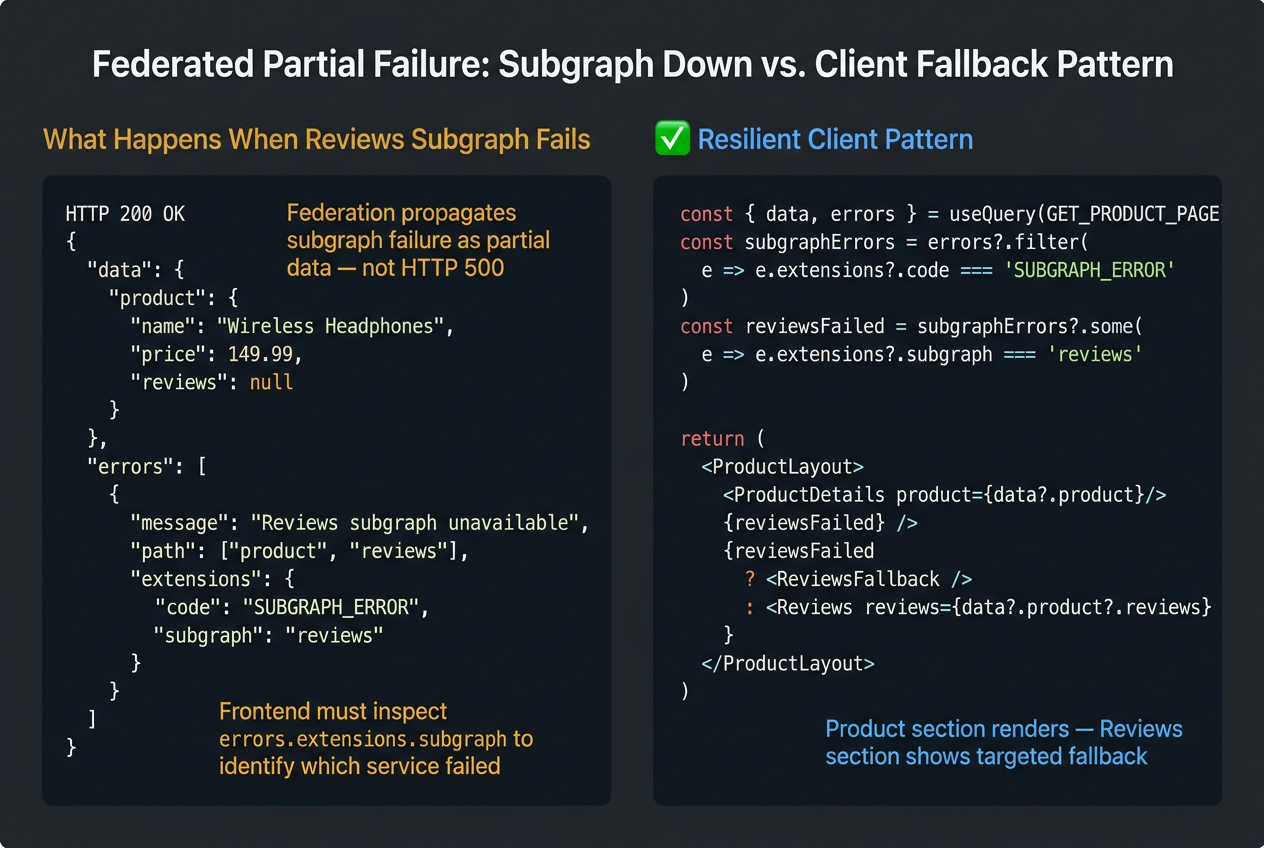
The platform team explains after an hour: the Orders subgraph had a brief outage at 14:22. The Apollo Router returned partial data — user from the Users subgraph resolved correctly, orders from the Orders subgraph returned null because the subgraph was unreachable. The router didn't fail the entire request. It returned what it had. And because the client used the default errorPolicy: 'none', the errors array was there — but the component never checked it.
Actually, one more thing: the id field wasn't included in the user selection. The router couldn't perform entity stitching between the Users and Orders subgraphs. The orders field returned null even when the Orders subgraph was healthy. Two separate bugs, both invisible, both silent.
This is the federated supergraph from the client's perspective. One unified schema, one HTTP request, one response — assembled from multiple domain services that can fail independently. Writing queries against a supergraph requires knowing three things that don't apply to monolithic GraphQL: @key entity fields, partial data semantics per subgraph, and how to read a query plan. This article covers all three.
A GraphQL client is not a data fetcher — it is a local replica of your server's data graph. In a federated supergraph, that graph spans domain boundaries. The replica must reflect those domain boundaries correctly, including their independent failure modes.
1. What a Supergraph Is from the Client's Perspective
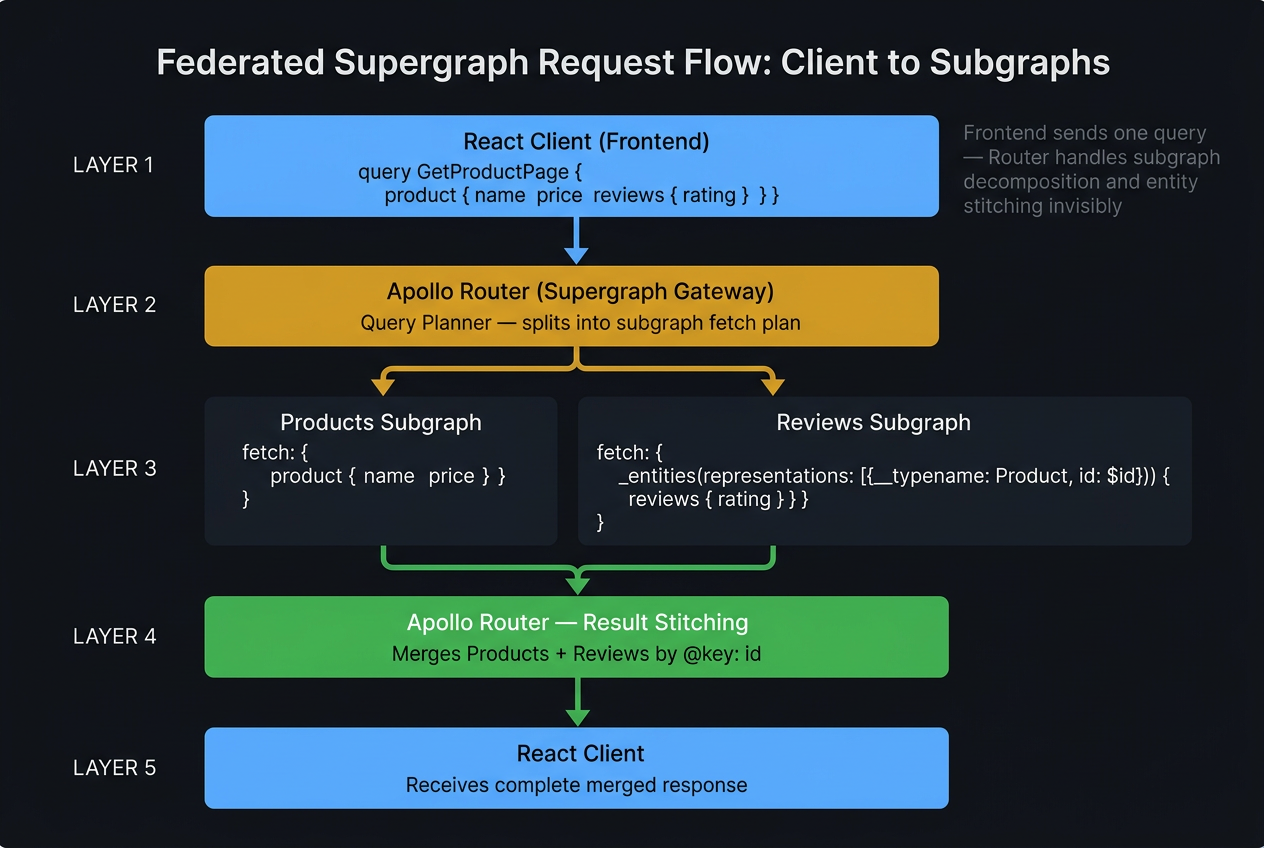
The Apollo Router presents the supergraph as a single, unified schema. From the client's perspective, there is no visible boundary between subgraphs. You write queries against one schema, send them to one endpoint, and receive one response.
Internally, the router:
- Parses the query into a query plan — a graph of fetch operations and entity stitching steps
- Executes the fetch to the Users subgraph in parallel with available fields
- Uses the
@keyentity reference to correlateUserentities across subgraphs - Fetches
ordersfrom the Orders subgraph using theUser.idas the entity key - Stitches the responses into a single unified result
None of this is visible to the client. But knowing it exists is essential for debugging, query optimization, and understanding why User.id must be in your selection set.
2. The @key Field: Why You Must Include It
This is the most common and most silent federated query bug. The @key directive on the server defines which field identifies a User entity across subgraphs. From the backend schema (covered in the companion Backend series, Part 3):
id is the @key field — the distributed foreign key the router uses to stitch User entities across subgraph boundaries.
2.1 What Happens When @key Is Missing
The router cannot correlate the User from the Users subgraph with the User representation in the Orders subgraph without the @key field. The orders field returns null. No error is emitted — the router treats the missing stitching key as a missing entity reference.
2.2 The Correct Query: Always Include @key Fields
Fragment colocation is the systematic solution to this class of bug. If your UserOrders fragment always includes id, every query that spreads it will always include the @key field. This is one of the structural benefits of fragment colocation beyond refactoring safety.
3. Partial Data: What the Client Receives When a Subgraph Fails
When the Orders subgraph is unavailable, the router does not return an HTTP 500. It returns the data it has — from the Users subgraph — and includes an error for the failed field:
This is the same partial data pattern from Part 6, applied at subgraph granularity. The client-side handling is identical:
errorPolicy: 'all' is not optional for federated graphs — it is the minimum correct configuration. With the default errorPolicy: 'none', a single subgraph outage throws an error and discards the entire response, including data from healthy subgraphs. The user sees a full error page instead of a graceful degraded experience.
3.1 Fragment-Level Error Boundaries for Subgraph Zones
Each subgraph boundary is a natural Error Boundary boundary. Wrap each data zone from a different subgraph in its own Error Boundary:
When the Orders subgraph fails, only <OrdersUnavailable /> renders. The profile and recommendations remain functional. This is the production-correct architecture for any federated UI.
4. Reading a Query Plan in Apollo Studio
The query plan is the router's decomposition of a supergraph query into subgraph fetches. Reading it is the correct debugging technique for slow federated queries — it shows exactly which subgraph fetches are sequential vs. parallel and where the latency is concentrated.
Access the query plan in Apollo Studio's Explorer tab after executing a query. A plan for a simple two-subgraph query looks like this:
4.1 What the Plan Tells You
Parallel: These fetches execute concurrently — their latencies don't add upSequence: These fetches execute serially — the second waits for the first. A long sequence is a performance bottleneck.Flatten: The router is stitching an entity — correlating the@keyfield from one subgraph's response with the representation in another
When the plan shows Sequence { Fetch A → Flatten → Fetch B → Flatten → Fetch C }, the total latency is A + B + C. Restructuring the query to allow parallel fetches, or restructuring the schema to add a field that eliminates the sequential dependency, is the performance optimization.
5. @defer Across Subgraph Boundaries
Apollo Router ≥ 1.25 supports @defer across subgraph boundaries. Deferred fields from a slow subgraph stream in after the fast subgraph's data has already been delivered to the client:
@defer across subgraph boundaries lets fast subgraphs deliver their data immediately without waiting for slow subgraphs. The user sees the profile header instantly; the orders and recommendations fill in as each subgraph responds. This is meaningfully better than blocking the entire render on the slowest subgraph.
Cross-series link: The server-side implementation of @defer in Apollo Router — multipart HTTP response configuration, subgraph-level defer support, and the router version requirements — is covered in GraphQL Backend & API Design, Part 3 (Federation & Subgraph Architecture) (coming soon).
Summary
| Concept | Rule |
|---|---|
| Supergraph transparency | The supergraph presents a single schema to the client — the router decomposes queries across subgraphs transparently; the client never needs to know which subgraph owns which field. |
@key fields |
@key entity fields must be present in every query selection that crosses a subgraph boundary — missing them causes the router to return null for the entity, with no error, silently. |
| Subgraph failure | Subgraph failure returns null for the affected entity fields, not a gateway-level HTTP error — errorPolicy: 'all' is required to receive both partial data and the error detail. |
| Query plan debugging | Reading the query plan in GraphOS is the correct debugging technique for slow federated queries — it reveals sequential vs. parallel fetch ordering and identifies the bottleneck subgraph. |
@defer and federation |
@defer works across subgraph boundaries in Apollo Router ≥ 1.25 — use it to render critical cross-domain data immediately while slow subgraph responses stream in. |
This is Part 8 and the final article in the GraphQL Frontend Engineering series.
Continue with the companion series: The server-side architecture that makes everything in this series possible — schema design, resolver performance, DataLoader, federation subgraph authoring, subscriptions server setup, observability, schema security, evolution patterns, and testing — is covered in GraphQL Backend & API Design (coming soon), a companion 8-part series for backend and platform engineers.
This article was developed with AI-assisted deep search, specification cross-referencing, and technical research synthesis.
