
GPU Process & Rasterisation: The Hidden Workhorse of Browser Rendering
Explore how the GPU Process isolates hardware rendering from the browser's main logic, how tile-based rasterisation works under OOP-R, and why compositor layers live in VRAM with real budget implications.
Browser Engine Architecture
GPU Process & Rasterisation: The Hidden Workhorse of Browser Rendering
The GPU Process is the least-discussed component of Chromium's architecture, yet it performs the most computationally expensive step in the rendering pipeline: converting the abstract display lists generated by Raster Worker Threads into actual pixels on your screen.
Understanding its design reveals why compositor layer budgets matter, what OOP-R actually changes, and how a GPU driver crash can be silently recovered without losing a single tab.
1. Why the GPU Process Exists
1.1 Driver Instability
GPU drivers are written by hardware vendors — NVIDIA, AMD, Intel, Qualcomm — and are notoriously inconsistent in quality. A driver bug can cause a hard crash (process termination), a hang (infinite loop in a kernel call), or silent memory corruption.
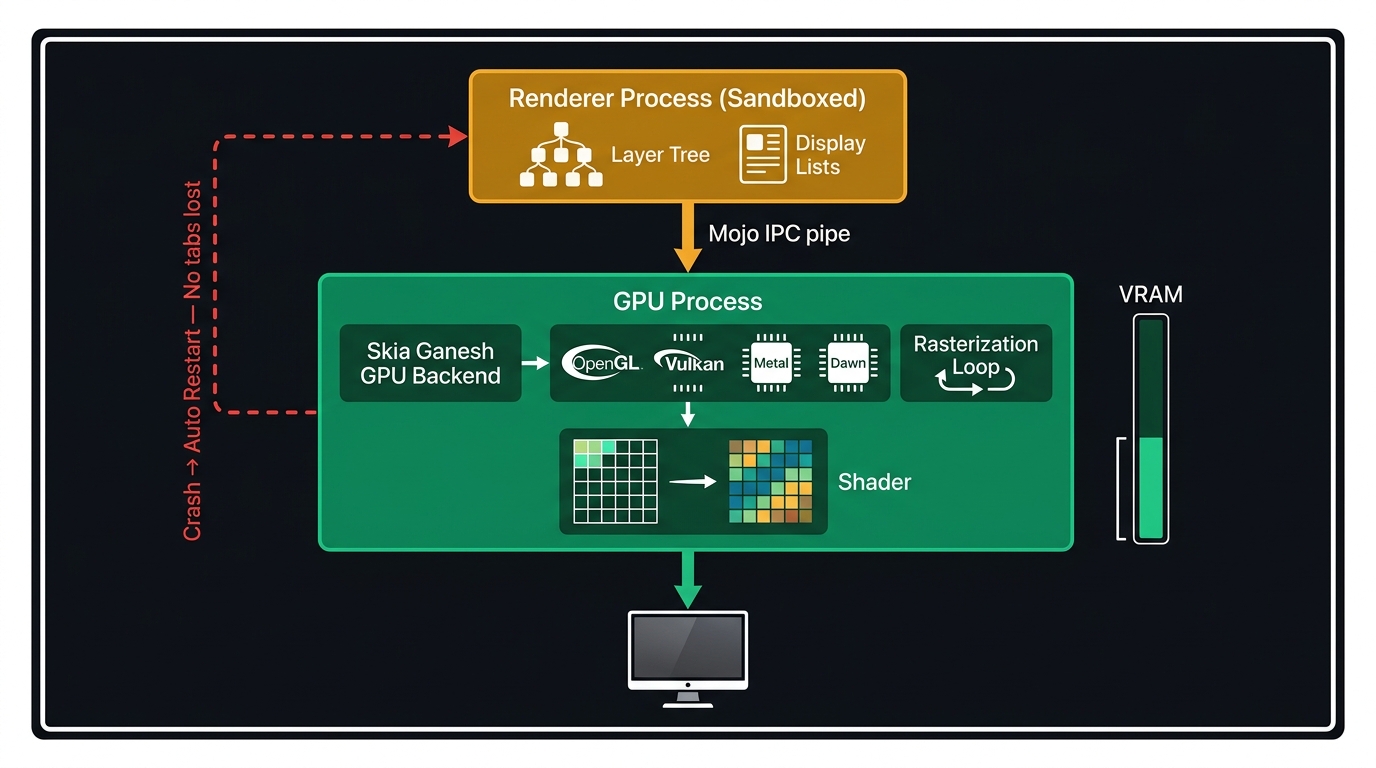
Before Chromium introduced the GPU Process, a driver crash would terminate the browser's main process, killing all tabs. The fix is architectural: isolate all GPU calls into a dedicated process. When the GPU Process crashes:
- The Browser Process detects the process exit.
- It spawns a new GPU Process immediately.
- Each Renderer Process is notified to re-send its layer textures.
- The user sees a brief flicker — but no tab is lost and no data is destroyed.
1.2 The Security Boundary
GPU memory (VRAM) is shared hardware. Without isolation, a compromised Renderer Process could issue GPU commands that read texture data from other processes — a GPU-side equivalent of a cross-process memory leak. The GPU Process acts as a validation layer: Renderer Processes submit draw commands via Mojo IPC, and the GPU Process validates and executes them, never exposing raw GPU memory pointers.
2. Tile-Based Rasterisation
2.1 Layers and Tiles
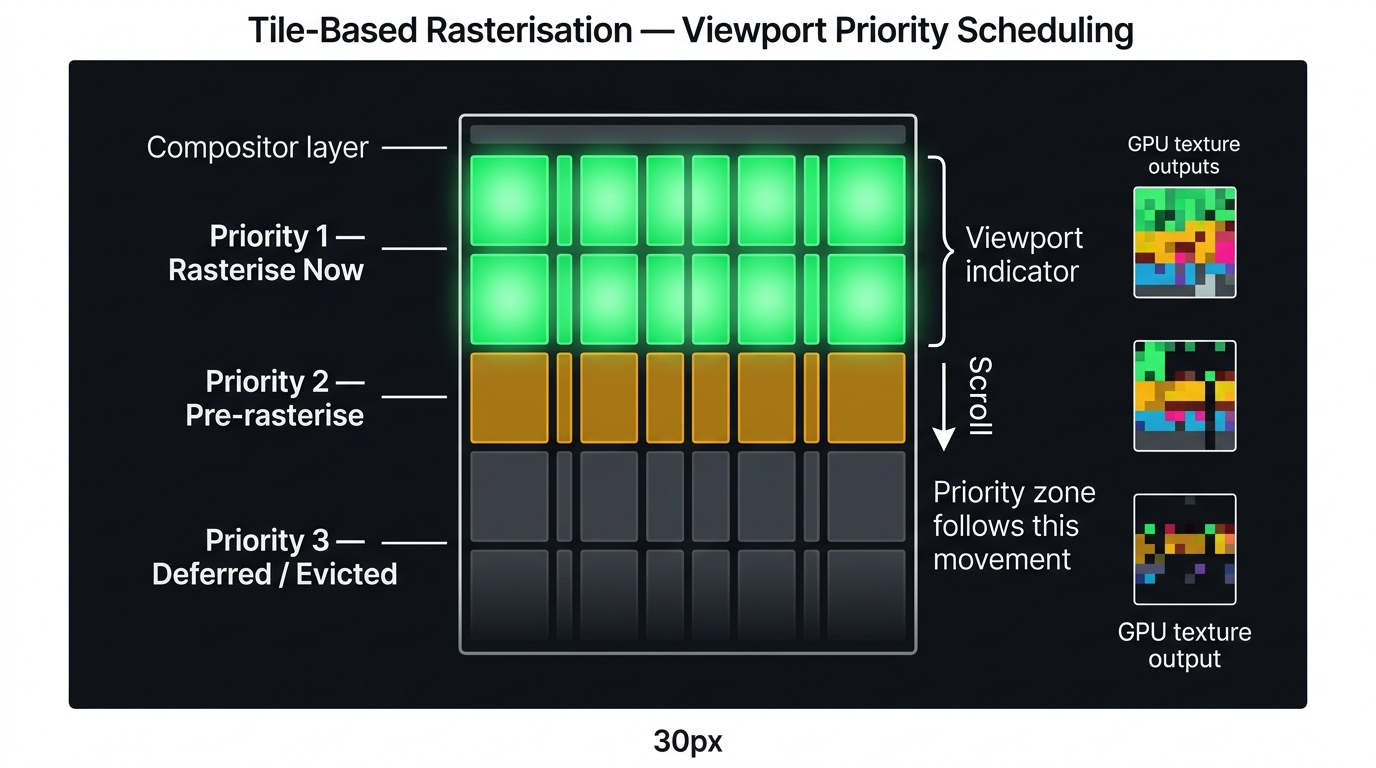
The Compositor Thread (in the Renderer Process) divides the page into a layer tree. Each compositor layer has an independent backing surface. These layers are not rasterised whole — instead, the Compositor divides each layer surface into a tile grid (commonly 256×256 or 512×512 px per tile).
This tiling is essential for three reasons:
- Priority scheduling — tiles covering the viewport are rasterised first. Tiles below the fold are deferred until the user scrolls toward them, preventing wasted GPU work.
- Memory efficiency — off-screen tiles can be evicted from VRAM when memory pressure is detected, and re-rasterised on demand when needed.
- Parallelism — independent tiles can be rasterised concurrently by the pool of Raster Worker Threads.
2.2 OOP-R: Out-of-Process Rasterisation
In Chromium's legacy architecture, Raster Worker Threads in the Renderer Process would rasterise tiles on the CPU (using the Skia software renderer) and then upload the resulting bitmap to the GPU Process as a texture.
OOP-R (Out-of-Process Rasterisation) eliminated the CPU rasterisation step:
- Raster Worker Threads now generate GPU command lists (Skia DDL — Deferred Display Lists) instead of running the actual rasterisation.
- These command lists are transmitted to the GPU Process.
- The GPU Process executes them using Skia's GPU backend (Ganesh, or its replacement Graphite), running the actual rasterisation entirely on the GPU's parallel shader hardware.
The result is faster rasterisation, lower CPU load, and better frame consistency — especially on mobile where CPU/GPU resources are shared.
3. Skia: The Drawing Engine
All of Chromium's rasterisation is performed by Skia, an open-source 2D graphics library also used by Flutter and Android's 2D rendering stack.
Skia operates in two modes:
| Mode | Rasterisation Target | Used In |
|---|---|---|
| Skia Software (CPU) | CPU pixel buffer | Fallback (no GPU), printing |
| Skia Ganesh (GPU) | OpenGL / Vulkan / Metal / D3D textures | Main rendering path |
| Skia Graphite (GPU) | Vulkan / Metal / D3D12 (Dawn) | Next-gen, replacing Ganesh |
When Skia Ganesh receives a display list tile, it translates Chromium's abstract draw commands (fill, stroke, clip, image draw) into a stream of GPU shader invocations, producing a texture that the Compositor can use directly.
4. VRAM: The Layer Budget
Every promoted compositor layer occupies a dedicated VRAM allocation proportional to its pixel dimensions and bit depth. A 1920×1080 RGBA layer at 8-bit per channel = ~8 MB of VRAM for that single layer.
Over-promoting elements to compositor layers is a common cause of jank on mobile devices with 2–4 GB of shared CPU/GPU memory. When VRAM pressure is detected, the OS may force-evict textures, causing the Compositor to re-rasterise them — introducing a visible hitch. Audit your layer tree before shipping any will-change-heavy animation.
4.1 Auditing Layers in DevTools
Open Chrome DevTools → Layers panel to inspect the active layer tree:
- Each layer shows its memory consumption in MB.
- The compositing reason is shown (e.g., "has a will-change CSS property", "is an accelerated video").
- You can rotate the 3D layer view to see layer stacking depth.
A common debugging pattern: if your animation feels smooth in desktop Chrome but stutters on an Android device, open the Layers panel on the desktop and look for layers larger than 20 MB or more than ~50 active layers. That is the VRAM budget being exceeded on the mobile GPU.
5. The Complete Rasterisation Flow
6. References
This article was developed with AI-assisted deep search, specification cross-referencing, and technical research synthesis.
