
Renderer Threads: Main Thread, Compositor, and Raster Workers
Dissect the Renderer Process's internal thread model: why the Main Thread is the bottleneck, how the Compositor Thread achieves 60 fps scroll without touching JS, and what Raster Workers actually do with paint records.
Browser Engine Architecture
Renderer Threads: Main Thread, Compositor, and Raster Workers
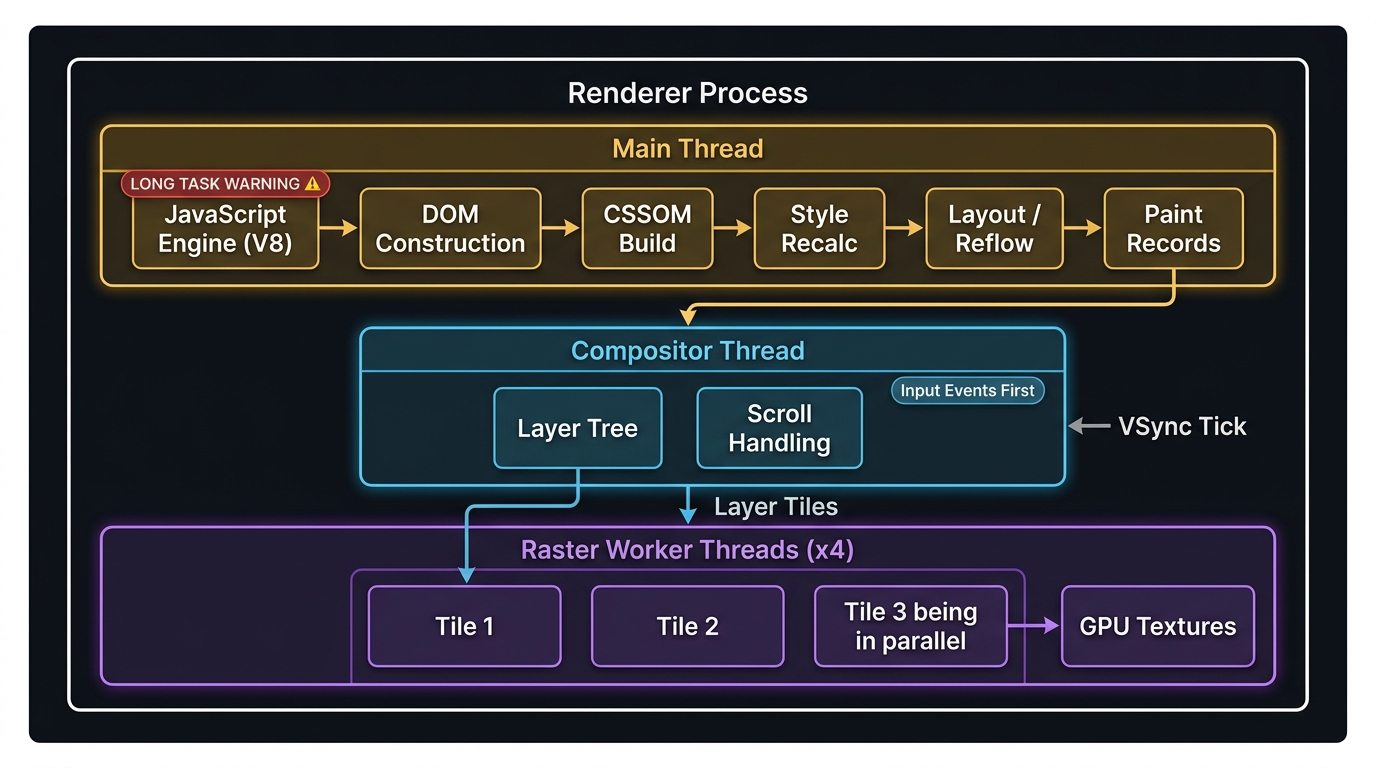
The Renderer Process is not single-threaded. Inside it, a coordinated set of specialised threads divides the work of turning HTML, CSS, and JavaScript into pixels. Understanding which thread owns which responsibility — and how they hand off work to each other — is the key to diagnosing and eliminating rendering performance problems.
1. The Main Thread
The Main Thread is the most constrained resource in browser rendering. Every expensive operation is serialised onto it:
- JavaScript execution — V8 runs all script synchronously on this thread.
- DOM construction — HTML parsing,
document.createElement, attribute mutations. - CSSOM construction — style rule parsing,
getComputedStylequeries. - Style recalculation — matching CSS selectors to DOM nodes to produce Computed Style.
- Layout (Reflow) — computing the exact geometry (x, y, width, height) of every box in the document.
- Paint record generation — producing a display list of draw calls ("fill rect at 40,80 with red") without actually drawing pixels.
If a JavaScript task runs for more than ~50 ms, the browser categorises it as a Long Task. During a Long Task, the Main Thread cannot respond to input, cannot update the paint record, and the user perceives the page as frozen. Use the Performance panel's Long Tasks overlay to identify them.
1.1 Why the Main Thread is the Bottleneck
Because JavaScript is single-threaded and layout depends on the DOM state that JS modifies, everything in that list above must happen in sequence on one thread. There is no way to run a style recalculation in parallel with a JavaScript mutation — the mutation must finish before the style result is valid.
This is why every performance optimisation strategy in frontend engineering ultimately boils down to: keep the Main Thread free.
2. The Compositor Thread
The Compositor Thread is what makes modern browsers feel smooth. It was designed with a single goal: handle scroll, animations, and input without ever waking the Main Thread.
When the Main Thread finishes generating paint records, it hands them to the Compositor Thread along with layer metadata. The Compositor then:
- Divides the page into layers based on compositor layer promotion hints (
will-change,transform,position: fixed, video elements, etc.). - Receives input events first — scroll, touch, pinch-zoom events are delivered to the Compositor before the Main Thread even sees them.
- Handles compositor-only animations — if an animation only affects
transformoropacity, the Compositor can advance the animation frame entirely on its own, sending updated composited frames to the GPU, with the Main Thread idle.
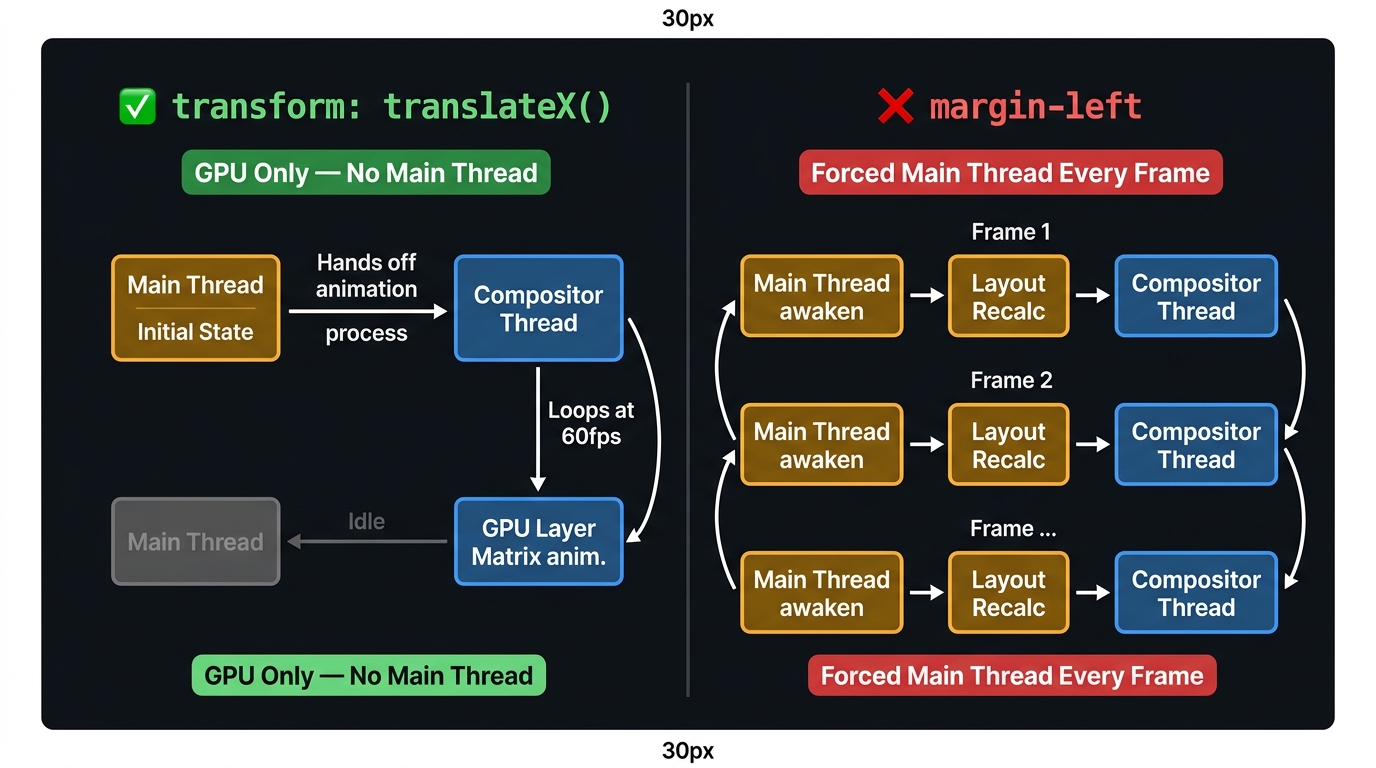
The Compositor Thread is a shadow renderer that can animate and scroll pre-computed layers without touching JavaScript. The moment an animation touches a property that requires knowing the document's geometry (any layout-triggering property), the Compositor must interrupt the Main Thread on every single frame — destroying the performance benefit.
2.1 Compositor-Safe vs. Layout-Triggering Properties
| CSS Property | Requires Main Thread Layout? | Compositor-Only? |
|---|---|---|
transform |
❌ No | ✅ Yes |
opacity |
❌ No | ✅ Yes |
filter (GPU-only) |
❌ No | ✅ Yes |
top, left (absolute) |
✅ Yes | ❌ No |
width, height |
✅ Yes | ❌ No |
margin, padding |
✅ Yes | ❌ No |
background-color |
Partial (paint only) | ❌ No |
When building animations, always prefer transform for position and scale changes, and opacity for visibility. These are the only two properties that the Compositor Thread can animate without triggering a layout recalculation on the Main Thread.
3. Raster Worker Threads
The Compositor Thread does not draw pixels itself. It delegates rasterisation — converting paint records into actual bitmaps — to a pool of Raster Worker Threads.
3.1 How Tiling Works
Instead of rasterising the entire page at once (which would be prohibitively slow for long documents), the Compositor divides each layer into a grid of tiles (typically 256×256 or 512×512 pixels). Raster Worker Threads pick up individual tiles and convert paint records into GPU textures in parallel.
The Compositor prioritises tiles that are in or near the viewport, so that visible content is always rasterised first. Tiles far below the scroll position are rasterised at a lower priority or not at all until the user scrolls toward them.
3.2 GPU-Accelerated Rasterisation
On modern hardware, Chromium uses OOP-R (Out-of-Process Rasterisation): the Raster Worker Threads issue GPU draw commands directly through the GPU Process rather than rasterising on the CPU. This moves the per-tile pixel-filling workload onto the GPU's parallel shader hardware, leaving the CPU free for JavaScript.
You can verify whether GPU rasterisation is active for a specific layer in Chrome DevTools → Layers panel. Layers with the GPU rasterisation badge skip the CPU tile-fill phase entirely.
4. The Full Thread Handoff Pipeline
5. Compositor Layer Promotion: Power and Cost
Promoting an element to its own compositor layer gives the Compositor Thread the ability to move, scale, or fade it independently of everything else on screen — without a layout pass. This is why will-change: transform is used before triggering an animation.
Every compositor layer consumes GPU memory (VRAM). On a page with hundreds of promoted layers — common in over-eager animation frameworks — VRAM usage can spike enough to cause jitter on lower-end devices. Audit layers with chrome://tracing or the DevTools Layers panel before shipping.
6. References
This article was developed with AI-assisted deep search, specification cross-referencing, and technical research synthesis.
