
Browser Internal Architecture: The Multi-Process Model
Understand how Chromium separates the Browser, Renderer, and GPU into isolated processes, why the Renderer is sandboxed, and how IPC bridges the gap between JavaScript and the operating system.
Browser Engine Architecture
Browser Internal Architecture: The Multi-Process Model
Modern browsers are essentially operating systems for web content. To guarantee stability, security, and consistent performance, Chromium distributes its workload across strictly isolated, specialized processes rather than running everything inside a single binary.
Understanding this architecture transforms abstract concepts — crashes, jank, memory isolation — from mysterious symptoms into logical consequences of deliberate design decisions.
1. The Three Core Processes
1.1 The Browser Process
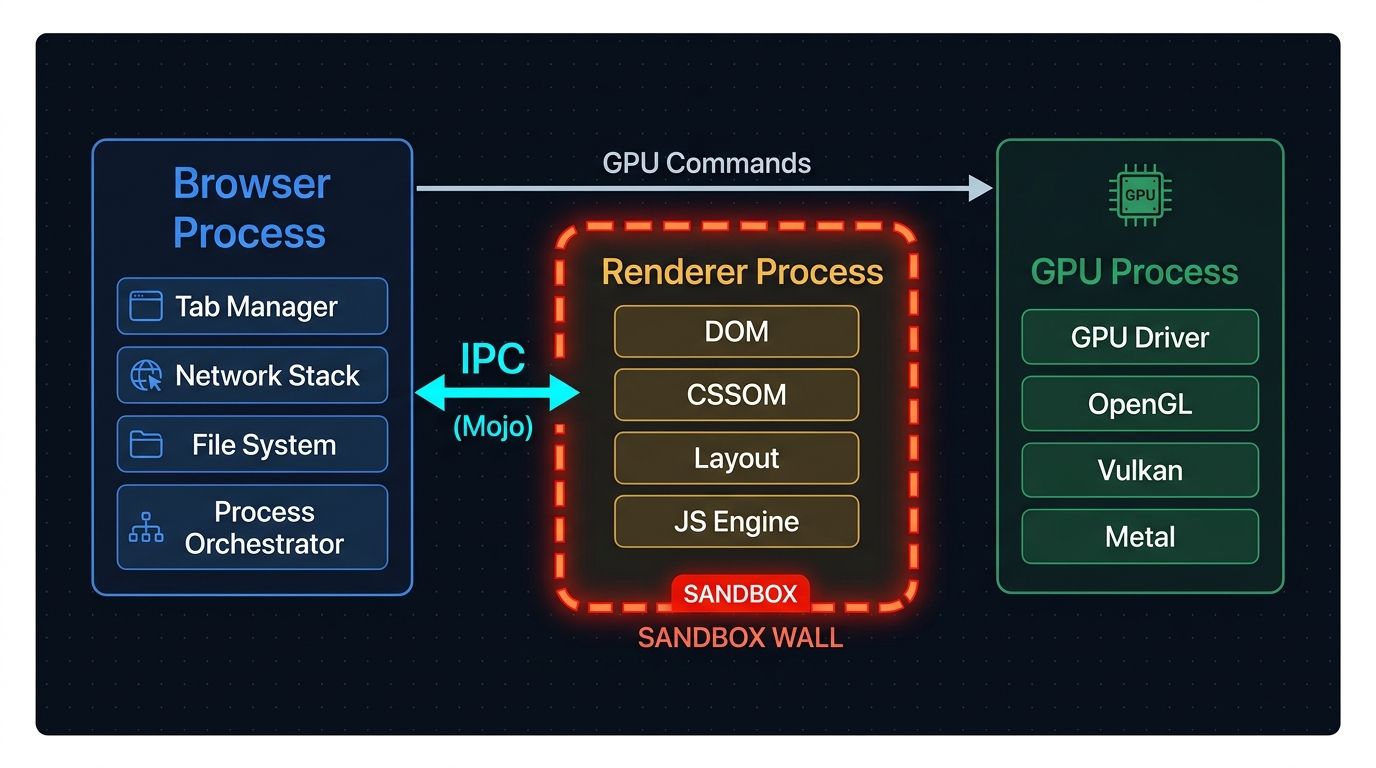
The Browser Process is the privileged coordinator. It runs with full OS permissions and owns every capability that requires trust:
- Tab and window management — creates, destroys, and arranges browser UI chrome (address bar, tab strip, devtools).
- Network stack — all HTTP/HTTPS requests originate here, regardless of which tab initiated them.
- File system access — downloads, cache writes, profile data.
- Process orchestration — spawns and reaps Renderer and GPU processes.
Because it holds elevated privileges, it is also the security gatekeeper. Any request from a sandboxed child process must pass through the Browser Process for validation.
1.2 The Renderer Process
There is typically one Renderer Process per site origin (enforced by Site Isolation). Its sole responsibility is to turn HTML, CSS, and JavaScript into a visual representation — the document.
The Renderer Process executes untrusted, arbitrary code from the internet. Because of this, it is strictly sandboxed by the OS: it has no direct access to the file system, network interfaces, GPU, or any OS system call that was not explicitly whitelisted.
Any time a script inside a renderer needs a privileged operation — fetching a resource, writing a cookie, querying a device sensor — it must send a message across the IPC channel to the Browser Process, which validates and executes the request on its behalf.
1.3 The GPU Process
GPU drivers are notoriously unstable across hardware vendors. A driver bug that causes a crash inside the browser's main process would terminate the entire browser. The GPU Process prevents this by:
- Running all OpenGL/Vulkan/DirectX commands in an isolated child process.
- If the GPU Process crashes, only it dies — the Browser Process respawns it without losing tabs.
- Accepting composited layer data from Renderer Processes and issuing the final draw calls to the hardware.
2. The IPC Bridge
Since the Renderer Process is sandboxed, it cannot call OS APIs directly. The mechanism that allows it to communicate with the Browser Process is Inter-Process Communication (IPC).
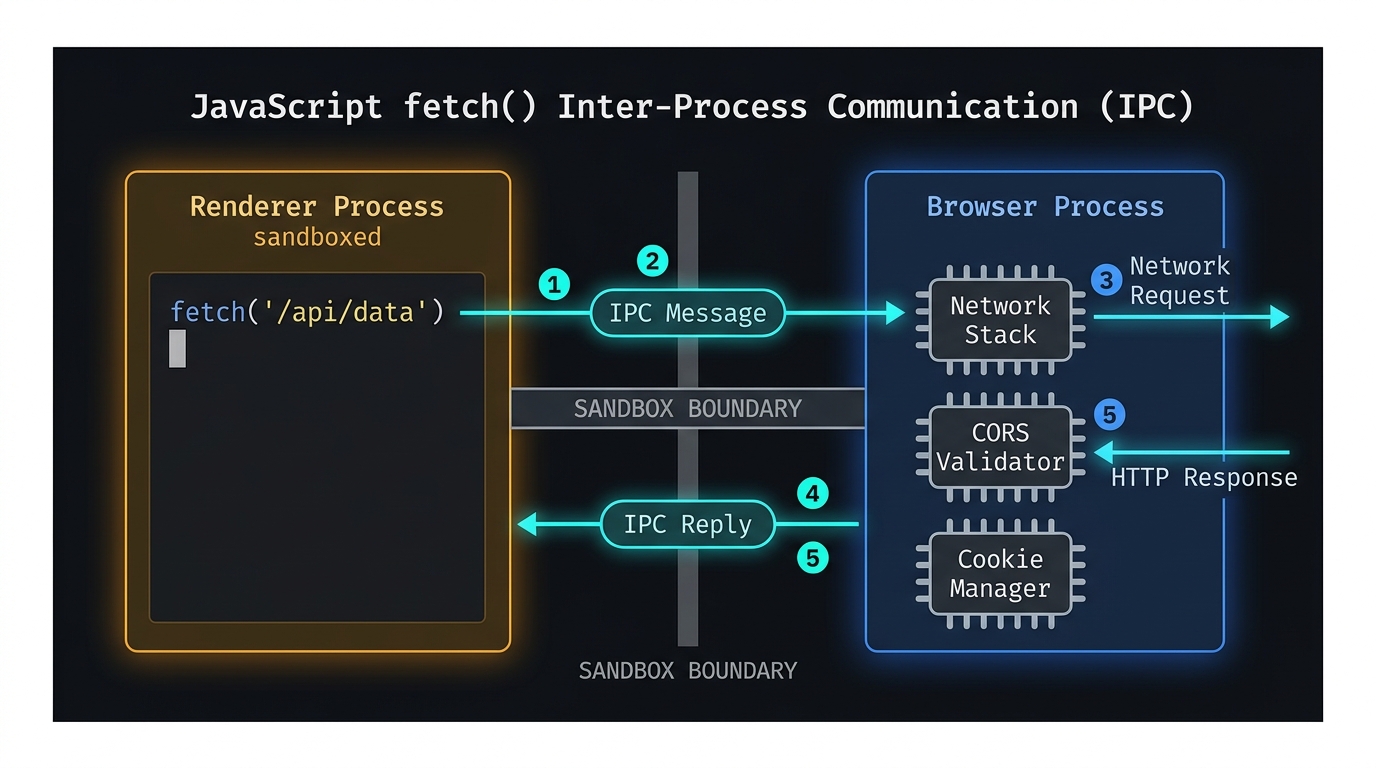
Chromium's IPC layer is implemented via Mojo, a modern message-passing system. Every cross-process call — whether it is a network request, a cookie read, a permission dialog — travels through a Mojo pipe as a structured message. The Browser Process validates the caller's origin before acting.
This design means a compromised Renderer Process (via an XSS exploit or memory-corruption vulnerability) cannot escalate privileges to read local files or access other tabs' memory without also breaking through the Browser Process's validation — a second, independent security boundary.
3. Site Isolation: One Origin, One Process
Prior to Site Isolation, a browser could share a single Renderer Process across multiple origins to conserve memory. The Spectre CPU vulnerability (2018) demonstrated that malicious JavaScript could use speculative execution side-channels to read memory from other origins in the same process.
Chromium's response was Site Isolation: every cross-site navigation now forces the creation of a new Renderer Process. Cross-site iframes (e.g., an embedded payment widget from a different domain) also run in a separate Renderer Process from the parent page.
Site Isolation has a real memory cost — each extra process carries a ~20–30 MB overhead. Chrome manages this by coalescing same-site tabs and applying heuristics on low-memory devices. Understanding this trade-off matters when debugging high-memory usage in developer tools.
4. Mental Model: Why This Architecture Shapes Everything
Every performance concept in front-end engineering flows from this architecture:
| Concept | Root cause in the process model |
|---|---|
| Renderer crashes don't kill the browser | Renderer is a separate OS process — only that tab dies. |
| GPU driver crash doesn't lose tabs | GPU work is isolated to the GPU Process. |
| Cross-tab memory isolation | Site Isolation — separate address spaces per origin. |
| Network requests can't bypass CORS | All requests route through the Browser Process for header enforcement. |
| "Jank" is a Main Thread problem | Layout and JS run on one thread inside the Renderer — the next article. |
Think of the Browser as a mini OS kernel (the Browser Process), running untrusted user-space programs (Renderer Processes) inside strict sandboxes, with a dedicated driver layer (GPU Process) for hardware access. IPC is the syscall boundary.
5. References
This article was developed with AI-assisted deep search, specification cross-referencing, and technical research synthesis.
