Siddhant Deval
Siddhant Deval
backend5 min read

Stateful Connection Management: Resilient Client Lifecycles & Database Change Streams

Building production-grade real-time applications requires decoupling stateful socket connections from reactive UI rendering lifecycles, and isolating database change detection from socket distribution via a centralized ingestion worker. This article solves React 18/19 StrictMode double-mount socket leaks, implements cryptographic ticket handshake authentication, and architects a Single Ingestion Worker pattern over MongoDB Replica Set Change Streams with oplog window sizing and automated Full State Sync fallback on stale resume tokens.

Stateful Connection Management: Resilient Client Lifecycles & Database Change Streams

Real-time is not a library you import, but an architectural contract across the network stack: choose the lowest-complexity transport that matches your data symmetry, budget for long-lived socket file descriptors, and decouple stateful client connections from stateless event producers via a distributed backplane. Parts 1–3 established the transport layer — from polling overhead equations and SSE wire framing to RFC 6455 binary frames and OS socket memory math. Now we assemble the complete application engine.

The hardest part of real-time web development is not choosing a transport — it is integrating that transport correctly into a React component tree, an Express authentication system, and a database that must detect its own writes and stream them to the right clients. Most tutorials show a single-file socket.io demo with no authentication, no cleanup, and no consideration for what happens when React 18 mounts the component twice in StrictMode, the JWT expires mid-session, or the MongoDB replica set failover takes 15 seconds and your Change Stream cursor silently dies.

This article solves all of it. We implement a production-grade real-time application layer: a cryptographic ticket handshake for WebSocket authentication, a ref-counted singleton ConnectionManager, React 18/19 StrictMode-resilient socket hooks, and a Single Ingestion Worker over MongoDB Replica Set Change Streams with oplog window sizing, resume token management, and automated Full State Sync fallback.


1. The Client-Side Architecture Problem

1.1 Why Component-Scoped Sockets Break

The first mistake in every real-time tutorial is storing the WebSocket instance in React component state or a useRef inside the component that renders the real-time UI:

TYPESCRIPT
// ❌ Component-scoped socket — creates reconnection storms
function FleetMap() {
  const [socket, setSocket] = useState<WebSocket | null>(null)

  useEffect(() => {
    const ws = new WebSocket('wss://api.fleettracker.io/ws/fleet')
    setSocket(ws)

    return () => ws.close() // ← Closes on every re-render!
  }, [])

  // Problems:
  // 1. Each mount of FleetMap creates a new WebSocket connection
  // 2. When FleetMap unmounts (route change, conditional render),
  //    the socket closes — even if another component needs it
  // 3. React 18 StrictMode double-invokes useEffect → 2 connections opened
  // 4. Navigation away and back → old socket closed, new one opened
}

The structural problem: A WebSocket connection is application-scoped infrastructure, not component-scoped UI state. It should live exactly as long as the user's authenticated session, not as long as a particular component is mounted.

1.2 The Singleton ConnectionManager Pattern

The correct architecture uses a module-level singleton that is initialized once and shared across all components:

TYPESCRIPT
// client/lib/SocketManager.ts
import { getTicket } from './auth'

type EventHandler = (data: unknown) => void

class SocketManager {
  private socket: WebSocket | null = null
  private subscriptions = new Map<string, Set<EventHandler>>()
  private refCount = 0
  private reconnectTimer: ReturnType<typeof setTimeout> | null = null
  private reconnectAttempts = 0

  /** Increment ref count — called when a component subscribes */
  async acquire(): Promise<void> {
    this.refCount++
    if (this.refCount === 1) {
      await this.connect()
    }
  }

  /** Decrement ref count — called when a component unsubscribes */
  release(): void {
    this.refCount = Math.max(0, this.refCount - 1)
    if (this.refCount === 0) {
      this.disconnect()
    }
  }

  on(event: string, handler: EventHandler): () => void {
    if (!this.subscriptions.has(event)) {
      this.subscriptions.set(event, new Set())
    }
    this.subscriptions.get(event)!.add(handler)

    // Return unsubscribe function
    return () => {
      this.subscriptions.get(event)?.delete(handler)
    }
  }

  private async connect(): Promise<void> {
    // Fetch a short-lived ticket for the WebSocket handshake
    const { ticket } = await getTicket()
    const url = `wss://api.fleettracker.io/ws/fleet?ticket=${ticket}`

    this.socket = new WebSocket(url)

    this.socket.onmessage = (e) => {
      const msg = JSON.parse(e.data) as { type: string; data: unknown }
      this.subscriptions.get(msg.type)?.forEach((handler) => handler(msg.data))
    }

    this.socket.onclose = (e) => {
      if (e.code !== 1000 && e.code !== 1001) {
        // Abnormal close — reconnect with exponential backoff + jitter
        const delay = Math.random() * Math.min(30_000, 1_000 * Math.pow(2, this.reconnectAttempts++))
        this.reconnectTimer = setTimeout(() => this.connect(), delay)
      }
    }

    this.socket.onerror = () => {
      this.socket?.close()
    }
  }

  private disconnect(): void {
    if (this.reconnectTimer) clearTimeout(this.reconnectTimer)
    this.socket?.close(1000, 'Client unmounted')
    this.socket = null
    this.reconnectAttempts = 0
  }
}

// Module-level singleton — one instance for the entire application
export const socketManager = new SocketManager()

1.3 React 18/19 StrictMode: The Double-Mount Problem

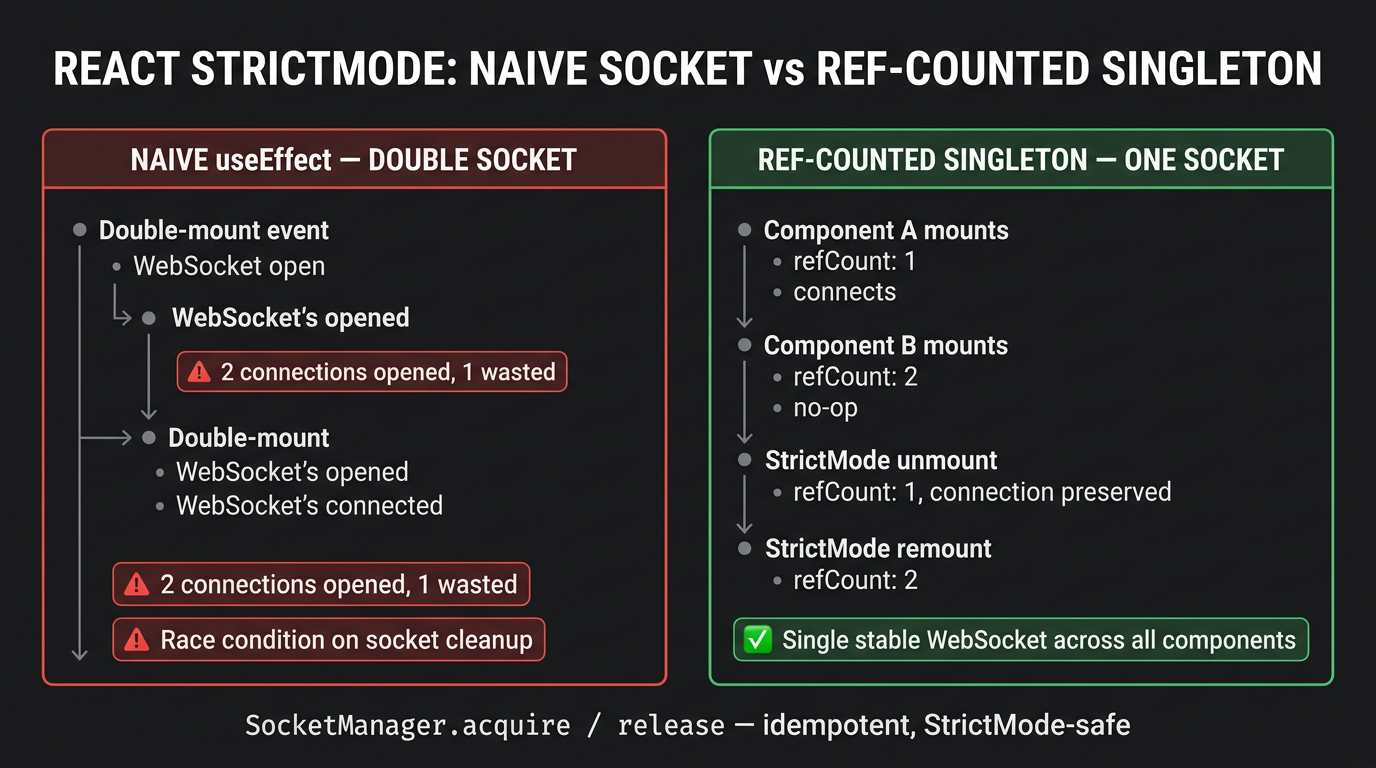
React 18 StrictMode deliberately mounts → unmounts → re-mounts every component in development to surface non-idempotent side effects. A useEffect that opens a WebSocket and closes it in the cleanup runs twice:

TEXT
Mount #1  → acquire() → refCount = 1 → connect() (WebSocket opens)
Unmount   → release() → refCount = 0 → disconnect() (WebSocket closes)
Mount #2  → acquire() → refCount = 1 → connect() (WebSocket opens again)

This is correct behavior — the singleton handles it gracefully. The ref-counting ensures that if multiple components call acquire() simultaneously, only one connection is opened:

TEXT
Component A mounts → acquire() → refCount = 1 → connect()
Component B mounts → acquire() → refCount = 2 → (no-op, already connected)
Component A unmounts → release() → refCount = 1 → (no-op, B still needs it)
Component B unmounts → release() → refCount = 0 → disconnect()
React 18 StrictMode double-mounts components causing naive socket hooks to duplicate connections; ref-counted SocketManager ensures exactly one socket is opened

1.4 The useRealtimeEvent Hook

TYPESCRIPT
// client/hooks/useRealtimeEvent.ts
import { useEffect, useRef } from 'react'
import { socketManager } from '../lib/SocketManager'

export function useRealtimeEvent<T>(
  eventType: string,
  handler: (data: T) => void,
  enabled = true,
): void {
  // Stable ref to avoid re-subscribing on every render
  const handlerRef = useRef(handler)
  handlerRef.current = handler

  useEffect(() => {
    if (!enabled) return

    let unsubscribe: (() => void) | null = null

    socketManager.acquire().then(() => {
      unsubscribe = socketManager.on(eventType, (data) => {
        handlerRef.current(data as T)
      })
    })

    return () => {
      unsubscribe?.()
      socketManager.release()
    }
  }, [eventType, enabled])
}
TYPESCRIPT
// Usage in any component — no socket management code
function VehicleTracker({ vehicleId }: { vehicleId: string }) {
  const [position, setPosition] = useState<VehiclePosition | null>(null)

  useRealtimeEvent<VehiclePosition>(
    'fleet:position',
    (data) => {
      if (data.vehicleId === vehicleId) setPosition(data)
    },
  )

  return <MapPin position={position} />
}

2. Server-Side WebSocket Authentication

2.1 The Anti-Pattern: Long-Lived JWT in Query String

TYPESCRIPT
// ❌ Passing a long-lived JWT in the WebSocket URL — multiple failures
const ws = new WebSocket(`wss://api.example.com/ws?token=${jwtToken}`)

// Problems:
// 1. The full URL (including query string) is logged in Nginx access logs,
//    CloudFront access logs, and application server logs — token is plaintext
// 2. Browser history / referrer headers may expose the token
// 3. The JWT is valid for its full lifetime (hours) — replay attack window
// 4. Cannot be rotated without closing the WebSocket connection

2.2 The Cryptographic Ticket Pattern

The ticket pattern uses a two-step exchange: the client authenticates via a standard REST endpoint (with a proper Authorization: Bearer header, not logged in access logs) to receive a single-use, short-lived (30 seconds), cryptographically signed ticket. The ticket is then used once to authenticate the WebSocket upgrade request.

TYPESCRIPT
// server/routes/auth.ts

import { randomBytes, createHmac } from 'node:crypto'

const TICKET_SECRET = process.env.WS_TICKET_SECRET! // 32-byte random secret
const pendingTickets = new Map<string, { userId: string; tenantId: string; expiresAt: number }>()

// Step 1: Client calls this REST endpoint with a valid Bearer token
app.post('/api/auth/ws-ticket', requireAuth, (req, res) => {
  const ticketId = randomBytes(32).toString('hex')
  const expiresAt = Date.now() + 30_000 // 30-second validity window

  // Sign ticket with HMAC-SHA256
  const signature = createHmac('sha256', TICKET_SECRET)
    .update(`${ticketId}:${expiresAt}:${req.user!.userId}`)
    .digest('hex')

  const ticket = `${ticketId}.${expiresAt}.${signature}`

  // Store pending ticket (in Redis for multi-node: SETEX ticket 30 userId)
  pendingTickets.set(ticketId, {
    userId: req.user!.userId,
    tenantId: req.user!.tenantId,
    expiresAt,
  })

  // Auto-expire if never used
  setTimeout(() => pendingTickets.delete(ticketId), 31_000)

  res.json({ ticket })
})
TYPESCRIPT
// server/ws/FleetWebSocketServer.ts
import { createHmac } from 'node:crypto'

function validateTicket(rawTicket: string | null): {
  userId: string
  tenantId: string
} | null {
  if (!rawTicket) return null

  const parts = rawTicket.split('.')
  if (parts.length !== 3) return null

  const [ticketId, expiresAtStr, signature] = parts as [string, string, string]
  const expiresAt = parseInt(expiresAtStr, 10)

  // Check expiry
  if (Date.now() > expiresAt) return null

  // Verify HMAC signature
  const pending = pendingTickets.get(ticketId)
  if (!pending) return null // Already consumed or expired

  const expectedSig = createHmac('sha256', TICKET_SECRET)
    .update(`${ticketId}:${expiresAt}:${pending.userId}`)
    .digest('hex')

  if (signature !== expectedSig) return null

  // Consume ticket — single-use enforcement
  pendingTickets.delete(ticketId)

  return { userId: pending.userId, tenantId: pending.tenantId }
}

wss.on('connection', (socket, req) => {
  const url = new URL(req.url!, 'http://localhost')
  const rawTicket = url.searchParams.get('ticket')
  const session = validateTicket(rawTicket)

  if (!session) {
    // Close with RFC 6455 Policy Violation code
    socket.close(1008, 'Invalid or expired ticket')
    return
  }

  connectionManager.register(socket, session)
})

3. Server-Side Connection Management

3.1 The In-Memory ConnectionManager

TYPESCRIPT
// server/lib/ConnectionManager.ts
import { WebSocket } from 'ws'
import { randomUUID } from 'node:crypto'

interface Connection {
  id: string
  socket: WebSocket
  userId: string
  tenantId: string
  connectedAt: number
  lastPingAt: number
}

class ConnectionManager {
  private readonly connections = new Map<string, Connection>()
  private readonly byTenant   = new Map<string, Set<string>>() // tenantId → Set<connId>
  private readonly byUser     = new Map<string, Set<string>>() // userId → Set<connId>

  register(socket: WebSocket, session: { userId: string; tenantId: string }): string {
    const id = randomUUID()
    const conn: Connection = {
      id,
      socket,
      userId: session.userId,
      tenantId: session.tenantId,
      connectedAt: Date.now(),
      lastPingAt: Date.now(),
    }

    this.connections.set(id, conn)
    this.addToIndex(this.byTenant, session.tenantId, id)
    this.addToIndex(this.byUser, session.userId, id)

    return id
  }

  unregister(connId: string): void {
    const conn = this.connections.get(connId)
    if (!conn) return

    this.connections.delete(connId)
    this.byTenant.get(conn.tenantId)?.delete(connId)
    this.byUser.get(conn.userId)?.delete(connId)
  }

  /** Broadcast an event to all connections for a specific tenant */
  broadcastToTenant(tenantId: string, message: unknown): void {
    const connIds = this.byTenant.get(tenantId)
    if (!connIds) return

    const payload = JSON.stringify(message)

    for (const connId of connIds) {
      const conn = this.connections.get(connId)
      if (conn?.socket.readyState === WebSocket.OPEN) {
        conn.socket.send(payload)
      } else {
        // Socket closed — clean up stale connection
        this.unregister(connId)
      }
    }
  }

  get activeCount(): number {
    return this.connections.size
  }

  private addToIndex(index: Map<string, Set<string>>, key: string, value: string): void {
    if (!index.has(key)) index.set(key, new Set())
    index.get(key)!.add(value)
  }
}

export const connectionManager = new ConnectionManager()

4. MongoDB Change Streams: The Single Ingestion Worker Pattern

4.1 The Replica Set Prerequisite

TYPESCRIPT
// ❌ Change Streams on a standalone MongoDB — throws immediately
const client = new MongoClient('mongodb://localhost:27017') // Standalone
await client.connect()

// This throws: MongoServerError: The $changeStream stage is only
// supported on replica sets and sharded clusters.
const stream = db.collection('vehicles').watch()

MongoDB Change Streams are implemented on top of the oplog (local.oplog.rs) — a capped collection that records every write operation in order. The oplog only exists on Replica Set members. To develop locally:

BASH
# Start a single-node replica set for local development
mongod --replSet rs0 --port 27017 --dbpath /data/db

# In mongosh: initialize the replica set
rs.initiate({
  _id: 'rs0',
  members: [{ _id: 0, host: 'localhost:27017' }]
})

4.2 The Scale Trap: Per-User Change Stream Cursors

TYPESCRIPT
// ❌ Opening a Change Stream cursor per connected WebSocket client
wss.on('connection', async (socket, req) => {
  const { tenantId } = validateTicket(/* ... */)

  // At 1,000 concurrent users: 1,000 open MongoDB cursors
  // Each cursor tails the oplog and transmits all events to the application
  // MongoDB Atlas free tier: 500 cursor limit — will throw at 501st user
  const stream = db.collection('vehicles').watch([
    { $match: { 'fullDocument.tenantId': tenantId } }
  ])

  stream.on('change', (change) => socket.send(JSON.stringify(change)))
  socket.on('close', () => stream.close())
})

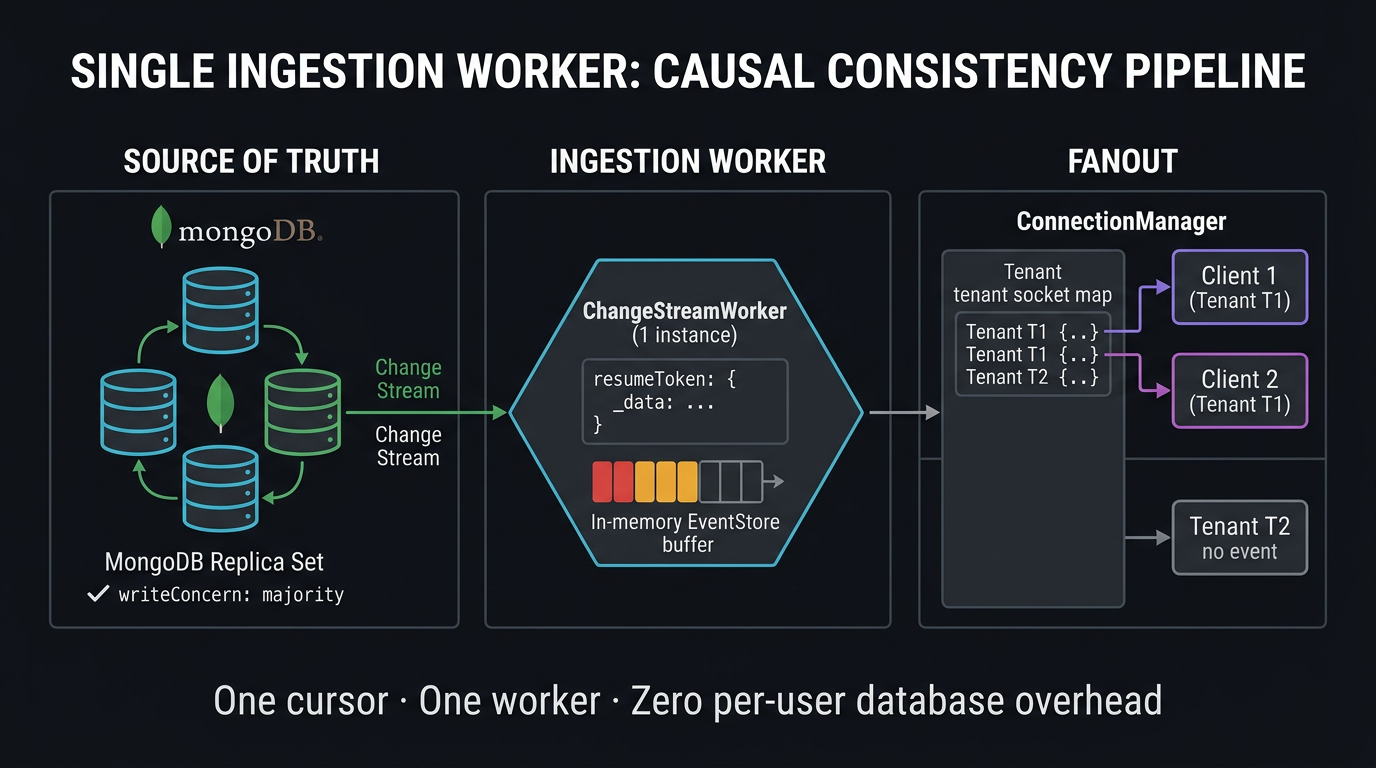
This creates one MongoDB cursor (and one oplog tail thread) per user. At 1,000 concurrent users, you have 1,000 cursors all reading the same oplog, all applying the same $match filter — 1,000× the database read pressure for identical data.

The Single Ingestion Worker pattern fans out one Change Stream cursor to active tenant connections via ConnectionManager

4.3 The Single Ingestion Worker

The correct architecture opens one Change Stream cursor — on a dedicated worker process — and fans out to the in-memory ConnectionManager:

TYPESCRIPT
// server/workers/ChangeStreamWorker.ts
import { MongoClient, ChangeStreamDocument } from 'mongodb'
import { connectionManager } from '../lib/ConnectionManager'
import { eventStore } from '../lib/EventStore'

const RECONNECT_DELAY_MS = 1_000
const MAX_RECONNECT_DELAY_MS = 30_000

class ChangeStreamWorker {
  private resumeToken: unknown = null
  private reconnectDelay = RECONNECT_DELAY_MS
  private running = true

  async start(client: MongoClient): Promise<void> {
    const db = client.db('fleettracker')

    while (this.running) {
      try {
        await this.runStream(db)
      } catch (err) {
        // ChangeStreamFatalError: resume token is stale (oplog rotated)
        if ((err as Error).message.includes('ChangeStreamFatalError') ||
            (err as Error).message.includes('resume token')) {
          console.error('Resume token stale — triggering Full State Sync')
          this.resumeToken = null
          await this.triggerFullStateSync(db)
        }

        // Reconnect with backoff
        await sleep(this.reconnectDelay)
        this.reconnectDelay = Math.min(MAX_RECONNECT_DELAY_MS, this.reconnectDelay * 2)
      }
    }
  }

  private async runStream(db: ReturnType<MongoClient['db']>): Promise<void> {
    const options = {
      fullDocument: 'updateLookup' as const, // Include the full document on updates
      ...(this.resumeToken ? { resumeAfter: this.resumeToken } : {}),
    }

    // Single cursor for the entire application
    const stream = db.collection('vehicles').watch(
      [{ $match: { operationType: { $in: ['insert', 'update', 'replace', 'delete'] } } }],
      options,
    )

    console.log('Change Stream worker connected, resumeToken:', this.resumeToken ?? 'none')

    for await (const change of stream) {
      this.reconnectDelay = RECONNECT_DELAY_MS // Reset backoff on successful events
      this.resumeToken = change._id // Checkpoint the resume token

      await this.processChange(change)
    }
  }

  private async processChange(change: ChangeStreamDocument): Promise<void> {
    const doc = (change as any).fullDocument
    if (!doc?.tenantId) return

    const event = {
      type: `fleet:${change.operationType}`,
      data: doc,
    }

    // Store in event buffer for SSE/long-poll replay
    const stored = eventStore.store(doc.tenantId, event.type, event.data)

    // Fan out to all active WebSocket connections for this tenant
    connectionManager.broadcastToTenant(doc.tenantId, {
      type: stored.type,
      id: stored.id,
      data: stored.data,
    })
  }

  private async triggerFullStateSync(db: ReturnType<MongoClient['db']>): Promise<void> {
    // Notify all connected clients that they must re-fetch full state
    // In practice: iterate all tenants with active connections and broadcast
    const allVehicles = await db.collection('vehicles').find({}).toArray()

    const vehiclesByTenant = new Map<string, unknown[]>()
    for (const v of allVehicles) {
      if (!vehiclesByTenant.has(v.tenantId)) vehiclesByTenant.set(v.tenantId, [])
      vehiclesByTenant.get(v.tenantId)!.push(v)
    }

    for (const [tenantId, vehicles] of vehiclesByTenant) {
      connectionManager.broadcastToTenant(tenantId, {
        type: 'sync:full',
        data: { vehicles },
      })
    }
  }
}

export const changeStreamWorker = new ChangeStreamWorker()

4.4 Oplog Window Sizing

The oplog is a capped collection — when it fills, the oldest entries are overwritten. If your Change Stream worker is offline longer than the oplog covers, the resume token is overwritten and the stream cannot resume:

JAVASCRIPT
// mongosh: Check current oplog size and estimated coverage window
use local
db.oplog.rs.stats().maxSize      // e.g., 2GB
db.oplog.rs.find().sort({ ts: 1 }).limit(1).next().ts  // oldest entry
db.oplog.rs.find().sort({ ts: -1 }).limit(1).next().ts // newest entry

// Calculate window (seconds)
const oldest = db.oplog.rs.find().sort({ ts: 1 }).limit(1).next().ts
const newest = db.oplog.rs.find().sort({ ts: -1 }).limit(1).next().ts
const windowSeconds = newest.t - oldest.t
print(`Oplog window: ${windowSeconds / 3600} hours`)
JAVASCRIPT
// Set oplog size (requires replica set reconfiguration)
// In mongod.conf:
replication:
  replSetName: rs0
  oplogSizeMB: 10240  # 10GB — target 48+ hours of coverage at peak write throughput
Crucial Requirement

Size your oplog to cover at least twice your maximum planned downtime during maintenance windows. If your Change Stream worker deploys once per week and deployments take up to 30 minutes, your oplog must cover at least 1 hour of writes. At 10,000 writes/second, a 2GB oplog covers approximately 3–4 hours. A 10GB oplog covers 15–20 hours.

4.5 CAP Alignment: CP Semantics with Majority Write Concern

TYPESCRIPT
// Server: configure write concern for Change Stream compatibility
const db = client.db('fleettracker', {
  writeConcern: { w: 'majority', j: true },
  readConcern: { level: 'majority' },
})

// Change Streams with readConcern: majority guarantee:
// - Events are emitted ONLY for writes that have been committed to a majority of replica set members
// - If the primary fails and a new one is elected, rolled-back writes are NEVER emitted to the stream
// - This enforces CP semantics: clients always see a consistent, committed view of the database
Mental Model Check

MongoDB Change Streams with readConcern: majority and writeConcern: majority deliver CP consistency for your real-time event stream: every event the stream emits represents a write that will survive any single node failure. The trade-off is latency — the write must propagate to a majority of replica set members before the Change Stream emits it, adding 1–5ms of replication lag compared to writeConcern: { w: 1 }.


5. Optimistic UI with Server Acknowledgment

For operations where the client initiates a change (updating vehicle destination, sending a command), optimistic UI renders the mutation immediately while waiting for server confirmation:

TYPESCRIPT
// client/hooks/useOptimisticUpdate.ts
import { useState, useCallback } from 'react'
import { socketManager } from '../lib/SocketManager'

interface OptimisticState<T> {
  data: T
  pending: boolean
  error: string | null
}

export function useOptimisticUpdate<T>(
  initialData: T,
  eventType: string,
) {
  const [state, setState] = useState<OptimisticState<T>>({
    data: initialData,
    pending: false,
    error: null,
  })

  const mutate = useCallback(async (optimisticData: T, serverFn: () => Promise<T>) => {
    // Render optimistic state immediately
    setState({ data: optimisticData, pending: true, error: null })

    try {
      const confirmed = await serverFn()
      // Server confirmed — apply authoritative data
      setState({ data: confirmed, pending: false, error: null })
    } catch (err) {
      // Server rejected — roll back to pre-mutation state
      setState({ data: initialData, pending: false, error: (err as Error).message })
    }
  }, [initialData])

  // Listen for server-side updates (e.g., another user changed the same record)
  useRealtimeEvent<T>(eventType, (serverData) => {
    setState((s) => s.pending ? s : { data: serverData, pending: false, error: null })
  })

  return { state, mutate }
}

Summary

Concept Rule
Storing WebSocket instances in React component state causes teardown leaks; a centralized singleton or stable context provider with ref-counted subscriptions is required for StrictMode resilience. Use a module-level SocketManager singleton with acquire() / release() ref counting; React 18 StrictMode double-mount will correctly open one socket, not two.
Passing long-lived JWTs in WebSocket query parameters exposes tokens in server access logs; use the short-lived, single-use cryptographic ticket exchange pattern for handshake authentication. REST endpoint issues a 30-second HMAC-signed ticket; the ticket is consumed once during WebSocket upgrade and deleted from the pending map.
MongoDB Change Streams strictly require a Replica Set; they fail immediately on standalone instances and must be driven by a single centralized ingestion worker to prevent oplog cursor exhaustion. Run rs.initiate() even in local development; open exactly one Change Stream cursor per application cluster, not one per connected user.
Database Change Stream resume tokens guarantee at-least-once delivery; if the oplog rotation window expires, the system must trigger an automated full-state resynchronization fallback. Size oplogSizeMB to cover at least 2× your maximum deployment downtime; catch ChangeStreamFatalError and trigger triggerFullStateSync() on resume token expiry.
Optimistic UI with server acknowledgment callbacks allows React interfaces to feel instantaneous while retaining the ability to rollback if the database rejects the mutation. Apply optimistic state immediately on user action; roll back to the pre-mutation snapshot on server error; apply authoritative server data on success.

What's Next

With a single Node.js process, the ConnectionManager is an in-memory singleton that cannot reach connections on other server instances. Part 5 scales the architecture horizontally: configuring Nginx to correctly proxy WebSocket upgrade headers, demystifying the sticky session myth (raw WebSockets don't need them; Socket.IO polling does), and architecting a Redis distributed backplane — evaluating Redis Pub/Sub (AP, at-most-once) against Redis Streams (CP, at-least-once) for cross-node event fanout.

Part 5 → Horizontal Scaling & Distributed Backplanes: Nginx WebSocket Proxying, Sticky Sessions & Redis Pub/Sub vs Streams — realtime-horizontal-scaling-redis-pubsub-streams (coming in Part 5 of this series)

Research & Synthesis Note

This article was developed with AI-assisted deep search, specification cross-referencing, and technical research synthesis.

#WebSockets#React#MongoDB#Change Streams#Node.js#Real-Time
Siddhant Deval

Written by Siddhant Deval

Senior Full-Stack Engineer building high-scale architectures, browser performance engineering systems, and SaaS platforms.