
Server-Sent Events (SSE): High-Throughput Unidirectional Streaming over HTTP in Express & React
SSE provides a vastly simpler, HTTP/2-multiplexed, firewall-resilient alternative to WebSockets for unidirectional server-to-client updates. This article dissects the text/event-stream wire protocol, explains why Nginx compression and buffering silently break event delivery, solves the native EventSource Bearer token dilemma via fetch() ReadableStream, and demonstrates how Last-Event-ID guarantees Monotonic Read Consistency across network disconnects.
Real-Time Web Architecture: From Polling & SSE to WebSockets & Distributed Backplanes
Server-Sent Events (SSE): High-Throughput Unidirectional Streaming over HTTP in Express & React
Real-time is not a library you import, but an architectural contract across the network stack: choose the lowest-complexity transport that matches your data symmetry, budget for long-lived socket file descriptors, and decouple stateful client connections from stateless event producers via a distributed backplane. For the majority of real-time use cases — notifications, live feeds, AI token streaming, order status updates — data flows strictly from server to client. WebSockets' bidirectional full-duplex TCP machinery is unnecessary and costly.
In Part 1, we established that long polling solves delivery latency but re-opens a new HTTP connection after every response, exhausting the browser's HTTP/1.1 6-connection pool under multi-tab usage. Server-Sent Events (SSE) eliminates both problems: a single persistent HTTP response streams events indefinitely, with native browser auto-reconnection, built-in Last-Event-ID state reconciliation, and HTTP/2 multiplexing that carries dozens of independent streams over one TCP connection.
This article dissects SSE from the wire protocol up — the text/event-stream binary layout, why Nginx compression silently breaks it, how Last-Event-ID guarantees Monotonic Read Consistency across network drops, and why the native EventSource browser API cannot send Authorization headers (and the three production-grade workarounds).
1. The SSE Wire Protocol
1.1 What SSE Actually Is
Server-Sent Events is not a new protocol. It is a W3C standard that runs entirely over standard HTTP — no protocol upgrade, no handshake negotiation, no new TCP connection. The server sends a single HTTP 200 OK response with Content-Type: text/event-stream and then never closes it. The response body continues streaming event data indefinitely as a sequence of plaintext chunks separated by double newlines.
This is radically simpler than WebSockets. There is no Upgrade header, no 101 Switching Protocols, no SHA-1 challenge-response, no binary frame parser. SSE is just HTTP, extended in time.
1.2 The text/event-stream Frame Format
Each SSE event is a block of field-value lines terminated by a mandatory double newline \n\n:
| Field | Required | Purpose |
|---|---|---|
id: <value> |
No | Monotonic event identifier; browser stores as EventSource.lastEventId and re-sends as Last-Event-ID header on reconnect |
event: <name> |
No | Custom event type; default is message; client listens with source.addEventListener('fleet:position', ...) |
data: <payload> |
Yes | Event payload; may span multiple data: lines (concatenated with \n between them) |
retry: <ms> |
No | Instructs the browser to wait this many milliseconds before reconnecting after a disconnect |
: comment |
No | Lines starting with : are comments; used for heartbeat keep-alive (:\n\n) without triggering a client event |
Multi-line data payloads:
The browser concatenates multi-line data: values with \n between each line before dispatching the event.
The double newline \n\n (a blank line) is the mandatory event delimiter. A single \n merely separates fields within the same event. Missing the blank line between events causes the browser to accumulate data indefinitely, buffering an ever-growing event that is never dispatched.
1.3 Visualizing the Wire
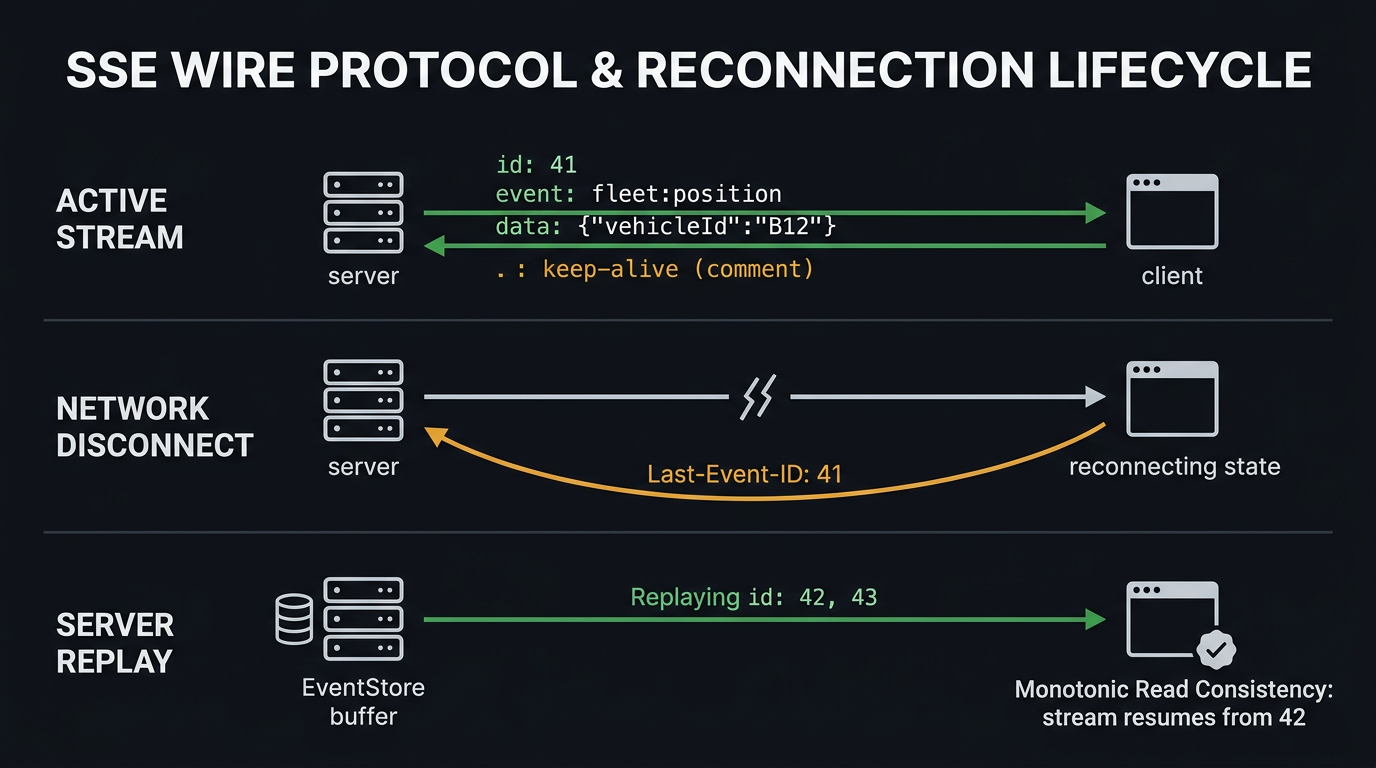
2. Building a Production Express SSE Endpoint
2.1 The Naive Broken Pattern
This will produce empty events on clients behind Nginx (Nginx buffers chunks until its 16KB threshold), leak an interval timer for every disconnected client (memory accumulation), and potentially serve a cached stream from a CDN.
2.2 The Correct Production SSE Endpoint
The Nginx Compression Trap: If your Nginx config has gzip on globally, it will attempt to compress text/event-stream responses. Compression requires buffering the response body to find compressible patterns — which means events are accumulated in Nginx's buffer (default 16KB) and only flushed in bulk, destroying real-time delivery. Always add gzip_types that excludes text/event-stream, or explicitly disable compression with add_header Content-Encoding identity on SSE routes.
2.3 Nginx Configuration for SSE
3. State Reconciliation: Last-Event-ID & Monotonic Read Consistency
3.1 How the Browser Tracks State
The browser's EventSource implementation is a state machine with built-in reconnection:
- Browser opens
GET /api/stream/fleetand begins receiving events. - Every event with an
id:field updates the internallastEventIdproperty. - On network disconnect,
EventSource.readyStatetransitions toCONNECTING. - After the
retry:delay (default 3,000ms, overridable by server), the browser re-opens the connection — automatically includingLast-Event-ID: <lastEventId>as a request header. - The server reads
req.headers['last-event-id']and replays any events with a higher ID from its buffer.
This is Monotonic Read Consistency: the client is guaranteed to observe events in strictly increasing ID order and to never "go backwards" — even across reconnections.
3.2 The Event Buffer / Replay Store
The Last-Event-ID mechanism is only as strong as the server's ability to replay missed events. In-memory ring buffers work for small, single-node deployments:
For multi-node SSE deployments, the in-memory buffer only contains events from the specific node the client is connected to. Missed events from other nodes require a shared persistent store (Redis Streams, MongoDB oplog) as the replay source. This is explored in Part 5.
3.3 Dynamic retry: Tuning — Neutralizing Reconnection Storms
The retry: field lets the server control reconnect timing. On planned restarts, you can progressively increase the retry interval to stagger client reconnections:
4. The Authentication Dilemma: EventSource vs fetch() + ReadableStream
4.1 The Native EventSource API
The browser's native EventSource API is straightforward:
The limitation: EventSource is a browser API with a fixed constructor signature. It supports withCredentials for httpOnly cookie-based auth, but cannot send custom request headers like Authorization: Bearer <token>.
4.2 Three Production Auth Patterns
| Pattern | Mechanism | Tradeoffs |
|---|---|---|
httpOnly Cookie |
Set Set-Cookie: session=<token>; HttpOnly; Secure; SameSite=Strict from your auth endpoint. Use withCredentials: true on EventSource. |
✅ Simplest. ✅ XSS-resistant. ❌ Requires same-origin or CORS credentials: include. ❌ CSRF risk if SameSite not set correctly. |
| Short-Lived Ticket Token | REST endpoint issues a single-use 30s cryptographically signed ticket. Client appends ?ticket=<token> to SSE URL. Server validates ticket on connection, discards after use. |
✅ Works with any auth system. ✅ Token not reusable. ❌ Ticket visible in server access logs (mitigate with HTTPS). |
fetch() + ReadableStream |
Use fetch() to open the SSE stream manually with Authorization header. Read the chunked response body via response.body.getReader(). |
✅ Full header control. ✅ Works with Bearer tokens. ❌ Must implement reconnection, Last-Event-ID tracking, and event parsing manually. |
4.3 Production useSSE React Hook
React 18 StrictMode deliberately double-invokes useEffect in development to expose cleanup bugs. An SSE hook that opens EventSource without proper cleanup in the return function will create two simultaneous SSE connections — doubling server memory and potentially causing duplicate event delivery. Always close the EventSource in the cleanup return.
5. HTTP/1.1 vs HTTP/2 — The Multi-Tab SSE Bottleneck
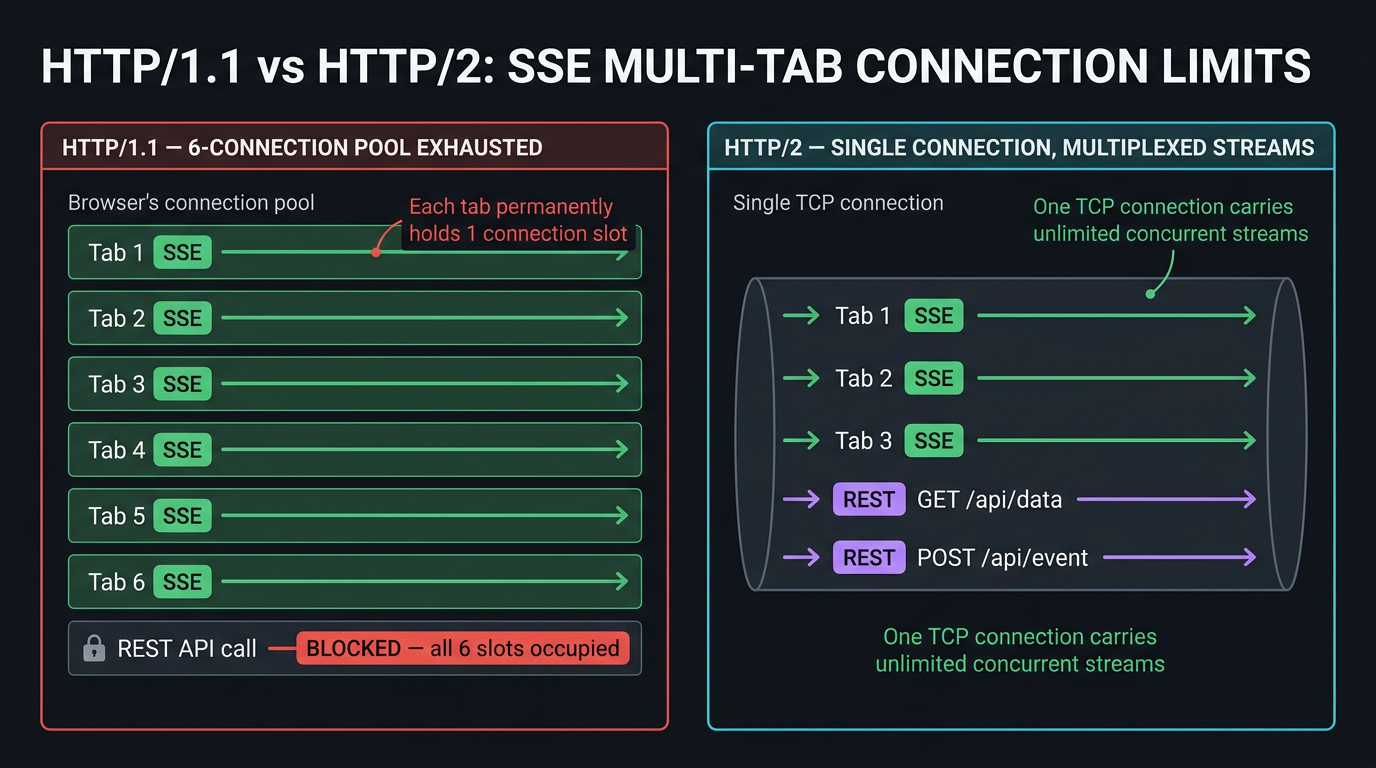
5.1 The HTTP/1.1 6-Connection Limit, Revisited
In Part 1 we saw that long polling exhausts the browser's 6-connection pool. SSE has the same problem under HTTP/1.1 — but with a crucial difference: SSE connections are truly persistent (never re-opened between events), so each tab permanently occupies one connection slot for the entire session lifetime.
HTTP/2 eliminates the deadlock entirely. Each SSE stream is a separate HTTP/2 stream multiplexed over the single underlying TCP connection. Dozens of SSE connections across tabs share one socket with no contention.
If you deploy SSE over HTTP/1.1 in a multi-tab application, you will receive bug reports from users saying "the app stops working when I open multiple tabs." The fix is not code — it is serving your application over HTTP/2. Verify with: curl -I --http2 https://your-domain.com/api/stream/fleet.
5.2 When to Choose SSE Over WebSockets
SSE excels where WebSockets add unnecessary complexity:
| Use Case | Best Transport | Reason |
|---|---|---|
| AI LLM token streaming (ChatGPT-style) | SSE | Strict server-to-client; single persistent stream; simple HTTP |
| Live sports / finance score feeds | SSE | Unidirectional updates; HTTP/2 multiplexing; CDN-compatible |
| System notification toasts | SSE | Low-frequency push; no client-to-server channel needed |
| Order status tracking | SSE | State machine transitions; Last-Event-ID reconciliation |
| Live chat / collaborative editing | WebSockets | Bidirectional; low-latency user input; requires server ↔ client channel |
| Online gaming / cursor tracking | WebSockets | Sub-50ms bidirectional; binary frame efficiency |
| Vehicle telemetry command-response | WebSockets | Server sends position; client sends commands; truly bidirectional |
6. CAP Theorem: Monotonic Read Consistency via Last-Event-ID
6.1 SSE Under Network Partitions
SSE is an AP-leaning transport with a crucial built-in consistency primitive: Last-Event-ID. When a network partition drops the client's SSE connection:
- Browser detects disconnect (
readyState → CONNECTING). - After
retry:delay, browser re-connects withLast-Event-ID: <lastSeen>. - Server replays events from its buffer with
id > lastSeen. - Client observes a causally consistent event stream — no events are skipped, no events are replayed out of order.
This is Monotonic Read Consistency from the PACELC model: the system may become temporarily unavailable (during the partition), but when it resumes, the client's view of the world only moves forward.
The consistency boundary: If events are generated faster than the server's in-memory buffer retains them during the disconnect, the Last-Event-ID replay falls back to the database. If even the database has rotated those events (TTL expiry, log compaction), the client must perform a full state sync — fetch the entire current application state and resume from the latest event ID.
SSE provides Monotonic Read Consistency — a weaker but practical guarantee. The client's event stream always moves forward: new events are strictly newer than previously observed events. This is sufficient for most real-world UIs (dashboards, feeds, notifications). If you need Linearizability (every client sees the same globally ordered view at the same instant), you need a CP transport like Redis Streams with consumer group acknowledgments — covered in Part 5.
Summary
| Concept | Rule |
|---|---|
SSE operates entirely over standard HTTP without a protocol upgrade dance — a single text/event-stream response handles continuous server-to-client push. |
Use Content-Type: text/event-stream, Cache-Control: no-cache, X-Accel-Buffering: no, and res.flushHeaders() on every SSE endpoint. |
Nginx and compression middleware buffer SSE chunks until buffer thresholds are met; X-Accel-Buffering: no with disabled compression on event streams is mandatory for real-time delivery. |
Set proxy_buffering off and gzip off in Nginx for all /api/stream/ locations; set proxy_read_timeout to exceed the server heartbeat interval. |
The Last-Event-ID protocol guarantees Monotonic Read Consistency: the server replays missed events from an in-memory buffer or database upon reconnect. |
Assign monotonically increasing id: to every event; implement replayMissedEvents(tenantId, sinceId) with database fallback when the in-memory buffer is evicted. |
| Under HTTP/1.1, opening multiple tabs with SSE connections exhausts the browser's 6-connection limit; HTTP/2 stream multiplexing eliminates this constraint entirely. | Serve all SSE endpoints over HTTP/2 (listen 443 ssl http2 in Nginx); verify with curl --http2-prior-knowledge. |
Native EventSource cannot send custom Authorization headers; production apps must use httpOnly cookies, cryptographic ticket query params, or fetch() with ReadableStream. |
Prefer httpOnly cookies with SameSite=Strict for SSE auth; use ticket tokens when cookie-based auth is not available. |
What's Next
SSE solves unidirectional server-to-client streaming cleanly over HTTP. But for bidirectional communication — client sending commands to the server and receiving responses on the same low-latency channel — a persistent, full-duplex TCP connection is required. Part 3 dissects RFC 6455 WebSockets from the wire level up: the 101 Switching Protocols handshake, the 4-byte XOR masking key requirement, OS file descriptor and socket buffer constraints at 50,000 connections, and the precise architectural boundary between raw ws and the Engine.IO abstraction layer inside Socket.IO.
Part 3 → WebSockets Under the Hood: RFC 6455 Framing, the Upgrade Handshake & Raw
wsvssocket.io—realtime-websockets-rfc6455-framing-socketio(coming in Part 3 of this series)
This article was developed with AI-assisted deep search, specification cross-referencing, and technical research synthesis.
