Siddhant Deval
Siddhant Deval
backend18 min read

Resolvers, Context & DataLoader: The N+1 Is Always Your Fault

The N+1 problem is not a GraphQL weakness — it is the default behavior of naive resolver implementation. DataLoader is not an optimization; it is the minimum correct implementation of any resolver that fetches from a shared data source.

Resolvers, Context & DataLoader: The N+1 Is Always Your Fault

You own the schema and the resolvers — the schema is a public contract you can never silently break, and every resolver is a performance commitment you make on every query. In Part 1, you designed a schema where User.orders is a graph traversal relationship. That decision looks elegant in SDL. What you may not have noticed is that you made a performance commitment with every field you put on User: for every user returned by the users query, the GraphQL execution engine will call User.orders once. In production, with 50 users per page, that is 50 sequential database queries — plus however many Order.items resolvers fire after that. The N+1 problem is not a GraphQL bug you can avoid by writing careful queries. It is the default execution behavior of the runtime, and the only escape is DataLoader.

Architectural Note

This is Part 2 of the GraphQL Backend & API Design series. It assumes you have read Part 1 (Schema Design: The SDL as a Domain Contract) and understand the schema structure we are now implementing resolvers for.


1. How the Resolver Execution Chain Actually Works

Before fixing N+1, you must understand exactly why it happens. The GraphQL execution model is field-by-field, not query-by-query.

1.1 The Execution Tree

When the runtime executes this query:

GRAPHQL
query GetUsersWithOrders {
  users {
    id
    name
    orders {
      id
      total
      items {
        product { title }
      }
    }
  }
}

It resolves fields in this exact order:

  1. Query.users — runs once, returns [User] (e.g. 10 users)
  2. User.id, User.name — runs once per user (10×2 = 20 field calls, trivial — no DB)
  3. User.orders — runs once per user (10 calls, each hits the DB)
  4. Order.id, Order.total — trivial field resolves
  5. Order.items — runs once per order (if each user has 5 orders = 50 calls)
  6. OrderItem.product — runs once per item (potentially hundreds of calls)
TYPESCRIPT
// ❌ The N+1 resolver — looks harmless, is catastrophic in production
const resolvers = {
  Query: {
    users: async (_, __, ctx) => {
      return ctx.db.query('SELECT * FROM users LIMIT 50');
      // Returns 50 users. Now the runtime calls User.orders 50 times.
    },
  },
  User: {
    orders: async (user, _, ctx) => {
      // 💥 This fires 50 times — once per user
      // In development: 50 × 0.3ms = 15ms total (invisible)
      // In production: 50 × 50ms = 2,500ms (2.5 second page load from DB alone)
      return ctx.db.query('SELECT * FROM orders WHERE user_id = $1', [user.id]);
    },
  },
};

The reason this is invisible in development: your local PostgreSQL responds in under 1ms per query. The N+1 pattern produces 50ms total in development and 2,500ms in production — a 50× performance cliff that only appears under real network conditions.

Performance / Safety Warning

The N+1 problem does not appear in unit tests (you mock the DB), does not appear in integration tests (your test DB has 2 rows), and does not appear in staging (your staging dataset has 10 rows). It only appears in production with real data volumes. Engineers ship it constantly precisely because no test catches it.


2. DataLoader: The Minimum Correct Implementation

DataLoader is not a caching layer you add when performance becomes a problem. It is the correct implementation of any resolver that reads from a shared data source. A resolver that reads from a database inside a list field without DataLoader is incorrect by default.

2.1 The batchLoadFn Contract

DataLoader works by collecting individual key requests within a single event loop tick and issuing them as a single batched query.

TYPESCRIPT
// ✅ The correct resolver with DataLoader
import DataLoader from 'dataloader';
import type { User, Order } from './types';

// The batchLoadFn contract:
// - Receives: an array of keys (user IDs) collected across all resolver calls in one tick
// - Returns: a Promise resolving to an array of values IN THE SAME ORDER as the input keys
//
// This is the most critical invariant: if keys are [1, 3, 2] and DB returns
// rows in ID order [1, 2, 3], you must re-order to [user1, user3, user2].
// Returning in wrong order silently maps data to the wrong parent.
async function batchLoadOrders(userIds: readonly string[]): Promise<Order[][]> {
  const rows = await db.query(
    'SELECT * FROM orders WHERE user_id = ANY($1)',
    [userIds]
  );

  // Group by user_id and return in the same order as userIds
  const ordersByUserId = new Map<string, Order[]>();
  for (const row of rows) {
    const existing = ordersByUserId.get(row.user_id) ?? [];
    existing.push(row);
    ordersByUserId.set(row.user_id, existing);
  }

  // CRITICAL: return in exactly the same order as the input keys
  return userIds.map((id) => ordersByUserId.get(id) ?? []);
}

// Usage in resolvers:
const resolvers = {
  User: {
    orders: async (user, _, ctx) => {
      // This does NOT immediately fire a DB query.
      // It registers user.id with the DataLoader for this tick.
      // After all 50 User.orders resolver calls have registered their keys,
      // DataLoader fires ONE batched query: WHERE user_id IN (1,2,3,...,50)
      return ctx.ordersLoader.load(user.id);
    },
  },
};

The transformation in database queries:

SQL
WITHOUT DataLoader (N+1):
  SELECT * FROM orders WHERE user_id = 1;   -- ~50ms
  SELECT * FROM orders WHERE user_id = 2;   -- ~50ms
  SELECT * FROM orders WHERE user_id = 3;   -- ~50ms
  -- ... (47 more queries)
  -- Total: 50 × 50ms = 2,500ms

WITH DataLoader (1 batch):
  SELECT * FROM orders WHERE user_id = ANY('{1,2,3,...,50}');  -- ~55ms
  -- Total: 1 × 55ms = 55ms
Crucial Requirement

The key order invariant is non-negotiable. DataLoader maps each key to the value at the same index in the returned array. If your batchLoadFn returns values in a different order (e.g., sorted by ID from the DB), each User.orders call receives the wrong orders. This is a silent data corruption bug — no error thrown, no test catches it, and users see each other's data.

2.2 DataLoader v2 API: maxBatchSize and batchScheduleFn

DataLoader v2 introduced two important parameters for high-throughput environments:

TYPESCRIPT
import DataLoader from 'dataloader';

const ordersLoader = new DataLoader(batchLoadOrders, {
  // v2: limits how many keys are batched in a single batchLoadFn call
  // Without this, a single tick with 10,000 resolver calls produces a
  // query with 10,000 IDs — which may exceed DB parameter limits or
  // cause the query planner to skip index usage.
  maxBatchSize: 500,

  // v2: replaces the default setTimeout(resolve, 0) batching window
  // Useful for replacing Node.js microtask-based batching with a
  // custom timing strategy in high-throughput event loops
  batchScheduleFn: (callback) => setTimeout(callback, 0),

  // Cache: per-request cache (prevents double-loading the same key in one request)
  // Set to false if your data is write-heavy and cache invalidation is complex
  cache: true,
});

3. The Context Object: Per-Request Lifecycle

DataLoader instances must be created fresh for every request. This is the most common DataLoader production bug: creating a module-level singleton DataLoader that is shared across all requests.

3.1 The Singleton Anti-Pattern

TYPESCRIPT
// ❌ Module-level singleton DataLoader — leaks user data across requests
// Because DataLoader has an internal cache, User A's request could return
// cached data from User B's previous request that resolved the same key.
// This is a data leakage vulnerability, not just a staleness bug.
const globalOrdersLoader = new DataLoader(batchLoadOrders); // ❌ Never do this

const resolvers = {
  User: {
    // This loader's cache persists across all requests on this process
    orders: async (user) => globalOrdersLoader.load(user.id), // ❌
  },
};

3.2 The Correct Per-Request Context Factory

TYPESCRIPT
// ✅ Per-request DataLoader creation via the context factory
import type { IncomingMessage, ServerResponse } from 'http';
import DataLoader from 'dataloader';
import { db } from './db';

// The context interface — typed per-request state
interface GraphQLContext {
  user: AuthenticatedUser | null;
  ordersLoader: DataLoader<string, Order[]>;
  productsLoader: DataLoader<string, Product>;
  db: typeof db;
}

// This factory function runs ONCE per request, not once per server start
async function createContext(req: IncomingMessage): Promise<GraphQLContext> {
  const user = await authenticateRequest(req);

  return {
    user,
    // ✅ Fresh DataLoader instances per request
    // Each request gets its own cache and batch window
    ordersLoader: new DataLoader<string, Order[]>(batchLoadOrders),
    productsLoader: new DataLoader<string, Product>(batchLoadProducts),
    db,
  };
}

// In graphql-yoga:
const yoga = createYoga({
  schema,
  context: createContext, // yoga calls this per request
});
Mental Model Check

The context object is the per-request service locator. Think of it as the GraphQL equivalent of a dependency injection container that lives exactly as long as one HTTP request — it is created at the start of the request and garbage collected when the response is sent. Nothing in the context should outlive a single request.

3.3 Pothos DataLoader Plugin

If you are using Pothos v4, the DataLoader plugin provides type-safe DataLoader integration with automatic key type inference:

TYPESCRIPT
// ✅ Pothos DataLoader plugin — eliminates the any cast in batchLoadFn
import PothosDataLoader from '@pothos/plugin-dataloader';

const builder = new SchemaBuilder({
  plugins: [PothosDataLoader],
});

// The plugin infers the key type from the object type's identifier
builder.objectType('User', {
  dataloader: {
    // Type-safe: TypeScript knows batchLoadFn receives string[] not any[]
    load: async (ids: string[], ctx: GraphQLContext) => {
      return ctx.db.users.findManyByIds(ids);
    },
    toKey: (user) => user.id, // How to extract the key from the parent object
  },
  fields: (t) => ({
    orders: t.loadMany({
      load: async (ids: string[], ctx: GraphQLContext) => {
        const rows = await ctx.db.orders.findByUserIds(ids);
        const grouped = groupBy(rows, 'userId');
        return ids.map((id) => grouped[id] ?? []);
      },
    }),
  }),
});

4. Resolver Error Semantics: null vs. throw

Two different failure conditions exist for resolvers, and they have different correct responses:

4.1 null — The Entity Does Not Exist

TYPESCRIPT
const resolvers = {
  Query: {
    user: async (_, { id }, ctx) => {
      const user = await ctx.db.users.findById(id);

      // ✅ Return null when the entity legitimately does not exist.
      // GraphQL interprets null as "no data for this field" — not an error.
      // The client receives { data: { user: null } } with no errors array.
      if (!user) return null;

      return user;
    },
  },
};

4.2 throw GraphQLError — Something Failed While Fetching

TYPESCRIPT
import { GraphQLError } from 'graphql';

const resolvers = {
  Query: {
    user: async (_, { id }, ctx) => {
      // ✅ Throw when the failure is operational — not a "not found" case
      if (!ctx.user) {
        throw new GraphQLError('Authentication required', {
          extensions: {
            code: 'UNAUTHENTICATED',
            // Machine-readable code — the client error handler keys on this
            // NOT on the message string (which can change without warning)
          },
        });
      }

      if (!ctx.user.canAccessUser(id)) {
        throw new GraphQLError('Insufficient permissions', {
          extensions: { code: 'FORBIDDEN' },
        });
      }

      const user = await ctx.db.users.findById(id);
      if (!user) return null; // ← null, not throw — entity doesn't exist

      return user;
    },
  },
};
Condition Correct Response Client Receives
Entity legitimately absent return null { data: { user: null } } — no error
Authentication missing/expired throw GraphQLError({ extensions: { code: 'UNAUTHENTICATED' } }) { data: null, errors: [{ extensions: { code: 'UNAUTHENTICATED' } }] }
Insufficient permissions throw GraphQLError({ extensions: { code: 'FORBIDDEN' } }) { data: null, errors: [{ extensions: { code: 'FORBIDDEN' } }] }
DB error during fetch throw GraphQLError({ extensions: { code: 'INTERNAL_SERVER_ERROR' } }) { data: null, errors: [...] }
Crucial Requirement

The extensions.code field is the machine-readable contract the client error handler must key on — not the message string. Message strings are for developers reading logs. Codes are for the client's onError function routing to the correct error boundary. Handle UNAUTHENTICATED by redirecting to login. Handle FORBIDDEN by rendering an access-denied state. Handle NOT_FOUND by rendering a 404 component.


5. graphql-yoga v5 — Zero-Config DataLoader Context

graphql-yoga v5 provides a built-in context plugin that handles per-request DataLoader scoping without manual wiring:

TYPESCRIPT
import { createYoga } from 'graphql-yoga';
import { useDataLoader } from '@graphql-yoga/plugin-dataloader';
import { schema } from './schema';

const yoga = createYoga({
  schema,
  plugins: [
    useDataLoader({
      // The plugin creates a fresh DataLoader per request, automatically
      // scoped to the request context — no manual createContext factory required
      ordersLoader: ({ context }) =>
        new DataLoader<string, Order[]>(
          async (userIds) => batchLoadOrders(userIds, context.db)
        ),
      productsLoader: ({ context }) =>
        new DataLoader<string, Product>(
          async (productIds) => batchLoadProducts(productIds, context.db)
        ),
    }),
  ],
});

6. Identifying N+1 in Production Traces

Once DataLoader is in place, how do you verify it's working? A DataLoader batchSize: 1 in a production trace is the N+1 signature — the DataLoader is present but its batching is not triggering.

In your APM tool (Datadog, Jaeger), look for:

  • batchSize: 50 in DataLoader spans → batching is working ✅
  • batchSize: 1 on a DataLoader that handled 50 keys → N+1 still present ❌

The batchSize: 1 signature means the DataLoader's batch window is firing before the second resolver call registers its key. Root causes: calling await loader.load(key) instead of collecting promises and Promise.all-ing them, or calling the loader outside the resolver execution context.
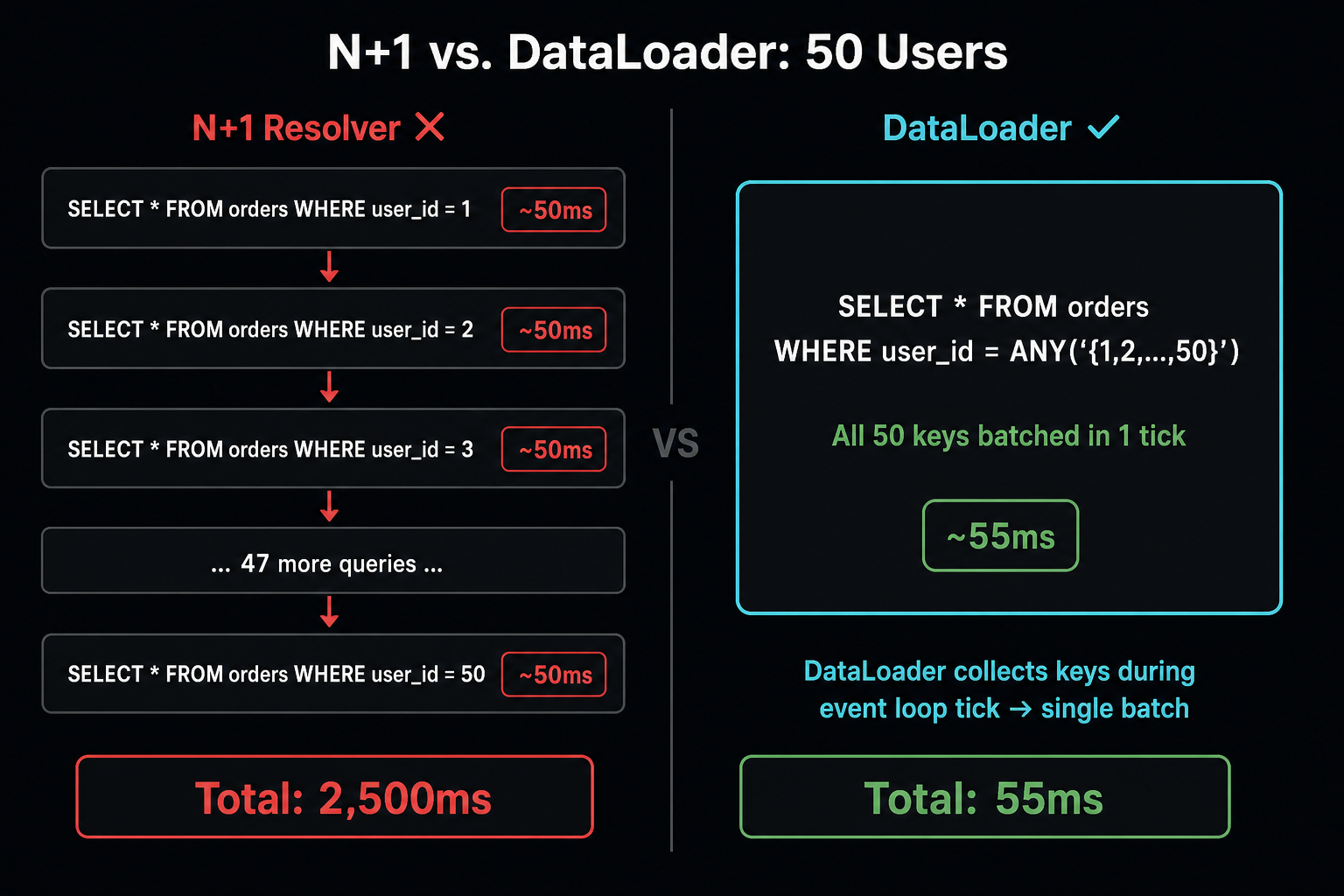

Flow Trace: N+1 sequential resolver DB queries vs. DataLoader batched single query

Left: N+1 — one DB query per user fires sequentially, totaling 2,500ms for 50 users. Right: DataLoader — all 50 user IDs are batched into one WHERE user_id IN (...) query, totaling 55ms.
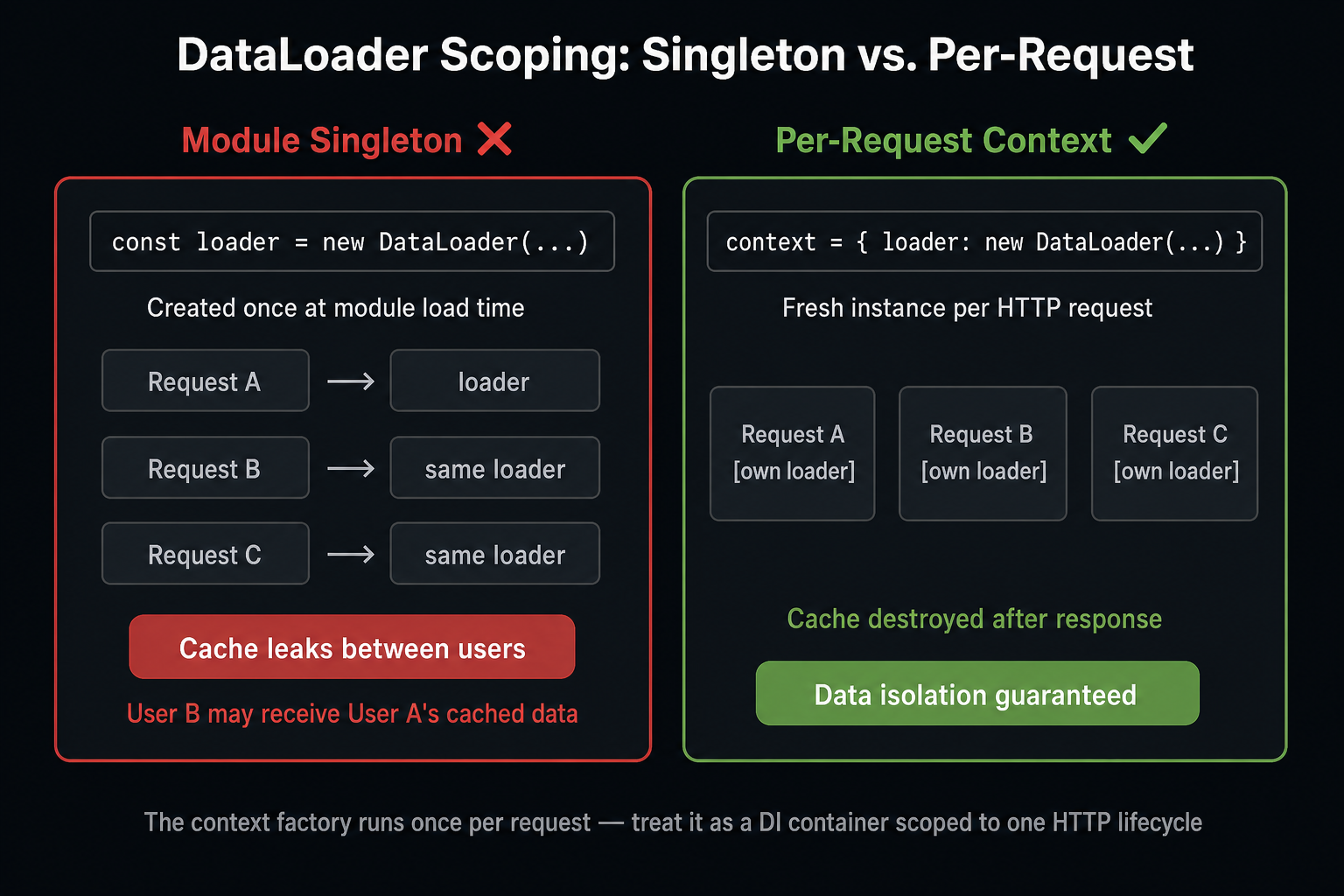
Mental Model: per-request Context object lifecycle — created at request start, holds scoped DataLoader instances, destroyed at response

The context object is a per-request service container. DataLoader instances inside it have a request-scoped cache. Module-level DataLoader singletons share that cache across all requests — a data leakage vulnerability.


Summary

Concept Rule
N+1 is always your fault A resolver that queries a database inside a list field without DataLoader executes N queries for N parent items by default — this is the execution model, not a bug.
batchLoadFn key order DataLoader's batchLoadFn receives an array of keys and must return an array of values in exactly the same order — returning in a different order silently maps data to the wrong parent.
Per-request context DataLoader instances must be created per-request in the context factory — module-level singleton DataLoaders share caches across requests, causing data leakage between users.
null vs. throw Return null from a resolver to signal "this entity does not exist in this context"; throw GraphQLError to signal "something failed while fetching this required data."
extensions.code The extensions.code field in GraphQLError is the client's machine-readable signal — emit UNAUTHENTICATED for missing/expired auth, FORBIDDEN for insufficient permissions, NOT_FOUND for missing entities.

What's Next

Part 3 — Federation & Subgraph Architecture extends the domain contract across team boundaries: a subgraph boundary is correct only when it maps to a domain that a single team owns end-to-end. Part 3 covers @key entity references, Apollo Router vs. the deprecated Gateway, schema registry CI checks, and partial data semantics when a subgraph is unavailable.

Research & Synthesis Note

This article was developed with AI-assisted deep search, specification cross-referencing, and technical research synthesis.

#GraphQL#DataLoader#Resolvers#Performance#Node.js
Siddhant Deval

Written by Siddhant Deval

Senior Full-Stack Engineer building high-scale architectures, browser performance engineering systems, and SaaS platforms.