
The Critical Rendering Path: Browser Engine Pipeline
Rendering is not a black box—it is a deterministic pipeline. Understanding the Critical Rendering Path (CRP) is the prerequisite for all frontend performance tuning, from CSSOM construction to compositor layers.
Modern Web Rendering & Performance
The Critical Rendering Path: Browser Engine Pipeline
Rendering performance is a deep-sea dive. The surface is the HTML payload you ship; the crushing depths are the pipelines, trees, and threads the browser uses to process it. To fix the surface, you must master the depths.
When developers see a blank white screen during page load, the instinct is often to stay at the surface—shrinking image sizes or deferring scripts blindly. This treats the browser like a black box. But the browser is a deterministic engine, and the sequence of steps it takes to drag your HTML from the surface network layer down to the depths of the GPU is known as the Critical Rendering Path (CRP).
1. The Surface Illusion: Size Over Sequence
1.1 The Naive Optimization
The most common frontend performance mistake is obsessing over the size of the payload at the surface, while ignoring the sequence required to process it in the depths.
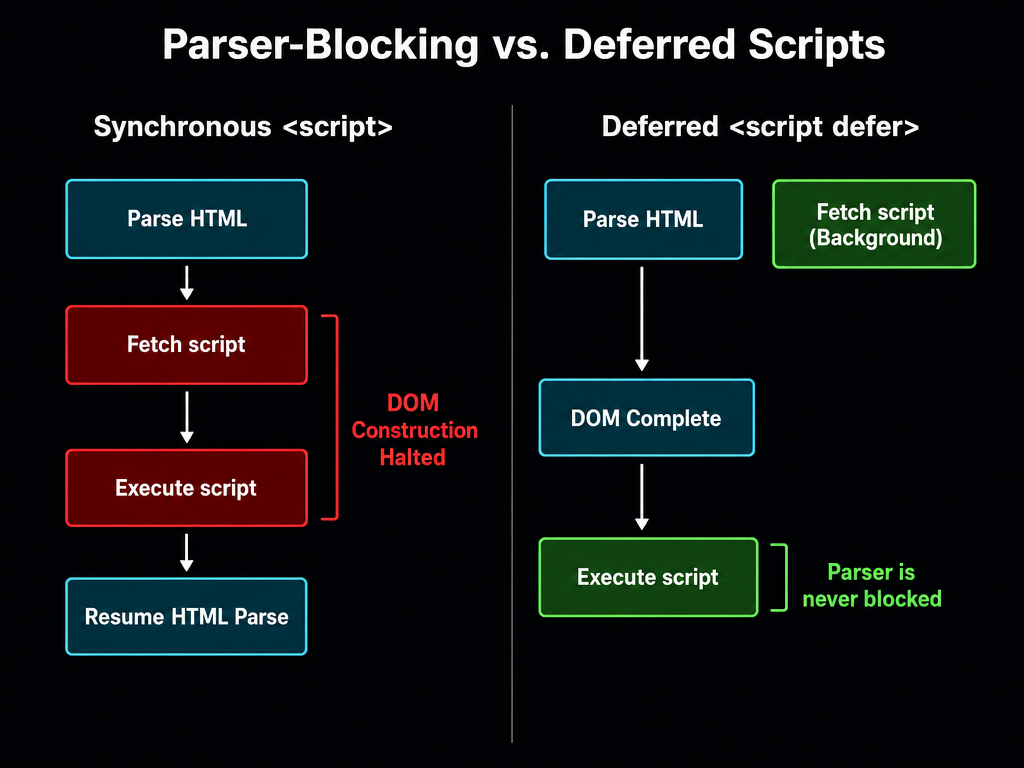
Why does this fail? Because the browser's HTML parser is a single-threaded operation. When it encounters a synchronous <script> tag, it must halt its descent, fetch the script from the surface, and execute it before it can continue parsing the HTML. If app.js takes 500ms to download and parse, the user stares at a blank screen for 500ms, regardless of how tiny your HTML payload is.
The fix isn't necessarily to make app.js smaller (though that helps). The fix is to change its priority in the dive sequence.
A small script in the wrong place is vastly more damaging to performance than a massive script that is properly deferred.
2. Into the Depths: The Five Stages of the Pipeline
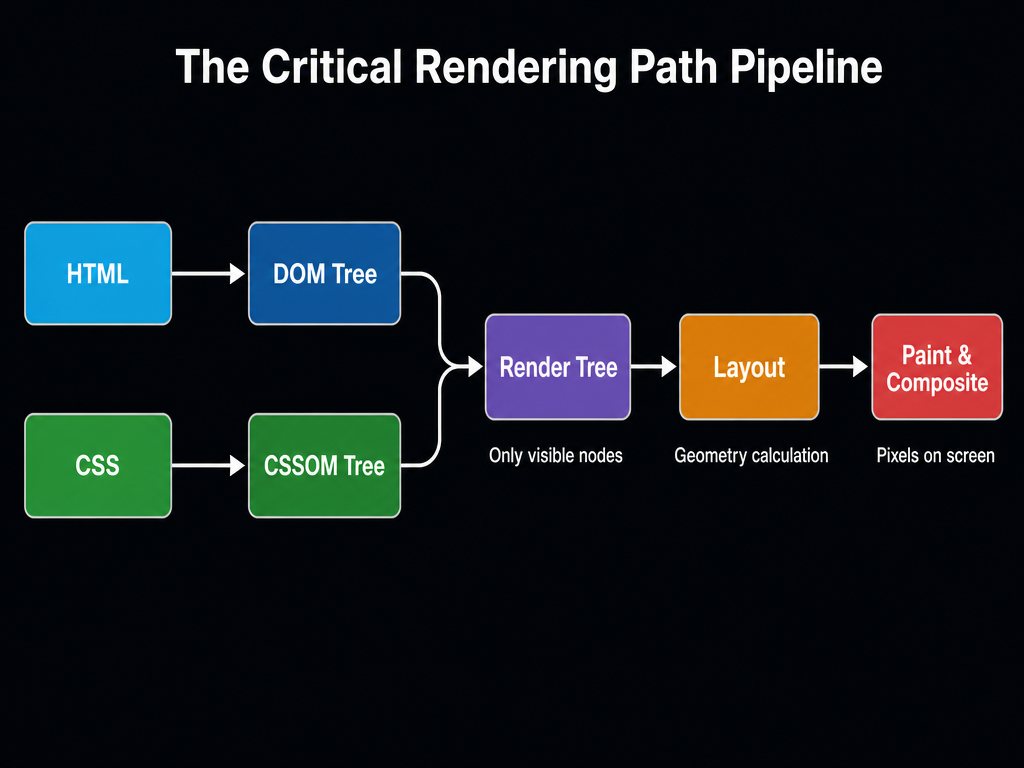
To truly fix performance, you must know what the browser is doing under the surface. The Critical Rendering Path consists of five strictly ordered layers of depth. Conceptually, this pipeline maps directly to the browser's thread architecture: the first four stages are trapped in the bottleneck of the Main Thread, while the final stage escapes to the Compositor Thread and GPU.
2.1 DOM Construction (The Content Reef)
The browser receives HTML as raw bytes, decodes them to characters, tokenizes them, and builds the Document Object Model (DOM) tree. The DOM represents the content of the page. Crucially, the DOM is built incrementally on the Main Thread. If HTML is streamed from the server, the browser can begin processing the top of the tree while the bottom is still sinking from the network.
2.2 CSSOM Construction (The Style Current)
When the parser finds a <link rel="stylesheet">, it issues a request for the CSS. Unlike HTML, CSS cannot be processed incrementally because later rules might override earlier ones. The Main Thread must build a complete CSS Object Model (CSSOM) tree before it can proceed deeper.
CSS is render-blocking. The browser will not paint anything until it has constructed the CSSOM, to prevent a Flash of Unstyled Content (FOUC).
2.3 The Render Tree (The Convergence)
At this depth, the DOM (content) and the CSSOM (style) are combined into the Render Tree.
The Render Tree contains only the nodes required to render the page. If a node is display: none in the CSSOM, it is entirely omitted from the Render Tree. (Note: visibility: hidden nodes are included, because they still occupy physical space).
2.4 Layout / Reflow (The Geometry Pressure)
With the Render Tree complete, the Main Thread calculates the exact geometry (size and position) of every element on the screen. This phase is called Layout (or Reflow). Layout is under immense pressure and is extremely expensive to compute. Changing the width of a single container at the root of the tree can force the Main Thread to recalculate the geometry of every child node all the way down, blocking JavaScript execution entirely.
2.5 Paint & Composite (The Ocean Floor)
Finally, hitting rock bottom, the Main Thread generates a list of draw calls (Paint) and hands them off. Here, the pipeline escapes the Main Thread bottleneck: the Compositor Thread and Raster Worker Threads take over. The Compositor separates the page into distinct layers (like Photoshop layers) and Raster Workers draw them independently, combining them on the GPU (Composite).
CSS properties like transform and opacity are handled exclusively by the Compositor thread on the GPU. Animating them bypasses the crushing pressure of Main Thread Layout and Paint entirely, making them the only safe properties for 60fps animations.
The CRP explains what steps the browser takes; our companion series, Browser Engine Architecture, explains who executes them, detailing the exact handoff between the Main Thread, Compositor Thread, and Raster Workers.
Summary
| Concept | Rule |
|---|---|
| DOM | Built incrementally at the surface by the Main Thread. Blocked by synchronous JavaScript. |
| CSSOM | Built all at once. Blocks rendering completely from going deeper. |
| Render Tree | Combines DOM and CSSOM. Omits display: none elements. |
| Layout | Calculates geometry. Highly sensitive to pressure changes; locks the Main Thread. |
| Compositing | GPU-accelerated layer drawing at the very bottom, executed by the Compositor Thread. |
What's Next
In Part 7, we cover LCP: Resource Priority Scheduling & the Critical Path, moving from the engine's internal pipeline up to network prioritization, resource fetching phases, and subresource preloading. Part 7: LCP & Resource Priority →
This article was developed with AI-assisted deep search, specification cross-referencing, and technical research synthesis.
